Quick Answer: What is Pokémon 721?
Pokémon #721 in the National Pokédex is Volcanion.
Volcanion is a highly sought-after Mythical Pokémon, boasting a unique dual Fire and Water typing. Because it is a Mythical Pokémon, it holds a special status for players looking to complete their Pokédex.
However, if you are looking for it in Pokémon GO, you need to know one crucial fact right away: Volcanion does not spawn in the wild. You cannot simply walk around your neighborhood or use a standard Lure Module to find it. Catching it requires a completely different gameplay strategy.
How to Get Volcanion in Pokémon GO: Special Research Explained
Since Volcanion is a Mythical Pokémon, Niantic handles its release differently than standard wild encounters or even Legendary Raids. To catch Volcanion, you must participate in specific ticketed events (such as Pokémon GO Fest) and complete dedicated Special Research. For those looking for official Pokémon GO tips and tools, understanding this mechanic is the first step.
Here is how the game mechanics actually work for Pokémon 721:
- Event-Exclusive Access: Volcanion is typically tied to major global or local events. You cannot encounter it outside of these specific promotional windows.
- The In-Game Ticket: An official in-game event ticket purchase is strictly required. Even if you are participating virtually, you must buy the ticket from the Pokémon GO shop to unlock the questline.
- Special Research Tasks: Once the event begins, you will receive a Special Research storyline. These tasks are highly active—you will need to spin specific event PokéStops, catch particular types of Pokémon, and walk significant distances (often to hatch eggs or earn Buddy Candy).
You aren’t hunting for a random spawn; you are preparing to complete a structured, movement-heavy quest.
The Challenge: Location-Locked Events and Walking Tasks
Knowing that Volcanion is tied to events and Special Research introduces a frustrating reality for many players: physical barriers. If you cannot travel, completing your Pokédex feels impossible.
Here are the common hurdles players face when trying to get Pokémon 721:
- Location-Locked Events: Major events like GO Fest are often hosted in specific global cities (e.g., London, Osaka, New York). Attending in person requires expensive flights and hotels.
- Continuous Walking Requirements: Special Research tasks demand significant physical movement. You might need to walk 5km or more to complete a single quest step.
- Basic Teleportation Fails: Simply “jumping” to a city isn’t enough. To hatch eggs or register Buddy distance for the research, the game requires continuous, simulated natural movement—not just static coordinate changes.
For players who want to complete their Pokédex but are physically blocked by schedule, budget, or mobility, finding a way to participate virtually becomes the only viable option.
Account Safety: Navigating Cooldowns and Error 12
Before considering virtual location tools to attend these events, you must understand Pokémon GO cooldown rules. Niantic strictly monitors location data, and jumping carelessly across time zones will trigger platform risk controls.
If you teleport a long distance and immediately interact with the game (like spinning a PokéStop or catching a Pokémon), you risk getting a soft ban or encountering “Failed to detect location (Error 12).”
The Cooldown Rule: To stay safe, you must wait a specific amount of time based on the distance you “traveled” before interacting with the game again. For long, cross-globe jumps to international event cities, the maximum cooldown period is typically 2 hours.
Important Safety Note:
No tool is 100% immune to platform risk controls or bans. It is crucial to plan your event participation in advance. Always allow your 2-hour cooldown to pass completely before you log into the game at the new event location.
How Fonelora Location Changer Helps You Participate Virtually
If you have purchased an official GO Fest ticket but cannot travel to the host city, you might be wondering how to change location in Pokémon GO. Fonelora Location Changer provides a guided desktop workflow to help you safely participate from home on supported iOS and Android devices.
Instead of relying on unstable mobile apps that often fail to register walking distances, Fonelora gives you precise movement control tailored for location-based games:
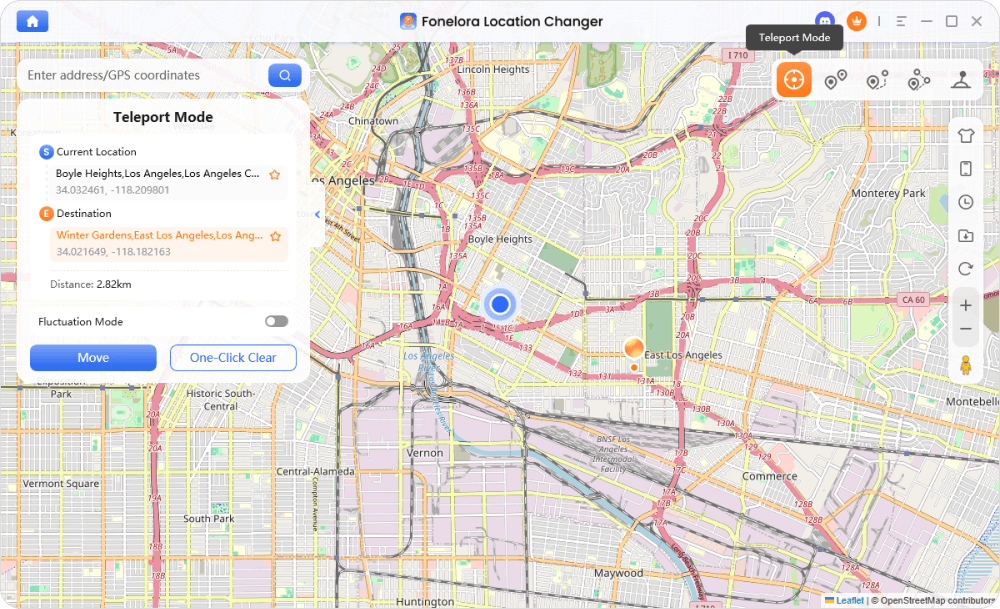
- Teleport Mode for Event Access: Instantly change your device’s GPS to the event city coordinates so you can access the localized Special Research.
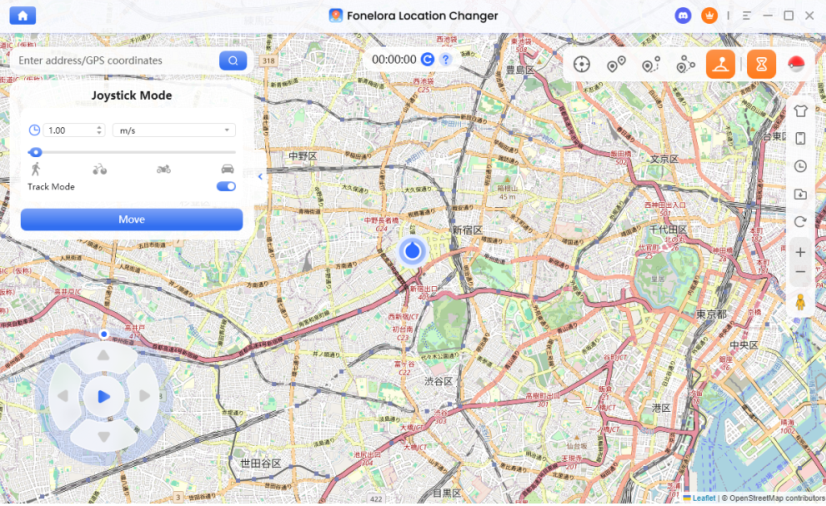
- Joystick Mode for Walking Tasks: Because Special Research requires distance tracking, Joystick Mode allows you to simulate natural walking speeds. You can navigate the virtual map in real-time to spin specific event stops and hatch eggs.
- Built-in Cooldown Timer: Rather than guessing when it’s safe to play, Fonelora features an integrated Cooldown Timer to remind you exactly how long to wait after a teleport, helping you manage account risk effectively.
Note: Fonelora Location Changer simulates your GPS movement, but you still must purchase the official event ticket in Pokémon GO to see the Volcanion Special Research.
Step-by-Step Guide: Setting Up Virtual Movement for Events
Ready to prep for the event? Before jumping into the software, review this Pre-Event Preparation Checklist to ensure you have completed the necessary game prerequisites:
- Purchase the Official Ticket: Virtual movement will not trigger the Volcanion Special Research unless the event ticket is actively bound to your Pokémon GO account.
- Check Device Compatibility: Ensure you are using a supported iOS or Android device and have a stable USB or Wi-Fi connection to your computer.
- Clear Your Cooldown: Verify that you have not spun a PokéStop, caught a Pokémon, or interacted with gyms in your physical location for at least 2 hours so you can jump to the event city safely.
Once you are prepared, here is how to use Fonelora Location Changer to access the localized event and complete your Volcanion research tasks safely:
Fonelora Location Changer
Realistic GPS movement simulation, flexible route control, easy no-modification setup, and support for gaming, social, privacy, and location-based testing in one platform.
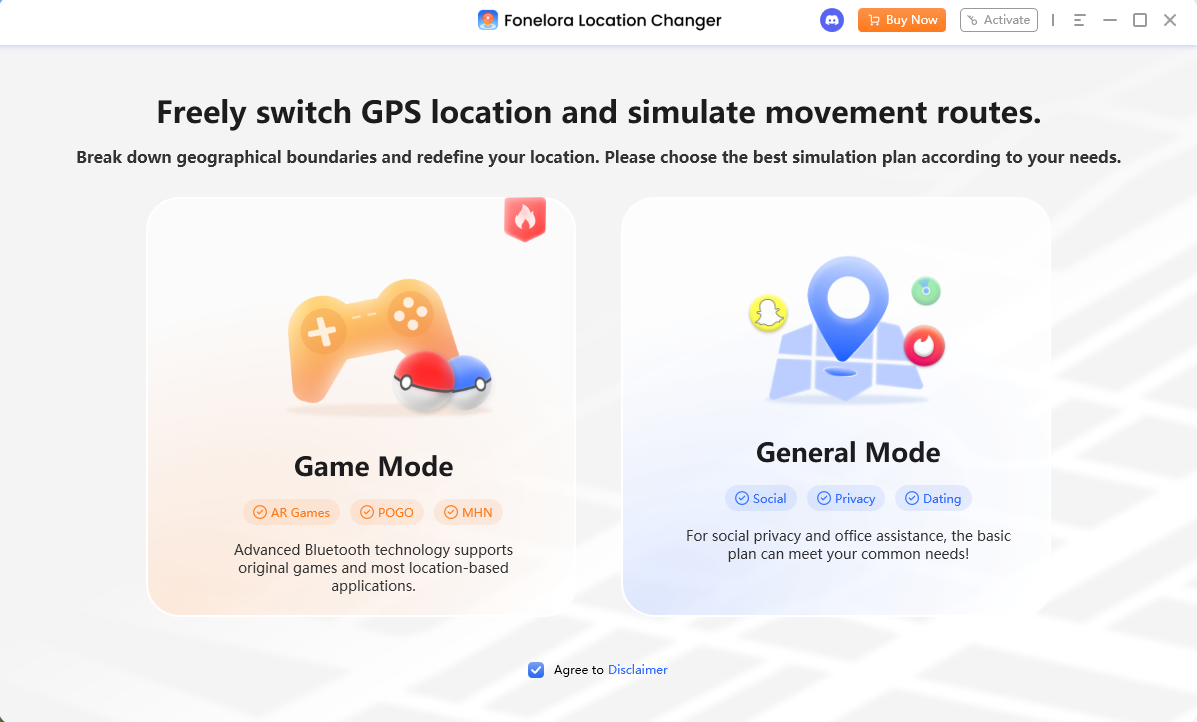
Connect Your Device: Download and launch Fonelora Location Changer on your computer. Connect your supported iOS or Android device using a USB cable or Wi-Fi, and select Game Mode.
Teleport to the Event City: Enter the event’s host city or specific coordinates into the search bar. Click to move your GPS location.
Wait Out the Cooldown: Before opening Pokémon GO, check Fonelora’s built-in Cooldown Timer. Wait for the recommended time (up to 2 hours for long jumps) to pass completely to avoid soft bans.
Walk with Joystick Mode: Once the cooldown is over, open Pokémon GO. Switch Fonelora to Joystick Mode (the joystick icon on the dashboard). Set your speed to a natural walking pace (e.g., 2m/s) and use your keyboard or mouse to move around, spin event PokéStops, and accumulate the distance needed for your Special Research.
Frequently Asked Questions (FAQs)
- Is Volcanion a Legendary or Mythical Pokémon?
- Pokémon 721, Volcanion, is officially classified as a Mythical Pokémon. In Pokémon GO, this means it does not appear in standard wild spawns or regular Legendary Raids, and is instead reserved for Special Research questlines.
- Can Volcanion be shiny in Pokémon GO?
- Currently, Shiny Volcanion is not available in Pokémon GO. Niantic typically releases the base version of a Mythical Pokémon first, with the shiny variant introduced during a separate, later event.
- How can I participate in GO Fest if I cannot travel?
- First, you must purchase the official digital ticket from the in-game shop. Then, under supported conditions, you can check out virtual location resources like Fonelora Location Changer to teleport to the event coordinates and simulate walking. Always strictly observe cooldown rules when doing this.
- Where are the best coordinates to catch Volcanion?
- There are no static, permanent “best coordinates” for Volcanion because it does not spawn in the wild. The coordinates you need will depend entirely on which specific city is hosting the current GO Fest or ticketed event.
- Does a location changer bypass the need for an event ticket?
- No. A location changer only simulates your physical GPS location. The Special Research required to catch Volcanion is account-bound and will only activate if you have purchased the official event ticket with real money.
Ready to Catch Volcanion? Next Steps
Catching Pokémon 721 is a milestone for any dedicated trainer. Remember that Volcanion requires a strategic approach: you cannot find it in the wild, so you must secure an official in-game ticket for specific events and be prepared to complete movement-heavy Special Research.
If physical travel or walking limitations are holding you back, participating virtually is possible with the right preparation. By using Fonelora Location Changer, you can safely teleport to the event host city and utilize Joystick Mode to accumulate the walking distance required to finish your research tasks.
Just remember to buy your ticket, respect the Cooldown Timer, and plan your jumps carefully.
Ready to get set up before the next big event? Check compatibility and try Fonelora Location Changer to master your virtual movement today.
More Related Articles

Fonelora Location Changer
- Bluetooth Hardware Simulation for Safer GPS Spoofing
- Realistic Movement & Route Simulation
- No Root or Jailbreak Required
- All-in-One Solution for Games, Social Apps & Privacy



