If you are running completely out of PokéBalls, a working promo code is the fastest way to restock. Here is a direct list of active Pokémon GO promo codes you can use right now. If these short-lived freebies aren’t enough to keep your item bag full, read on for a continuous PokéStop farming strategy further down the page.
Active Pokémon GO Promo Codes (Updated)
Active Promo Codes:
- FENDIxFRGMTxPOKEMON: Grants exclusive Fendi avatar items.
- GOFEST2024: (Event-specific) Grants Premium Raid Pass and Berries.
- CAPTAINPIKACHU: Grants a special timed encounter.
Niantic releases new codes randomly during community days or special events. All codes are strictly single-use per account and frequently expire within 24 to 48 hours of release. Check back often and redeem them immediately when you find them.
How to Redeem Pokémon GO Codes (iOS & Android)
Redeeming codes is straightforward on Android, but iOS users face a specific hurdle since Niantic completely removed the in-app redemption option for iPhones.
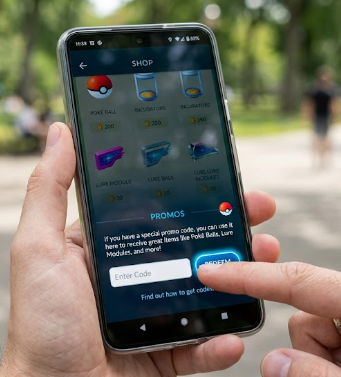
How to Redeem on Android (In-App)
1. Open the Pokémon GO app.
2. Tap the PokéBall icon at the bottom to open the Main Menu.
3. Tap the Shop icon.
4. Scroll to the very bottom of the page to find the Promos text field.
5. Enter your active code and tap Redeem.
How to Redeem on iOS (iPhone/iPad)
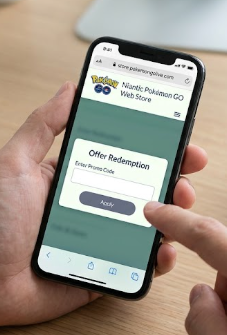
Because you cannot redeem codes inside the iOS app, you must use the mandatory Web Store workaround. It is an extra step, but it is the only official method:
1. Open your mobile or desktop browser and visit the official Niantic Pokémon GO Web Store (store.pokemongolive.com).
2. Log in using the exact same account credentials linked to your Pokémon GO app (Google, Facebook, Niantic Kids, etc.).
3. Enter the promo code in the “Offer Redemption” box and click Apply.
4. Open your Pokémon GO app. A push notification will confirm your free items have been added to your inventory.
Recently Expired Codes & The Promo Code Limitation
It is incredibly frustrating to find a code online only to get an “Invalid” or “Expired” error message. Promo codes are tied to short-term events, meaning they die fast.
Recently Expired Codes (Do Not Use):
- 43L2JD2Z52D92 (Expired)
- YKG5ZPC4CUX52 (Expired)
The Real Promo Code Limitation:
Even when you successfully enter a working code, you will quickly notice a core problem. Codes usually only provide 5 to 10 PokéBalls, a couple of revives, or a handful of berries. If you are an active player, this tiny yield does not solve the underlying issue: you are chronically out of items.
Hunting for one-time freebies is just a temporary fix. To build a sustainable inventory so you are actually prepared for Raid Hours and Community Days, you need a workflow that lets you hit more PokéStops continuously.
A Better Way to Restock Items: Continuous PokéStop Farming
When promo codes inevitably run out, the absolute best way to restock items is by spinning dense clusters of PokéStops. However, not everyone lives next to a bustling city center or a park loaded with stops.
If you want to access the best places to spoof Pokémon GO but cannot physically travel to high-density areas every time your item bag is empty, Fonelora Location Changer offers a practical workaround for supported iOS and Android devices.
To be clear, Fonelora Location Changer is not a promo code generator. Instead, it is a desktop-guided tool that allows you to safely change location in Pokémon GO and simulate movement. By navigating to a PokéStop-heavy area virtually, you can continuously farm PokéBalls, potions, and berries right from your computer, bypassing the chronic item shortage without having to wait for Niantic to drop another code.
Fonelora Location Changer
Realistic GPS movement simulation, flexible route control, easy no-modification setup, and support for gaming, social, privacy, and location-based testing in one platform.
Farm Items Effortlessly with Fonelora Location Changer
Fonelora Location Changer makes it easy to simulate a walking route through your favorite item-farming spots without actually leaving your house.
How to Farm Items with Fonelora Location Changer:
1. Select Game Mode: Choose the dedicated Game Mode, which provides a location-changing environment specifically optimized for LBS games
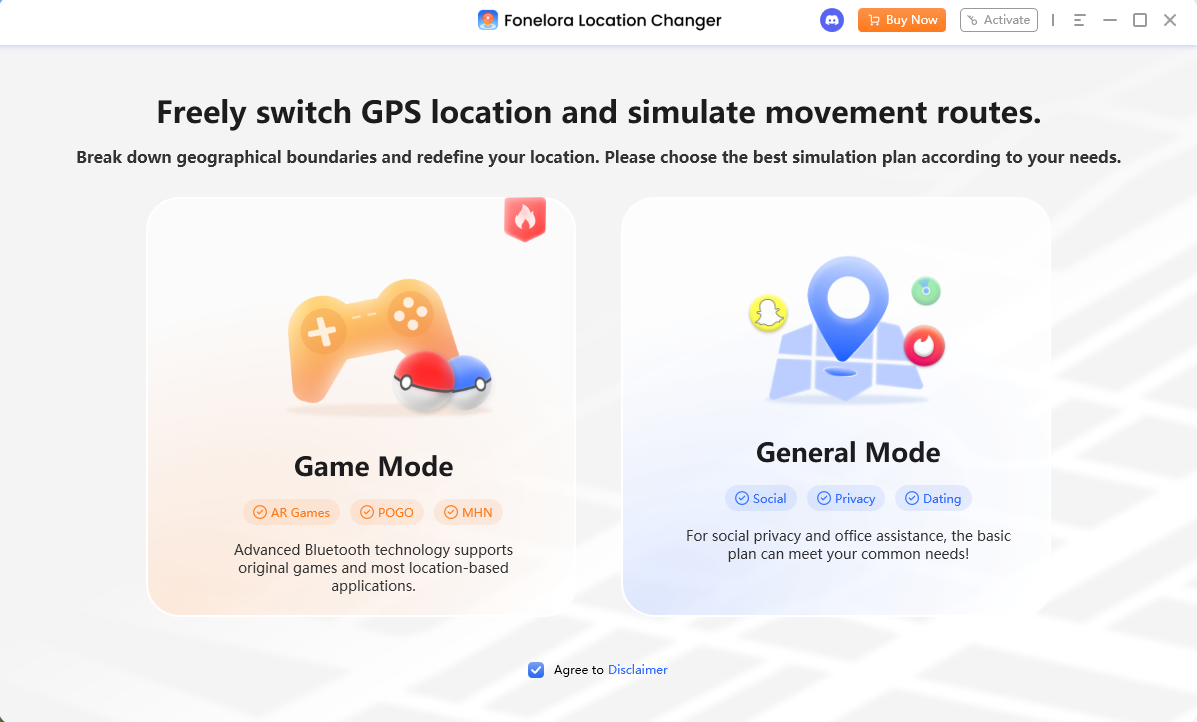
2. Connect your device: Connect your supported iOS or Android phone to your computer via USB or Wi-Fi and launch the software.

3. Pick a movement style:
- Use Joystick Mode to manually control your walking direction around a local park, spinning stops in real-time.
- Use Multi-Spot Mode to create an automated walking loop through a dense downtown area.
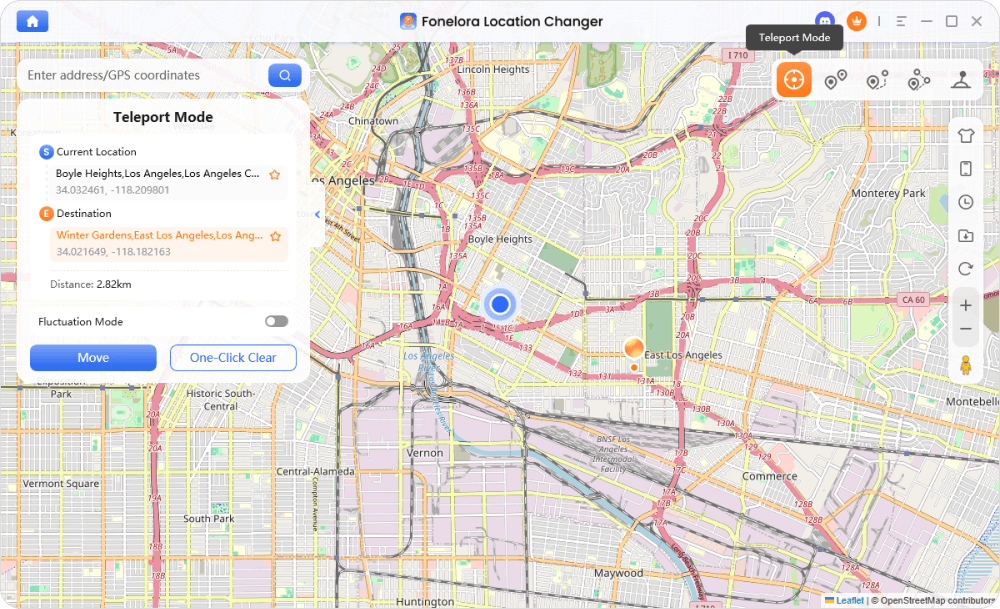
4. Start farming: Let the simulated movement run at a realistic walking speed while you restock your in-game inventory.
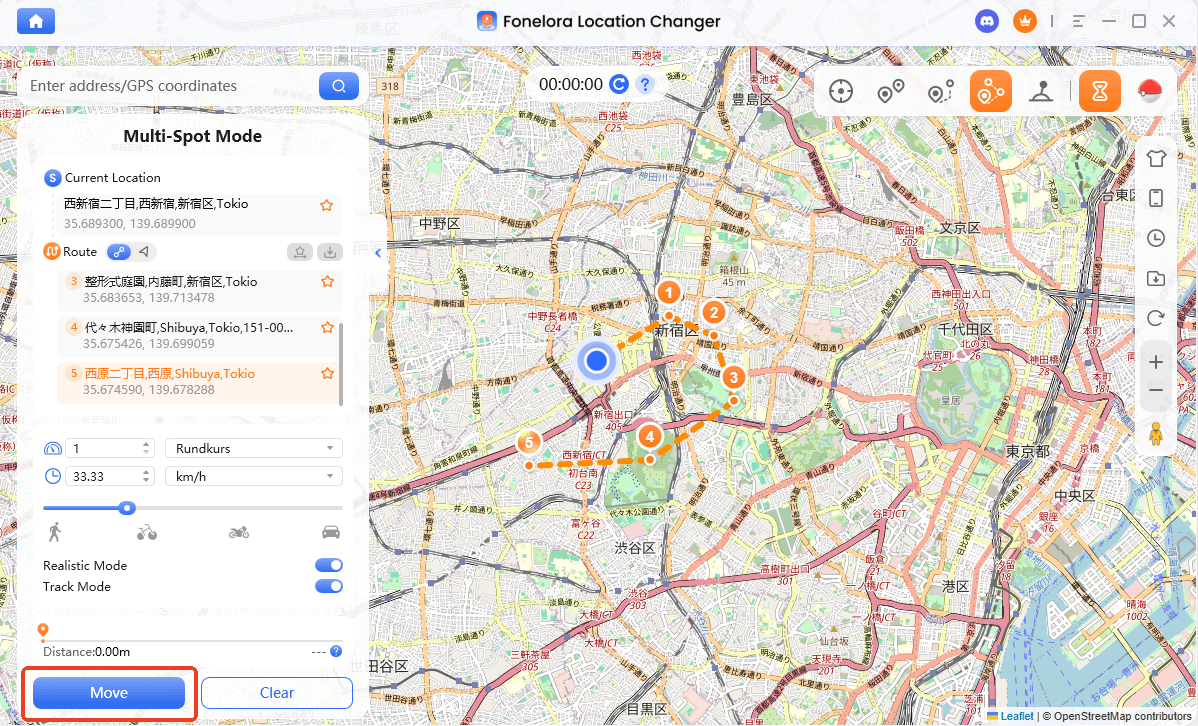
By setting up a continuous route, you can gather far more items in ten minutes than a month’s worth of promo codes could ever provide.
Cooldown Rules and Safe Virtual Movement
Any time you use virtual movement in Pokémon GO, it is critical to manage your account risk. Jumping long distances instantly will trigger a soft ban, meaning Pokémon will flee instantly and PokéStops will not drop any items.
Checklist for Safe Virtual Movement:
- Respect Cooldown Timers: Always wait the required cooldown period before interacting with the game after a long-distance teleport. Understanding Pokémon GO cooldown rules is essential. Fonelora Location Changer includes a built-in cooldown timer to help you track this easily.
- Use Realistic Speeds: When farming items, keep your simulated movement speed at a normal walking or jogging pace. Avoid driving speeds unless necessary.
- Limit Daily Teleports: Avoid jumping between different countries or distant cities multiple times in a single day.
- Understand the Risks: No tool can guarantee 100% protection against soft bans or detection. Always use Game Mode features responsibly and follow the cooldown rules to minimize your risk.
Frequently Asked Questions About Pokémon GO Codes
Q1: Why is my Pokemon GO promo code not working?
Promo codes are strictly single-use per account. If you get an error, the code has likely expired, was typed incorrectly, or you have already redeemed it on your account.
Q2: How do I redeem codes on iOS?
In-app redemption is no longer supported on iPhones. You must visit the official Niantic Pokémon GO Web Store (store.pokemongolive.com) on a browser, log in with your game account, and apply the code there.
Q3: Where can I find more Pokemon GO codes?
Niantic usually drops codes during special events, Community Days, or official live streams. Keeping an eye on their official Twitter/X and Instagram accounts is the best way to catch flash codes.
Final Thoughts: Keep Your Item Bag Full
Finding an active Pokémon GO promo code is a great way to grab a quick handful of PokéBalls or an exclusive avatar item. Remember that iOS players must always use the Niantic Web Store to claim these freebies, so bookmarking that page will save you a lot of future frustration.
However, constantly hunting for codes that expire in 24 hours is exhausting and rarely provides enough items for dedicated players. If you want a smarter, long-term strategy to keep your item bag full, Fonelora Location Changer is the ideal solution. By simulating realistic movement through PokéStop-dense areas, you can easily farm all the items you need to prepare for your next big event. Explore more Pokémon GO guides for tips, check your device compatibility, and try Fonelora Location Changer today to take full control of your Pokémon GO inventory.

Fonelora Location Changer
- Bluetooth Hardware Simulation for Safer GPS Spoofing
- Realistic Movement & Route Simulation
- No Root or Jailbreak Required
- All-in-One Solution for Games, Social Apps & Privacy
More Related Articles