With over a decade of experience in mobile technology and a passion for location-based gaming, we have spent countless hours testing solutions for players just like Alex. He has personally tested dozens of apps across iOS 15-17 and Android 6-14 to find what truly works, understanding the technical details and the frustration of being a rural player firsthand.
For many Pokémon GO trainers, especially those in rural or less-populated areas, the game can feel frustratingly limited. If you’ve ever felt stuck with few PokéStops, sparse Pokémon spawns, or no way to join exciting raids happening in distant cities, you know the challenge well. This guide was created to solve that exact problem. We’re not just going to tell you how a fake GPS for Pokémon GO works; we’re going to recommend the specific, tested tools that get the job done reliably.
This guide provides a complete, step-by-step method for using a Pokémon GO GPS changer on both iOS and Android. Our recommendations are based on direct, hands-on experience, so you can stop searching and start exploring.
Table of ContentsHide
Comparing Strategies for Long-Distance Trading Goals in Pokémon GO
Achieving your collection goals requires selecting the right strategy based on reality, rather than unverified rumors. Players generally have three legitimate methods to obtain regional Pokémon and execute distant exchanges. Each procedure carries different requirements regarding time cost, technical skill, and account safety.
Below is an objective decision matrix comparing the primary methods for safely expanding your collection network.
| Strategy | Success Rate | Time Cost | Geographic Limit | Safety Risk |
| Official 40km Distance Events | High | High (Waiting for official developer schedules) | 40 Kilometers Maximum | None (Official method) |
| Local Trades with Returning Travelers | High | Medium (Requires coordinating local meetups) | 100 Meters | Low (Meeting in safe, public spaces) |
| Community Apps (Campfire/Discord) | High | Low (Quick search for local partners) | Used to arrange meetups | None (Uses official APIs or scheduling) |
Relying on official 40km event boosts offers high security, ensuring your account remains entirely safe from bans. Because a 40km radius will not cross an ocean, meeting local travelers who recently returned from abroad is the most viable way to acquire international species. Always ensure you arrange these meetings in safe, public locations.
Using third-party coordination tools helps you schedule your exchanges efficiently. Platforms like Discord or Niantic’s own Campfire app are vital for finding these traveling trainers. Choosing to coordinate with returning vacationers yields the absolute best results for a successful Pokédex completion.
Understanding the Pokémon GO Trade Range and Proximity Rules
Understanding the game’s baseline rules helps clarify exactly why strategic coordination is necessary. The standard Pokémon GO trade range acts as a localized, invisible boundary around your in-game avatar. If your trading partner steps outside this 100-meter radius, the system immediately blocks the transaction. This strict geographic limitation encourages real-world social interaction.
For players attempting to fill international Pokédex slots, this rule initially presents a massive barrier. Additionally, standard Pokémon GO trading requirements include specific daily transaction limits and high in-game currency costs.
To plan successfully, you must remember the Golden Rules of Trading:
1. The Strict Proximity Limit: You must physically be within 100 meters of your partner under normal conditions.
2. The 1-Special-Trade Limit: Even if you are standing directly next to a friend, you are generally restricted to one “Special Trade” per day. Special trades involve Legendary Pokémon, Shiny Pokémon, or species not currently registered in your Pokédex—exactly the types of rare creatures international traders seek.
3. Extremely High Stardust Costs: Trading an unregistered regional Pokémon is incredibly expensive. At the lowest friendship tier, a single Special Trade costs an astonishing 1,000,000 Stardust.
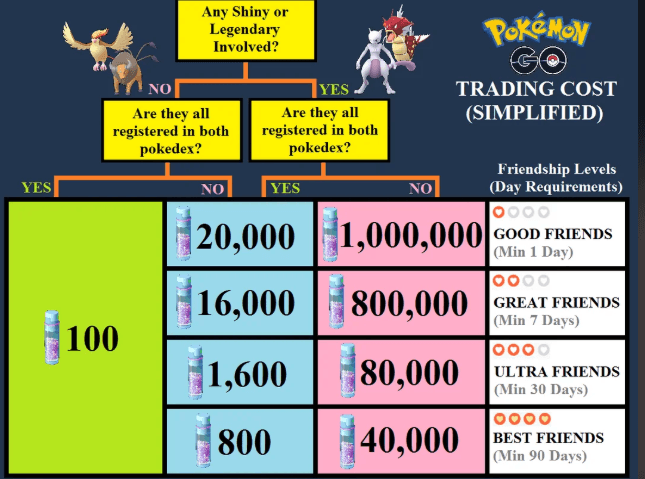
Because standard mechanics demand physical proximity and heavily restrict special transactions, relying on everyday gameplay for global collection requires meticulous planning. This baseline reality underscores exactly why tracking official event bonuses and building high-level friendships remain the only reliable techniques for expanding your borders.
The Official Solution: Expanding Trading Distance During Events
The most reliable method for regional long-distance exchanges revolves around official developer schedules. For players dealing with geographic constraints, discovering this mechanic transforms a frustrating limitation into an actionable goal.
Because players often misunderstand event-based trading distance increases, we must clarify the exact mechanics. During special promotional windows—such as Lunar New Year, Anniversary events, or specific Community Days—Niantic activates a trading bonus. This temporary adjustment increases the maximum trading radius to a strict limit of 40 kilometers.
To ensure you never miss the 40km trading feature window, follow this daily procedure:
1. Open your Pokémon GO app and tap the binoculars icon on the bottom right of the screen.
2. Swipe over to the “Today View” tab.
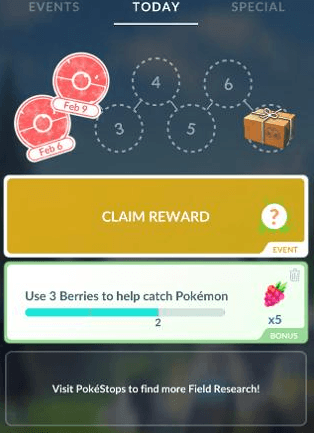
3. Scroll down to the “Active Bonuses” section.
4. Look for an official announcement detailing an increased Pokémon GO trading distance to 40km.
When this bonus activates, you must act quickly. Prepare your desired Pokémon in advance and ensure you have enough Stardust. Synchronizing your gameplay schedule with these event windows is the premier technique to successfully bypass standard physical limitations and trade with friends a few towns over.
CRITICAL WARNING: Local Time Zone Synchronization
Event windows are inherently tied to local time zones, typically ending at exactly 8:00 PM local time. If you are coordinating a 40km trade with someone residing in a neighboring time zone across a state line, you absolutely must agree on whose local time applies. The panic of trying to execute a distant trade at 7:58 PM, only to realize your partner’s event ended an hour ago, is a heartbreaking experience that ruins months of planning. Always confirm the exact hour and time zone before the event begins so you do not get locked out at the last minute.
Executing Long-Distance Trades via Community Tools
Since a 40km radius will not help you trade with someone in another country, the true secret to obtaining international regional Pokémon is finding players in your local area who have recently returned from traveling abroad.
Preparation is the absolute key to successfully executing these trades. You must connect with these travelers well before arranging a safe meetup or waiting for a 40km event boost. The first step in this procedure is exchanging Friend Codes with active members of your local community.
Follow these precise instructions to coordinate your collection goals:
1. Find Returning Travelers: Open the official Campfire app to locate your local neighborhood group. Look for “trading” or “regional” chat channels where players eagerly announce the exclusive Pokémon they brought back from their international vacations. You can also search for local Discord servers dedicated to your specific city or county.
2. Exchange Codes: Navigate to your Trainer Profile, tap the “Friends” tab, select “Add Friend,” and copy your 12-digit code to share with your new local contact.
3. Build Friendship Levels: Send and open gifts daily with your new contacts. Increasing your Friendship level dramatically reduces the Stardust required for unregistered Pokédex entries.
4. Aim for a Lucky Status: If you reach the Best Friend tier after 90 days of interaction, continued daily gift exchanges offer a chance to trigger a Lucky Friend status. A Lucky trade guarantees that the exchanged Pokémon will have high base stats and require exactly half the standard Stardust to power up.
5. Schedule the Session: Use your chosen coordination tool to agree on an exact minute to log in. Whether you are meeting up at a local park for a 100-meter trade or staying home to use a 40km event bonus, prompt communication prevents frustrating timing errors.
Thorough preparation ensures that when you finally locate the rare species you need, your trades execute flawlessly.
Need More Control Over Your Pokémon GO GPS Location?
The methods above focus on official trading rules: normal trades require about 100 meters, and event-boosted trades have historically been limited to 40 kilometers. These limits are important, and no tool should be presented as a guaranteed way to unlock worldwide Pokémon GO trading. However, some players still need more control over their device GPS when coordinating local meetups, testing location-based issues, or managing movement in areas where GPS drift causes repeated “out of range” errors.
In those situations, Fonelora Location Changer can be a useful desktop-based option. It allows iPhone and Android users to change their device GPS location from a computer without jailbreak or root access. Compared with random mobile fake GPS apps, FLC gives you a cleaner way to select a location on the map, simulate movement, and control your virtual position more steadily.
This can be helpful when you want to test whether Pokémon GO is reading your phone location correctly, plan a local trading session more smoothly, or reduce location instability before entering a trade lobby. Use it carefully, because Pokémon GO has strict fair-play systems and unrealistic location jumps may increase account risk.
Fonelora Location Changer does not change Pokémon GO’s official trading rules. It can help manage your device GPS location, but trades still depend on the active in-game distance limit, Stardust rules, friendship level, and daily Special Trade restrictions.
How to Use Fonelora Location Changer
If you need to manage your phone GPS location with FLC, the basic workflow is simple:
- Step 1. Install and open Fonelora Location Changer on your Windows or Mac computer.
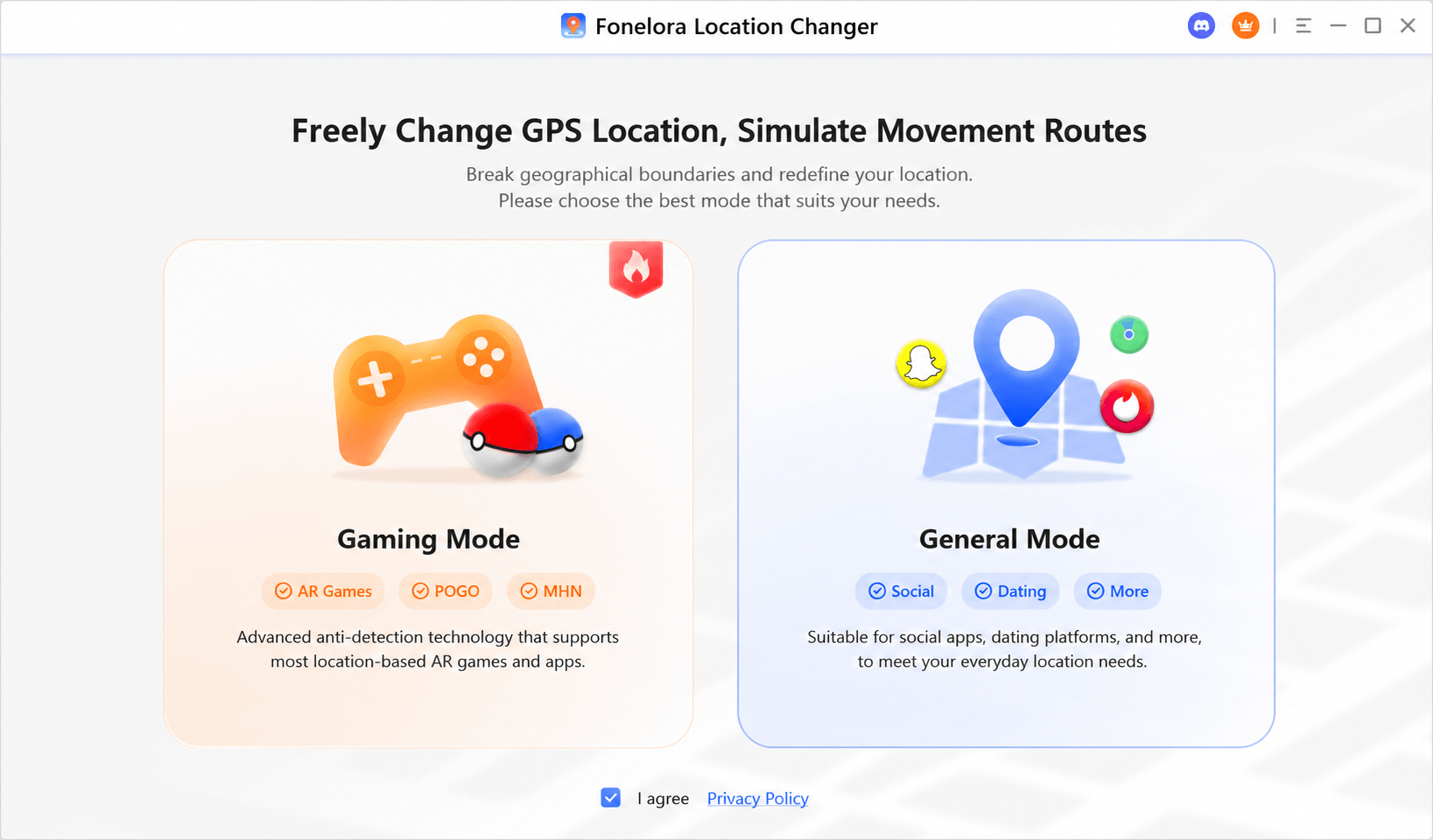
- Step 2. Connect your iPhone or Android device and follow the on-screen instructions to complete recognition.

- Step 3. Choose a target location on the map, such as a nearby meetup area or event location.
- Step 4. Apply the virtual GPS location to your phone.
- Step 5. Open Pokémon GO and check whether your avatar appears in the selected area.
- Step 6. Use route or joystick mode only if you need smoother movement, and keep movement realistic.
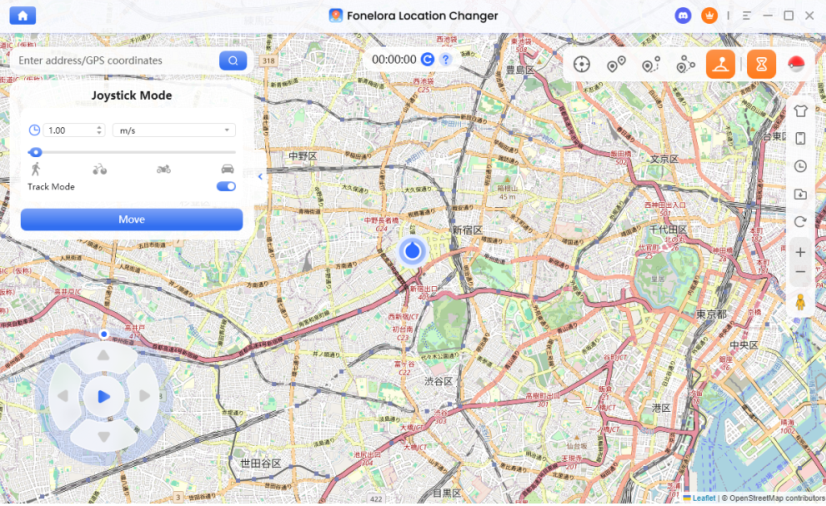
- Step 7. Restore your real location when finished by using the reset option or restarting your device.
Troubleshooting Errors When Trading at a Distance
Even with perfect coordination, technical errors or overlooked rules can disrupt a transaction. A frequent obstacle is the difficulty coordinating distant friends when system errors suddenly occur right in the middle of a trade. Here are rapid solutions to the most common trading problems.
Insufficient Stardust for Unregistered Entries
Attempting to trade a regional Pokémon you do not currently own classifies as a Special Trade. If you lack a high friendship level, this transaction costs 1,000,000 Stardust.
Solution: Verify your Stardust balance well before arranging a meetup. Prioritize sending gifts for 30 consecutive days to reach the “Ultra Friend” status. This effort effectively reduces the cost to a much more manageable 80,000 Stardust. Reaching “Best Friend” drops the requirement down to an incredibly accessible 40,000 Stardust.
Daily Special Trade Caps
During certain special events, the daily cap for special trades might temporarily increase to two or three, but the standard limit remains strictly one per day.
Solution: Track your daily activity carefully. If the screen displays an error, confirm neither you nor your partner has already completed a Special Trade that calendar day in your respective local time zones.
The Wi-Fi to 5G GPS Drift Bug
Sometimes the game app struggles to verify your precise location, particularly on varying iOS and Android operating systems. A specific, highly documented GPS drift bug frequently happens when a player’s phone switches from Wi-Fi to a 5G cellular network right during the trade animation. The phone briefly loses its precise location ping, causing the game to think you suddenly stepped out of the 40km or 100m range. This forces an immediate “out of range” cancellation error.
Solution: If you receive an “out of range” error during a confirmed meetup or event, close the app completely. Choose one stable network connection—either remain entirely on Wi-Fi or turn Wi-Fi off to rely exclusively on your 5G data. Toggle your phone’s location services off and back on, then restart the game to force a fresh, stable GPS location ping before re-entering the trading lobby.
Frequently Asked Questions About Pokémon GO Remote Trades
To provide absolute clarity on international trading, we have compiled clear answers to the most common questions regarding developer rules and distance limitations.
Can you trade remotely in Pokémon GO?
Yes, but only up to 40 kilometers, and only during specific in-game events. True worldwide remote trading is not a feature in the game. You must wait for Niantic to officially announce a temporary distance extension bonus to trade beyond 100 meters.
What is the trading distance limit in Pokémon GO?
The standard trading distance limit is approximately 100 meters. You must physically be within this exact radius of your trading partner under normal, everyday gameplay conditions.
Does Pokémon GO allow global long-distance trading?
No. Pokémon GO does not allow worldwide trading. Long-distance trading is allowed exclusively during special promotional events, but the maximum distance cap is strictly held at a 40-kilometer radius.
Do events increase trading distance?
Yes. Community Days, Lunar New Year events, and game anniversary celebrations frequently feature active bonuses that increase the maximum allowed trading distance between two accounts to 40 kilometers.
How do you trade with friends in Pokémon GO?
Navigate to your Trainer Profile, tap the “Friends” tab, select the friend you wish to interact with, and tap the “Trade” button. Both players must be actively on the trading screen and within the active geographic limit to proceed.
Can you trade regional Pokémon remotely?
Yes, provided the other player is within the 40km event radius and you execute the transaction during an active distance-boosting event. Keep in mind that trading an unregistered regional Pokémon counts as a Special Trade and requires a significant Stardust fee.
What are the requirements for trading in Pokémon GO?
Both players must be at least Trainer Level 10, be active on each other’s Friend List, possess sufficient Stardust to cover the transaction cost, and be within the active geographic distance requirement.
Conclusion
Overcoming the barrier that Pokémon GO normally requires players to be within about 100 meters to trade no longer demands booking expensive international flights. By tracking official event schedules and understanding the strict 40-kilometer distance cap, you can safely plan your distant exchanges without falling for false global trading rumors. Understanding exactly when these distance bonuses activate removes the difficulty in coordinating trades with friends in neighboring towns.
More importantly, learning how to locate returning international travelers in your local area ensures those elusive regional Pokémon remain entirely accessible. You now possess the exact procedure to schedule and execute these local and regional exchanges flawlessly, avoiding last-minute time zone lockouts and GPS errors.
If you also need more control over GPS stability while testing locations or preparing for a local trading session, Fonelora Location Changer can help you manage your phone’s virtual location from desktop. Just remember that successful trades still depend on Pokémon GO’s official distance limits, friendship rules, and Stardust requirements.
To regain control over your Pokédex completion, set up your profile on community platforms like Campfire today and start connecting with local players who love to travel.”


Hot Topics
