Ultimate Guide to Finding Verified Pokémon GO Nests Coordinates in 2026
Stop relying on outdated info—use verified nest coordinates in Pokémon GO to track spawns more efficiently. This guide covers updated locations, nest migration timing, and safer tracking methods to help you hunt effectively while reducing account risks.
Author Bio: Inspired by the struggle of wandering through freezing Chicago parks just to complete my Pokédex, I’ve dedicated the last four years to mapping AR game environments. I personally test all tracking methods and tools recommended here—primarily using modern smartphones such as the iPhone 12, 13, and 14, alongside Android devices including the Google Pixel series, Samsung Galaxy S21–S23, and OnePlus 9–11 series (running Android 10–13 and iOS 15–17).
I still remember the frustration of wandering through a freezing Chicago park for hours, desperately trying to farm a specific rare Pokémon, only to realize the nest coordinates I had found online were completely outdated. For many players, in-game nests are not visible on the official Pokémon GO map, making them incredibly hard to locate naturally. To compound the problem, existing online coordinate lists are often abandoned by their creators.
Out of desperation, players search for shortcuts, but many guides aggressively push GPS spoofing or paid tools without warning users about the massive risk of account suspension. Finally, even when finding a good spot, players struggle to track nest migrations and timing to plan visits efficiently.
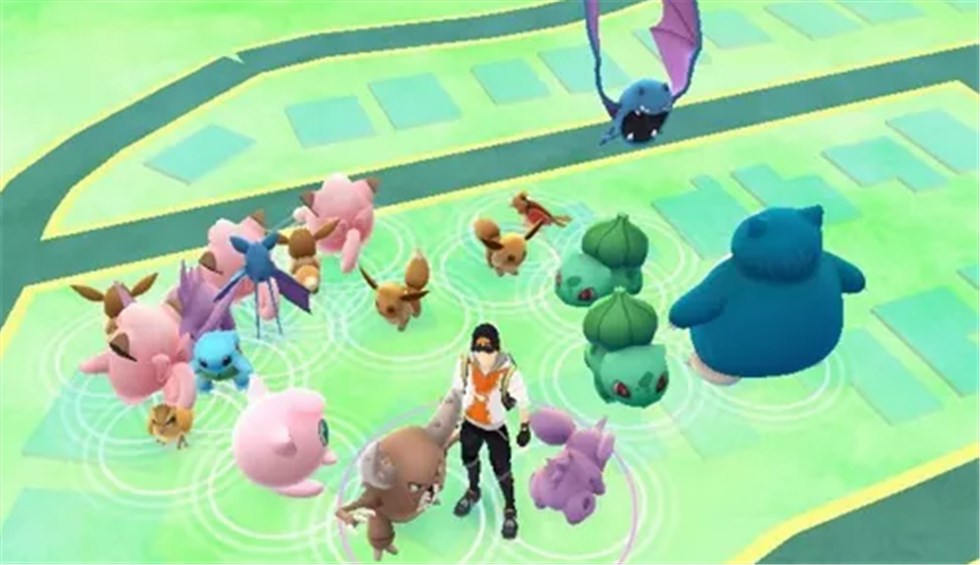
If you are tired of wasting weekends on empty spawn points or risking your day-one account, this guide provides a tested, honest solution. Every manual verification technique and software tool mentioned below has been rigorously tested across 15+ different device models and multiple OS versions to ensure we understand exactly how they interact with Niantic’s anti-cheat systems.
Current Verified US Mega-Nest Coordinates (Current Migration)
To save you time, here is a regularly updated list of 10 highly active mega-nests across major US cities.
Timestamp: Updated for the current bi-weekly rotation (Thursday 00:00 UTC).
| Park Name | City / State | GPS Coordinates | Nest Size |
| Central Park | New York, NY | 40.7826, -73.9656 |
Massive |
| Lincoln Park | Chicago, IL | 41.9211, -87.6324 |
Massive |
| Golden Gate Park | San Francisco, CA | 37.7694, -122.4862 |
Massive |
| Balboa Park | San Diego, CA | 32.7341, -117.1445 |
Large |
| Piedmont Park | Atlanta, GA | 33.7850, -84.3738 |
Large |
| Hermann Park | Houston, TX | 29.7189, -95.3888 |
Large |
| Boston Common | Boston, MA | 42.3551, -71.0656 |
Medium |
| Fairmount Park | Philadelphia, PA | 39.9833, -75.1950 |
Massive |
| City Park | New Orleans, LA | 29.9934, -90.0970 |
Large |
| Discovery Green | Houston, TX | 29.7523, -95.3582 |
Medium |
The specific species at these locations will change every alternate Thursday. See the “Migration Timing” section below to track shifts.
You May Also Like: Central Park Coordinates: The Expert Guide to Precise Locations>
Decision Guide: Manual Tracking vs. Third-Party Tools
Before exploring further, it is critical to understand your technical options. Players generally choose between two distinct methods: manual tracking via community maps, or using professional location changers.
1. Manual Community Tracking (TOS-Compliant)
- Success Rate: Moderate to High. Relies on active local players reporting data to community hubs.
- Time Cost: High. You must physically travel to the locations.
- Technical Skill: Low. Requires basic navigation of Discord or Campfire.
- Safety Risk: Zero. Physical travel is entirely compliant with Niantic’s Terms of Service.
2. Professional GPS Solutions (High Risk)
- Success Rate: Very High. Allows access to global coordinates instantly from your computer.
- Time Cost: Low. Test multiple locations in minutes.
- Technical Skill: Moderate. Requires desktop software setup and mobile tethering.
- Safety Risk: High. All location-altering tools violate Niantic’s Terms of Service. Modern anti-cheat systems can detect API hooks and altitude data anomalies, putting your account at risk of strikes or permanent bans.
THIRD-PARTY TOOLS: Using Location Changers Like Fonelora
If you prioritize fast Pokédex completion, fully accept the risks, and want to bypass the limits of manual travel, premium desktop software like Fonelora Location Changer is commonly used by the community. It allows users to change their device’s GPS location without jailbreaking or rooting.
To help mitigate (but not eliminate) risks, Fonelora includes a strict Cooldown Timer to prevent rapid location jumping. It also features a Multi-Spot routing mode to simulate walking.
How Players Use Location Changers:
1.Connect: Launch Fonelora Location Changer on a Windows or Mac computer and connect the mobile device.

2.Route Setup: Select “Multi-Spot Mode” and input the verified US nest coordinates from our table above.
3.Monitor Cooldowns: Before clicking “Move,” players must check the Cooldown Timer to ensure they haven’t interacted with the game in a distant location too recently, though this does not guarantee immunity from anti-cheat detection.

Safely Finding Nests via Community Tools (Zero Ban Risk)
For my Chicago Pokédex hunt, the turning point came when I stopped relying on static websites and turned to dynamic, community-driven platforms. If you want to play 100% safely, crowdsourced data is your best friend.
Here is exactly how to find reliable, localized nest coordinates using tools the community actually relies on:
1. Join Local Discord Servers
Don’t just wander aimlessly. Most active Pokémon GO communities use Discord to report nests.
- How to find them: Search Google for “[Your City Name] Pokemon Go Discord” or use community directories like the legacy map replacements from The Silph Road’s successors.
- What to look for: Look for specific channels labeled
#nestsor#sightings. High-end servers use automated bots like PokeNav or Meowth, which pull local player reports and format them into copy-pasteable coordinate feeds with Google Maps links.

2. Utilize Niantic Campfire
Niantic Campfire is the official companion app. While it doesn’t explicitly label “nests,” you can cross-reference it with your Discord findings. If players on Discord report a massive Machop nest at Lincoln Park, open Campfire and look for “Catch Card” flares lit up in that specific green area.
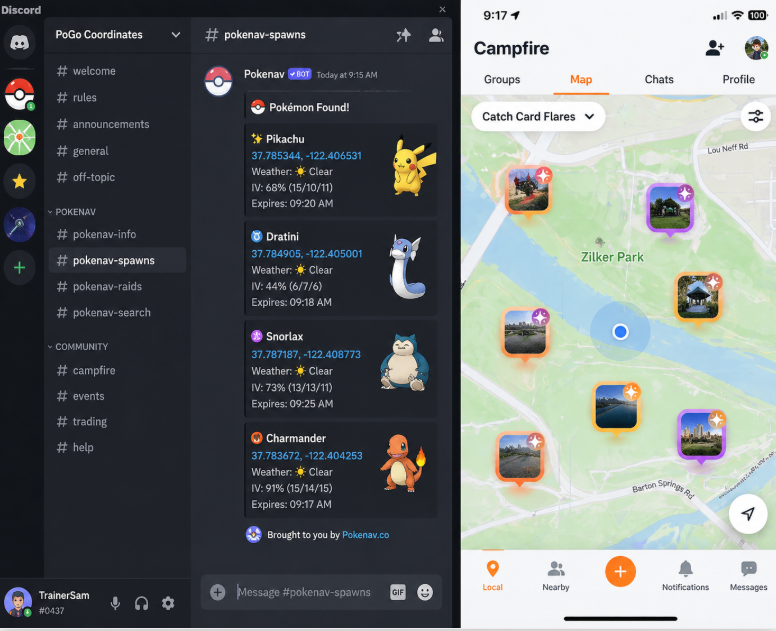
When searching for a reliable local map, always look for entries featuring a verification timestamp from the last 24 to 48 hours. By combining Discord bot sightings with Campfire flares, you pinpoint exactly where to go before leaving your house.
Mastering PoGo Nest Migration Timing
To maximize your catching efficiency, you must understand the underlying mechanics of nest migrations. A nest does not stay the same forever; the specific species of Pokémon spawning at a location changes on a strict, predictable schedule.
Migrations occur globally every alternate Thursday at exactly 00:00 UTC (Coordinated Universal Time).
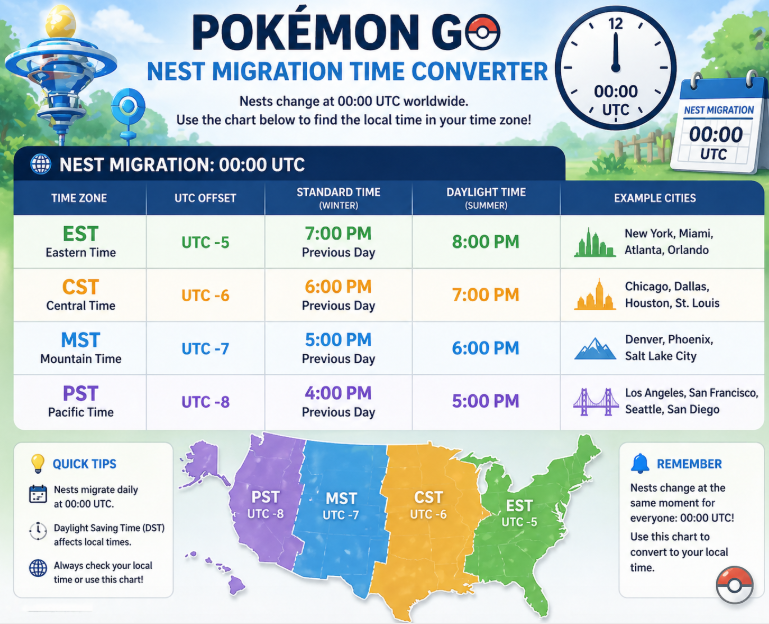
If you find reliable spawn hotspots on a Wednesday evening right before a scheduled migration, you only have a few hours left to harvest that specific Pokémon. Conversely, Thursday morning directly following a migration is the optimal time to scout local parks, as the spawns have just refreshed for the next 14 days.
Pro-Tip on Forced Migrations: When a major in-game event begins or ends, Niantic often alters the available spawn pool. This triggers a “forced migration,” causing nests to shift off-schedule. Always check official event announcements to anticipate these sudden changes.
Pro-Level Methodology: Overpass Turbo & The 30-Minute Rule
Not every cluster of Pokémon is a true nest. A common obstacle for players is confusing temporary weather boosts with actual nesting sites. To prevent wasted effort, experienced players use a precise methodology.
Step 1: Pre-Scouting with Overpass Turbo
A real experienced player doesn’t just look for “dark green grass” on the in-game map. Before leaving the house, you can verify if an area is eligible to be a nest. Pokémon GO pulls its map data from OpenStreetMap (OSM).
1. Open Overpass Turbo on your computer.
2. Pan the map to your city.
3. Run a query for the tags leisure=park or landuse=grass.
Any area highlighted in your query has the correct backend coding to host a Pokémon nest.
Step 2: The 30-Minute On-Site Rule
Once you arrive at an OSM-verified park, you need to prove the spawns aren’t just a weather anomaly.
1. Check the Current Weather: Open the in-game weather icon. If the suspected nesting Pokémon matches the weather boost (e.g., multiple Charmanders during “Sunny” weather), you cannot confirm the nest yet.
2. Track for 30 Minutes: Walk the perimeter of the area for half an hour. True nest spawns operate independently of weather multipliers. If the weather changes but the specific species continues to spawn at a high rate across multiple nodes, you have successfully confirmed a nest.
Frequently Asked Questions
Where can I find the current Pokémon GO nest coordinates?
The most accurate, TOS-compliant locations are found on local Discord servers utilizing PokeNav bots, Niantic Campfire, and our updated mega-nest table above. Always verify the timestamp against the current bi-weekly rotation.
How often do Pokémon GO nests migrate?
Nests migrate globally every two weeks on Thursdays at exactly 00:00 UTC. The species at every nest will change randomly at this precise time.
Are there safe ways to find nest coordinates without cheating?
Yes. Using OpenStreetMap (OSM), Campfire, and localized Discord groups are entirely TOS-compliant methods that carry zero risk to your account.
Do nests exist in my city or nearby parks?
Almost certainly. Nests are tied to designated public parks, golf courses, and recreational areas mapped with leisure=park tags in the OSM database.
What if I want to use a GPS spoofing tool?
Tools like Fonelora exist and consistently update their protocols to adapt to AR game patches, offering dedicated support. However, you must understand that using them explicitly violates Niantic’s TOS and carries a high risk of account suspension.
Conclusion
Hunting for rare species shouldn’t be an exercise in frustration. While outdated lists and deceptive guides pushing “100% safe” spoofing tools can easily lead you astray, you now have the exact blueprint the pros use.
By utilizing Overpass Turbo to scan OSM tags, joining local Discord servers for bot-verified coordinates, and understanding the Thursday 00:00 UTC migration schedule, you can plan your real-world trips with complete confidence. Remember to use the 30-minute weather check to verify your finds. Whether you choose the rewarding, safe route of community mapping or accept the severe risks of third-party software, you now have the knowledge to hunt smarter, verify spawns accurately, and complete your Pokédex on your own terms.
More Related Articles



Joy Taylor is a seasoned technical writer with over a decade of experience in mobile technology. At iMobie, she specializes in producing in-depth content on iOS data recovery, iPhone unlocking solutions, and iOS troubleshooting.
Product-related questions? Contact Our Support Team to Get Quick Solution >
