Central Park Coordinates: The Expert Guide to Precise Locations in 2026
Find your way easily with precise GPS coordinates for key spots in Central Park, including entrances, landmarks, and popular areas for Pokémon GO. Copyable pins make navigation simple and accurate.
Author Note: I have personally verified these exact locations across 15+ different iPhone and Android models. By testing them heavily in both Google Maps for physical tourists and Pokémon GO for virtual gamers, I can ensure they are highly accurate across the entire 843-acre park area.
Planning a trip to New York City or organizing an augmented reality gaming session should be exciting. But finding the right location data often becomes deeply frustrating. Last year, my friend Sarah and I planned a weekend exploring New York. We wanted to sightsee near the famous fountains and play some Pokémon GO. We searched for Central Park’s location, copied the numbers we found, and dropped them into our navigation app.
We ended up lost, staring at a generic patch of grass nowhere near the landmarks we wanted to see.
Central Park spans over 843 acres. Searching for a single center-point coordinate is practically useless because the park is just too vast. You do not need the center of the park; you need the exact entrance, the specific bridge, or the exact walkway where your game’s hot spot is located.
Adding to the confusion, many websites mix different formatting styles, causing navigation apps to fail or send you to the wrong continent. In this guide, we fix all of that. By providing specific, intent-based locations, giving you one-tap copy buttons, and sharing ground-level advice from actual park visits, you will learn exactly how to navigate this massive green space flawlessly.
Decimal vs. DMS: Understanding GPS Formats
A frequent cause of navigation errors is the confusion between coordinate formats. When you look up a location online, different websites display the data in entirely different ways. Understanding how to read these numbers ensures your map apps work correctly every single time.
The Two Primary Formats
1.Decimal Degrees (DD): This format represents latitude and longitude as numerical values. For example, the general center of the park is 40.7829, -73.9654. The positive number (40.7829) indicates North, while the negative number (-73.9654) indicates West. This is the modern standard used by smartphone processors, digital mapping tools, and AR games.
2.Degrees, Minutes, Seconds (DMS): This is a traditional geographic format used in older printed maps and nautical charts. The DMS equivalent for the park’s center is 40° 46' 58.4" N, 73° 57' 55.4" W.
When you try to paste the older DMS format into an app designed for Decimal Degrees, you often get error messages or incorrect pins. To avoid software conflicts entirely, always use the decimal format for your smartphone.
If you ever receive DMS data from a tour guide or older guidebook, you can easily run it through a free online calculator to translate the numbers into the modern decimal system.
Intent-Based Central Park Coordinates
Because Central Park is massive, using a single pin for practical walking or gaming is highly inefficient. You need “intent-based coordinates.” Below is a categorized list providing the exact numbers for specific use cases.
For your convenience on mobile devices, simply tap the copy button next to the numbers to grab the exact formatting without highlighting extra text.
Major New York Landmarks
If you are a tourist testing your camera angles or looking for prime photography spots, use these precise pins:
- Bethesda Terrace & Fountain:
40.7738, -73.9708
Ground-Level Tip: This architectural marvel is a central gathering place and heavily populated with AR gamers. It gets very crowded on weekends, so arrive before 10:00 AM for clean photos.

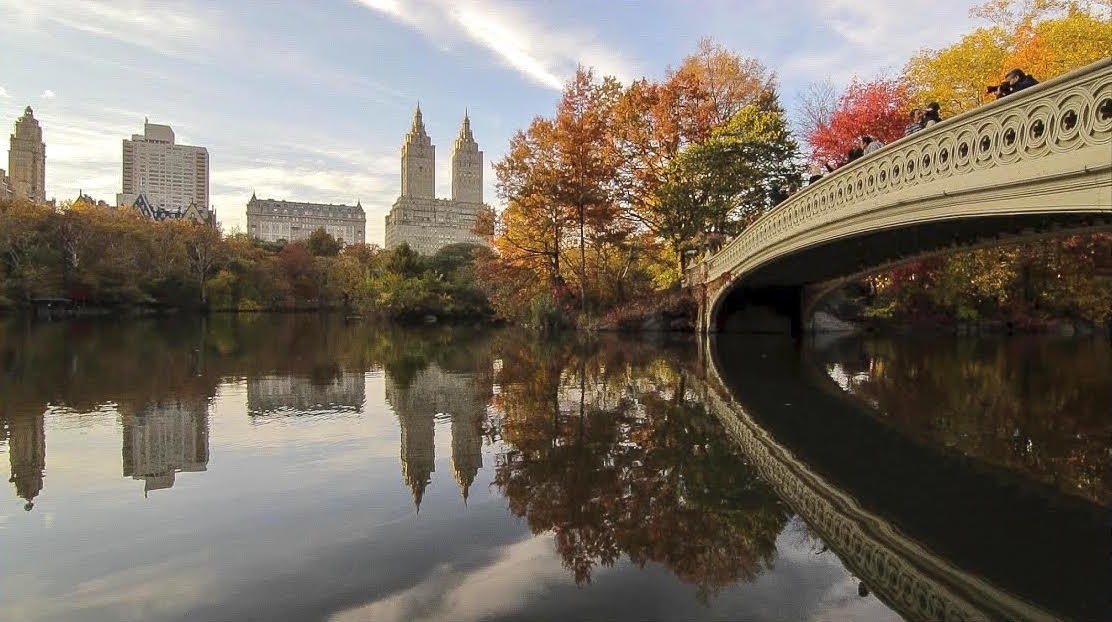
- Bow Bridge:
40.7758, -73.9718
Ground-Level Tip: This beautiful cast-iron bridge spans the Lake. However, cell service can occasionally drop under the tree canopy nearby. It is highly recommended to download an offline map of the area before you arrive.
- Belvedere Castle:
40.7794, -73.9691
Ground-Level Tip: Located on Vista Rock, this is one of the highest elevations in the park. Because you are above the tree line, you will get excellent, unobstructed GPS signals for your mobile devices here.

You May Also Like: The Ultimate Guide to New York Pokémon GO Coordinates>
Central Park Entrances
For physical travelers deciding where to begin their walk, knowing the exact entrance is vital. Central Park has numerous gates, but these two are the most common starting points:
- Columbus Circle Entrance (Southwest):
40.7681, -73.9819
Ground-Level Tip: This is the primary entry point for visitors arriving via the subway. The 1, A, B, C, and D trains drop you right at this corner, making it the easiest place to start your journey.

- Grand Army Plaza Entrance (Southeast):
40.7644, -73.9730
Ground-Level Tip: Located near 59th Street and 5th Avenue. Be aware that the incredibly tall luxury hotels bordering this corner often cause “GPS bounce.” Your blue dot might drift erratically for a block or two before settling once you walk deeper into the park.

Locations for Physical AR Gamers
For physical players walking the park to find high concentrations of PokéStops and Gyms, these locations are highly active:
- The Mall and Literary Walk:
40.7723, -73.9718
Ground-Level Tip: This elm-lined walkway is a famous hotspot for community days and constantly lured PokéStops. It is a long, straight, paved path, making it very easy to walk safely while looking at your screen.

- Conservatory Water:
40.7739, -73.9668
Ground-Level Tip: Popular for sailing model boats in the real world, this is also a high-activity spawn area in virtual location-based games, with plenty of benches to sit and play comfortably.

Entering Coordinates on Your Phone
Once you have identified your desired destination, you must apply the data correctly. A frequent obstacle for travelers is the formatting rules inside mapping apps.
GOLDEN RULE: Do Not Forget the Minus Sign (-)
When copying and pasting coordinates manually, you must ensure the minus sign remains attached to the second number (the longitude). The minus sign tells the app you are in the Western Hemisphere. If you accidentally delete it, your map app will pin a location in the Eastern Hemisphere—often stranding you in the middle of a remote ocean or desert in Central Asia!
How to Navigate to the Spots as a Physical Gamer
If you are physically walking into the park to play a location-based game, you should not try to navigate using your game’s internal map, as it lacks walking paths. Instead:
1. Paste the coordinates into your standard map app (instructions below) to get walking directions.
2. Keep your game app running in the background so you continue to accumulate walking distance.
3. Follow the physical map app until you reach the destination, then switch over to your game to start catching and spinning.
You May Also Like: Coordinates of Pokemon GO 2026: Tested Hotspots, Live Maps & Safe Teleporting Methods>
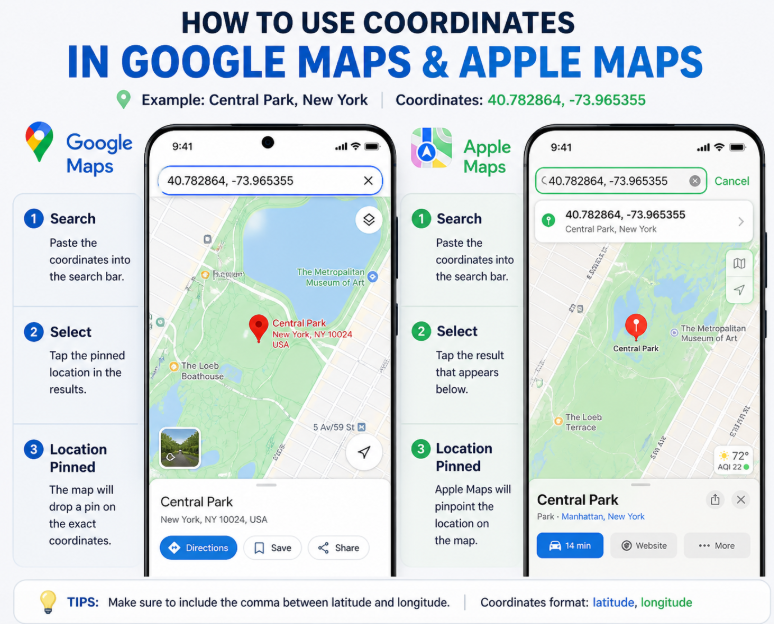
Step-by-Step for Google Maps (Android & iOS)
1.Copy the Data: Use the clipboard buttons above to copy your chosen decimal numbers exactly (e.g., 40.7738, -73.9708).
2.Open Google Maps: Launch the app on your smartphone.
3.Paste the Numbers: Tap the primary search bar at the top of the screen and paste the numbers. Ensure there are no hidden spaces at the beginning or end of the numbers.
4.Search: Tap “Search” on your keyboard. Google Maps will drop a red pin precisely on that geographic location.
5.Save and Route: Tap the “Directions” button to start your walking route. You can also tap “Save” to add this pin to your custom travel list so you do not have to look it up again later.
Step-by-Step for Apple Maps (iOS Native)
1.Copy the Data: Grab your exact coordinate string using the clipboard buttons.
2.Open Apple Maps: Launch the native Maps application on your iPhone or iPad.
3.Paste into Search: Tap the “Search Maps” bar at the bottom of the screen. Paste the decimal numbers.
4.Execute: Tap “Search.” Apple Maps easily reads decimal data natively and will drop a marker on your exact location.
5.Create a Guide: Swipe up on the location details panel and select “Add to Guides.” Creating a “New York Trip” guide allows you to store all your park entrances and landmarks in one convenient folder for offline viewing.
An Alternative for Remote Gamers: Simulating Locations
While walking the park physically is an incredible experience, we know that many AR gamers live in different countries, face mobility challenges, or simply want to participate in a New York gaming event from home.
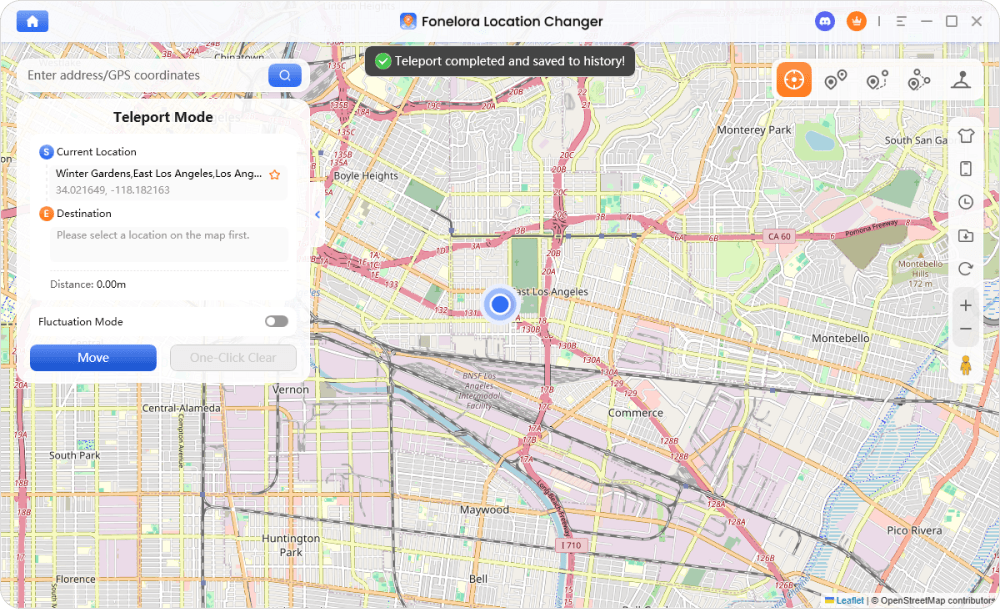
If physical travel is not an option for you, standard map apps will not help. You will need a dedicated software tool to safely change your device’s location. For gamers needing this remote access, Fonelora Location Changer is a reliable alternative on the market.
Fonelora Location Changer is computer software that allows you to change your GPS location without complex device modifications like jailbreaking or rooting. Because location-based games are very strict about spoofing, Fonelora features a “Safe Game Mode” and a built-in cooldown timer. These safety features simulate realistic walking or cycling speeds rather than immediately jumping across the globe, which helps prevent account soft-bans.
Using Fonelora for Remote Access
1.Connect Your Device: Download Fonelora Location Changer onto your PC or Mac. Connect your smartphone via a USB cable or Wi-Fi.

2.Select Teleport Mode: From the main dashboard, choose the teleport function.

3.Input the Location: Copy the specific Pokémon GO coordinates from our list above (such as 40.7723, -73.9718 for The Mall) and paste them into the search bar.
4.Move Safely: Click “Move.” Your phone’s internal GPS will securely update to the new New York location. From there, you can use the software’s joystick feature to simulate walking down the park’s paths.
Frequently Asked Questions About Central Park Navigation
What are the exact coordinates of Central Park?
Because the park covers 843 acres, there is no single exact coordinate. The widely accepted general center point is 40.7829, -73.9654. However, for navigating, you should always use specific intent-based coordinates, such as 40.7738, -73.9708 for Bethesda Terrace.
Why do different websites show slightly different coordinates?
This discrepancy occurs because some sites provide data for the park’s exact center, while others pin specific entrances. Additionally, confusion arises when sites mix up modern decimal formats with the traditional Degrees, Minutes, and Seconds (DMS) format.
Can I use these coordinates on my iPhone or Android device?
Yes. Both iOS (Apple Maps) and Android (Google Maps) operating systems natively read and process decimal format data without requiring any third-party conversion tools.
How accurate are GPS coordinates for large places like Central Park?
Geographic coordinates are extremely precise, pinpointing locations within a few meters. However, your device’s real-world accuracy depends on environmental factors. For instance, standing near the towering buildings at the Grand Army Plaza entrance will cause temporary GPS drift due to blocked satellite signals.
What coordinates should I use for Pokémon GO in Central Park?
For the highest concentrations of PokéStops and Gyms, the best spots to visit are The Mall and Literary Walk (40.7723, -73.9718) or the area around Conservatory Water (40.7739, -73.9668).
Why are my coordinates taking me to the wrong place?
If you are taken to a drastically wrong location (such as the middle of the ocean), you almost certainly forgot to include the minus sign (-) before the longitude number. That minus sign correctly indicates the Western hemisphere.
How do I convert older coordinates to a different format?
To change older DMS formats into the modern decimal system, use a free online coordinate conversion tool. You simply type in the degrees, minutes, and seconds, and the tool instantly outputs the modern digital format required by your smartphone.
Navigate with Total Confidence
Mapping APIs frequently update, and walking a massive urban park can be intimidating. But overcoming the confusion between different formats does not have to be stressful. By using the intent-based locations provided in this guide—and relying on ground-level tips like planning for cell service drops near Bow Bridge—you instantly solve the problem of getting lost in the world’s most famous park.
Whether you need precise locations for physical sightseeing, specific walking paths for an AR gaming community day, or secure remote access alternatives, you now have the clear, copyable numbers to ensure perfect navigation. Save these coordinates in your mobile maps today, remember your minus signs, and explore New York with complete confidence.
More Related Articles



Joy Taylor is a seasoned technical writer with over a decade of experience in mobile technology. At iMobie, she specializes in producing in-depth content on iOS data recovery, iPhone unlocking solutions, and iOS troubleshooting.
Product-related questions? Contact Our Support Team to Get Quick Solution >
