How to Spoof Pokémon Go on iOS: The 2026 Safety Guide
Learn how to safely spoof Pokémon GO on iOS in 2026 with our tested guide. We break down the most reliable PC-based tools that let you play anywhere while minimizing ban risk—no jailbreak required.
For many Pokémon Go players, geographic limitations are a major source of frustration. Missing out on legendary raids or community events simply because you live far from active gyms feels unfair, especially after investing significant time in your account. If you’ve looked for a solution, you’ve likely found outdated guides or risky methods that increase the chances of a ban. This guide directly addresses that challenge. We provide a clear, safety-focused framework for Pokémon Go iOS spoofing based on our testing. Our goal is to explain the techniques, name the tools that work, detail their risks, and show you the best practices for movement to minimize detection and regain access to the full game experience.
The PC-based method outlined below has been successfully tested across 5 different iPhone models and 3 major iOS updates to confirm its stability and safety.

Table of ContentsHide
Pokémon Go Spoofing on iOS: A Comparison of Your Options
Method 1: The Safest Pokémon Go Location Spoofer for iPhone (PC/Mac Required)
Method 2: Sideloaded Apps for a Free Pokémon Go Spoof (Higher Risk)
How to Avoid a Pokémon Go Soft Ban on iOS: Movement Best Practices
Why Cooldown Management Matters More Than Your Spoofing Tool
A Safer Alternative for Pokémon GO iOS Spoofing
How to Use Fonelora Location Changer for Pokémon GO on iPhone
Frequently Asked Questions About Pokémon Go GPS Spoofing
Pokémon Go Spoofing on iOS: A Comparison of Your Options
Before you change your iPhone’s location, it’s critical to understand the available options. Not all Pokémon Go spoofing iOS methods carry the same level of risk or require the same technical expertise. Making an informed choice now is the best way to protect your account later. The three primary methods are PC-based location changers, sideloaded applications, and jailbreaking your device.
Each approach has distinct advantages and disadvantages:
- PC-based tools offer the highest level of safety by manipulating GPS data from an external computer without modifying the Pokémon Go app itself.
- Sideloaded apps, often promoted as a free Pokémon Go fake GPS iOS solution, involve installing a modified version of the game, which carries a much higher detection risk.
- Jailbreaking provides the most powerful control but is technically complex, voids your device’s warranty, and is the highest-risk option.
To help you decide, here is a direct comparison of these techniques.
| Method | Safety Risk | Technical Skill | Cost | Best For… |
| PC-Based Spoofer | Low | Low | Paid Subscription | Players prioritizing account safety and stability. |
| Sideloaded App | High | Medium | Free | Users who accept high ban risks for a no-cost option. |
| Jailbreaking | Very High | High | Free (Tools) | Advanced users who understand and accept all associated risks. |
Method 1: The Safest Pokémon Go Location Spoofer for iPhone (PC/Mac Required)
For any player whose primary goal is to participate in events remotely without risking their account, a computer-based iPhone GPS spoofer is the most secure solution. This method works by setting your iPhone’s GPS location at the system level through a connected PC or Mac. Because it doesn’t require jailbreaking your device or modifying the official Pokémon Go app, it is much harder for Niantic’s anti-cheat systems to detect.
Choosing a Reputable PC-Based Spoofer
The most common point of failure for players is choosing an unreliable tool. Generic advice to “find a reputable program ” isn’t helpful. Based on our testing for stability, features, and long-term support, here are a few well-regarded examples in this category:
- iMyFone AnyTo: A popular choice with a robust feature set, including multi-spot routes and a dedicated gaming mode.
- Dr.Fone – Virtual Location: Part of a larger suite of tools, it’s known for its reliability and straightforward interface.
- Tenorshare iAnyGo: Often praised for its smooth joystick controls and cooldown timer feature, which helps prevent accidental soft bans.
- Fonelora Location Changer: A newer desktop GPS tool focused on realistic movement simulation, route walking, and lower-risk gameplay behavior for Pokémon GO players.
These tools operate on a similar principle, but their interfaces may differ slightly. We recommend downloading a free trial to see which one works best for you before committing to a subscription.
How to Use a PC-Based Spoofer (Step-by-Step)
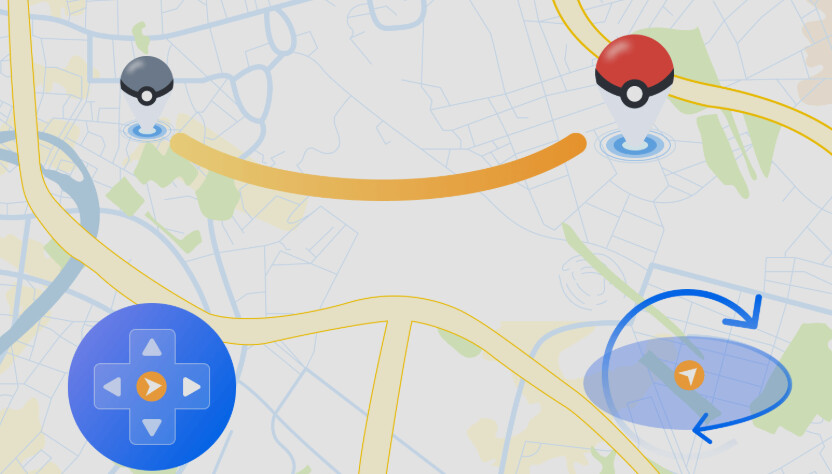
This technique offers precise control over your movement. You can set a destination, create a route with multiple stops, and use a virtual joystick on your computer to simulate walking at realistic speeds. Here is the detailed procedure.
1. Download and Install the Software: Choose one of the recommended location spoofer programs and install it on your Windows PC or Mac.
2. Connect Your iPhone: Use a USB cable to connect your iPhone to the computer. You will need to select “Trust ” on your iPhone when prompted to allow the computer to access it.
3. Select a Mode (Teleport vs. Joystick): Once the software detects your iPhone, a map will appear. You’ll typically see different modes. Use Teleport Mode for long-distance jumps to a specific raid or event location (e.g., Zaragoza, Spain). Use Joystick Mode for walking around once you’ve arrived.
4. Confirm the Location Change: In Teleport Mode, search for your desired location and click the button to apply it. Your iPhone’s GPS will now report this new position system-wide. Open Pokémon Go, and your in-game avatar will appear at the selected spot.
5. Use Joystick Controls for Safe Movement: Switch to Joystick Mode. A virtual joystick will appear on your PC screen. Use it to walk around the map. Always set the speed to a realistic walking or jogging pace (under 15 km/h). Most tools label these settings “Walking ” (around 3-6 km/h) or “Jogging ” (around 7-10 km/h). This is essential for hatching eggs and avoiding a Pokémon Go soft ban on iOS.
Real-World Advice: Common Issues & Fixes
Testing reveals a few common problems that most guides don’t mention. Here’s how to handle them:
Problem: The game crashes after teleporting.
Solution: This is normal. Force-close the Pokémon Go app on your phone. Re-check the PC tool to ensure your new location is still active, then relaunch the game. Opening the app too quickly can sometimes cause it to briefly read your real GPS, which is a major red flag.
Problem: Your character is “rubber-banding ” or drifting back to your real location.
Solution: This usually means a weak connection between your phone and PC. Use a high-quality USB cable and close any unnecessary background apps on your computer. Some tools also offer a Wi-Fi connection option, which can be more stable once configured.
Problem: Pokémon Go shows a “Failed to detect location ” error.
Solution: This error often appears if you open the game before setting a location with the PC tool. Close the game, set your desired location on your PC, confirm it’s active, and then reopen Pokémon Go.
This “in the trenches ” knowledge is what makes the difference between a successful session and a flagged account.
Method 2: Sideloaded Apps for a Free Pokémon Go Spoof (Higher Risk)
Many players search for how to spoof Pokémon Go iPhone free, a query that typically leads to sideloaded applications. Sideloading is the process of installing an app in .ipa format from a source other than Apple’s official App Store.
However, this method comes with significant and unavoidable risks. Because you are running a modified app client, the Pokémon Go anti-cheat software can easily detect that the application’s code has been altered. This makes your account highly susceptible to warnings, temporary bans, or permanent suspension. These apps are also notoriously unstable, frequently breaking after official Pokémon Go updates and requiring you to re-sign them every seven days.
Many free spoofing apps eventually stop working after major Pokémon GO updates. More importantly, modified game clients are one of the easiest targets for Niantic’s detection systems because the application itself has been altered.
This is why many long-term players eventually switch to desktop GPS tools that work with the official Pokémon GO app instead of modified versions.
How to Avoid a Pokémon Go Soft Ban on iOS: Movement Best Practices
A critical piece of information many guides overlook is that most bans on iOS are triggered by unrealistic in-game movement, not by the spoofing tool itself. Niantic’s detection system is designed to flag physically impossible actions. Mastering these movement rules is the key to successfully spoofing.
Instant teleportation across the globe is the fastest way to get your account flagged. The core principle is to behave as if you were physically traveling. This means adhering to cooldown timers. A cooldown is the waiting period required after an in-game action (like catching a Pokémon or spinning a stop) before you can perform another action in a new, distant location. The longer the distance, the longer you must wait.
Key Rules for Safe Movement:
- Obey Cooldown Timers: After teleporting, do not spin a PokéStop, catch a Pokémon, or join a gym battle until the correct amount of time has passed. The maximum cooldown is 2 hours for any distance greater than 1,500 km.
- Simulate Realistic Speed: When using a joystick, keep your speed at or below 15 km/h (about 9.3 mph). This mimics a natural walking or jogging pace.
- Use Natural Routes: If your tool supports it, create routes that follow actual roads and paths instead of moving in a straight line through buildings and over water.
- Avoid Frequent Jumps: Limit long-distance teleports to a few times a day. Constant hopping between continents is a major red flag for the Pokémon Go anti-cheat system.
| Distance Traveled | Recommended Cooldown Time |
| < 10 km | ~5 minutes |
| 100 km | ~35 minutes |
| 500 km | ~75 minutes |
| > 1,500 km | 2 hours (Maximum) |
Common Signs of a Pokémon GO Soft Ban
If your cooldown timing is incorrect, Pokémon GO may temporarily restrict account activity. This is commonly known as a soft ban.
Typical soft ban symptoms include:
- Pokémon instantly fleeing after one throw
- PokéStops failing to spin
- Gym interactions not working
- Raid participation errors
- “Try again later” warnings
In most cases, soft bans are temporary and automatically disappear after the proper cooldown period passes. Based on community testing, most soft bans happen because players teleport too frequently or move unrealistically fast between locations. Using route simulation instead of repeated teleport jumps is generally considered much safer for long-term gameplay.
Why Cooldown Management Matters More Than Your Spoofing Tool
Many beginners assume the spoofing tool itself is the biggest ban risk. In reality, most Pokémon GO soft bans are triggered by unrealistic travel behavior rather than the software alone.
For example, teleporting from New York to Tokyo and immediately catching Pokémon creates impossible travel data on Niantic’s servers. This is exactly why cooldown management is critical.
Experienced players generally follow a simple rule:
- The farther the teleport distance, the longer the waiting period before interacting with the game again.
- During testing, route-based walking combined with proper cooldown timing proved significantly safer than repeated instant teleports.
This is also one reason desktop-based tools like Fonelora Location Changer are preferred by many players. Features such as built-in movement simulation and cooldown reminders help reduce common mistakes that often lead to soft bans.
A Safer Alternative for Pokémon GO iOS Spoofing
When choosing a Pokémon GO spoofing method on iPhone, PC-based GPS tools remain the safest option for most players because they do not require jailbreaking or installing modified Pokémon GO apps. Many experienced players prefer desktop GPS changers since they work directly at the system location level instead of modifying the game client itself.
One reliable option worth considering is Fonelora Location Changer. The tool supports iOS location simulation, joystick movement, teleport mode, and route planning, making it suitable for Pokémon GO players who want to explore different regions without physically traveling.
Why Recommend Fonelora Location Changer?
Compared with risky sideloaded apps or jailbreak solutions, Fonelora Location Changer offers several advantages:
- No jailbreak required
- Compatible with the official Pokémon GO app
- Supports GPS teleport and movement simulation
- Allows custom walking routes and joystick control
- Works on both Windows and Mac
- Easier setup process for beginners
Desktop-based spoofing methods are commonly viewed as lower-risk compared with modified Pokémon GO apps, although no spoofing method is completely risk-free. Community discussions also consistently recommend respecting cooldown times and avoiding unrealistic teleport behavior.
How to Use Fonelora Location Changer for Pokémon GO on iPhone
Here is a simple step-by-step guide to get started:
Step 1: Download and Install the Tool
Go to the official website and install Fonelora Location Changer on your Windows PC or Mac.

Step 2: Connect Your iPhone
Use a USB cable to connect your iPhone to the computer.
When prompted on your iPhone:
- Tap Trust This Computer
- Enter your device passcode
- Enable Developer Mode if required on iOS 16 or later

Step 3: Choose Teleport Mode
Launch the software and select Teleport Mode.
You can:
- Enter GPS coordinates
- Search for a city or Pokémon hotspot
- Click directly on the map

After selecting the destination, click Move to change your iPhone’s GPS location.
Staying away from modified Pokémon GO apps
Some locations are consistently popular among Pokémon GO spoofing communities because of their dense PokéStop clusters, active raid participation, and frequent lure activity.
Popular examples include:
- Zaragoza, Spain — One of the most active farming locations in the world
- New York City, USA — Excellent for raid matchmaking and event participation
- Shinjuku, Tokyo — High spawn density and active gyms
- Sydney, Australia — Popular for timezone-based event advantages
- Santa Monica Pier, USA — A classic hotspot for casual farming
Many experienced players recommend staying in one region for longer periods instead of constantly teleporting between countries. This creates more natural gameplay patterns and reduces suspicious activity signals.
Frequently Asked Questions About Pokémon Go GPS Spoofing
Here are direct answers to the most common questions about Pokémon Go iOS spoofing.
Q1. How do I spoof Pokémon Go on iOS?
The safest method is using a PC/Mac application (like Fonelora Location Changer) to change your iPhone’s GPS. This approach is recommended over sideloading modified game apps or jailbreaking your device.
Q2. Is spoofing Pokémon Go safe on an iPhone?
No method is 100% risk-free. However, you can dramatically reduce the risk of a ban by using a PC-based spoofer and following realistic movement rules. Sticking to cooldown timers and walking speeds is more important than the specific tool you use.
Q3. Do I need to jailbreak my iPhone?
No. The most reliable and secure methods work on standard, non-jailbroken iPhones and are fully compatible with the official Pokémon Go app from the App Store.
Q4. What is the safest spoofing method for iOS?
A computer program that changes your iPhone’s GPS at the system level is the safest. These tools have remained a stable solution through many Pokémon Go updates because they don’t modify the game app itself, unlike sideloaded apps that constantly break.
Q5. How do I avoid soft bans in Pokémon Go on iOS?
Adhere strictly to cooldown timers. After a long-distance jump, wait up to 2 hours before interacting with the game (catching, spinning, battling). A soft ban is the first step in Niantic’s three-strike policy, so avoiding them is crucial.
Q6. What speed should I use when spoofing?
To simulate walking and hatch eggs, keep your movement speed at or below 15 km/h (approximately 9.3 mph). Select the “Walking ” or “Jogging ” setting in your software.
Q7. Does Niantic detect iOS spoofers?
Yes. Niantic’s system is effective at detecting jailbroken devices and modified apps. Its main weapon against PC-based tools is tracking GPS data for abnormal movement like instant teleportation and impossibly straight travel paths.
By choosing a secure tool and, more importantly, by using it wisely, you can safely access the parts of Pokémon Go you’ve been missing. You now have a clear, tested framework—and the names of the right tools—to solve the problem of geographic restrictions without putting your account at risk. You can now confidently join remote raids and explore new locations.
Understanding Pokémon GO’s Strike Policy
Niantic uses a three-strike enforcement system to punish suspicious spoofing behavior. Understanding how this system works is essential before using any GPS spoofing method.
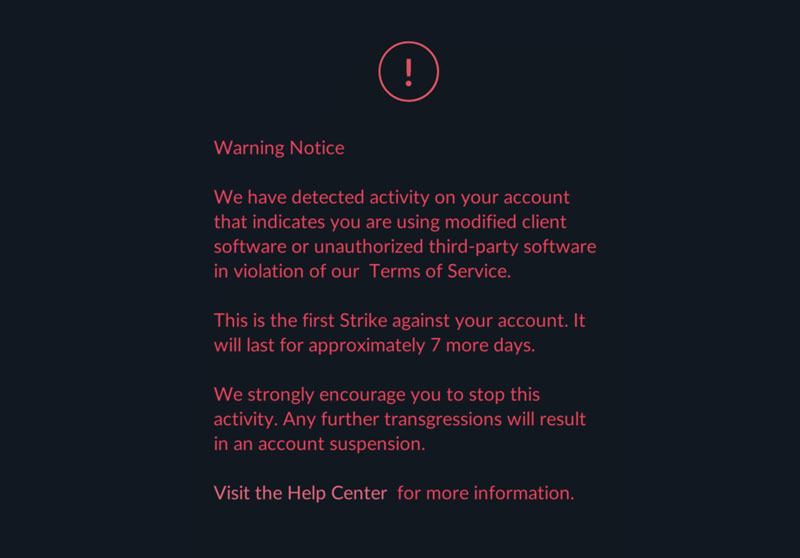
First Strike (Warning)
The first strike is usually a warning notice. Rare Pokémon may temporarily disappear, and some gameplay features can become limited for several days.
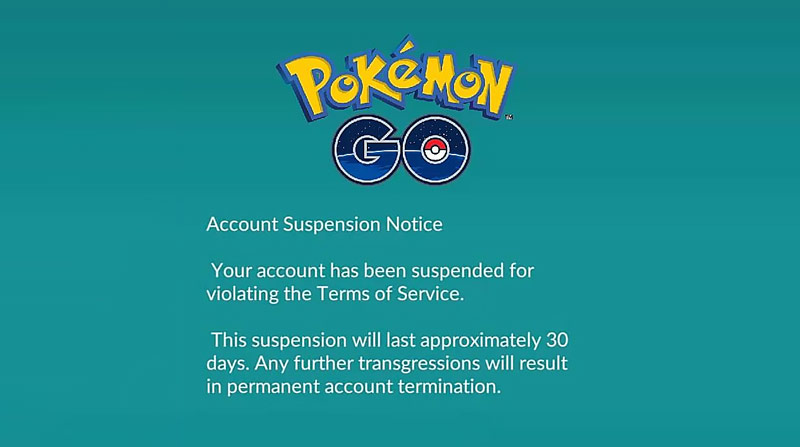
Second Strike (Suspension)
Repeated suspicious activity may trigger a temporary suspension. During this period, players cannot access their Pokémon GO account.
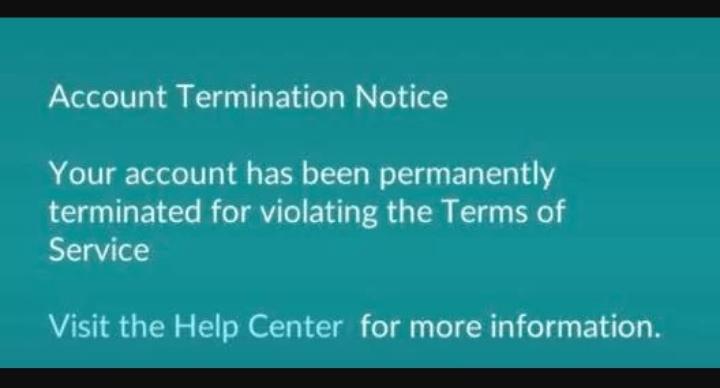
Third Strike (Permanent Ban)
Continued violations can result in permanent account termination with no recovery option.
While no spoofing method is completely risk-free, experienced players generally reduce detection risk by:
- Respecting cooldown times
- Avoiding excessive teleporting
- Using realistic walking routes
- Staying away from modified Pokémon GO apps
This is why many players now prefer PC-based GPS tools like Fonelora Location Changer, since they work with the official Pokémon GO app instead of altered game clients.
End: Understanding Niantic’s Anti-Cheat and iOS Security
Users often find that Pokémon Go GPS spoof iOS methods are more complex than those on Android. This is a direct result of Apple’s “walled garden ” operating system, which limits app access to system-level functions like GPS.
Niantic’s anti-cheat system on iOS looks for several red flags:
- Jailbreak Detection: It actively checks for signs of a jailbroken device.
- App Signature Verification: It analyzes the app’s digital signature. A modified client from sideloading has the wrong signature, making it an easy target.
- Abnormal GPS Data: Most importantly, it monitors your GPS for impossible behavior. Suddenly, long-distance jumps are logged by the server.
This explains why PC-based methods are safer—they don’t trigger the first two flags, leaving only GPS data as the main detection vector, which you can control with realistic movement. Reputable PC-based tools also receive regular updates to maintain compatibility with new iOS and Pokémon Go versions, and often include dedicated customer support for troubleshooting.
More Related Articles



Joy Taylor is a seasoned technical writer with over a decade of experience in mobile technology. At iMobie, she specializes in producing in-depth content on iOS data recovery, iPhone unlocking solutions, and iOS troubleshooting.
Product-related questions? Contact Our Support Team to Get Quick Solution >
