[2026 Guide] EFRP.Me APK Free Download & FRP Bypass Guide
“Hey there! I’m having trouble getting past the FRP on my Android. My friend mentioned something called EFRP.Me APK. Does it actually work? Are there any risks involved?” If you’re facing the same issue, read this post to learn more about EFRP.Me APK.
iMobie DroidKit – Bypass FRP on Android Safely
Free download iMobie DroidKit to bypass Google account verification without credentials. Supports bypass FRP on phones running Android OS 6 – 15. No technical knowledge is required. No malware and viruses.

Factory Reset Protection (FRP) is a security feature implemented on Android devices to prevent unauthorized access after a factory reset. However, users who are locked out of their Google account because they forget their credentials or acquire second-hand devices with an activated FRP lock may encounter difficulties in accessing their devices. In these situations, EFRP. Me APK can help users restore their access. Some users might be concerned about the efficacy and potential risks of using EFRP. Me APK. Don’t worry, this post provides a full guide on utilizing the EFRP. Me APK FRP bypass tool.
| Feature/tool | EFRP.Me APK | iMobie DroidKit |
| Tool Type | APK installed on phone | Desktop software |
| PC required | ❌ | ✅ |
| Supported Android Versions | Android 5.0 – Android 13 (partial) | Android 6 – Android 15 |
| Supported Brands | Samsung, Xiaomi, Huawei, OPPO, Vivo, OnePlus (varies by model & patch) | Android phones and tablets of all manufacturers in the market, such as SAMSUNG, Google, HTC, SONY, LG, MOTOROLA, HUAWEI, ZTE, Xiaomi, OPPO, SHARP, ViVo, LENOVO, MEIZU, OnePlus, TCL, Gionee, Meitu, Nubia, Smartisan, etc. |
| FRP Bypass Method | App shortcuts & system access loopholes | PC-assisted FRP removal |
| Success Rate | ⚠️ Unstable (depends on model & OS) | ✅ High |
| Ease of use | Medium (manual steps required) | Very Easy (guided clicks) |
| Safety & Malware Risk | ⚠️ Medium–High (depends on download source) | ✅ Very Safe (official software) |
| Best for | Users without PC, older Android devices | Users wanting higher success & safety |
What Is EFRP.Me APK?
EFRP.Me APK is an Android application developed to help users bypass the FRP lock on their Android devices, including Samsung, Huawei, Oppo, OnePlus, Xiaomi, etc. This tool provides shortcuts to applications and settings on the device. EFRP.Me APK is particularly useful for individuals who have forgotten their Google account details or have a used device that remains linked to the former owner’s account.
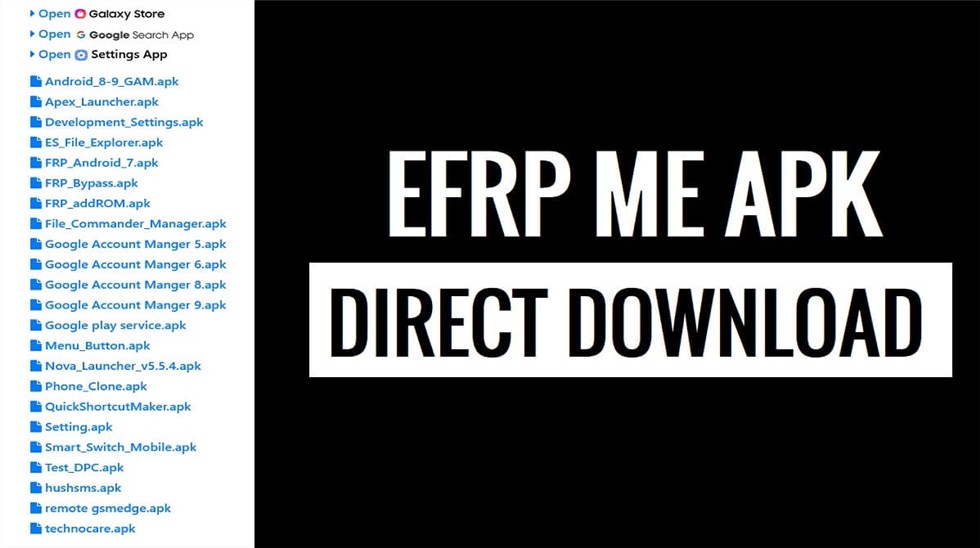
EFRP Me APK Interface
1. Key Features of EFRP.Me APK:
- Enables users to remove the FRP lock, granting access to the device without the original Google account credentials.
- Supports various Android brands, including Samsung, Huawei, Xiaomi, Oppo, Vivo, and others.
- Designed with simplicity in mind, making it accessible to users with varying levels of technical expertise.
- Certain versions can operate without an internet connection, providing flexibility in different situations.
2. Pros & Cons
Pros:
- No PC Required: As an APK on mobile phones, EFRP.Me APK is suitable for users without computers nearby.
- Free to Use: EFRP.Me APK is available for free, though some advanced features or support services might require payment.
Cons:
- Compatibility Issues: Only support Android 5.0 to Android 13, and the latest Android versions or newer device models are not included.
- Uncertain success rate: The success rate of bypassing FRP with this tool is not consistent, and it might depend on your phone model and Android version.
- Security Risks: Downloading from unverified sources can expose devices to malware or unwanted software.
- Lack of Official Support: Users may face challenges in obtaining assistance if issues arise during the bypass process.
3. EFRP.Me APK Compatibility
| Supported Android Versions | Supported Brands (Varies by Model & Patch) |
| Android 5.0 to Android 13 (partial support) | Samsung |
| Limited or inconsistent support on Android 14 & newer | Xiaomi |
| Huawei | |
| OPPO / Realme | |
| Vivo | |
| OnePlus |
Is EFRP.Me APK Free to Use?
Yes, EFRP.Me APK is completely free to download and use. Users can access its features without any subscription or purchase. However, it’s essential to download the application from a trusted source to avoid potential security risks. Additionally, while the tool itself is free, some advanced features or support services might require payment.
Is EFRP.Me APK Safe to Use?
The safety of EFRP.Me APK largely depends on the source from which it is downloaded. Obtaining the APK from reputable websites can minimize security risks. However, downloading from unverified sources may expose your device to malware or unwanted software. Moreover, since EFRP.Me APK is a third-party application; it doesn’t come with official support, which means users must exercise caution and ensure they understand the potential risks involved in bypassing FRP locks.
How to Download & Use EFRP.Me APK
Before proceeding with the download and installation of EFRP.Me APK, consider the following precautions:
- Ensure your device has at least a 50% charge to prevent interruptions during the process.
- A reliable internet connection is necessary for downloading the APK and any additional files.
- Allow installation from unknown sources in your device settings.
How to Download EFRP.Me APK
Follow these steps to download the APK file:
Step 1. Connect the FRP-locked Android device to Wi-Fi
Step 2. Access a browser through the available system prompts
Step 3. Visit a trusted EFRP.Me APK download page.
Step 4. Download the APK file to your device.
EFRP.Me APK is not an official Google or OEM tool. Always verify the source before downloading to avoid malware or modified APKs.
Here Is a Step-by-step Guide to Bypassing FRP Using EFRP.Me APK:
Step 1. Locate the APK file in your device’s download folder.
Step 2. Tap on the file to initiate the installation.
Step 3. If prompted, enable installation from unknown sources.
Step 4. After installation, launch the app from your app drawer.
Step 5. The app will guide you through the necessary steps to bypass the FRP lock.
Step 6. You may need to access certain device settings or a web browser within the app to download additional files.
Step 7. Once the process is complete, restart your device.
Step 8. You should now have full access without the need for previous Google account credentials.
Best Alternative to EFRP.Me APK FRP Bypass-DroidKit Way
While EFRP.Me APK offers a viable solution for bypassing FRP locks; some users may seek alternatives with higher success rates or official support. Here, we highly recommend iMobie DroidKit – Android FRP Bypass Tool. With regular updates, this tool supports bypassing FRP on devices running Android OS 6 – 15. Its powerful function and advanced technology can guarantee its highest success rate in Android FRP bypass among competitors. It offers a user-friendly interface and easy steps. With a few clicks, you can regain access to your phone without any hassle. As a comprehensive Android solution toolkit, DroidKit was developed to address various device issues, including screen unlock without password, Android system repair, etc.
Main Benefits of DroidKit FRP Bypass Tool:
- Support multiple Android phones, including Samsung, Xiaomi, etc.
- Higher success rate in bypassing FRP on Android phones.
- Easy steps and a fast process to bypass FRP with a few clicks.
- No technical skills are required. No malware and viruses.
Free Download * 100% Clean & Safe
There are steps to bypass FRP on Android devices via iMobie DroidKit:
Step 1. Free download and install iMobie DroidKit on a computer. Then choose the FRP Bypass mode.

DroidKit FRP Bypass
Step 2. Connect your device to the computer with a USB cable. Click Start to launch the operation.
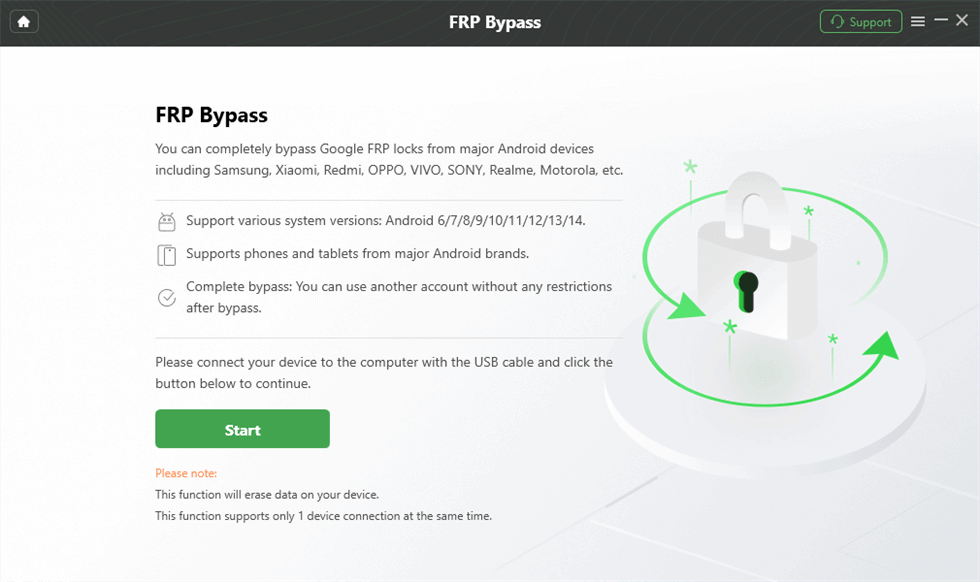
Launch the FRP Operation
Step 3. Wait for the Configuration file to complete. After that, click Start to Bypass.
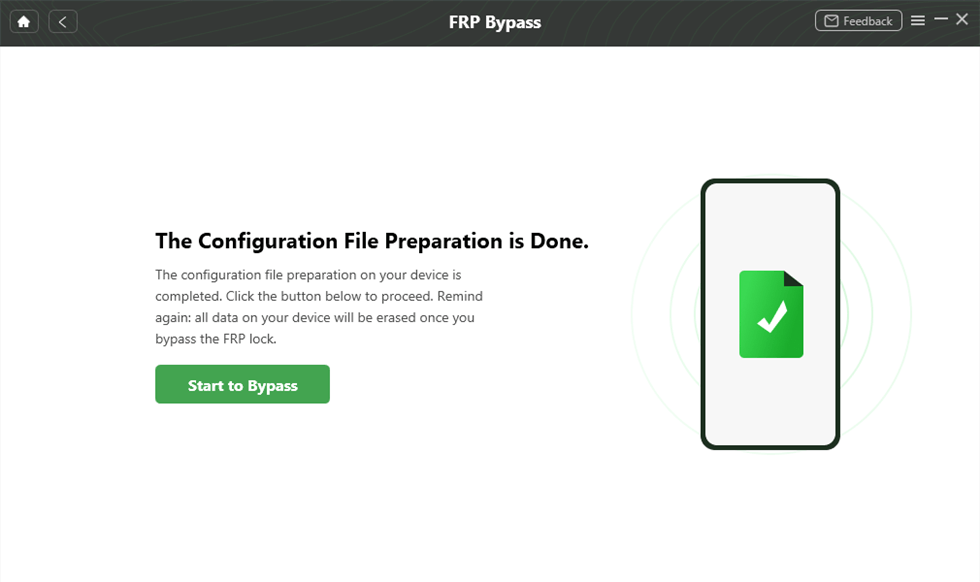
Preparing the Configuration File
Step 4. Follow the guidance below, and complete these operations on your device. Then click Reset.
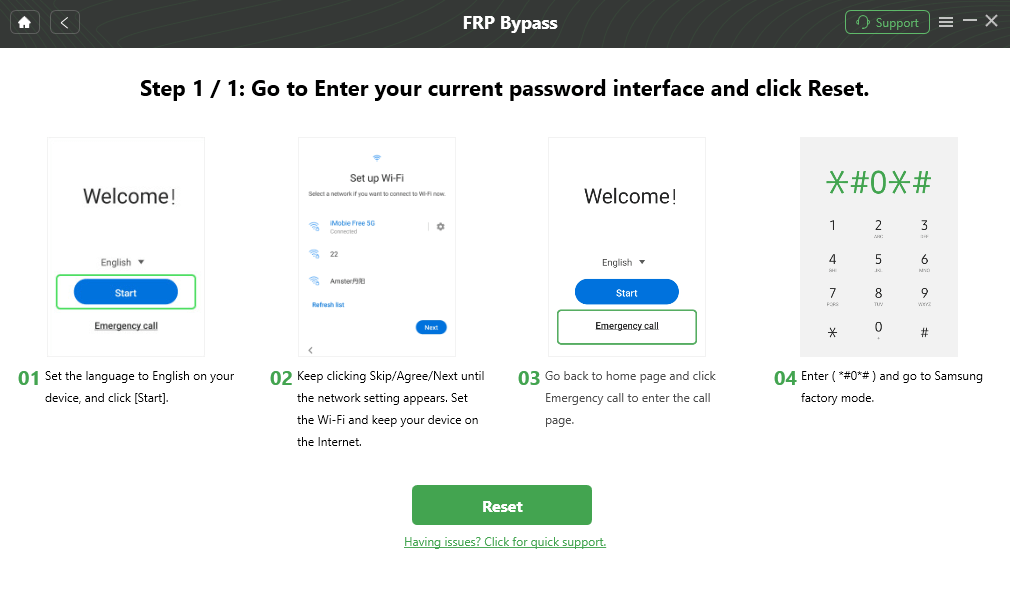
Go to Factory Mode
Step 5. Wait until the bypass process is completed. Then your device will bypass FRP successfully.

FRP Bypass Complete
FAQs About EFRP.Me APK
Q1. Is EFRP.Me legal?
EFRP.Me is a third-party FRP bypass tool, not authorized by Google. Legality depends on local laws and usage scenarios. It should only be used on devices you legally own or have permission to unlock.
Q2. Does EFRP.Me work on Samsung Galaxy A12?
It may work on older Android versions. However, many users report failures on Galaxy A12 running Android 13, due to updated security patches.
Q3. Is it safe to install APKs from unknown sources?
Installing APKs from unknown sources carries security risks, including malware and data leaks. Always scan files and avoid untrusted websites.
Conclusion
EFRP.Me APK is a free and accessible tool to help users bypass FRP locks on Android devices. However, it still has some limitations, including security risks, compatibility issues, and an uncertain success rate in FRP bypass. For those looking for a safer and more reliable FRP bypass solution, iMobie DroidKit FRP Bypass stands out as a powerful alternative. With a higher success rate and a user-friendly interface, DroidKit ensures a smoother and more secure FRP bypass process.
Free Download * 100% Clean & Safe



Joy Taylor is a seasoned technical writer with over a decade of experience in mobile technology. At iMobie, she specializes in producing in-depth content on iOS data recovery, iPhone unlocking solutions, and iOS troubleshooting.
Product-related questions? Contact Our Support Team to Get Quick Solution >
