How to Bypass FRP with FixFirmware APK
Using FixFirmware APK to bypass FRP on Android without computer. Check the step-by-step instructions and turn to an alternative FRP bypass tool if FixFirmware APK won’t work for you.
Factory Reset Protection (FRP) is a helpful security feature on Android phones after a reset. But it can be a problem if you forget your Google account details or buy a used phone that’s still locked. Fortunately, with software like FixFirmware APK, it is possible to bypass the FRP lock and get your phone working again. In this article, we are going to discuss what FixFirmware APK is and how you can use it to FRP bypass your Android phone.
What Is FixFirmware APK?
FixFirmware APK is a software designed to help users bypass the FRP without computer on their Android devices. The issue of FRP lock can arise when you forget your Google password or buy a second-hand phone. With FixFirmware APK, you can directly bypass the FRP lock on your Android device without the need for a computer. It also helps with Android customization and troubleshooting, all while keeping your device secure.
Is FixFirmware APK Safe to Use?
FixFirmware APK can not be considered 100% safe. This is because it is not on Google’s Play Store, and hence has not undergone safety verification by Google. Such apps can contain malware that can cause damage to your phone or result in data loss. Also, installing APKs from unknown sources can void your phone’s warranty. Only download apps from trusted sites and scan them with anti-virus before installing.
How to Bypass FRP with FixFirmware APK
Using the FixFirmware APK for FRP bypass can be complicated because you need to prepare your device well before bypassing. Here are the detailed steps for bypassing FRP with FixFirmware APK:
Step 1. Power on your Google-locked phone. On your welcome screen, click “Start,” and then select “Agree” to all options. After that, go back to the welcome page and join a Wi-Fi network.
Step 2. When you get to the Google verification page, click “Next.” Then, open the keyboard and click “More.”
Step 3. Click on “About” and then “Privacy Policy” and scroll down to “Contact Us.” Now, click on the email link and choose “Messages.”
Step 4. In the message box, type the URL of the YouTube website and send a random message to make the link clickable. When it’s clickable, click it to open YouTube.
Step 5. On YouTube, click your profile, go to “Settings,” then “Terms of Service,” and accept them.
Step 6. In the YouTube app, type “fixfirmware/apk” in the search bar, click the first link, and download the necessary apps like Disabler Pro and Notification Bar.
Step 7. Complete the installation and agree to the terms. Go to “Downloads” and install the downloaded apps.
Step 8. Go to Accessibility > Installed Apps > Notification Bar, and enable it.
Step 9. Open the “fixfirmware/apk” page again, turn off Wi-Fi, and use the “Direct open disabler pro” option. Agree, enable admin, and reconnect Wi-Fi.
Step 10. Click the 3 dots on the screen, select “Import from XML,” and choose “Disable Play Services.”
Step 11. Go to Settings > Accounts > Google > Bypass FRP. Follow the on-screen steps.
Step 12. In Settings > Apps, open Chrome. Search for “Activity Tracker” and select it.
Step 13. Open the “Android Setup” and select “PreDeferredSetupWizardActivity.” Click “Agree.”
Step 14. Now you can perform a factory reset to access your phone.
As the steps are more than expected, you should try them carefully to avoid errors. Besides, some processes can be different due to the variety of each device.
What To Do If FixFirmware APK Is Not Working?
If you are facing issues like low success with FixFirmware APK, you can use a better alternative, such as DroidKit. This powerful tool can bypass FRP on Android easily. A good thing is that it is perfect for beginners and doesn’t require any advanced skills. Unlike most APK files that can be risky or harm your device, DroidKit is totally clean and safe that supporting more Android brands like Samsung, Xiaomi, Lenovo, etc.
Key Features of DroidKit:
- Quickly remove all screen locks from your device without any hassle.
- Compatible with multiple Android devices, including Samsung, LG, Oppo, and more.
- Recover lost files, photos, and data even without a backup plan.
- Retrieves important data from a broken or damaged phone.
- Reinstalls the Android OS you prefer, hassle-free.
Steps to bypass FRP with DroidKit:
Step 1. Download DroidKit and install it on your computer. It supports Windows and Mac systems.
Free Download * 100% Clean & Safe
Step 2. Launch the software and click on the “FRP Bypass” tab. Click the “Start” button on the next screen and connect your phone to the PC via a USB cable. Your PC will recognize the connection and will proceed to the next screen.

DroidKit FRP Bypass
Step 3. Choose your mobile phone’s model from the suggested brands. You might have to choose the OS version too for the devices running Color OS 14. The tool will download a compatible configuration file for FPR bypassing.
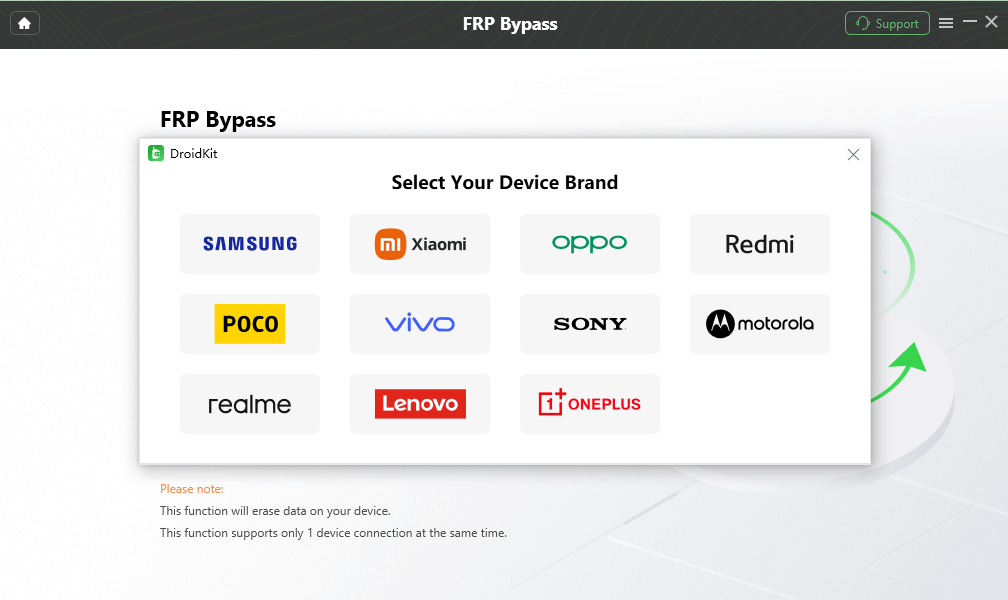
Select Correct Brand
Step 4. Click “Start to Bypass” once the file has downloaded, and choose the recommended variant of Android.
Step 5. Follow the on-screen instructions and tap “Reset” to complete the action. This will initiate the bypass process.
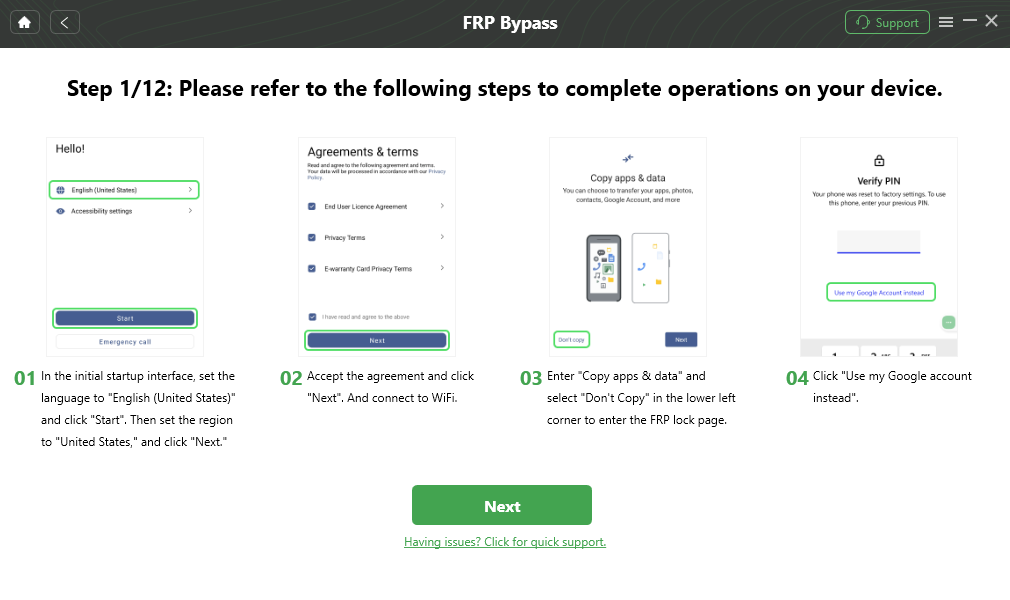
Follow the Bypass Steps
Step 6. Once the above steps are completed, your phone will restart without any factory reset protection restrictions.

FRP Bypass Complete
Conclusion
FixFirmware APK helps unlock FRP without a computer, but it can be tricky and not always safe. Moreover, FixFirmware requires your understanding of some essential Android techniques. If this method is too complicated or doesn’t work for you, DroidKit is a much easier and safer way to unlock your phone. Try DroidKit today to unlock your Android device. It’s fast, simple, and reliable.
Free Download * 100% Clean & Safe



Senior writer of the iMobie team as well as an Apple fan, love to help more users solve various types of iOS & Android-related issues.
Product-related questions? Contact Our Support Team to Get Quick Solution >
