How to Unlock a Google-Locked Phone
Locked out by Google verification after a factory reset? This guide explains how to unlock a Google-locked phone with the original Google account, recover your account, or bypass FRP when credentials are unavailable.
iMobie DroidKit – Unlock Google-Locked Phone Without Credentials
Locked out of a Google account? Free download iMobie DroidKit to bypass the Google lock directly by yourself within minutes. No need to enter the previous Google account or password. Supports multiple Android brands like Samsung, Xiaomi, Redmi, OPPO, and more.

I bought a phone and its locked. I don’t know the password nor the Google account. How can I open it?
-Quora
Purchasing a second-hand phone or performing a factory reset on a locked device can lead to a Google verification page or an FRP (Factory Reset Protection) lock, blocking access to your phone and Google services without the original email and password.
Quick answer
Yes, you can unlock a Google-locked phone if you know the previously synced Google account, can recover the account, or use a supported FRP bypass method. If you still have the Google account and password, the official free method is the safest choice. If you bought a used phone or cannot verify the previous account after a reset, a PC-based FRP bypass tool like DroidKit can be a practical option for supported Android devices.
Table of ContentsHide
Can You Unlock a Phone That’s Google-Locked?
Which Method Should You Choose?
Method 1. Unlock Google-locked Phone Without Google Account & Password
Method 2. Unlock a Google-Locked Phone with Your Google Account
Method 3. Unlock Google-Locked Phone via Google Account Recovery
What If You Still Can’t Unlock the Google-Locked Phone?
FAQs about Google-Locked Phone
Can You Unlock a Phone That’s Google-Locked?
A Google-locked phone occurs when Factory Reset Protection (FRP), an Android security feature, is activated after a factory reset, requiring the original Google account and password to unlock the device. FRP enhances security through screen locks and data encryption and can also be triggered remotely via Google’s Find My Device if your phone is lost. When locked, you’ll see a verification screen stating, “This device was reset. To continue, sign in with a Google Account previously synced on this device.”
Unlocking the phone is simple if you know the original Google account and password. However, if you bought a second-hand phone, forgot the password, or cannot contact the previous owner, you may need another solution to bypass the FRP lock or remove the previously synced Google account from Android.
You can also learn more from this Android FRP bypass guide if you want to compare more FRP lock removal methods for different Android devices.
Which Method Should You Choose?
Before trying any method, check which situation matches your phone. This can help you avoid wasting time on a method that does not fit your case.
| Your Situation | Recommended Method | Free? | Best For |
| You know the previously synced Google account and password | Unlock with Google account | Yes | Official and safest unlock |
| You forgot the Google password but still own the account | Google Account Recovery | Yes | Users with recovery email or phone number |
| You bought a used phone and do not know the previous Google account | DroidKit FRP Bypass | Free download available | Supported Android devices locked after reset |
| You are using a Samsung phone or tablet | Samsung-specific FRP guide or FRP tool | Depends on method | Samsung users stuck on Google verification |
How to Unlock Google-locked Phones
Method 1. Unlock Google-locked Phone Without Google Account & Password
If you cannot unlock your Android device, you might erase your locked phone. However, to use your device again, you need your Google Account password.
What if you don’t know the device’s Google account & password? This time, you need a professional FRP bypass tool- iMobie DroidKit, which is an excellent choice for unlocking a Google account after a reset, compatible with various Android phone and tablet models. Supporting both Windows and Mac, DroidKit offers regular updates and works with over 10 Android brands, including Samsung, Xiaomi, and OPPO. It provides tailored bypass solutions for each device model and Android OS (versions 6–15), ensuring seamless access to your device.
For Samsung users, you can also check the Samsung FRP bypass guide for more brand-specific solutions.
What Can You Get after Google Lock Removal:
- Regain full access to your phone immediately.
- Remove the previous Google account from your device.
- Log in to another Google account of yours to enjoy all Google services.
- The whole process is done by yourself and on your computer with the protection of SSL-256 encryption.
- All content on your device will be erased after the Google account is removed successfully.
Free Download * 100% Clean & Safe
Steps to Unlock Google-locked phone:
Step 1. Free download and launch the tool on your computer > Choose FRP Bypass.

Choose FRP Bypass Mode
Step 2. Connect your Google-locked phone > Tap on the Start button > Choose the brand of your Android phone.
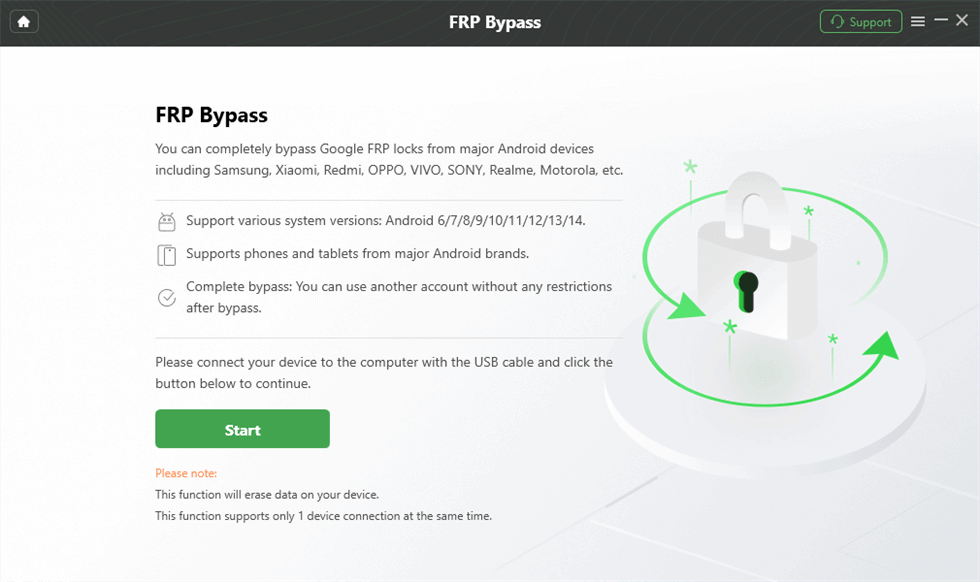
Connect Device and Click Start
Step 3. Choose your device’s brand. Wait for DroidKit to prepare a configuration file for your device and continue.
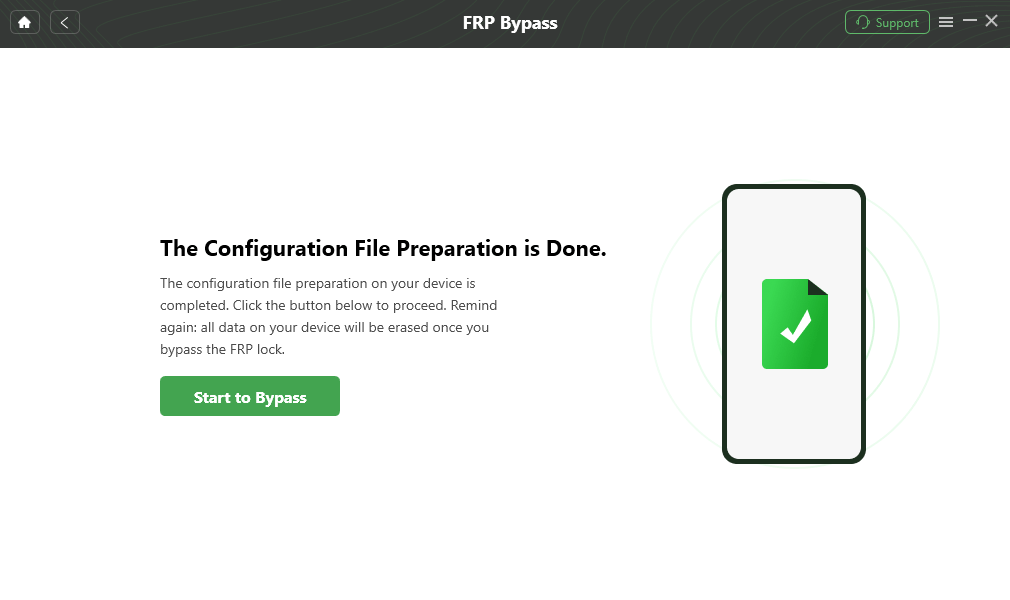
Click Start to Bypass
Step 4. Follow the on-screen instructions to complete the corresponding settings > Tap on Reset.
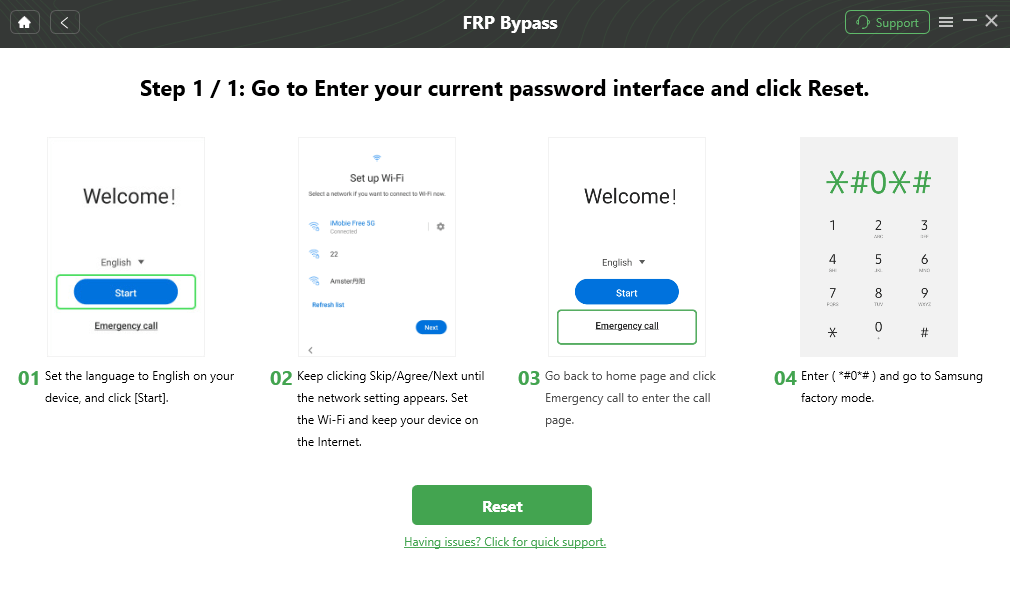
Click Reset
Step 5. After that, DroidKit will start bypassing Google lock. After the bypass process completes, your device will be restarted.

FRP Bypass Complete
Further Reading: How to Bypass FRP on Samsung >
Method 2. How to Unlock Google Locked Phone with Google Account
If you have access to the Google account and password, follow the tutorial below to unlock your phone for free. You can remove Google account lock for free as below:
If the account or password is unavailable, don’t worry—things get slightly more complex, but solutions exist. Use the FRP bypass tool iMobie DroidKit to bypass Google verification or recover the Google account and password with Method 3. Keep reading to find the method that best suits your needs.
Unlock Android Phone with Google Account for Android OS 9.0(Pie):
Step 1. Launch the Settings app on your device and then select Accounts and Backup.
Step 2. In Accounts, find your Google account and then tap Remove Account to disable the FRP.
Unlock Android Phone with Google Account for Android OS 6.0:
Step 1. From Settings, select Accounts > Tap Google.
Step 2. Choose the Google account that you want to remove > Tap More in the top right corner > hit the Remove Account option.
Method 3. Unlock Google-locked phone by Google Account Recovery
If you don’t remember your original Google password, you can try resetting it. The most common method is to verify your identity through a text message or phone call sent to the number linked to your account. If that’s not an option, you can use alternatives such as your recovery email or security questions. Just make sure you still have access to these recovery methods; otherwise, the reset process won’t work.
Option 1. Find the Password via Recovery Email
If the recovery email associated with the account is available, action the following to prove ownership:
1. Go to the Google Account Recovery page and choose the Forget email option.
2. On the next page, enter the recovery email address associated with the Google account, then tap send for a one-time code to that address.
3. Log in to your recovery email and check for the verification code. After inputting the six-digit code, you will be prompted to change a new password.
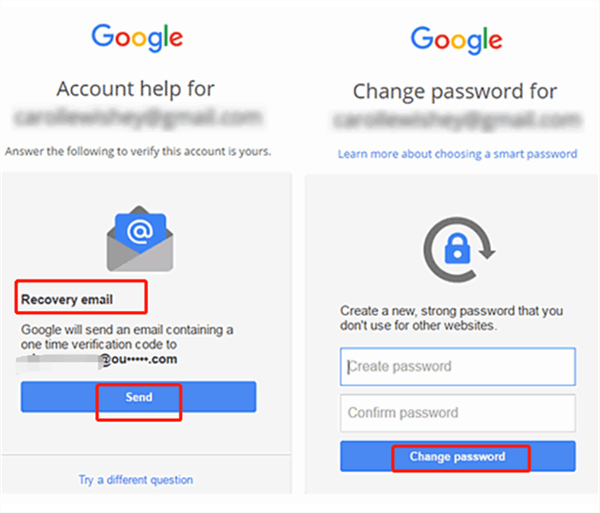
Recover Google Account Password by Sending Recovery Email
Option 2. Find the Password by Offering Answers to Secret Questions
When you fail to verify ownership via recovery email, hit the “Try a different question” option at the bottom to answer secret questions. If you correctly select the “Year” and “Month” when the original account was created, you get a chance to set up a new password.
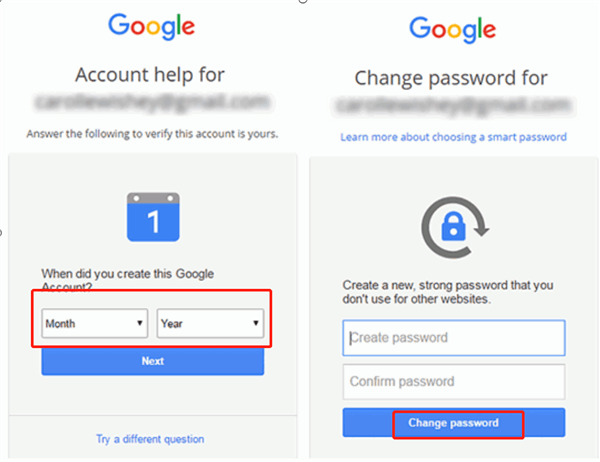
Recover Google Account Password by Answering Questions
What If You Still Can’t Unlock the Google-Locked Phone?
If the methods above do not work, check the possible reasons below:
| Problem | Possible Reason | What to Try Next |
| You entered your Google account but the phone still asks for verification | The account is not the one previously synced on this device | Try another Google account that was used on the phone before reset |
| You reset the Google password but cannot sign in immediately | Google may require a waiting period after password reset | Wait and try again later with the recovered account |
| You bought a used phone and cannot contact the previous owner | The phone is still protected by the previous Google account | Use a supported FRP bypass method or ask the seller to remove the account |
| Manual FRP methods do not work | Your Android version or security patch may block old methods | Try a PC-based option or compare Android phone unlocking software |
For security reasons, FRP is designed to prevent unauthorized access. You should only unlock a phone you own or have permission to use.
FAQs about Google-Locked Phone
Q1: Can I unlock a Google-locked phone for free?
Yes, but only in certain situations. If you know the previously synced Google account and password, you can unlock the phone for free during setup. If you forgot the password, Google Account Recovery is also free, but it requires access to recovery information such as your phone number or recovery email.
Q2: How to Remove Google Account from Phone after Factory Reset?
If you remember the previous Google account and password, you can follow the steps below to remove the previous Google account after the factory reset:
- On the setup screen after resetting the phone, connect to Wi-Fi.
- When prompted, enter the Google account email and password that was previously synced to the phone.
- Follow the on-screen instructions to complete the setup.
- Once inside the phone, you can remove the account via: Settings > Accounts > Google > Select the account > Remove Account.
However, if you don’t have the previous Google account credentials, don’t worry, iMobie DroidKit FRP bypass tool can help you bypass Google account verification to regain access to your Android.
Q3: How to Remove Google Smart Lock on a Phone?
You can follow the steps to turn off Google Smart Lock on Android:
- On your Android device, open “Settings” and then go to “Security and Privacy”.
- Select the “More Security Settings” option.
- In the next screen, choose the “Trust agents” option.
- Toggle the slider to turn off the “Extend Unlock” option.
The Bottom Line
That’s all about how to unlock a Google-locked phone with or without a Google account. If you know the previously synced Google account, the official sign-in method is the safest free option. If you forgot the password, Google Account Recovery is worth trying first.
If you cannot verify the previous Google account after a factory reset, especially on a second-hand phone, iMobie DroidKit can be a practical option to bypass Google lock on supported Android phones and tablets. Free download DroidKit and follow the guided process to regain access to your device.
Free Download * 100% Clean & Safe
More Related Articles


Roger Smith is a senior technical writer with years of experience in providing Android solutions. He loves to help users solve various problems such as Android unlock, Android data recovery, and Android system repair.
Product-related questions? Contact Our Support Team to Get Quick Solution >
