MTK Client Tool Free Download & Latest Review
This article covers how to use MTK Client Tool FRP bypass for unlocking MediaTek devices securely. It explains the tool’s key features, download and installation steps, and detailed FRP bypass instructions. For easier FRP removal, DroidKit is also recommended as a safer alternative.
The MTK Client Tool is widely used for repairing and unlocking MediaTek-powered smartphones. Many users rely on it to perform advanced operations without professional technical knowledge or costly equipment. Among its most striking features is the MTK Client Tool FRP bypass that enables one to skip Google account verification. In this guide, you will learn how to download, install, and effectively use the MTK Client Tool FRP bypass.
What Is the MTK Client Tool?
The MTK Client Tool is a specific software for MediaTek-based smartphones and tablets. It uses low-level security exploits to access device partitions and enable advanced modifications. By entering BROM mode, users can flash firmware, unbrick devices, and bypass various restrictions. Another famous function includes handling MTK Client Tool FRP bypass operations effectively.
Key Features of the MTK Client Tool:
- Factory Reset: Restores the device to its original software state by erasing settings and all personal data.
- Erase FRP: Removes Google factory reset protection lock to allow the device to be used with different associated accounts.
- Mi Account Bypass: Temporarily bypasses Xiaomi account verification, enabling usage without entering registered account credentials.
- Safe Format (Para): Executes a secure format preserving essential user data stored within specific parameter partitions.
- Vivo Demo Remove: Removes pre-installed demo applications and configurations that come with Vivo showroom display devices.
- Bootloader Unlock/ Relock: Quickly unlock the bootloader and relock it after making changes.
- Safe Format (Misc): Performs a safe reset while keeping important user data intact under miscellaneous partitions.
Pros:
- Supports a wide variety of MediaTek devices efficiently.
- Completely free to download and use for users.
- Easy interface suitable for intermediate technical users.
Cons:
- Some features require specific firmware compatibility to work.
- Limited support for devices with advanced security or auth.
The MTK Client Tool is mainly targeted at technicians, developers, and advanced Android users. It is also suitable for individuals who want to repair, unlock, or customize MediaTek devices.
How to Download & Install MTK Client Tool
Before using its powerful features, you must first download and install the MTK Client Tool. This setup prepares your computer for tasks like flashing firmware, unlocking bootloaders, or using the MTK Client Tool FRP bypass. Ensuring correct installation helps avoid errors and makes advanced device operations smoother. Follow the complete steps below to find out how you can download and install it:
| System Requirements |
| Operating System: Works on Windows, Linux, and macOS platforms.
Python: Version 3.9 or newer must be installed. USB Drivers: MediaTek USB VCOM drivers are required for proper device detection in BROM mode. USB Port: A stable, direct USB port (preferably a motherboard port) is recommended. Python Libraries: Install required libraries using pip and the provided requirements.txt file. Device-Specific Drivers: Windows users may need UsbDk; Linux users may require patched kernels for older chipsets. |
Follow the steps below to finish installing the MTK Client Tool on your computer.
Step 1. Download the MTK Client Tool from any trusted source and then access your PC’s Windows Security. Head to the Virus & Threat Protection section and turn off the “Real-time Protection” toggle.
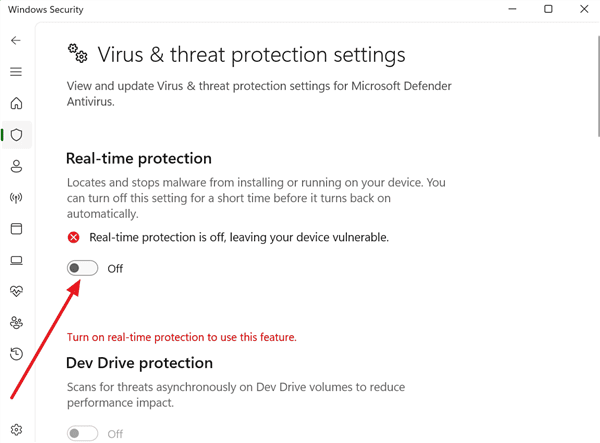
Disable Virus & Threat Protection on Windows
Step 2. Access the newly downloaded MKT Client Tool’s ZIP file, right-click on it, and choose the “Extract” option.
Step 3. Upon extracting, open the folder and right-click on the “.exe” file to choose the “Run As Administrator” option.
Step 4. As the tool runs, press the “MKT Driver” button and follow the displayed instructions to install it.
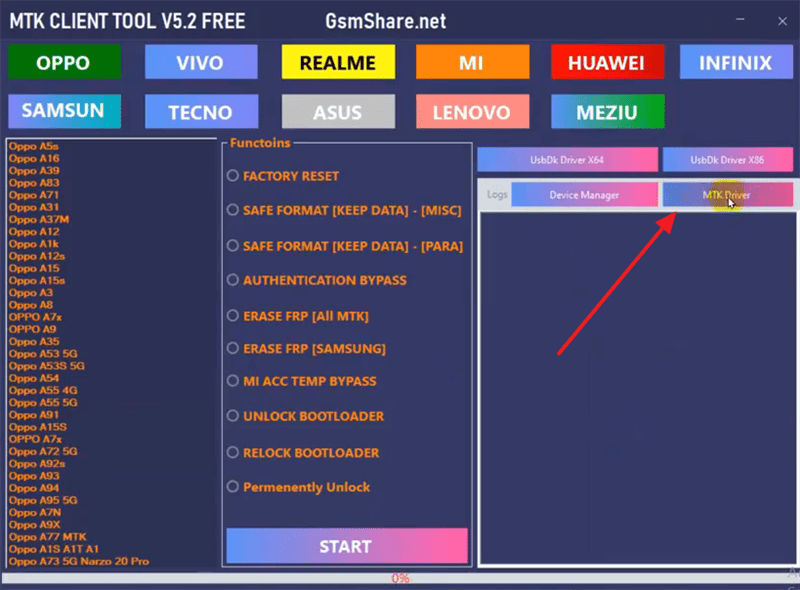
Install MTK Driver
Step 5. Hit the “UsbDk Driver x64” button and wait for a few minutes to install the required libraries.
Now you have gotten the MTK Client Tool prepared on your computer and ready for device unlocking.
How to Bypass FRP with MTK Client Tool
The MTK Client Tool FRP bypass feature allows users to easily skip Google account verification. With just a few guided steps, users can remove account verification and regain device usability. This method is highly effective for technicians and individuals alike. Let’s explore the step-by-step instructions to successfully bypass FRP using the MTK Client Tool:
Step 1. After launching the tool, choose the “Erase FRP (All MKT)” option and hit the “Start” button.
Step 2. Power off your phone, then use a USB cable to connect it to the PC.
Step 3. Press the “Volume Up” and “Volume Down” keys together for a few seconds.
Step 4. It will start detecting your device. After that, the FRP bypass process will begin.
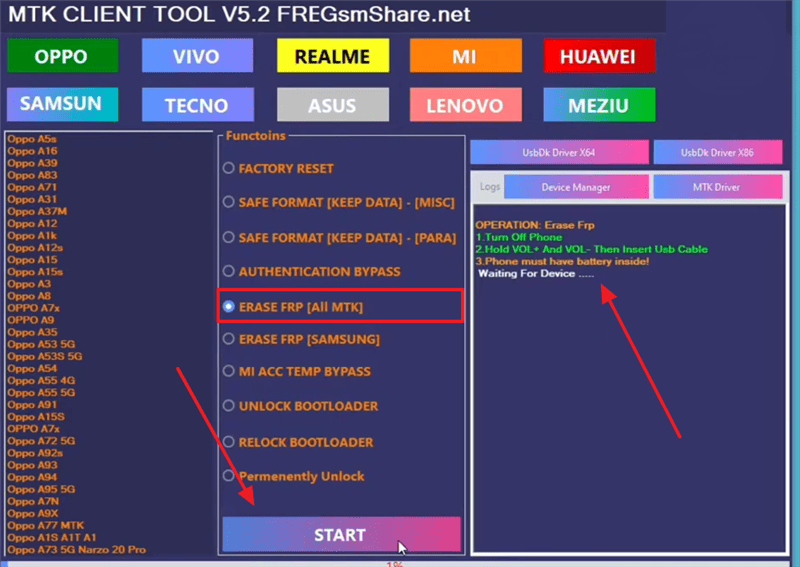
Bypass FRP with MTK Client Tool
Wait until the bypassing process is finished. Then you can restart your phone and use it without verification.
Best Alternative to MTK Client Tool – DroidKit
While the MTK Client Tool FRP bypass works for many MediaTek devices, it has limitations. Some users face compatibility issues or struggle with advanced setups, which creates the need for a simpler solution. In this case, DroidKit comes in as a reliable alternative designed with user convenience in mind. It aids in bypassing Google FRP after a factory reset without needing any technical expertise.
Moreover, the tool supports Samsung, Xiaomi, Redmi, POCO, OPPO, Motorola, and many more brands. After bypass, you can immediately log in with another Google account to access all services. This tool guarantees full device usability, letting you enjoy unrestricted Android features freely. Unlike risky methods, the process is done on your own computer with strong encryption.
Why choose DroidKit for FRP bypass?
- Easy to Use: The clear UI and instructions make it easy to use for all users.
- Latest Device Support: Even compatible with the latest devices, Samsung S23, S24, and others.
- Connection Stability: Stable USB connection to ensure smooth and uninterrupted bypass.
- High Success: Advanced technology ensures a high success rate in unlocking Android devices.
Free Download * 100% Clean & Safe
Detailed Steps to Bypass FRP using DroidKit:
Step 1. When you download and run DroidKit, choose the “FRP Bypass” feature and hit the “Start” button. Upon seeing a dialogue box, connect your phone to the PC and click the “OK” button.

DroidKit FRP Bypass
Step 2. Select your mobile brand and then choose the device version on the next screen. Hit the “Next” button and let the tool start preparing the compatible configuration file.
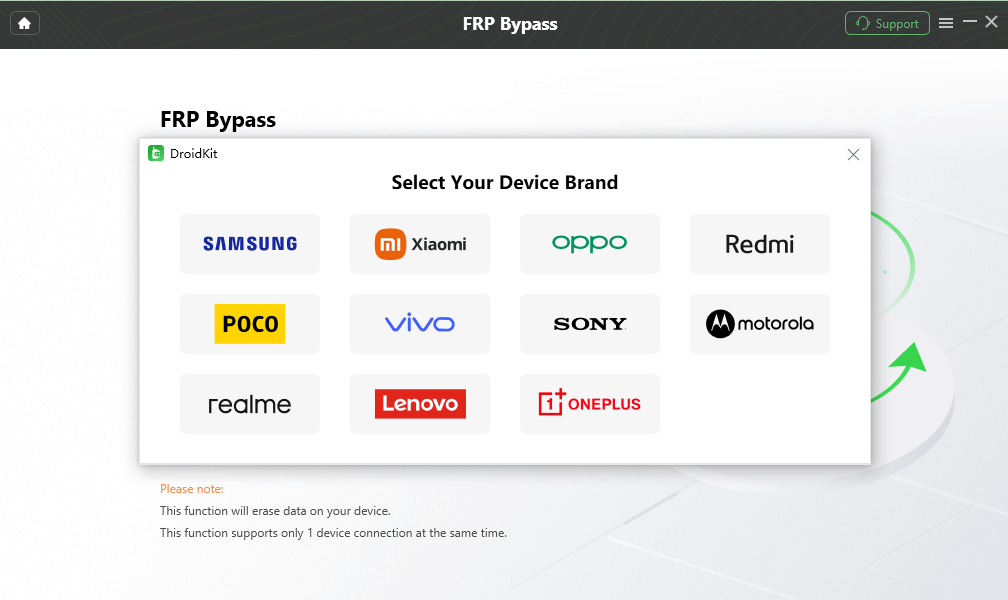
Select Correct Brand
Step 3. As the start finishes the configuration task, press the “Start To Bypass” button. Follow the provided instructions on your screen to move forward and complete the FRP bypass process.

FRP Bypass Complete
After bypassing, the Google account ought to be skipped on your device. You can set it up with another account and boot into the system easily.
FAQs About MTK Client Tool
1. What devices are supported in the MTK Client Tool?
The tool works with most Android devices that use MediaTek processors. It supports many MTK chipsets such as MT6781, MT6789, MT6855, MT6886, MT6895, MT6983, and MT8985. Since it connects through BROM mode, the tool supports both old and new MediaTek devices.
2. What to do if the MTK Client Tool doesn’t work?
If the tool doesn’t work, first make sure you have installed the correct MediaTek USB drivers and the required Python version. Try running the tool as an administrator, as this fixes permission issues. Also, check and disable your antivirus settings because some tools can be flagged by mistake.
3. Is the MTK Client Tool free?
Yes, the MTK Client Tool is completely free, so you don’t need to pay any activation fees or buy a license to use it. All of its features, such as flashing firmware, bypassing FRP, and unbricking devices, are available without cost. This makes it one of the best Android unlock tools for MediaTek device users and technicians.
Conclusion
In summary, this article has explored what the MTK Client Tool is, how to download and install it, and the instructions to bypass FRP with MTK Client Tool. You can just follow the steps to solve the problems. Moreover, if the MTK Client Tool is too complicated for you, DroidKit can be a great alternative. It provides a comprehensive unlocking strategy for Android users. Download DroidKit now to regain full device access confidently.
Free Download * 100% Clean & Safe


Roger Smith is a senior technical writer with years of experience in providing Android solutions. He loves to help users solve various problems such as Android unlock, Android data recovery, and Android system repair.
Product-related questions? Contact Our Support Team to Get Quick Solution >
