MediaTek FRP Bypass Tool Review: MTK FRP Tool Download & Alternative
Looking for a MediaTek FRP bypass tool? This MTK FRP Tool review explains what it does, how to use it on MTK Android devices, its pros and risks, and when DroidKit can be a safer alternative if the tool fails.
DroidKit – A Guided FRP Bypass Alternative
If MTK FRP Tool cannot detect your phone, your device is not MediaTek-based, or you want a guided FRP bypass process, DroidKit offers a simpler PC-based option for Android FRP removal.

FRP lock can stop you from setting up an Android phone after a factory reset if the device still asks for the previously synced Google account. For users with MediaTek-powered Android devices, MTK FRP Tool is often searched as a free way to remove or bypass FRP on a Windows PC.
However, not every Android phone uses a MediaTek chipset, and not every MTK FRP Tool download source is reliable. Some versions may be outdated, unsupported, or risky to install. That is why it is important to understand what the tool can do, when it may fail, and what alternative you can use if you prefer a more guided FRP bypass process.
In this review, we will cover what MTK FRP Tool is, how to use it, its pros and cons, common errors, and a practical alternative for users who do not want to handle MTK drivers and manual FRP commands.
Quick Answer: Is MTK FRP Tool Worth Using?
MTK FRP Tool can be useful if your Android phone uses a MediaTek chipset and you are comfortable using a Windows PC, USB drivers, and Boot ROM mode. It is often searched as a free MediaTek FRP bypass tool, but the main risk is that many download sources are unofficial and may include outdated or unsafe files.
If your device is not detected, your phone is not MTK-based, or you prefer a guided FRP bypass process, DroidKit can be a more user-friendly alternative for Android FRP removal.
For users comparing multiple utilities, you can also check the best FRP bypass tools. If you need a broader understanding of Google lock and FRP removal methods, read this Android FRP bypass guide.
What Is MTK FRP Tool?
MTK FRP Tool is a Windows-based utility designed for some Android phones and tablets powered by MediaTek chipsets. It is mainly used to remove or bypass FRP lock after a factory reset, especially when the user cannot verify the previously synced Google account.
The tool is also searched as:
- MediaTek FRP bypass tool
- MTK FRP unlock tool
- MTK bypass tool
- MediaTek FRP unlock tool
- MTK FRP tool free
- MTK FRP tool 2025
In general, MTK FRP Tool works by communicating with the device through a USB connection and MediaTek drivers. On supported models, it may allow the user to erase or bypass FRP-related partitions or settings. However, it is not a universal Android unlock solution. It is mainly intended for MediaTek devices and usually requires manual steps such as driver installation, correct USB connection, and Boot ROM mode.
Main Features of MTK FRP Tool
- Bypass FRP lock on some MediaTek Android phones.
- Support basic functions such as Bypass FRP or Erase FRP.
- Work with a Windows PC and USB cable.
- Support many MTK-based phone brands and models, depending on the tool version.
- Often available as a free utility from third-party sources.
Because MTK FRP Tool is usually distributed outside official app stores, users should be careful before downloading or running it on a computer.
Before You Download MTK FRP Tool: What to Check
Before downloading any MTK FRP Tool file, check the source carefully. Many free FRP tools are shared through third-party websites, and not every file is verified or updated.
- Make sure your phone uses a MediaTek chipset.
- Use a Windows PC and install the correct MTK USB drivers.
- Avoid unknown ZIP files, password-protected archives, or suspicious installers.
- Do not use the tool if you are not sure how to enter Boot ROM mode.
- Back up important data if the phone is still accessible before trying any unlock operation.
- Scan downloaded files before opening them on your PC.
- Avoid tools that claim to bypass every Android phone without limitation.
If the download source looks suspicious or the tool requires unnecessary permissions, it is safer to stop and use a more reliable FRP bypass method instead.
How to Use MTK Tool to Bypass FRP
MTK FRP Tool usually requires a Windows computer, a USB cable, MTK USB drivers, and a supported MediaTek Android device. The exact steps may vary depending on the tool version and device model, but the general process is similar.
Before you start:
- Charge your Android phone to at least 50%.
- Prepare a stable USB cable.
- Install MTK USB drivers on your Windows PC.
- Disable antivirus temporarily only if you fully trust the tool source.
- Make sure the device is truly MediaTek-based.
Steps to use MTK FRP Tool:
Step 1. Download MTK FRP Tool from a source you trust and extract the file on your Windows PC.
Step 2. Install the required MTK USB drivers if they are not already installed.
Step 3. Run the MTK FRP Tool as administrator.
Step 4. Power off your Android phone completely.
Step 5. Connect the phone to your PC with a USB cable while using the required key combination to enter Boot ROM or preloader mode.
Step 6. Wait for the tool to detect your device.
Step 7. Choose the available FRP function, such as Bypass FRP or Erase FRP.
Step 8. Wait until the process finishes. Do not disconnect the phone during the operation.
Step 9. Restart your Android phone and check whether the Google verification screen has been removed.
If your phone is not detected, do not keep repeating the process blindly. Check the USB driver, cable, chipset, and Boot ROM mode first. If the tool still fails, consider using a guided alternative instead.
MTK FRP Tool Pros and Cons
MTK FRP Tool can be helpful for users who understand manual Android repair tools, but it is not the best option for everyone. Here is a quick comparison of its advantages and limitations.
| Pros | Cons |
| Free to use for many MTK-based Android devices | No single official download source or verified support channel |
| Can remove FRP on some MediaTek phones | Only works with MediaTek chipsets, not Qualcomm, Exynos, Kirin, or other platforms |
| Simple functions such as Bypass FRP or Erase FRP | Requires Windows PC, MTK USB drivers, and Boot ROM mode |
| Does not require coding skills | Wrong operation may cause detection failure, boot issues, or data loss |
| Useful for users who understand manual FRP tools | Download files from unreliable sites may carry security risks |
What If MTK FRP Tool Is Not Working?
MTK FRP Tool may fail if the phone is not detected, the USB driver is missing, the device is not MediaTek-based, or the Android security patch blocks the command. Here are common issues and safer next steps.
| Problem | Possible Reason | What to Try |
| Device not detected | Missing or incorrect MTK USB drivers | Reinstall drivers and try another USB cable or port |
| Tool stuck on waiting for device | The phone did not enter Boot ROM mode correctly | Power off the device and retry the required key combination |
| Bypass FRP option fails | Unsupported Android version or security patch | Use a newer FRP method or a guided alternative |
| The tool does not support your phone | The device is not MediaTek-based | Try an Android FRP tool that supports more brands and chipsets |
| Windows blocks the tool | The file may be unsigned, outdated, or suspicious | Do not run files from sources you cannot verify |
If you are dealing with repeated FRP failures, this guide on FRP bypass not working can help you identify possible causes and next steps.
Best MTK FRP Tool Alternative – DroidKit
If MTK FRP Tool is too technical, cannot detect your phone, or does not support your chipset, DroidKit can be a better option for users who want a guided FRP bypass process without manually handling MTK commands.
DroidKit is designed as an Android phone toolkit with an FRP Bypass mode. Instead of asking users to manually find chipset-specific commands, drivers, or Boot ROM steps, it provides a guided process on Windows or Mac.
How to Bypass FRP with DroidKit
Follow the steps below if you want a guided FRP bypass process on your computer. Before you start, download DroidKit and install it correctly on your Windows or Mac computer.
Free Download * 100% Clean & Safe
Step 1. Open DroidKit and select FRP Bypass from the main menu.

DroidKit FRP Bypass
Step 2. Connect your Android device to your computer using a USB cable. Click Start, then choose your device’s brand to continue.
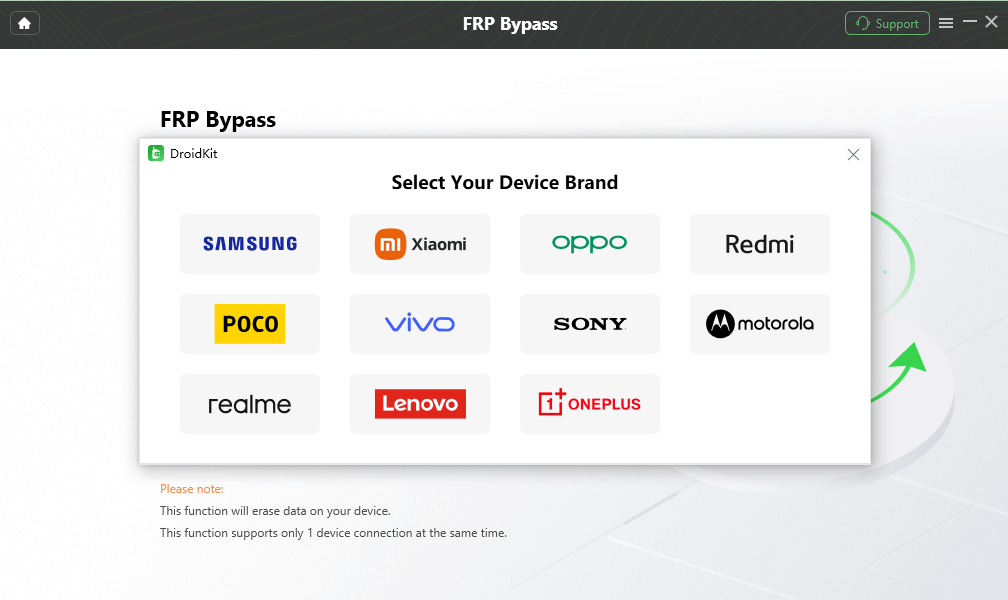
Select the Correct Brand
Step 3. Wait as DroidKit prepares the configuration file for your device. Once done, click Start to Bypass to proceed.
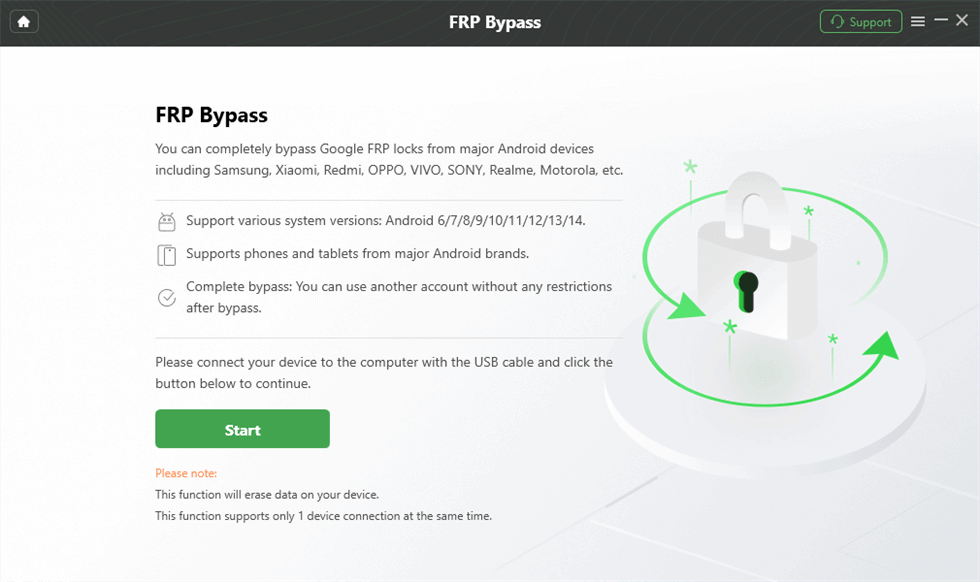
Launch the FRP Operation
Step 4. Select your device’s operating system version and model, then click Next to move forward.
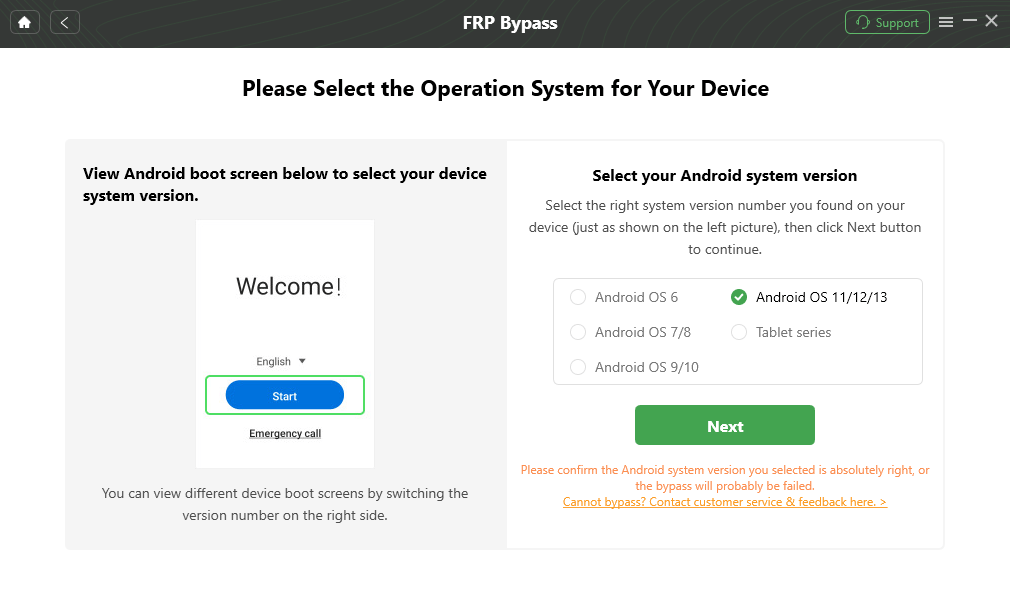
Select the Correct System Version
Step 5. Follow the on-screen instructions to enter Factory Mode and complete the necessary settings on your device.
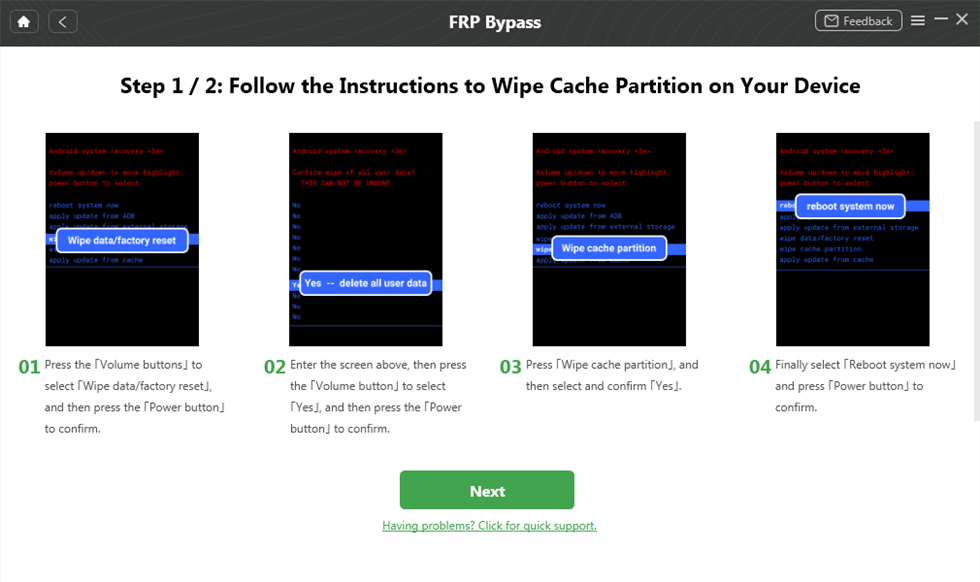
Complete Corresponding Settings
Step 6. Wait for the process to finish. Your device will restart after the FRP bypass process is completed.

FRP Bypass Complete
MTK FRP Tool vs DroidKit: Which One Should You Choose?
MTK FRP Tool and DroidKit are built for different types of users. If you are familiar with manual tools and your device is MediaTek-based, MTK FRP Tool may be worth trying. If you want a guided process or your device is not detected, DroidKit may be easier to use.
| Item | MTK FRP Tool | DroidKit |
| Main use | Bypass FRP on some MediaTek devices | Guided Android FRP bypass process |
| Device scope | Mainly MTK-based phones | Designed for broader Android FRP scenarios |
| Computer required | Windows PC | Windows or Mac |
| Technical difficulty | Medium to hard | Beginner-friendly guided steps |
| Drivers and Boot ROM | Usually required | Guided by the software process |
| Best for | Users who know MTK tools and drivers | Users who want a clearer step-by-step FRP bypass option |
If your goal is to compare more Android FRP utilities, you can also review this Android FRP tool page for additional options.
Conclusion
MTK FRP Tool can be a useful MediaTek FRP bypass tool for users who have a supported MTK-based Android phone and understand how to work with USB drivers, Boot ROM mode, and manual FRP functions. It is often free, but its biggest limitations are compatibility, unofficial download sources, and technical difficulty.
If MTK FRP Tool cannot detect your phone, your device is not MediaTek-based, or you simply want a guided process, DroidKit is a practical alternative for Android FRP removal on a computer.
Try DroidKit for Android FRP Bypass
If MTK FRP Tool fails or feels too technical, DroidKit can help you continue with a guided PC-based FRP bypass process.
Free Download100% Clean & Safe
Free Download100% Clean & Safe
Free Download * 100% Clean & Safe
FAQs About MTK FRP Tool
1. What is MTK FRP Tool?
MTK FRP Tool is a Windows utility used to bypass FRP on some Android phones with MediaTek chipsets. It usually requires MTK USB drivers, a USB cable, and Boot ROM mode.
2. Is MTK FRP Tool free?
Many versions of MTK FRP Tool are shared for free online. However, users should be careful because unofficial download sources may provide outdated or unsafe files.
3. Does MTK FRP Tool work on all Android phones?
No. MTK FRP Tool is designed for MediaTek-based devices. It usually does not work on phones with Qualcomm, Exynos, Kirin, or other chipsets.
4. Why is MTK FRP Tool not detecting my phone?
The common reasons include missing MTK USB drivers, a faulty USB cable, incorrect Boot ROM mode, or an unsupported device model.
5. Can I use MTK FRP Tool on Android 13, Android 14, or Android 15?
It depends on the device model, chipset, security patch, and tool version. Newer Android versions may block older FRP commands, so MTK FRP Tool may not work on every updated device.
6. What is the best MTK FRP Tool alternative?
If MTK FRP Tool does not work or feels too technical, DroidKit can be a more guided FRP bypass alternative for users who prefer step-by-step instructions on a PC.
More Related Articles
- MTK Auth Bypass Tool review
- MTK Client Tool FRP bypass
- Miracle Box FRP tool review
- Pangu FRP bypass guide
- Qualcomm FRP tool options


Roger Smith is a senior technical writer with years of experience in providing Android solutions. He loves to help users solve various problems such as Android unlock, Android data recovery, and Android system repair.
Product-related questions? Contact Our Support Team to Get Quick Solution >
