How-to Tutorial: Secure Startup LG Bypass [Updated]
Losing access to a locked LG phone can be frustrating, especially when important data is at risk. This guide explores several secure startup LG bypass techniques to help you regain access. From using specialized tools like DroidKit to trying a hard reset, you’ll find a solution that works for you.
DroidKit – Bypass LG Secure Startup Easily
Free download DroidKit to bypass LG Secure Startup with a few clicks. Support devices running Android 6 – 15. No technical know ledge ang skills are required.

Secure Startup LG Bypass often becomes necessary when users get locked out of LG devices. A Reddit post shared the struggle of a parent wanting access to photos on an LG Aristo. Such concerns highlight why secure startup LG bypass discussions continue to gain online attention among frustrated device owners. This tutorial explores 6 reliable methods for bypassing Secure Startup, balancing data security concerns with practical accessibility needs.
Table of ContentsHide
Introduction to LG Secure Startup
Is Secure Startup LG Bypass Possible?
Top 6 Ways to Secure Startup LG Bypass
- Way 1. Secure Startup LG Bypass via DroidKit [Easy & Secure]
- Way 2. Bypass LG Secure Startup Using the Forgot Pattern Feature
- Way 3. Secure Startup LG Bypass Using Find My Device
- Way 4. Bypass LG Secure Startup Via ADB
- Way 5. LG Secure Startup Bypass Via Hard Reset
- Way 6. Secure Startup LG Bypass by Booting into Safe Mode
Tip: How to Turn Off LG Secure Startup?
FAQs about Secure Startup LG Bypass
Introduction to LG Secure Startup
LG Secure Startup is an advanced protection system available on LG smartphones, designed to safeguard information. It requires entering a password, PIN, or pattern at boot before the system fully loads applications. This encryption-based process ensures no one can access calls or notifications without proper credentials.
Secure Startup LG Bypass
Users can enable it through security settings, specifically under Android’s encryption and credentials management menu options. However, forgetting login details leaves phones inaccessible, which blocks even alarms or basic notifications until unlocked. This is why many seek secure startup LG bypass solutions, motivated by recovering critical memories.
Is Secure Startup LG Bypass Possible?
Yes, a secure startup LG bypass is possible, though it depends on specific scenarios and chosen methods carefully. The device unlocks normally after startup when the right PIN, password, or pattern is entered. Nevertheless, using all 30 tries normally causes a factory reset and deletes all files and settings stored. Fortunately, several bypass methods exist to let users unlock devices while minimizing data loss risks.
Top 6 Ways to Secure Startup LG Bypass
There are multiple approaches available when attempting a secure startup LG bypass, each suited to specific user situations. The following section provides the top 6 ways to help users regain device accessibility:
Way 1. Secure Startup LG Bypass via DroidKit [Easy & Secure]
To bypass Secure Startup on LG phones, DroidKit is a reliable option. Supports Android 6-15, this tool can remove all Android screen locks without requiring the password or previous credentials. Beyond LG, it supports over 20,000 phones and tablets, including Samsung, Xiaomi, Oppo, and other major brands. With only a few clicks, you can unlock your device effortlessly. Except for screen unlock features, DroidKit also provides solutions for other Android issues, including bypass FRP lock, recovering lost Android data, etc. Thanks to its intuitive interface and step-by-step guidance, even beginners can solve Android problems easily, without needing extra technical skills.
Main Benefits of DroidKit:
- Unlock all types of screen locks, including pattern, password, PIN, fingerprint, and face ID.
- Regularly updated to stay compatible with the latest Android versions.
- No root required, with full privacy and device security guaranteed.
- Step-by-step guidance ensures a smooth unlocking process with high success rates.
Free Download * 100% Clean & Safe
Detailed Steps to Bypass Secure Startup on LG Phones via DroidKit:
Step 1. Download and install DroidKit onto your computer. Open the app, and on the main screen, click Screen Unlocker.
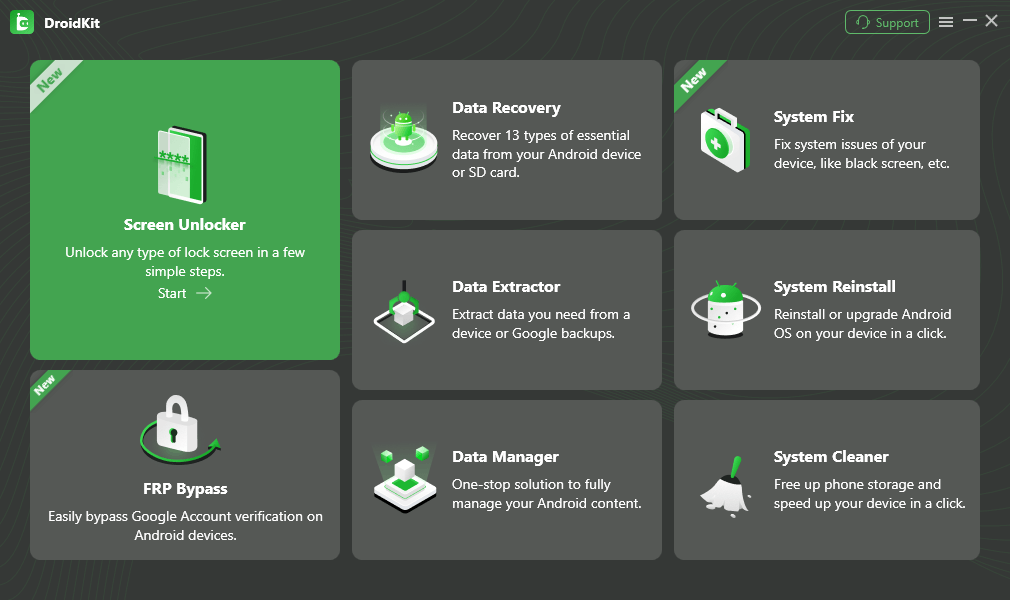
Select Screen Unlocker Mode
Step 2. Connect your locked Samsung phone using a USB cable. Click Start to continue.
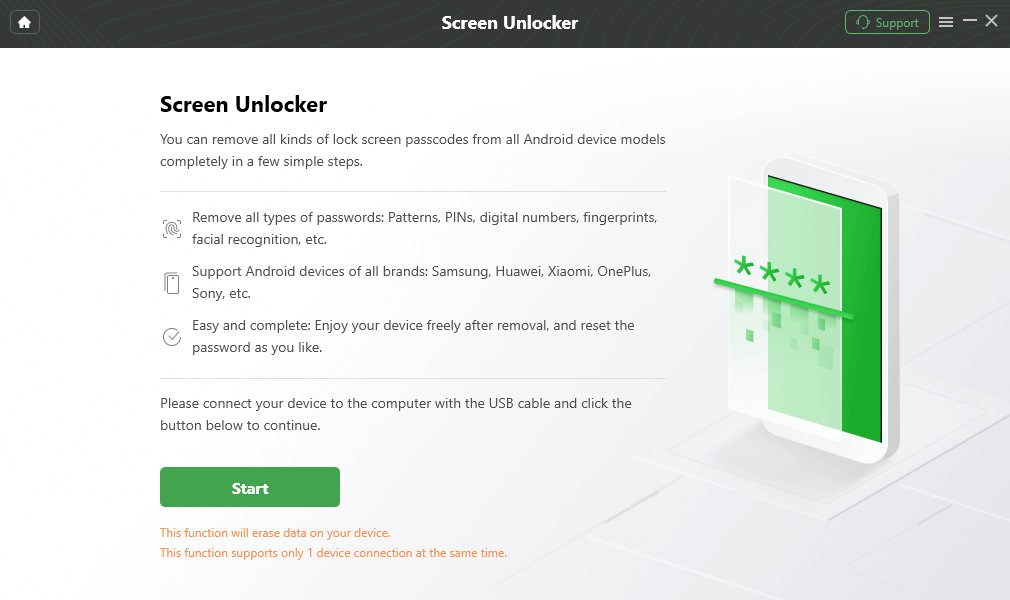
Connect your Locked Phone
Step 3. DroidKit will prepare the right configuration file for your specific device. Just wait a few seconds while it processes. Click on Remove Now when asked to begin unlocking the device.
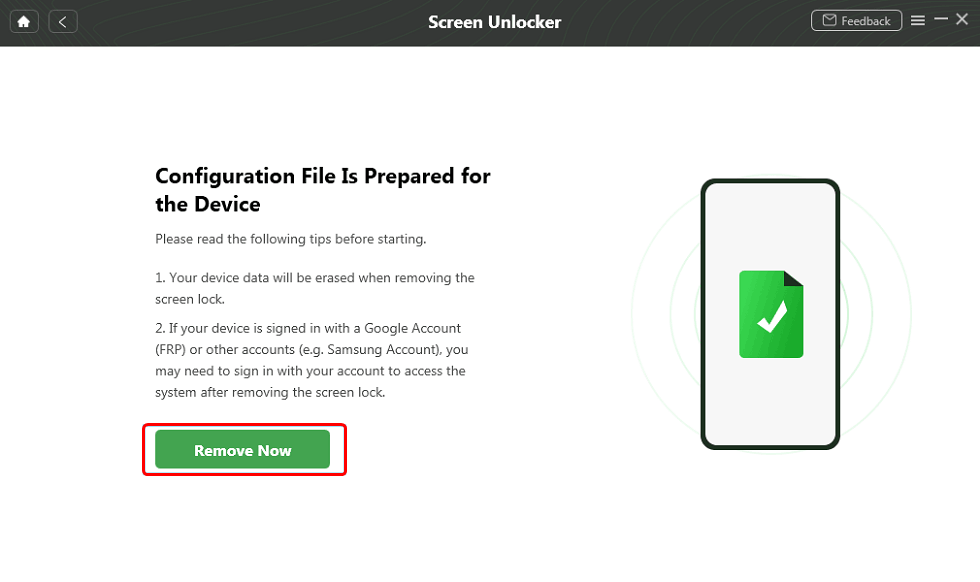
Click Remove Now Button
Step 4. Once the mode is correct, the software will remove the screen lock.
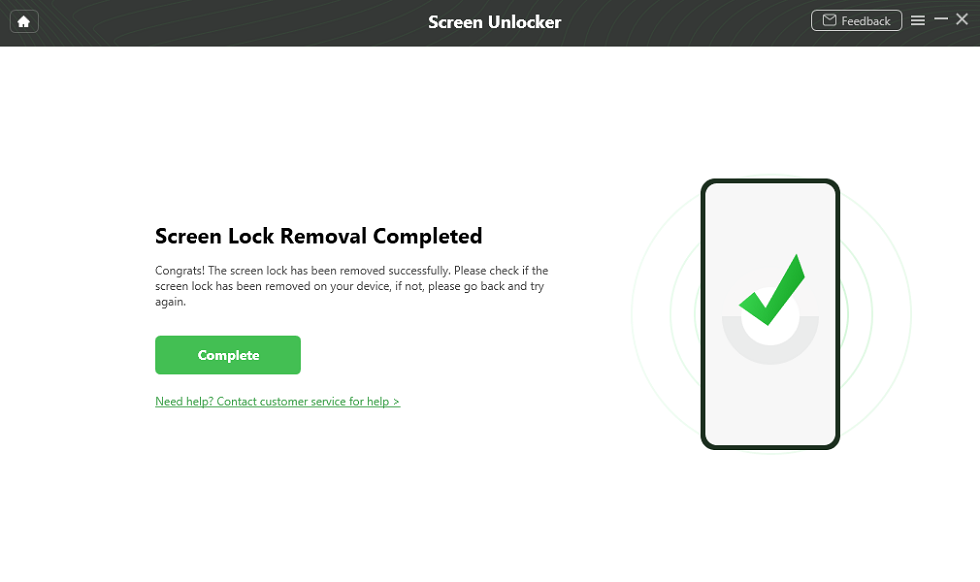
Unlock Screen Successfully
Way 2. Bypass LG Secure Startup Using the Forgot Pattern Feature
The Forgot Pattern option also provides a solution for users who cannot recall their LG Pattern lock. By entering your linked Gmail account, the phone grants renewed access without erasing stored data. However, this method works particularly well on devices running Android 4.4 or earlier versions. Review the steps below to find out how you can use this secure startup LG bypass technique:
Step 1. Input the wrong Pattern lock a few times, tap the Forgot Pattern.
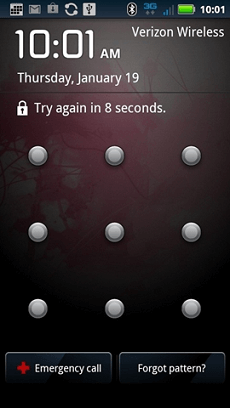
Choose Forgot pattern
Step 2. Sign in with your Google account, and authenticate with the linked account (email + password).
Step 3. Once verified, set a new pattern / PIN/password to unlock the device.
Way 3. Secure Startup LG Bypass Using Find My Device
Google’s Find My Device tool offers multiple powerful options to bypass Secure Startup on LG. Through this function, users can completely erase device data, including screen locks. However, this method will erase all content on your phone. If you have important data, make sure to back up your locked Android in advance to prevent data loss. Adhere to the given guide below to utilize this method as a secure startup LG bypass option:
Step 1. Open Google Find Hub on your PC and sign in with the same Google account linked to your LG.
Step 2. Click on your phone and hit Erase Device to bypass secure startup and delete all data.
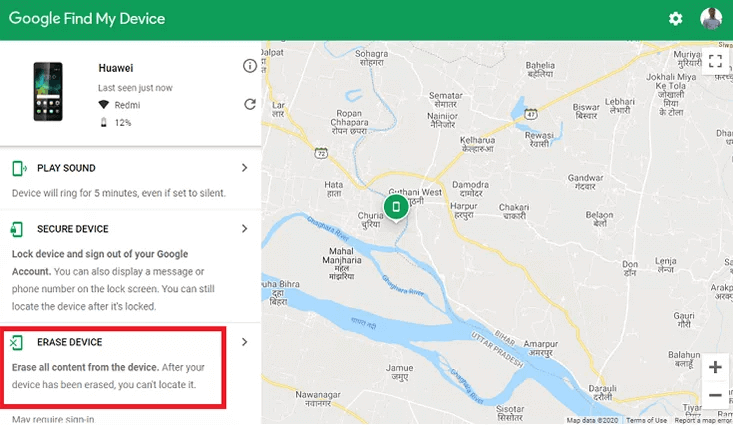
Choose Erase Device
Way 4. Bypass LG Secure Startup Via ADB
Using ADB provides another possible way to attempt a secure startup LG bypass without entering the password. This method works by connecting your LG phone to a computer and sending certain helpful commands. However, not all users may succeed, since compatibility depends on device settings and prior enabled options. Review the steps below to find out how you can perform this procedure to bypass secure setup:
Step 1. After connecting your LG to the PC, search for the Command Prompt and click the Run As Administrator option.
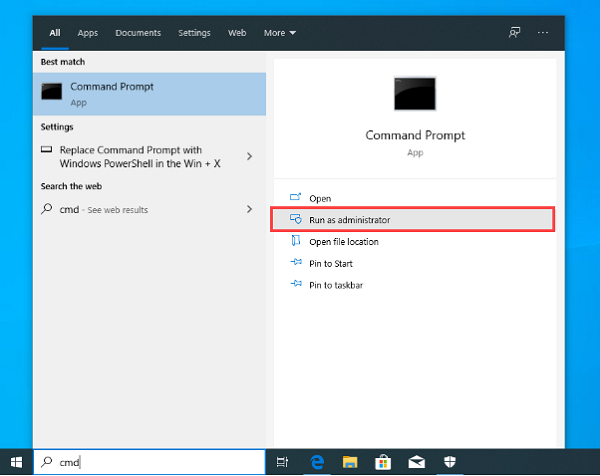
Click on Run as administrator
Step 2. Input the adb shell rm /data/system/gesture.key command and hit the Enter key to start bypassing the secure startup.
Way 5. LG Secure Startup Bypass Via Hard Reset
When the above basic methods do not help, performing a hard reset is also a way to unlock LG devices. This process works by wiping internal storage entirely, including the encryption that powers secure startup functionality. However, it also erases apps, multimedia, and every personal file saved previously. Go through the instructions below to perform a hard reset as another secure startup LG bypass solution:
Step 1. Power off your phone and either press the Power + Volume Down or Power + Home + Volume Up keys together.
Step 2.When you see the Factory Data Reset screen, use the Volume Down key to select Yes.
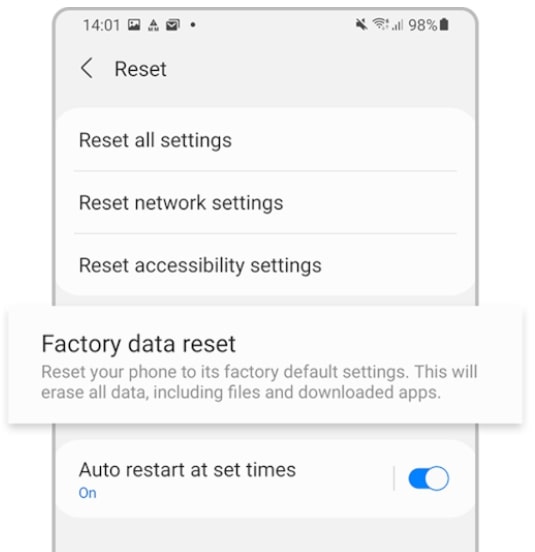
Factory Data Reset
Step 3. Press the Power key to confirm the hard reset process. Then you regain access to your LG phone easily.
Way 6. Secure Startup LG Bypass by Booting into Safe Mode
Booting into Safe Mode can help users bypass certain external lock apps that interfere with device accessibility. When enabled, Safe Mode disables non‑system apps, allowing removal of problematic security tools downloaded from outside sources. However, system‑level encryption and protections remain fully intact. If you want to learn how to use this secure startup LG bypass method, take guidance from the given steps:
Step 1. Press the Power key for a few seconds and tap Power Off to turn off your phone.
Step 2. Keep pressing the Power and Volume Down simultaneously until your phone boots into Safe Mode.
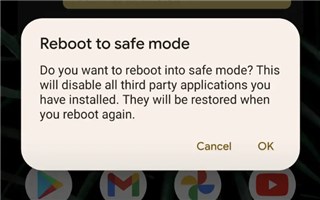
Boot Your Device into Safe Mode
Step 3. Head to the Settings to access the Apps section, uninstall the third-party lock screen app, and restart your phone.
Tip: How to Turn Off LG Secure Startup?
Turning off LG’s Secure Startup feature is possible only when you can still access your smartphone normally. The process requires entering the correct password, PIN, or pattern before adjustments are allowed. Once inside, users can disable the lock through settings and remove extra login prompts during restarts. To learn it, review the following instructions and disable the LG Secure Startup feature:
Step 1. Access the LG settings, tap Lock Screen & Security.
Step 2. Select the Encryption & Credentials option.
Step 3. Choose Secure Startup, and hit the OK button.
FAQs about Secure Startup LG Bypass
Q1. How to bypass LG Secure Startup 30 Attempts?
After 30 failed attempts, your smartphone usually automatically starts a full factory reset. This security process is designed to protect stored data from unauthorized individuals. Once triggered, recovery generally becomes impossible without backups and erases all essential files.
Q2. Is it possible to bypass the LG lock screen without a reset?
Bypassing an LG lock screen without performing a full factory reset is difficult. Modern Android versions have advanced security features that make unauthorized access almost impossible. However, specialized tools like DroidKit definitely provide successful access instead.
Q3. How do I enable Secure Startup on my Android phone?
To enable Secure Startup, open Settings and navigate directly to your phone’s security menu. Tap Encryption & Credentials, then locate the available Secure Startup configuration option. Choose whether to require a password, PIN, or pattern during every device startup.
Conclusion
In summary, this article has explored 6 different methods for secure startup LG bypass. Yet most options risk losing important contacts, memories, and saved information forever. For a simpler and more reliable solution, DroidKit offers an easier way to unlock LG devices within minutes. It can also easily back up data from a locked Android device without hassle. Try DroidKit today to unlock and bypass the LG phone’s secure startup.
Free Download * 100% Clean & Safe


Roger Smith is a senior technical writer with years of experience in providing Android solutions. He loves to help users solve various problems such as Android unlock, Android data recovery, and Android system repair.
Product-related questions? Contact Our Support Team to Get Quick Solution >
