TSM Tool: Full Guide on Android Unlock & FRP Bypass
This guide explains what the TSM Tool is, how to download and install it, and how to use it for Android unlock and bypass FRP. It also introduces DroidKit as a simpler alternative for data recovery, lock removal on owned devices, and system repair across many Android brands.
Unlocking Android phones can be confusing, especially with FRP and other security locks. Many technicians turn to the TSM Tool to repair software, flash firmware, and bypass FRP. This tool works on Qualcomm and MediaTek chipsets and supports a wide range of Android brands.
In this guide, you’ll learn what the TSM Tool is, how to install it, and how to use it to unlock or repair your phone. We will also cover how to bypass FRP using simple steps. Alternatively, you will discover DroidKit which makes Android repairs, data recovery, and lock removal easier for personal devices without needing deep technical skills. Let’s dig in!
What Is TSM Tool?
The TSM Tool (Turbo Service Mobile) is an Android repair and unlocking utility. It helps technicians and phone users fix software issues, flash firmware, and bypass security locks on Android devices. It works on Qualcomm and MediaTek chipsets and supports many brands.
TSM Tool removes FRP, KG/MDM locks, and screen locks like PIN, Pattern, or Password. It can also repair IMEI numbers, enable ADB, and reset phones to their factory settings. The tool supports regular updates, customer support, and SN changes for active plans.
Core Features of TSM Tool:
- Remove FRP, KG/MDM, and Mi Cloud locks.
- Flash firmware and repair software issues.
- Bypass bootloader security.
- Enable hidden menus and diagnostic modes.
- Repair IMEI and fix “call not sent” errors.
- Works with Qualcomm and MediaTek devices.
| Pros | Cons |
| Handles multiple repair and unlock tasks.
Works with many Android models. Fast performance with regular updates. |
Requires the purchase of a plan to use the full features.
Risky if downloaded from unofficial sources. Some features need technical know-how. |
Target Users: TSM Tool is ideal for mobile repair shops, technicians, and power users. It’s also useful for anyone who needs to unlock or repair Android phones without sending them to a service center.
How to Download & Install TSM Tool?
You can easily download and install the TSM tool by following the steps below. However, take a look at the checklist before proceeding to the steps.
Before You Start — Quick Prep
- Back up important data.
- Charge your phone to at least 50%.
- Use a reliable USB cable.
- Close other programs on your PC.
Requirements Checklist
- Windows PC (Windows 7 or newer).
- Stable internet connection.
- Phone USB drivers for your brand (Samsung, Xiaomi, etc.).
- Reliable USB cable.
- Administrator rights on the computer.
Steps to Download & Install TSM Tool
Step 1: Download the latest version of the TSM Turbo Service Mobile tool from its official site and save it to your PC. Extract the folder and run TSMTool.exe as administrator.
Step 2: Click Next. Now Install. Wait for the setup to finish and click Close.
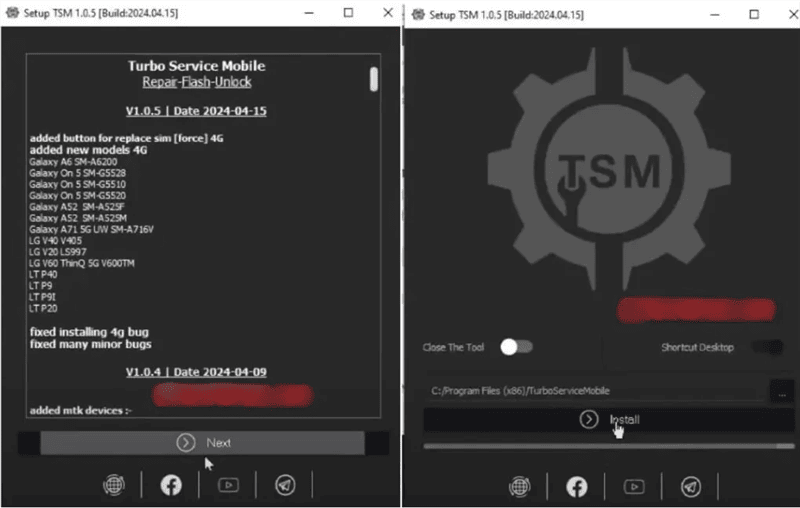
Install TSM Tool
Step 3: On the desktop, execute TSM again with administrator rights. Next, select Sign Up. Now, create your account with your name, email address, and a password.
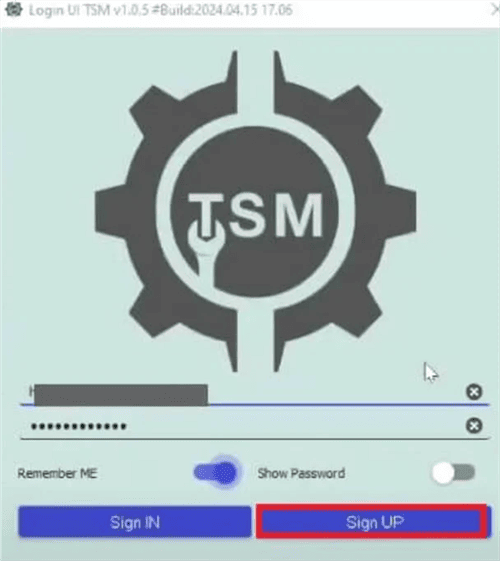
Sign Up TSM Tool
Step 4: Return to the TSM app. Sign in with your new account credentials.
Step 5: Before connecting your phone, install the right USB driver for your phone brand.
Then you have gotten the TSM Tool prepared before Android unlock or FRP bypass. Just follow the steps below to finish the process for unlocking.
How to Unlock Android with TSM Tool
TSM Tool allows you to unlock Android devices within seconds in a safe way. It offers you step-by-step instructions for working with your equipment directly via a computer connection. With this tool, the process will be smooth, avoiding putting your data in danger.
Below are the steps to unlock an Android with the TSM Tool.
Step 1: First, open the TSM Tool and log in to your account.
Step 2: Now, plug your Android device into your computer with a USB cable.
Step 3: Return to the TSM tool. Input your email and password credentials for the TSM Tool login. Tap“Sign In.”
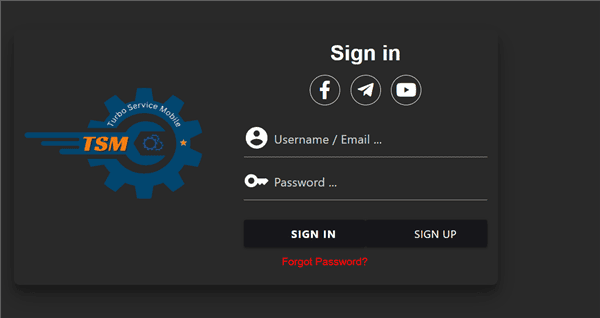
Sign In TSM Tool
Step 4: The TSM Tool will automatically recognize your device.
Step 5: Select “Unlock Screen” and follow the on-screen instructions.
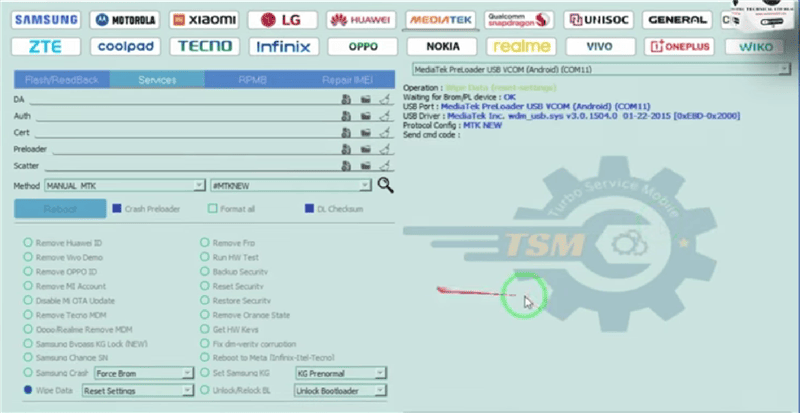
TSM Tool Unlock Android
Step 6: Wait for the TSM Tool to unlock the lock screen and restart your device.
How to Bypass FRP with TSM Tool?
Bypassing FRP is as simple and safe with the TSM Tool. It connects with your device and takes you through the procedure step by step. It is also easy to bypass safely and efficiently with just a couple of clicks.
Follow the simple steps below to bypass FRP with the TSM Tool.
Step 1: First, open the TSM Tool and log in to your account.
Step 2: Now, plug your Android device into your computer with a USB cable.
Step 3: Return to the TSM tool. Input your email and password credentials for the TSM tool login. Tap“Sign In.”
Step 4: Allow the tool to recognize your device automatically.
Step 5: Select Remove FRP and Click Start.
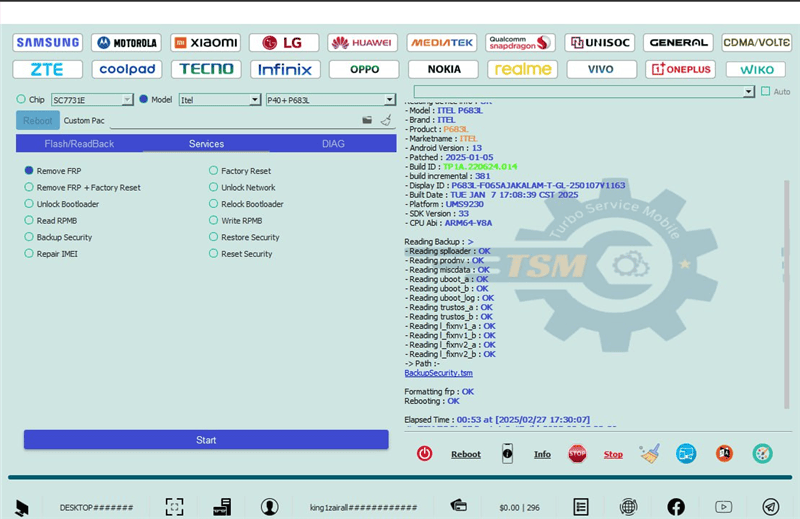
TSM Tool Remove FRP
Step 6: Wait for the TSM Tool to bypass the lock and restart your device.
Best Alternative to TSM Tool – DroidKit
The TSM Tool can feel complex and technical, especially for beginners. Many users look for a simpler way to recover or fix their Android devices. DroidKit is an easier alternative. It lets you recover lost data, remove screen locks on devices you own, and repair system problems. The interface is clean and clear. It supports many brands and chipsets. Updates keep it current. Moreover, DroidKit offers a smooth, reliable experience without the steep learning curve of TSM Tool.
DroidKit – Unlock Phone without Password
- Unlock all types of screen locks on an Android phone in minutes.
- Unlock 20,000+ models of Android phones & tablets.
- No technical knowledge is required; No need to root your device.
- Bypass FRP lock if you forget the Google account information.
Free Download100% Clean & Safe
Free Download100% Clean & Safe
Free Download * 100% Clean & Safe
Steps to Bypass FRP Lock using DroidKit:
Step 1: Download and install DroidKit on your PC and choose FRP Bypass Mode.

DroidKit FRP Bypass
Step 2: Plug your device into your PC with a USB. Then, click the Start button as shown in the interface below.
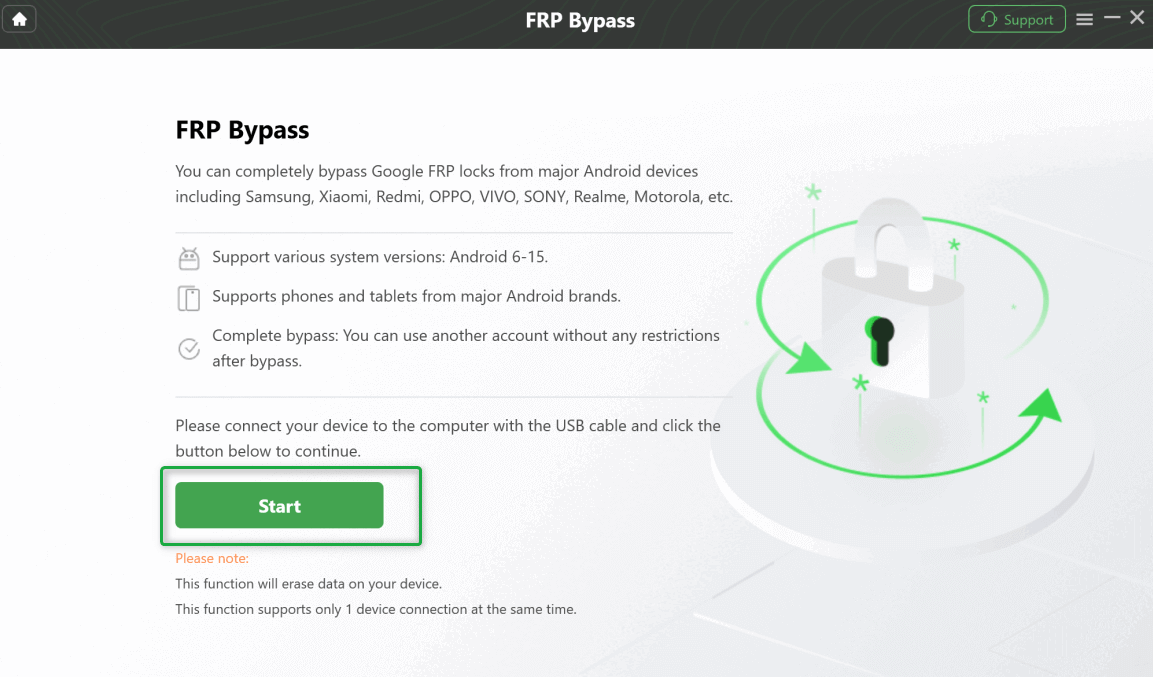
Connect Your Device and Start the Process
Step 3: Next, select your device brand, such as Samsung, Xiaomi, Oppo, etc.
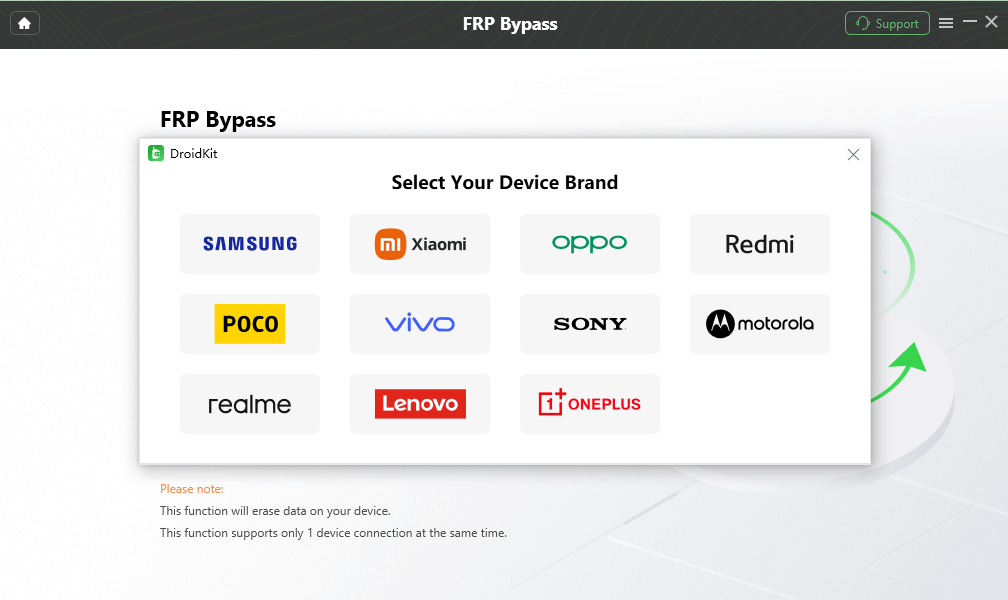
Select Correct Brand
Step 4: Now, select your Device version and click Next. DroidKit will start preparing your configuration file.
Step 6: Click the Start to Bypass button as the configuration file is ready.
Step 7: Follow the onscreen instructions and click Reset.
Step 8: DroidKit will start bypassing the FRP lock as you click the Reset button.

FRP Bypass Complete
After bypassing, your phone will restart, and you can set it up with a new account directly.
Conclusion
TSM Tool gives technicians and experienced users a powerful way to repair software. It also flashes firmware and unlocks Android devices when needed. DroidKit is easier to use. It guides you through data recovery and system repair. It can easily remove locks on phones you personally own. Both tools support many brands and get regular updates. For a smoother, beginner-friendly approach to Android maintenance, download DroidKit to simplify tasks and finish jobs faster.


Roger Smith is a senior technical writer with years of experience in providing Android solutions. He loves to help users solve various problems such as Android unlock, Android data recovery, and Android system repair.
Product-related questions? Contact Our Support Team to Get Quick Solution >
