Z3X Samsung Tool (2026): Download, Use, and the Best Alternative
What is 3X Samsung tool and how to use it? This is the stepwise guide to explore this tool. Additionally, you will get a bonus FRP Bypass alternative to handle the issue easily.
The Z3X Samsung Tool remains a go-to utility for professionals dealing with Samsung phone repairs in 2025. From FRP lock removal to IMEI repair and firmware flashing, this tool offers powerful capabilities, but it does require some technical know-how.
In this guide, you’ll learn how to download and use the latest version of Z3X Samsung Tool step by step. We’ll also introduce a simpler alternative for users who prefer a more beginner-friendly solution.
Part 1. What Is Z3X Samsung Tool?
Z3X Samsung Tool is widely used by mobile repair professionals for Samsung device servicing. It’s a Windows-based program that supports SIM unlocking, FRP bypassing, IMEI repair, firmware flashing, and more. Thanks to its wide compatibility with Samsung phones and tablets, it’s a staple in many repair shops.
1. Main Features of Z3X Samsung Tool
The Z3X Tool Pro version offers several essential features for Samsung device management:
- Unlocking the Phone: Remove SIM or network locks so you can use any mobile carrier.
- Updating or Fixing Software: Installing new software or repairing the phone by flashing firmware.
- Bypassing Google Lock (FRP): Bypass Google account verification whenever you get locked.
- Fixing IMEI Problems: Restore or fix corrupted IMEI numbers to enable proper network access.
- Rooting Support: Easily root or unroot Samsung devices for advanced customization.
- Read/Write Firmware: You can extract and edit firmware for backup or development purposes.
- Code Reading: Get device unlock or security codes saved in the device.
- Backup & Restore: Save and restore device data whenever necessary.
- Device Info Access: View full details like serial number, model, and region info.
- Huge Firmware Library: Access over 12TB of Samsung firmware files for all regions.
2.Z3x Samsung Tool Pro Latest Update
The Z3X Samsung Tool Pro v45.14 has optimized performance by importing new features such as bootloader unlocking, switching ADB mode, and smoother firmware handling. It supports even more Samsung models and is compatible with all unlocking, flashing, and repair tasks. Before an update, confirm your current version, as the tool gives an option for auto-update upon permission by the user.
Tool Info:
- Name: Samsung Tool Pro v45.14
- Size: Around 200 MB
- Type: EXE (Windows-based tool)
- Download Link: Mediafire – Samsung Tool Pro v45.14
3. Pros and Cons of Z3X Samsung Tool (Pro)
| Pros | Cons |
| Works with most Samsung phones and tablets | Not very beginner-friendly |
| Handles SIM unlock, frp bypass, firmware flash, and imei repair | Only available for Windows, and no macOS version available |
| Receives frequent updates for better compatibility | Full features require activation and payment |
| Ideal for professionals needing a complete repair solution | Risk of bricking a device if misused |
| Works fully offline after installation | |
| Gives access to a wide library of firmware files |
Part 2. How to Download and Use Z3X Samsung Tool (Pro)
Although Z3X is a professional tool, setting it up isn’t difficult if you follow the right steps. Here’s how to download and install it properly:
Step 1: Download from a Trusted Source
Official Z3X site or another verified link. Do not attempt to download using unknown sources because you may end up with an outdated or even unsafe file.
Step 2: Choose the Complete Setup File
Make sure you select the complete one (about 550MB) and not just an update. This will guarantee that all important elements are contained.
Step 3: Disable Antivirus Temporarily
This program might be blocked or flagged by some antivirus programs. It is best to disable them for installation and then enable them afterward.
Step 4: Install Software
Run the installation file and follow the on-screen instructions on setting up. It’s not different from installing any Windows software.
Step 5: Launch the Tool and Update if Needed
Once installed, open the program. If it asks to update certain components, allow the updates before continuing.
Step 6: Connect Your Samsung Device
Plug in your phone via USB. Make sure USB Debugging is enabled under Developer Options.
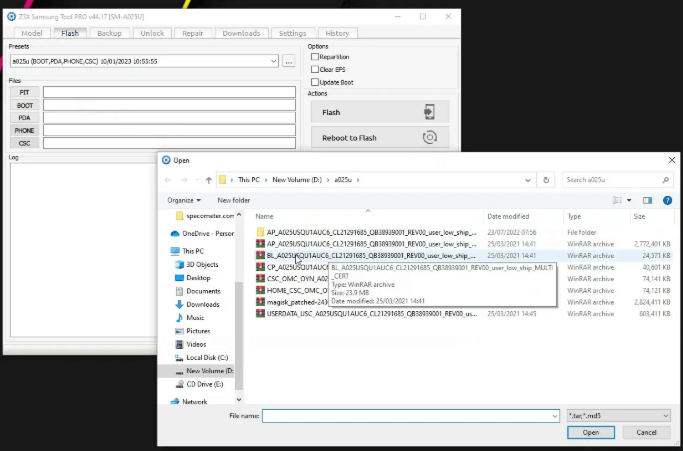
Step 7: Load Your Firmware Files
Under the “Flash” tab, load the firmware into their respective fields:
- BL (Bootloader)
- AP (PDA)
- CP (Modem)
- CSC (Region/Carrier info)
Step 8: Boot Your Phone into Download Mode
Turn off your device, then use the correct button combination to enter Download Mode. Connect it to your PC when ready.
Boot Your Phone into Download Mode
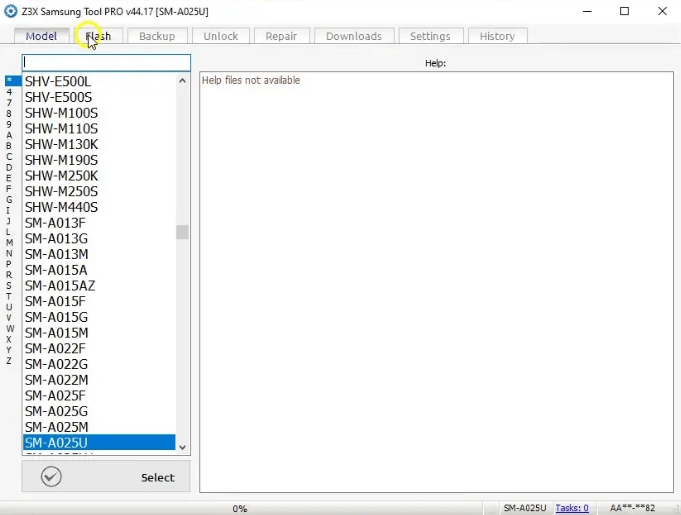
Step 9: Start Flashing
Once your phone is detected and everything is set, click the Flash button and let the tool complete the job.
Start Flashing
Step 10: Done
Once everything is done, your phone will reboot, and a “Flash Done” message will pop up on your screen.
Z3X Samsung Tool Pro is a versatile solution designed for advanced mobile technicians and Samsung users, offering features such as device unlocking, firmware flashing, IMEI repair, and FRP bypass. While it enjoys strong recognition in the industry, user opinions remain divided: some highlight its powerful capabilities, while others question its stability. For example, technician Sarah commented, “Z3X performs well for unlocking, but its frequent crashes during firmware updates make it less reliable for urgent repairs.” Then, is there a more reliable and easier alternative? Yes. Please continue to read.
Part 4. Bonus: Try Z3X Samsung Tool Easier Alternative – 100% Safe
For a simpler and safer alternative to the technical Z3X Samsung Tool, consider DroidKit. It’s an all-in-one Android solution that helps you bypass FRP lock, remove screen locks, and fix system issues with just a few clicks. With DroidKit, you can remove the FRP lock in minutes using simple steps.
You can remove the FRP lock in just minutes using simple steps. Whether you’re unlocking your phone or removing a Google account, DroidKit provides a risk-free and user-friendly experience
Key Features of DroidKit:
- Support more than 20,000 Android models including Samsung, LG, Huawei, Google, etc.
- Bypass Google FRP lock without needing the original account credentials.
- Fix Android System Issues like boot loops, crashes, and black screens.
- Unlock all the types of screen locks- PIN, password, pattern, fingerprint, and face ID.
Free Download * 100% Clean & Safe
How to use DroidKit for screen unlock:
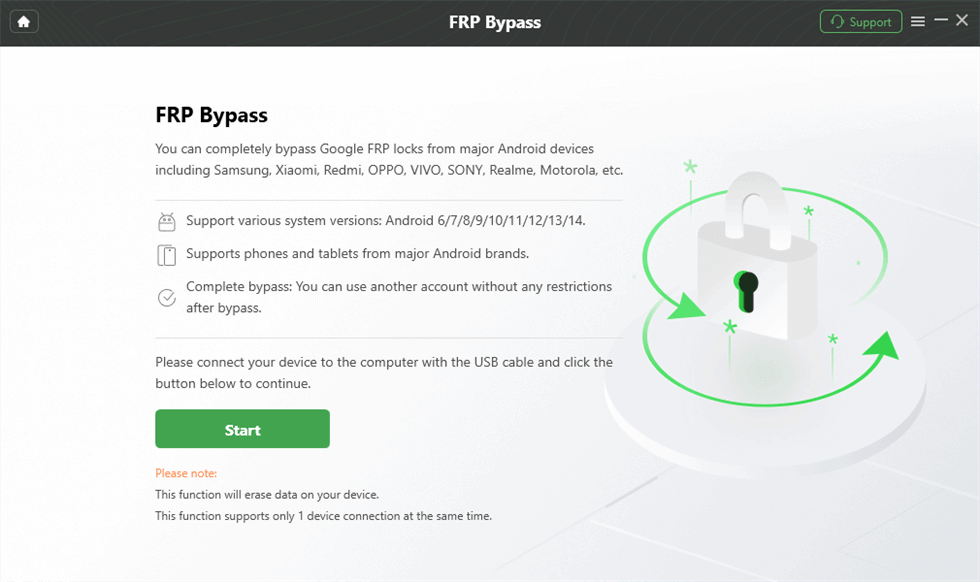
Step 1: Download DroidKit for free and run that on your computer. Connect your Android phone via USB and select FRP Bypass from the menu.

DroidKit FRP Bypass
Step 2: Connect your device to the PC with the help of a USB cord > Hit the Start button, and proceed to the next step.
Launch the FRP Operation
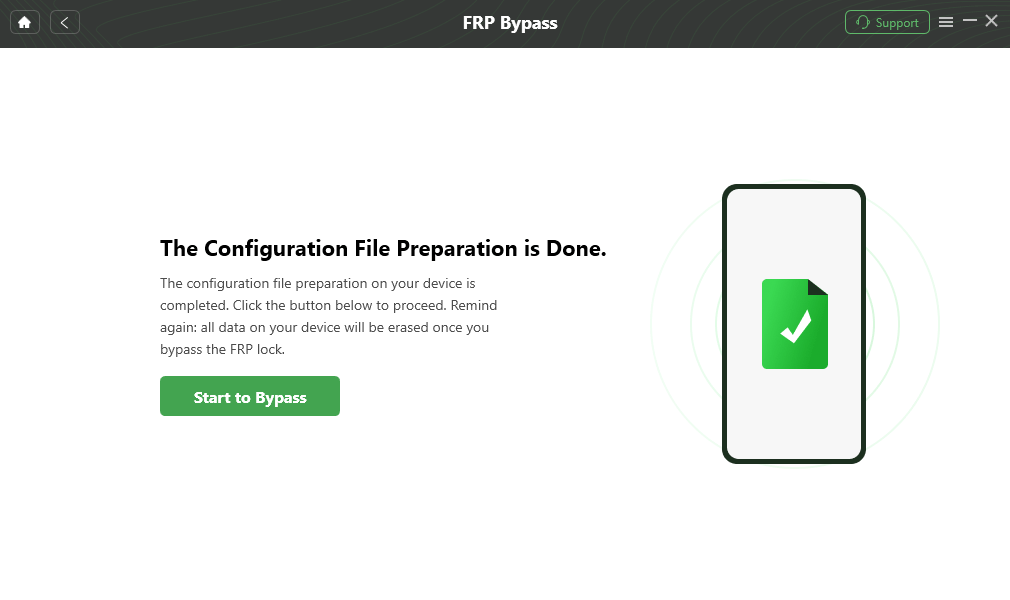
Step 3. Once DroidKit detects your device, it will prepare a configuration file. Click Start to Bypass, then follow the on-screen instructions to enter Recovery Mode.
Click Start to Bypass
Step 4. Follow the on-screen instructions to wipe the cache portion of your device.
Step 5. Once the process is complete, your device will restart automatically, and the FRP lock will be successfully removed.

FRP Bypass Complete
Part 5. FAQs
Q1. Is Samsung Tool Pro compatible with all Samsung devices?
Samsung Tool Pro covers almost all the Samsung phones and tablets, particularly old and mid-range models. But it might not support new flagship handsets or those having new security updates, especially Android 13/14 models.
Q2. Is it safe to root my Samsung device with this tool?
Rooting is possible with the Samsung Tool Pro, but it is risky. It can void your warranty, and if not done properly, it can damage your phone or cause system failure.
Conclusion
The Z3X Samsung tool is quite famous among people who are similar to phone mechanics. If you are looking for an easy tool, then DroidKit is a good choice. It does SIM unlocking, screen lock bypassing, system errors, and other related activities without involving any technical skills. Whether you face a lock screen or are dealing with an update glitch, DroidKit makes it simple. It is made for users who want to just let the phone roll back into getting operational fast and without frustration.


Roger Smith is a senior technical writer with years of experience in providing Android solutions. He loves to help users solve various problems such as Android unlock, Android data recovery, and Android system repair.
Product-related questions? Contact Our Support Team to Get Quick Solution >
