Will iPhone 12 Get iOS 27? Full Compatibility Guide for iPhone 12, SE, 11, 14, 15, and 16
Wondering whether your iPhone 12, iPhone SE, iPhone 11, or newer iPhone will get iOS 27? This guide explains supported models, likely feature limits, and what to do if the update does not appear.
Quick Answer: Will iPhone 12 Get iOS 27?
Yes, iPhone 12 will get iOS 27. The full iPhone 12 lineup is expected to be supported, including:
- iPhone 12
- iPhone 12 mini
- iPhone 12 Pro
- iPhone 12 Pro Max
That means if you own an iPhone 12, you should be able to install iOS 27 when the update becomes available in your region and for your device. However, compatibility does not always mean every new feature will be available. Some advanced AI, Siri, or performance-related features may work only on newer iPhone models.
If your iPhone 12 is not showing the iOS 27 update, it does not always mean your phone is unsupported. It may be caused by storage issues, beta profile settings, network problems, Apple server rollout timing, or an older iOS version that needs to be updated first.
iOS 27 Supported iPhones: Compatibility Table
Here is a simple compatibility overview for the models most users are searching for.
| iPhone Model | Will It Get iOS 27? | Notes |
|---|---|---|
| iPhone SE 2020 / iPhone SE 2 | Yes | Supported as iPhone SE 2nd generation |
| iPhone SE 2022 / iPhone SE 3 | Yes | Supported as iPhone SE 3rd generation |
| iPhone 11 | Yes | One of the oldest supported Face ID models |
| iPhone 11 Pro / Pro Max | Yes | Same generation as iPhone 11 |
| iPhone 12 | Yes | Full iPhone 12 lineup supported |
| iPhone 12 mini | Yes | Treated as part of the iPhone 12 series |
| iPhone 12 Pro / Pro Max | Yes | Supported, though some newer features may be limited |
| iPhone 13 series | Yes | Supported |
| iPhone 14 series | Yes | Supported |
| iPhone 15 series | Yes | Supported |
| iPhone 16 series | Yes | Supported |
| iPhone 17 series | Yes | Newer models should support iOS 27 |
Will iPhone SE 2020 Get iOS 27?
Yes, Will iPhone SE 2020 get iOS 27 is one of the most common questions because the iPhone SE 2020 is older than many Face ID iPhones.
The answer is yes. The iPhone SE 2020 is also known as the iPhone SE 2nd generation, and it is included in the iOS 27 compatibility range.
However, SE 2020 users should be more careful before updating. This model has an older design, smaller battery, and often less storage than newer iPhones. If your iPhone SE 2020 has only 64GB of storage and is already nearly full, the update may fail or take much longer than expected.
Learn more about iPhone update if you’re regret to update it: How to Delete iOS Update Files and Reclaim Storage
Before installing iOS 27 on iPhone SE 2020, it is smart to:
- Back up your iPhone with iCloud or a computer.
- Free up storage.
- Charge the battery above 50%.
- Use a stable Wi-Fi connection.
- Wait a few days after release if you are worried about early bugs.
Will iPhone SE 3 Get iOS 27?
Yes, Will iPhone SE 3 get iOS 27 has a clear answer: the iPhone SE 3 should support iOS 27.
The iPhone SE 3, also known as the iPhone SE 2022, is newer than the iPhone SE 2020 and has stronger hardware. It should handle iOS 27 better than the SE 2020 in most cases.
That said, the iPhone SE 3 may still miss some features that depend on newer camera systems, Face ID hardware, or more advanced Apple Intelligence requirements. For most everyday features, including security improvements, app compatibility, Messages updates, Safari improvements, and system changes, iPhone SE 3 users should still receive strong value from iOS 27.
Will iPhone SE 2022 Get iOS 27?
Yes, Will iphone se 2022 get ios 27 is another way users search for the same device. The iPhone SE 2022 is the iPhone SE 3rd generation, and it is expected to get iOS 27.
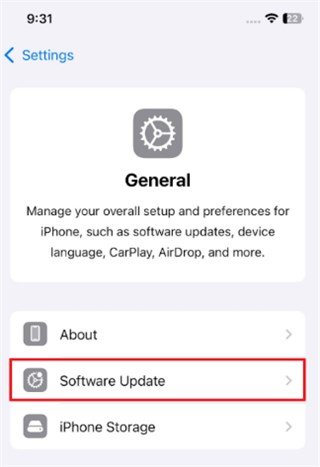
If you are using an iPhone SE 2022 and iOS 27 is not showing, check Settings > General > Software Update. Also make sure your device is not enrolled in an old beta profile that could affect update visibility.
Will the iPhone 11 Get iOS 27?
Yes, Will the iPhone 11 get iOS 27 is especially important because iPhone 11 is one of the oldest iPhone models still included in the iOS 27 support range.
This is good news for iPhone 11 owners. It means the device can still receive a major iOS update instead of being limited only to security patches.
However, iPhone 11 users should understand the difference between three types of support:
- Update support — the phone can install iOS 27.
- Feature support — the phone may not receive every new iOS 27 feature.
- Performance support — the update may work, but battery health and storage condition can affect the experience.
If your iPhone 11 battery health is already low, iOS 27 may feel heavier than older iOS versions. In that case, replacing the battery or freeing up storage may improve the experience more than buying a new phone immediately.
Will iPhone 12 Get iOS 27?
Yes, iPhone 12 will get iOS 27.
For most iPhone 12 users, this is the main question. The iPhone 12 still has capable hardware, 5G support, strong cameras, and an A14 Bionic chip. It remains usable for many everyday tasks, including browsing, messaging, social media, maps, video calls, and mobile games.
The bigger question is not whether iPhone 12 can install iOS 27. The better question is:
Should you update your iPhone 12 to iOS 27 right away?
For most users, the answer is yes, but not necessarily on day one. If you use your iPhone 12 for work, travel, banking, or important daily tasks, waiting for the first minor update, such as iOS 27.0.1 or iOS 27.1, may be safer.
Will iPhone 12 Mini Get iOS 27?
Yes, iPhone 12 mini should also get iOS 27.
Some users worry that the iPhone 12 mini may be treated differently because Apple discontinued the mini line. But for iOS compatibility, the iPhone 12 mini belongs to the iPhone 12 generation.
The main issue with iPhone 12 mini is not compatibility. It is battery life. Because the device is smaller, the battery is smaller too. If your battery health is already poor, you may notice faster battery drain after a major update.
Before updating iPhone 12 mini to iOS 27, check:
- Battery health
- Available storage
- App compatibility
- iCloud backup status
Will iPhone 14 Get iOS 27?
Yes, Will iPhone 14 get iOS 27 is an easy yes.
The iPhone 14 series is much newer than the oldest supported iPhones. This includes, iPhone 14, iPhone 14 Plus, iPhone 14 Pro, and iPhone 14 Pro Max
iPhone 14 users should expect a smoother iOS 27 experience than iPhone 11 or iPhone SE 2020 users. The Pro models may also receive more advanced camera, display, and performance features depending on Apple’s final feature list.
However, some AI-related features may still be limited compared with newer iPhones if Apple reserves them for models with more powerful chips or more RAM.
Will iPhone 15 Get iOS 27?
Yes, Will iPhone 15 get iOS 27 also has a clear answer: the iPhone 15 series will support iOS 27.
The iPhone 15 series is still modern, so users should not worry about basic compatibility. The main difference may be between standard iPhone 15 models and iPhone 15 Pro models. If iOS 27 includes advanced AI features, the Pro models may receive more complete support.
For everyday users, iOS 27 should bring better system stability, app compatibility, privacy improvements, and new iPhone features.
Will iPhone 16 Get iOS 27?
Yes, Will iPhone 16 Get iOS 27 is definitely yes.
The iPhone 16 series is newer and should be one of the best-supported iPhone generations for iOS 27. It should receive the update and is more likely to support newer system features than older iPhones.
If you own an iPhone 16, you usually do not need to worry about whether your device can run iOS 27. Instead, you should focus on whether you want to install the first public release immediately or wait for early bugs to be fixed.
Will iPhone 12 Get iOS 28?
The question Will iPhone 12 get iOS 28 is more uncertain.
iOS 27 support is much clearer because Apple’s current compatibility information includes the iPhone 12 lineup. But iOS 28 is a future update, and Apple has not finalized the public compatibility list for that version yet.
A reasonable prediction is that iPhone 12 may be close to the cutoff line for future major iOS updates. It may still get iOS 28, but users should not assume it until Apple confirms the official iOS 28 supported devices list.
For now, the safest way to phrase the answer is:
iPhone 12 gets iOS 27, but iOS 28 support is not guaranteed until Apple officially announces the iOS 28 compatibility list.
This is an important section to include because many users searching for iOS 27 compatibility are also thinking ahead: should they keep the iPhone 12 for another year, or upgrade soon?
Why iOS 27 May Not Show on Your iPhone
Even if your iPhone supports iOS 27, the update may not appear immediately. Here are the most common reasons.
1. The Update Has Not Rolled Out to You Yet
Apple updates can roll out gradually. If you check too early, your device may not show the update right away.
2. Your iPhone Storage Is Too Full
Major iOS updates need free space to download, verify, and install. If your iPhone has very little storage left, the update may fail or not appear properly.
Try deleting:
- Large videos
- Unused apps
- Offline music
- Old message attachments
- Duplicate photos
- App caches where possible
3. Your Battery Is Too Low
Your iPhone may block installation if the battery is too low. Charge your device or keep it connected to power during the update.
4. Your Wi-Fi Connection Is Unstable
A weak Wi-Fi connection can cause the update to pause, fail, or disappear. Use a reliable network before downloading iOS 27.
5. You Are Using a Beta Profile
If your iPhone has an old beta profile installed, update behavior may be different. Check your VPN, device management, and beta update settings.
6. Apple Servers Are Busy
On major release days, many users download the update at once. If Apple’s servers are busy, waiting a few hours can help.
Should You Update iPhone 12 to iOS 27 Right Away?
If your iPhone 12 is working normally, you can update to iOS 27. But whether you should update immediately depends on your situation.
You can update early if:
- Your iPhone has enough storage.
- Your battery health is still good.
- You want the latest security improvements.
- You are comfortable with possible early bugs.
- You already backed up your data.
You may want to wait if:
- You rely on your iPhone for work.
- Your iPhone 12 battery is already weak.
- You have very little storage left.
- You are worried about app compatibility.
- You prefer a more stable version like iOS 27.1.
A smart approach is to wait a few days, check early user feedback, then update after the first bug reports are clear.
What to Do Before Updating to iOS 27
Before installing iOS 27 on iPhone 12, iPhone SE, iPhone 11, or any other supported model, follow this checklist.
Back Up Your iPhone
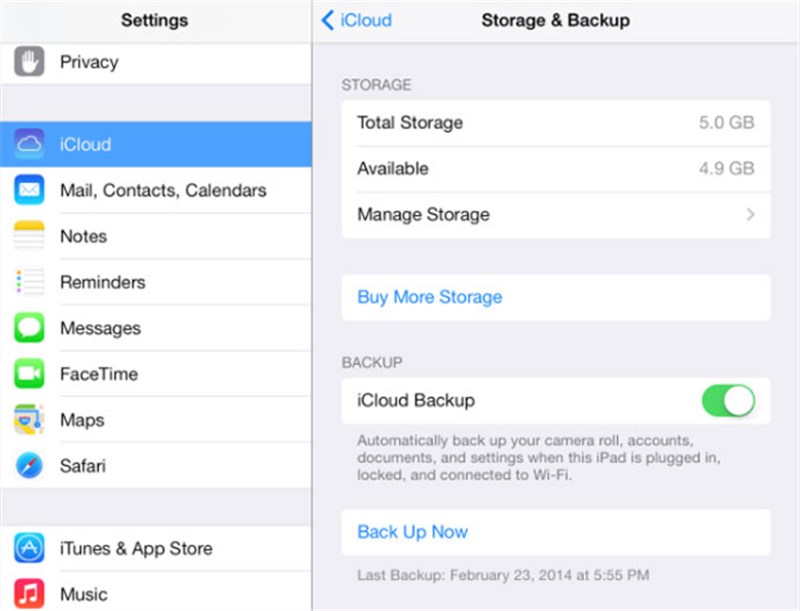
Use iCloud Backup or connect your iPhone to a computer with Finder or iTunes. This protects your photos, messages, app data, and settings if something goes wrong.
Free Up Storage
Try to keep several gigabytes of free space before updating. More free space helps the update install smoothly.
Update Important Apps
Update apps like banking, work tools, messaging apps, and authenticator apps before installing iOS 27.
Check Battery Health
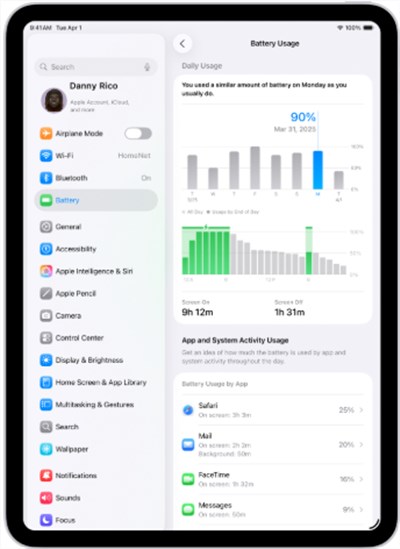
Go to Battery settings and check battery health. If your battery is heavily degraded, your iPhone may feel slower after a major update.
Save Important Login Information
Make sure you know your Apple ID password and passcode. You may need them after the update.
What If iPhone Gets Stuck During the iOS 27 Update?
Some users may search for iOS 27 compatibility after their iPhone already has a problem. For example:
- iPhone stuck on Apple logo after iOS 27 update
- iPhone stuck on preparing update
- iPhone stuck on verifying update
- iPhone 12 recovery mode after iOS 27
- iPhone update failed and won’t turn on
If this happens, try these steps:
- Wait for a reasonable amount of time, especially if the progress bar is moving slowly.
- Force restart your iPhone.
- Connect to a computer and check whether Finder or iTunes detects the device.
- Try Update first instead of Restore if you want to avoid data loss.
- Use recovery mode only when normal restart does not work.
If the iPhone still cannot start, a system repair or recovery method may be needed. This is where recovery-tool comparison pages often appear in search results, but users should understand the difference between updating, repairing, restoring, and erasing before choosing a method.
How to Fix iPhone Update Problems with AnyFix
If your iPhone gets stuck on the Apple logo, recovery mode, preparing update, verifying update, or a failed iOS 27 installation screen, you can try AnyFix iOS System Recovery. It is designed to help repair common iOS/iPadOS/tvOS system issues, including update failures, stuck screens, recovery mode problems, and system glitches without making the troubleshooting process too technical.
Here is how to use AnyFix when your iPhone cannot complete the iOS 27 update normally:
- Download and install AnyFix on your computer (compatible with Windows and Mac).
- Launch AnyFix and connect your iPhone to your computer using a USB cable.
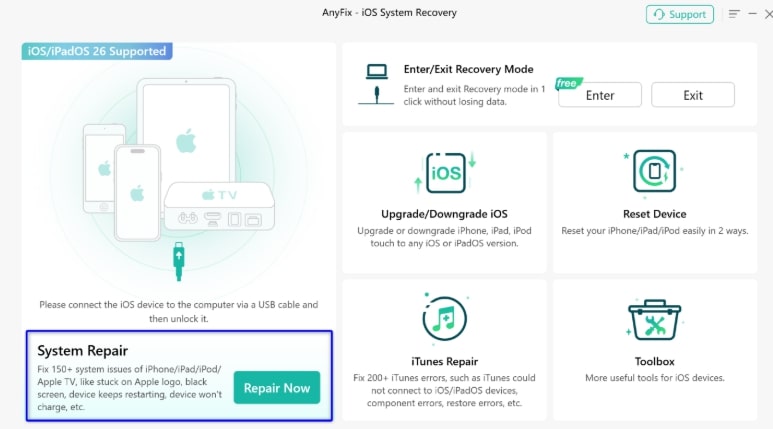
- On the AnyFix main interface, select ‘System Repair’ and click ‘Repair Now’.
Free Download for all windows & 100% safe Free Download for all mac & 100% safe
Free Download100% Clean & Safe
- Select ‘Standard Repair’ (this mode usually resolves system errors without deleting data), then proceed to the next step.
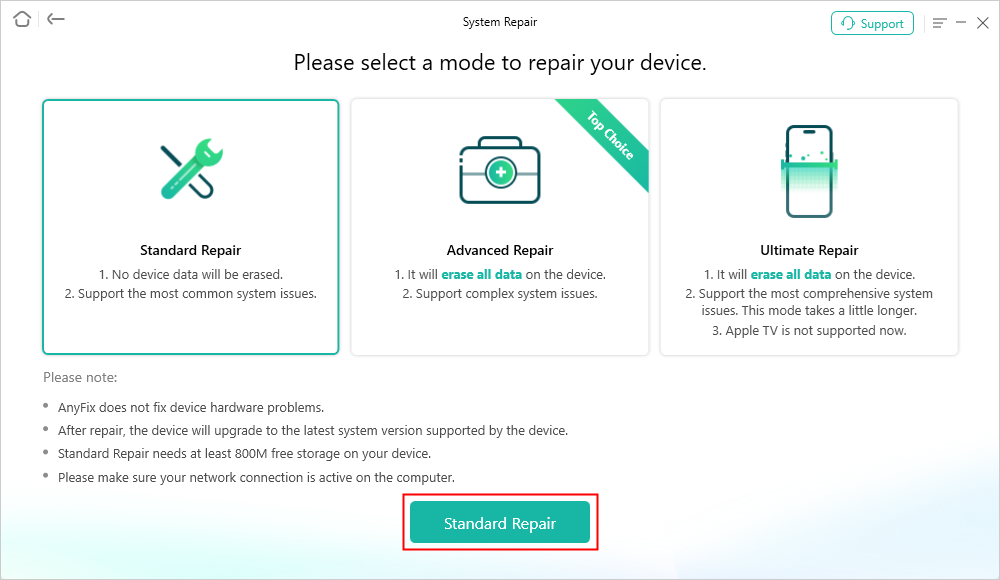
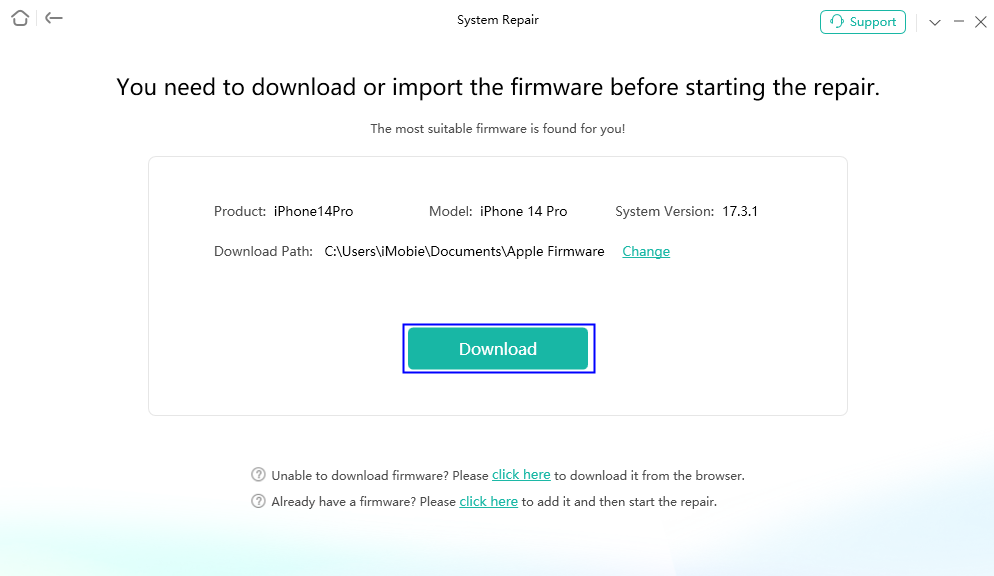
- AnyFix will automatically detect your iPhone model and system version and provide the corresponding firmware download; click ‘Download’.
- Once the firmware has finished downloading, click ‘Start Standard Repair’ to begin fixing the system issues.
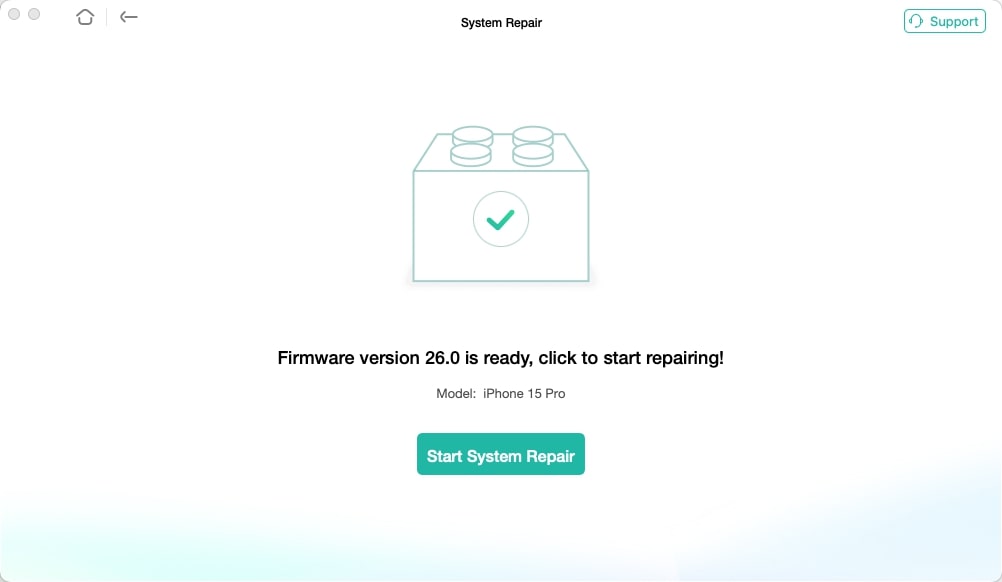
- Wait for the repair to complete; your iPhone will restart automatically, and the system issues should be resolved.
AnyFix is most useful when basic steps like force restart, checking Wi-Fi, freeing storage, or trying Finder/iTunes update do not solve the problem. If your iPhone contains important data, always avoid choosing erase/restore options unless you have a backup or clearly understand the data-loss risk.
Compatibility vs Features: The Important Difference
One of the biggest mistakes users make is thinking that iOS compatibility means full feature access.
That is not always true.
Your iPhone may support iOS 27, but some features may still require newer hardware. This is especially common with:
- AI features
- Advanced Siri features
- Camera-based intelligence features
- High-performance gaming features
- Pro camera tools
- New display-related features
For example, iPhone 12 may receive iOS 27, but it may not receive every feature available on iPhone 16 or newer models. This does not mean the update is useless. It simply means Apple may limit certain features based on chip performance, memory, camera hardware, or security requirements.
Final Verdict: Which iPhones Get iOS 27?
Here is the short version:
- Will iPhone SE 2020 get iOS 27? Yes.
- Will iPhone SE 3 get iOS 27? Yes.
- Will iphone se 2022 get ios 27? Yes.
- Will the iPhone 11 get iOS 27? Yes.
- Will iPhone 12 get iOS 27? Yes.
- Will iPhone 14 get iOS 27? Yes.
- Will iPhone 15 get iOS 27? Yes.
- Will iPhone 16 Get iOS 27? Yes.
- Will iPhone 12 get iOS 28? Not confirmed yet.
For iPhone 12 owners, the answer is good news: your device is still supported by iOS 27. But before updating, back up your data, check storage, review battery health, and understand that some advanced features may be limited to newer iPhones.
If your iPhone is still fast enough for your daily use, iOS 27 may help extend its life for another year. If your battery is weak, storage is full, or you want the newest AI features, it may also be the right time to compare repair, battery replacement, and upgrade options.
FAQ About iPhone 12 and iOS 27
Will iPhone 12 get iOS 27?
Yes. iPhone 12, iPhone 12 mini, iPhone 12 Pro, and iPhone 12 Pro Max are supported by iOS 27.
Will iPhone 12 get every iOS 27 feature?
Not necessarily. iPhone 12 can get the iOS 27 update, but some advanced features may require newer iPhone hardware.
Will iPhone 12 get iOS 28?
Apple has not confirmed iOS 28 compatibility yet. iPhone 12 supports iOS 27, but iOS 28 support should not be treated as guaranteed until Apple announces it.
Why is iOS 27 not showing on my iPhone?
Possible reasons include low storage, unstable Wi-Fi, beta profile settings, low battery, server delays, or regional rollout timing.
Should I update my iPhone 12 to iOS 27 now?
You can update if your phone has enough storage, good battery health, and a recent backup. If you are worried about early bugs, wait for the first minor iOS 27 update.
More Related Articles



Wanda Norris is a junior author in iMobie specializing in iOS tips and solutions. She keeps a close eye on every iOS update to provide practical, easy-to-understand guides that help users solve problems and master their Apple devices.
Product-related questions? Contact Our Support Team to Get Quick Solution >
