DirectUnlocks Review and Best Alternative
If you are looking for DirectUnlocks review, that’s it! This detailed review contains what DirectUnlocks is, the pros, cons, the service quality and customer satisfaction. And also, we will share with you the best alternative tool.
Have you ever gotten stuck on the activation lock page? Have you ever felt your smartphone is shackled to one carrier? DirectUnlocks claims to have the key to your freedom. But do they deliver on this promise? Our in-depth review takes a look at DirectUnlocks, assessing every aspect. We will analyze everything from service quality to customer satisfaction.
We’re exploring all the ins and outs, revealing the truth behind their lofty claims. So, are you ready to uncover the reality of DirectUnlocks? Sit back, and let’s unravel the story together. We’ll help you decide whether it is your phone’s liberator or another castle in the air.
What Is DirectUnlocks?
DirectUnlocks is an online service that specializes in unlocking smartphones and devices. You wait for it to unlock your iOS device after paying in advance. You pay the amount and share the IMEI number of your device. Then you wait for the company to respond.
Main Features of DirectUnlocks
In general, it has the following features:
-
Network Unlocking
Unlock SIM lock is the primary service that this platform provides. They help you to unlock your devices from any carrier to which they have been locked.
- Activation Lock Bypass
DirectUnlocks can remove the activation lock on your iPhone, iPad, Mac computer, and Apple Watch by providing IMEI or serial number.
-
Various Device Support
It typically supports a broad range of devices. This can include brands like Apple, Samsung, Huawei, LG, and many more.
-
Outstanding Customer Service
It takes less than 24 hours to unlock your phone. Also, the dedicated customer service team guides you throughout the process.
Is DirectUnlocks Legit?
DircetUnlocks is a paid tool so you might be worried about its legitimacy. We are going to share a detailed DircetUnlocks review. Thus, we will help you make an informed decision.
While it often works, users don’t receive any updates in a few situations. And in worse situations, don’t even get the refunds. To understand this further, look at user reviews on platforms like Trustpilot.
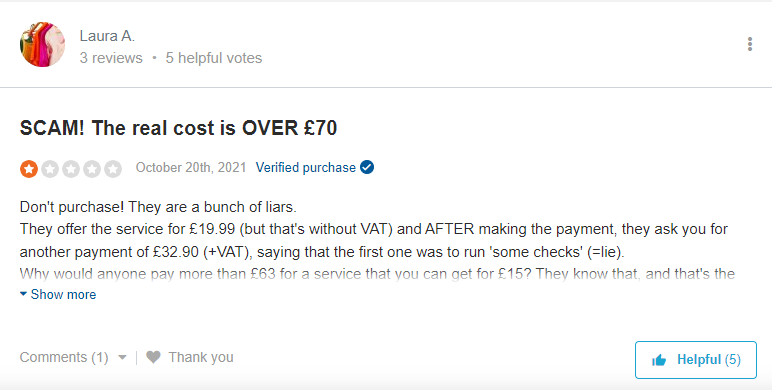
DirectUnlock Reviews
These DirectUnlocks reviews show that many users don’t get their phones unlocked. There are high chances of scam as it includes a huge advance payment.
However, DirectUnlocks has helped many users to unlock their devices. Generally, the success rate is 60-70%. And it mainly depends on your luck whether you get the services or not. Let’s go into a little more depth to understand whether it works or not.
Does DirectUnlocks Actually Work?
In many reviews, users acknowledge that the service works properly. And unlock their phones or other iDevices in less than 24 hours. On Sitejabber, it shows 4.4 stars from 11 741 reviews.
Also, some users didn’t get positive assistance from the platform. Those reviews raise the question of its credibility. So we suggest you first analyze the reviews properly. Then decide whether you should get their services or not.
Let’s keep the momentum going and learn more about this service.
Pros and Cons of DirectUnlocks
Pros
- Offers multiple unlocking services like SIM card unlocking, iCloud activation, and more.
- The service has been active for many years.
- No need for downloading and installation.
- Unlocks the majority of the phones within 24 hours.
- Holds a legitimate SSL certificate.
Cons
- Its success rate is low.
- It is a costly service.
- The cost depends on your system version and device model.
- Many users claim that it’s a fraud.
- Your device may get corrupted as you have to share your device’s IMEI number and serial number.
Trusted Alternative to Bypass iCloud Activation Lock
So far, DirectUnlocks is not a trusted solution to unlock a locked iDevice. Then what’s the next reliable alternative? The answer is AnyUnlock – iPhone Password Unlocker. AnyUnlock is the most efficient alternative to the DirectUnlocks tool. It can help you easily bypass the iCloud activation lock without Apple ID and passcode within simple steps. On top of that, you don’t require any tech knowledge to unlock your iDevice. Besides, it has the highest success rate in the industry.
Moreover, it can also unlock iPhone screen passcode, MDM lock, remove Apple ID, SIM Lock, and screen time passcode. Unlike DirectUnlocks, it doesn’t require your phone’s IMEI number.
Now free download AnyUnlock and follow the steps below to learn how to remove iCloud activation lock.
Free Download * 100% Clean & Safe
Step 1: Install and launch AnyUnlock on your PC. Choose Bypass iCloud Activation Lock mode.
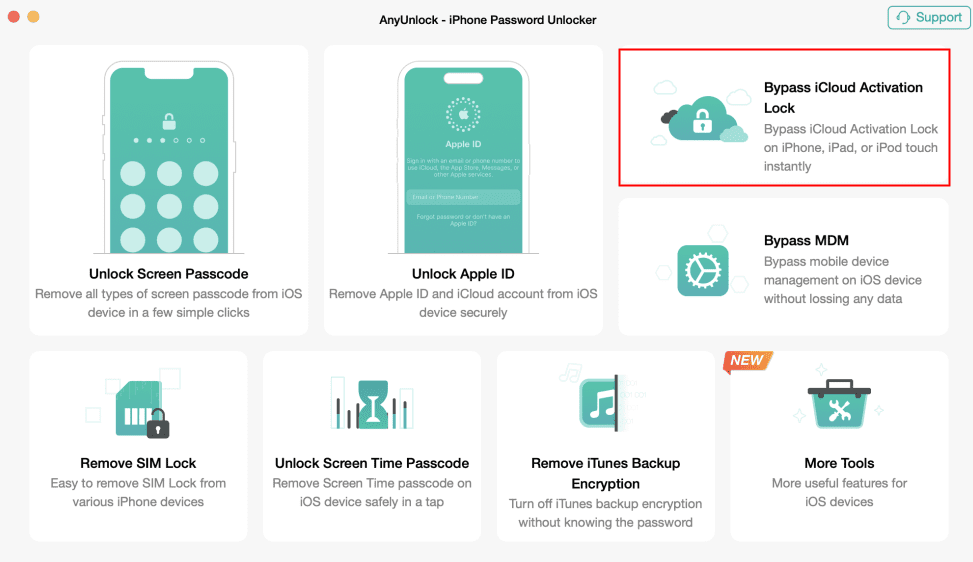
Choose Bypass iCloud Activation Lock
Step 2: Connect your iPhone/iPad to your computer via a USB cable. Click on the “Start Now” button.
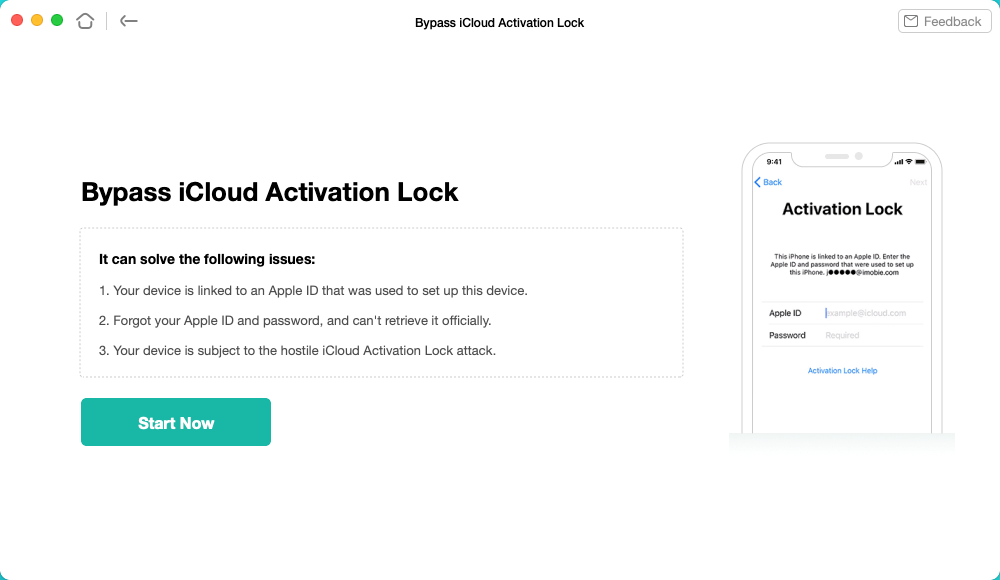
Click on the Start Now to Go On
Step 3: Follow the given instructions to Jailbreak your device.
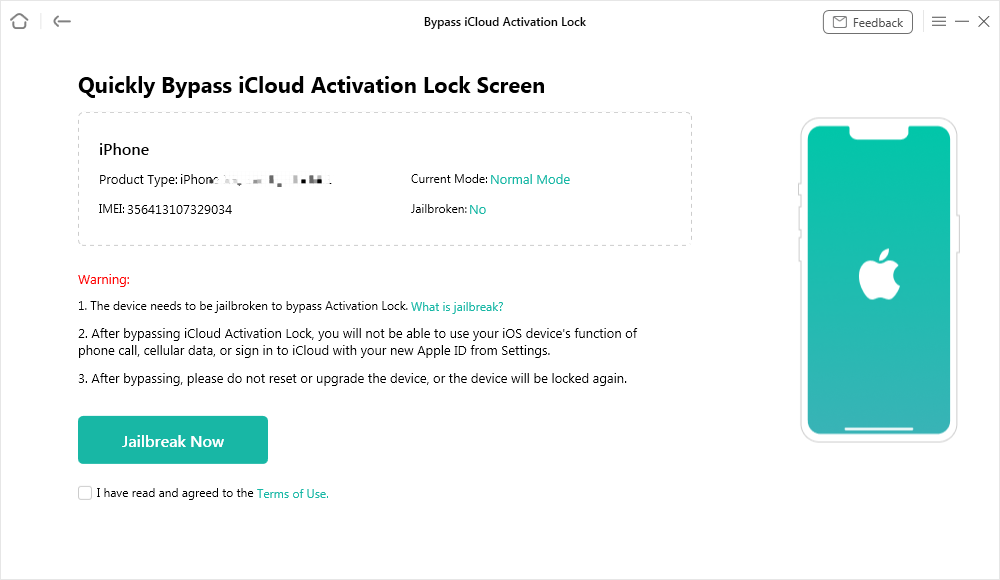
Jailbreak Your Device
Step 4: View and check basic info about your device, then click on Bypass Now button. When the bypassing process is completed, you’ll see the interface below.
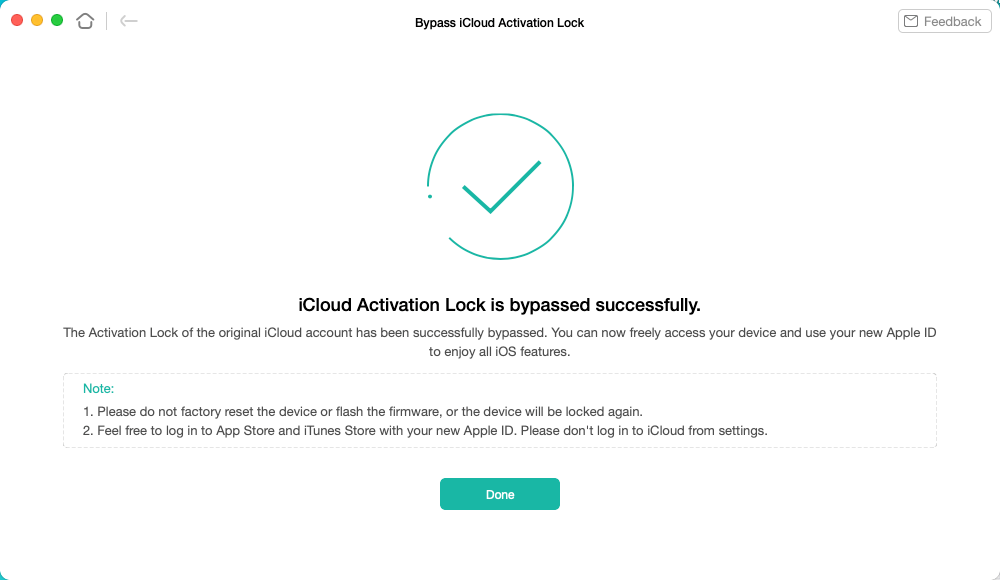
iCloud Activation Lock Is Bypassed Successfully
Great Alternative to Unlock iPhone Carrier
The review above mentions that many people said that DirectUnlocks is a scam. If you want to remove the SIM lock, we recommend AnyUnlock as the best replacement. AnyUnlock helps you to unlock the iPhone carrier and remove SIM restrictions. So you can use your iPhone with any SIM card from any network globally, including AT&T, Vodacom, Sprint, T-Mobile, Verizon, and others. You don’t need to contact carrier providers. And there will be no data loss, all your information will be safe and secure.
Free Download* 100% Clean & Safe
Step 1: Launch AnyUnlock on your computer. Now select SIM Lock mode.
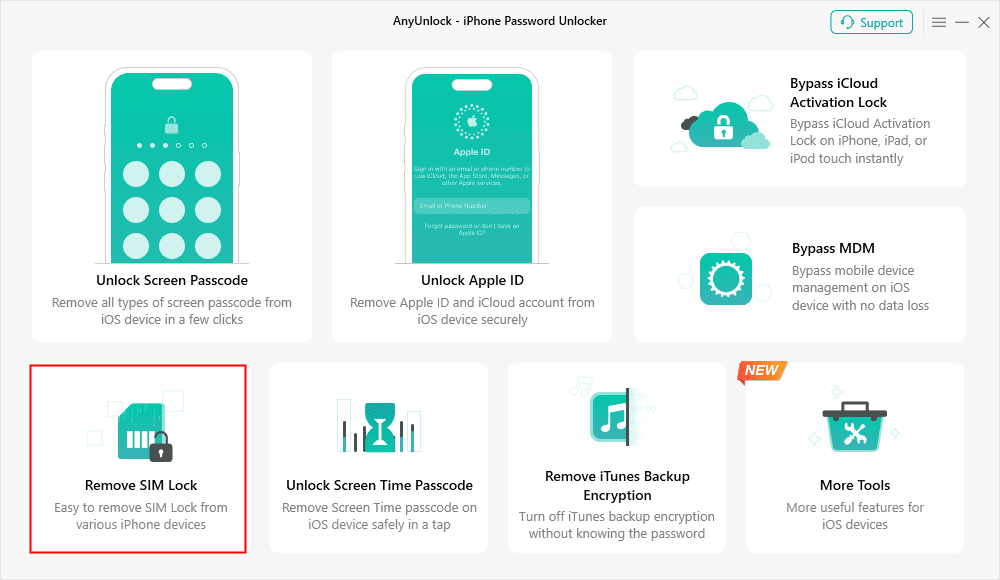
Choose Remove SIM Lock
Step 2: Connect your iDevice to the computer and click on Remove Now Button. If your device isn’t jailbroken, follow the instructions to jailbreak.
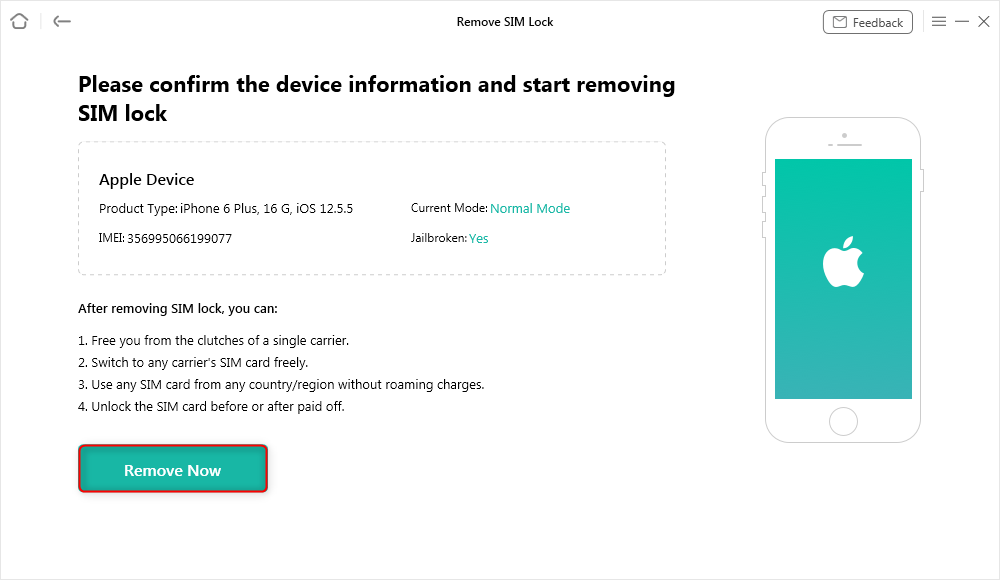
Click Remove Now
Step 3: Follow the below instructions to Forget This Network on your iPhone.
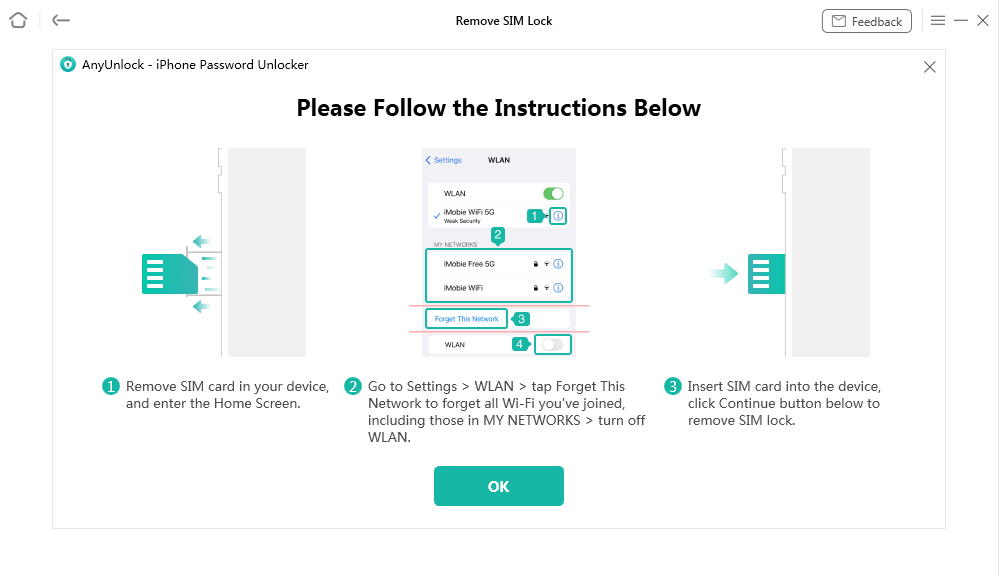
Forgot This Network on iPhone
Step 4: Now click the unlock button to remove the SIM lock. It will successfully remove the SIM lock as the process completes.
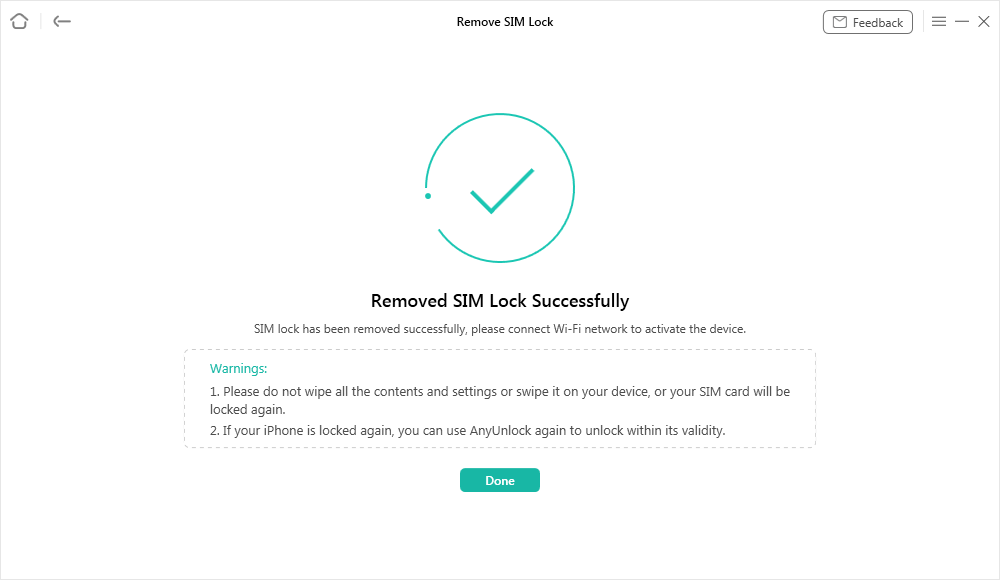
SIM Lock Removed Successfully
The Bottom Line
So, that’s our deep dive into DirectUnlocks. We’ve looked at how well it works and what their customers say. Now, you get to decide. Is DirectUnlocks the answer for your locked phone, or is it all talk and no action? You’ve got the facts. Now, you can make the smart choice. Remember, unlocking your phone could be just one decision away! Why not try AnyUnlock free?
Free Download * 100% Clean & Safe
Vital Phone unlock Tips



Senior writer of the iMobie team as well as an Apple fan, love to help more users solve various types of iOS & Android-related issues.
Product-related questions? Contact Our Support Team to Get Quick Solution >
