How to Jailbreak iPhone 11/11 Pro(Max) With/Without PC
This guide explains safe ways to jailbreak iPhone 11/11 Pro(Max) with or without a computer. It covers benefits like custom apps and better device control, along with risks such as warranty loss and security issues. For a reliable and simple process, AnyUnlock would be a better choice to jailbreak iPhone 11 without risks.
Jailbreaking has once again become a popular topic among iPhone users, especially for those using earlier-generation devices like the iPhone 11 series. Many users hope to unlock deeper customization, install powerful tweaks, or bypass certain system limitations. However, jailbreaking also comes with real risks, from system instability to security vulnerabilities, so understanding the safe methods and reliable tools is essential before you begin. This guide explains the safest approaches to jailbreaking an iPhone 11, the key risks you must consider, and practical tools that help you carry out the process more carefully and responsibly.
Also Read: 4 Ways to Jailbreak iOS 17 >
Why Do We Jailbreak iPhone 11/11 Pro (Max)?
Jailbreaking remains popular among iPhone 11 users because it offers a level of freedom and customization that Apple’s stock system doesn’t allow. As a result, many users choose to jailbreak their device to break free from these limitations and gain deeper control over how their iPhone works. The following points highlight the most common reasons:
- Custom Themes: Jailbreak iPhone 11 lets you use many new custom themes. It helps change the look and feel of your device.
- Extra Apps: You can install apps not found in the official store. These apps offer additional functions unavailable to regular users.
- Better Control: Gain full control over files and system resources on iPhone. Jailbreak lets you manage your device deeply and flexibly.
- New Features: You may unlock features missing from the regular phone setup. These features help your device feel updated and fun.
- Performance Boost: Some users jailbreak to install tools that speed up their devices. These tweaks can make the phone respond faster in tasks.
Risks of Jailbreaking iPhone 11/11 Pro (Max)
There are a lot of advantages to jailbreaking your iPhone 11, but there are also real risks to consider. Before deciding to move forward, it’s important to understand how jailbreaking can affect your device’s stability, security, and long-term usability:
- Warranty Loss: Jailbreaking an iPhone 11 cancels your phone’s official warranty immediately. Apple may refuse service for devices that have been jailbroken.
- System Bugs: Your device might experience crashes or errors after the jailbreak process. Jailbreak iPhone 11 sometimes makes apps or system functions unstable.
- Battery Drain: Added tweaks can drain the battery faster each day. The extra system load reduces overall device time.
- Privacy Risks: Exposing system files after jailbreak may lead to data leaks. Jailbreaking an iPhone 11 lowers the privacy defenses that Apple provides.
- Update Problems: Updating iOS becomes difficult or impossible after you jailbreak your iPhone 11. You may lose jailbreak and need special steps to update safely.
How to Jailbreak iPhone 11/11 Pro(Max) With a Computer
Through a computer, the tools required for Jailbreaking iPhone 11 would then be easier to manage. This part will guide you through 2 safe methods using trusted software on your PC:
Method 1: Jailbreak an iCloud-locked iPhone 11 via AnyUnlock
AnyUnlock is a powerful and dedicated tool made for users struggling with locked phones. It allows it to bypass iCloud Activation Lock within minutes without having to provide any Apple ID or password. This unlocker supports those devices with iOS 12.0 up to 16.7, with the exclusion of 12.4.5 and 12.4.6, to be jailbroken. Also, it uses an automated process with three clear steps to jailbreak iPhone 11.
Key Features of AnyUnlock:
- Protects device data by preventing remote erasing during and after unlocking.
- Provides a strong success rate based on optimized technology and user feedback.
- Offers one-click actions that simplify complicated processes into easy automated steps.
- Supports other unlock functions like passcode, Apple ID, and MDM removal.
Free Download * 100% Clean & Safe
Stepwise Guide to Jailbreak iPhone 11 via AnyUnlock:
Step 1. Download AnyUnlock and run it to select the “Bypass iCloud Activation Lock” option on the main screen.
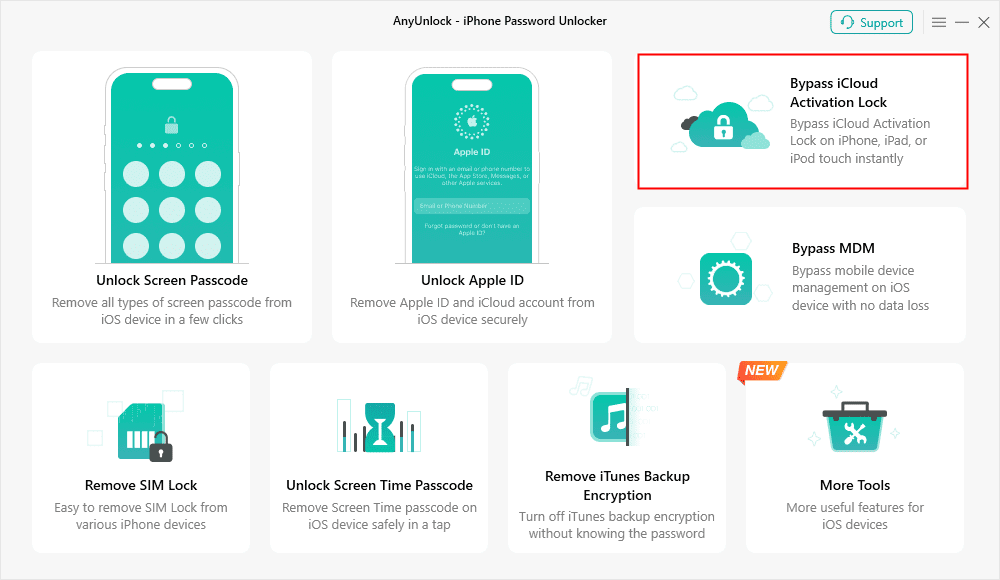
Bypass iCloud Activation Lock
Step 2. Connect your phone to the computer with a USB cable and opt for “Start Now.” When the tool recognizes your device, choose “Jailbreak Now” to continue.
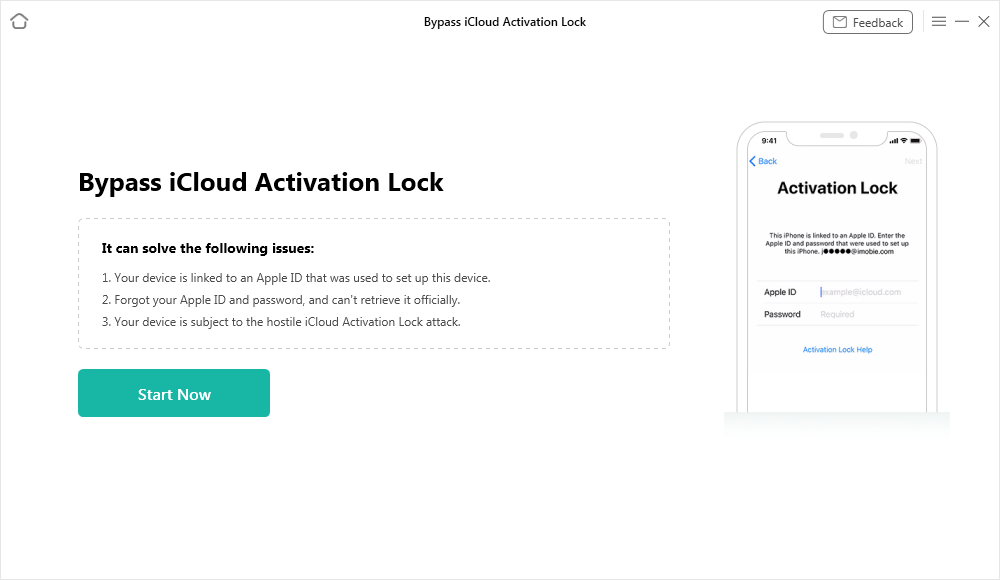
Connect Your iOS Device to the Computer
Step 3. Click Jailbreak Now, and AnyUnlock will start to jailbreak your device effortlessly.
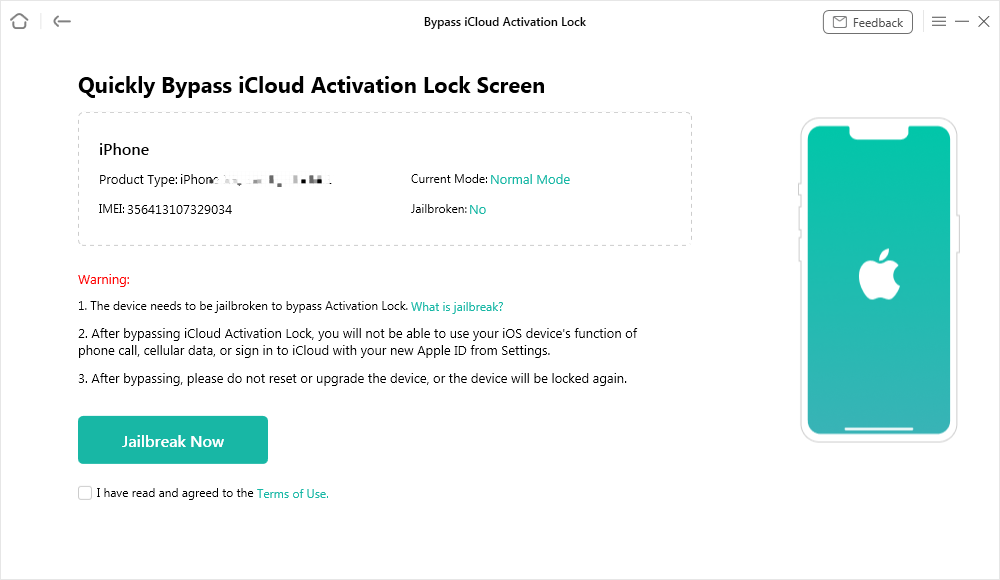
Jailbreak Your Device
Step 4. Once your iPhone has been jailbroken, AnyUnlock will display your device information to help bypass the iCloud lock. Click Bypass Now to continue.
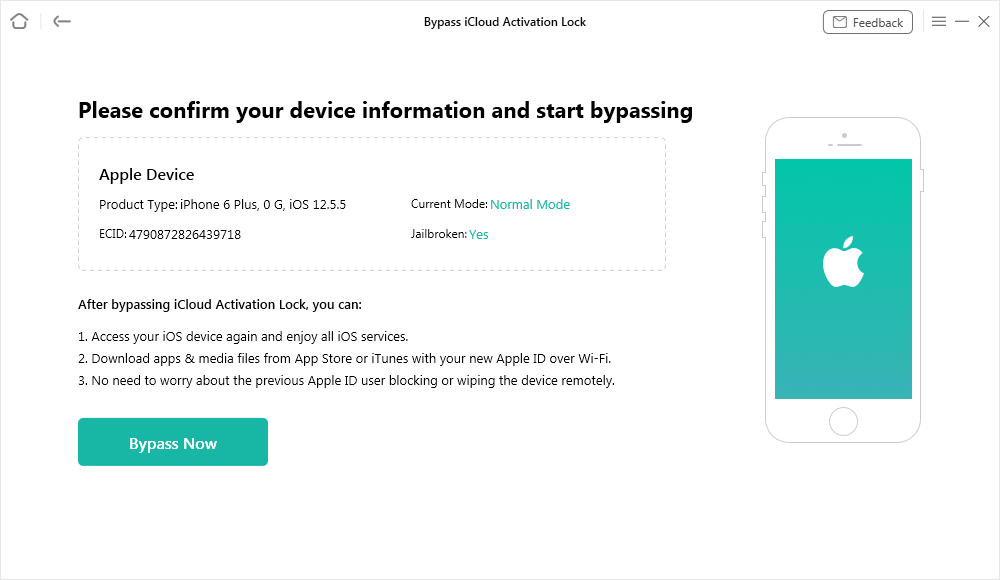
Confirm Your Device Information and Start Bypassing
Step 5. AnyUnlock will now begin bypassing the iCloud activation lock. Keep your iPhone plugged in during the process.
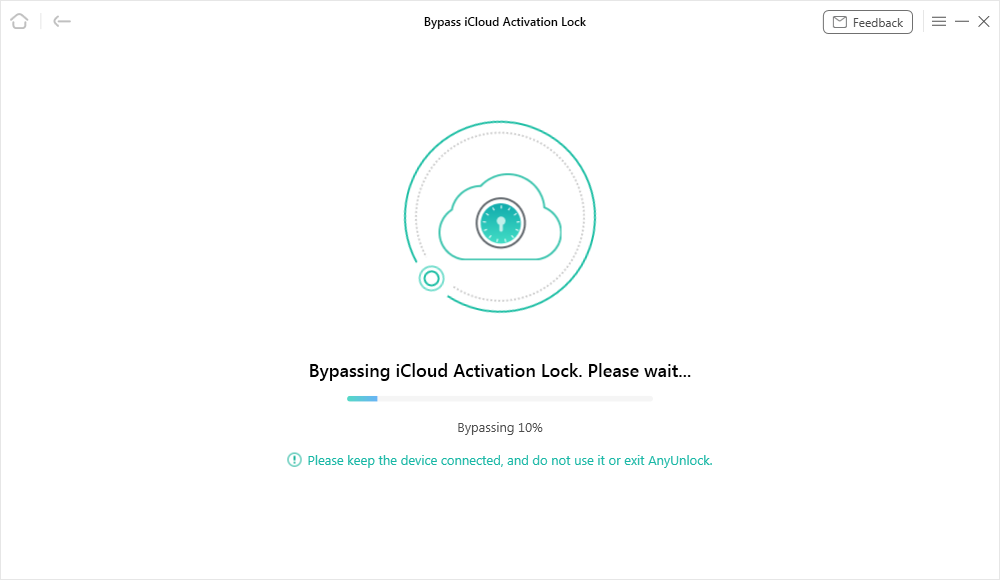
Bypassing iCloud Activation Lock
Step 6. Once the activation lock has been bypassed, you have successfully jailbroke your iPhone 15. Then you can access your device and set up a new Apple ID on it.
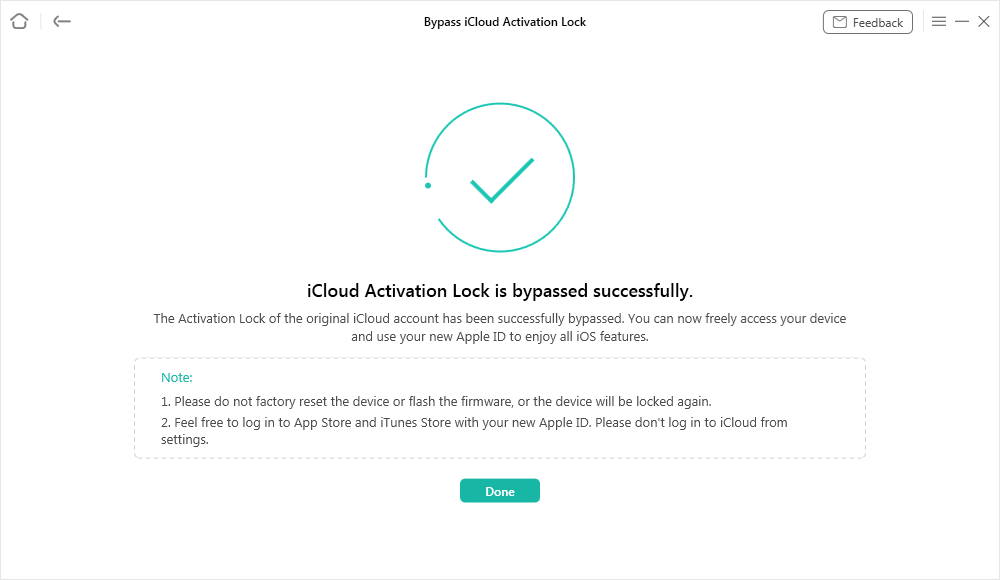
iCloud Activation Lock Is Bypassed Successfully
Method 2: Jailbreak iPhone 11 via Checkra1n
Checkra1n is another type of jailbreaking tool where you follow the manual instructions. Since Checkra1n does not support Windows directly, most users rely on a lightweight Linux environment (such as Checkn1x or Bootra1n) to run it from a USB drive. This method works for iPhone 11 devices running iOS 14.8.1 or earlier, but compatibility is limited and updates arrive slowly.Go through the given guide to use the Checkra1n tool:
Step 1. Begin by downloading Rufus and Checkra1n to your computer, then insert your USB drive. Open Rufus, click “Select” to load the “Checkn1 ISO file,” and hit the “Start” button.
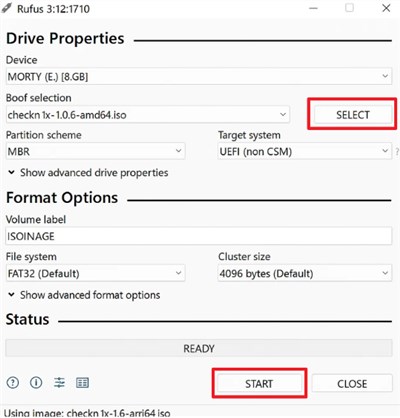
Step 2. When the prompt appears, pick “Write in DD Image” mode and confirm with “OK.” After the process completes, close “Rufus” to move forward.
Step 3. Restart your system with the key F12 multiple times until you are able to see the logo. Opt for the “USB Storage Device” option after loading the “Boot Menu.”
Step 4. As the Checkra1n Jailbreak Wizard opens, connect your iPhone 11 and press “Start.” When the tool switches your device to “Recovery Mode,” simply choose “Next.”
Step 5. Hit “Start” again and follow the button prompts and instructions shown on the screen. Your iPhone will then enter the required mode and begin jailbreaking.
How to Jailbreak iPhone 11/11 Pro(Max) Without a Computer
Some users simply want a method that doesn’t involve a laptop or extra software. That’s where Unc0ver comes in, a widely used tool that lets you jailbreak an iPhone 11 without a desktop. It gives root access and enables the installation of apps that are not from the App Store. The application actually has a version that serves from 12.0 to 14.8 for iOS versions. Although it has a complex setup and solution, you can follow the steps to use Unc0ver:
Step 1. When you browse the Unc0ver site on your phone, press the “Jailbreak” button.
Step 2. Access the “Profiles” section under the “General” settings and opt for the “Trust Unc0ver” profile.
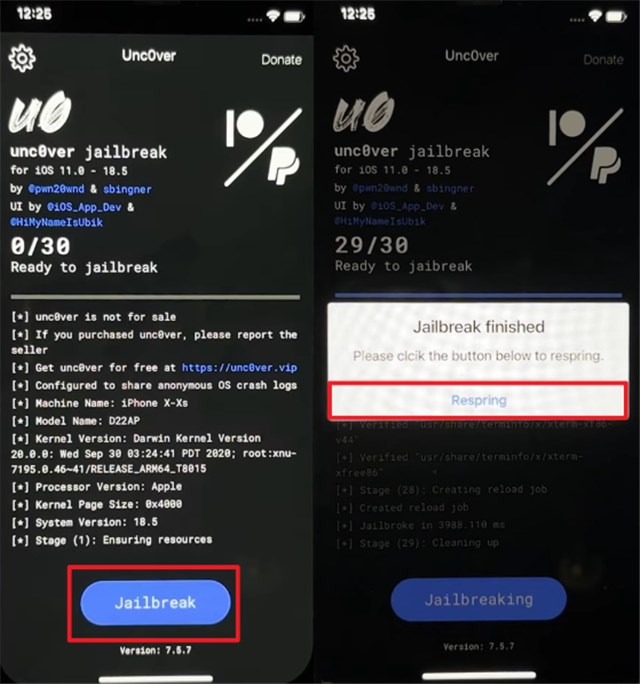
Step 3. Run the installed app and press the “Jailbreak” button to initiate.
Step 4. Once it concludes, tap “Respring” to restart your device and complete the jailbreak successfully.
FAQs about How to Jailbreak iPhone 11/11 Pro (Max)
Q1. What happens if I jailbreak my iPhone 11?
Jailbreaking iPhone 11 lets you install apps and tweaks outside the App Store. But it removes security protections, increases malware risks, and voids your warranty. Apple may also refuse repairs.
Q2. Which is better, root or Jailbreak?
Rooting is for Android phones, while jailbreaking works only on iPhones. Root lets you fully control Android and make big system changes. The jailbreak will let users install apps and tweaks that are not provided by Apple.
Q3. How do I jailbreak an iPhone 11 running iOS 16 or 17?
You can use AnyUnlock to jailbreak an iPhone 11, which supports the latest iOS version. Just connect your device, follow the DFU instructions, and the tool completes the jailbreak automatically.
Conclusion
In summary, jailbreaking gives you access to extra apps, deeper customization, and even enables options like jailbreaking an iPhone to unlock the carrier on older models. But it also brings risks such as weaker security and loss of warranty, so using safe and reliable methods is important. For a secure and effortless method to jailbreak iPhone 11, AnyUnlock is highly recommended. Download and try AnyUnlock today to unlock your iPhone’s true potential.
Free Download * 100% Clean & Safe



Joy Taylor is a seasoned technical writer with over a decade of experience in mobile technology. At iMobie, she specializes in producing in-depth content on iOS data recovery, iPhone unlocking solutions, and iOS troubleshooting.
Product-related questions? Contact Our Support Team to Get Quick Solution >
