How to Jailbreak iPhone 5s/6/6s/6s Plus With/Without Computer
This guide explains how to jailbreak iPhone 5s/6/6s/6s Plus with or without a computer. It covers benefits, risks, and detailed steps using tools like AnyUnlock, Checkn1x, and Unc0ver. For a safe, simple solution, AnyUnlock is highly recommended for effortless jailbreaking.
Jailbreaking remains popular among users of older iPhones who want more control and customization than iOS normally allows. As devices like the iPhone 6 stop receiving new updates and features, many users feel limited and look for ways to restore flexibility. Learning how to jailbreak an iPhone 6 helps you unlock additional options and tailor the device to your needs, and even explore possibilities such as jailbreaking iPhone to unlock carrier. This guide explains clear methods to jailbreak iPhone 6 with or without a computer for effortless and easy jailbreaking. If you are using an iPhone 5s, the methods are similar, but tool compatibility can vary by iOS version. For an iPhone 5s running iOS 12.5.7, Checkra1n or compatible Unc0ver-based methods are commonly used, so check your device model and iOS version before you start.
What Is Jailbreaking?
Jailbreaking basically removes Apple’s limits and lets an older iPhone access deeper system options. This process helps users change features that normally stay locked in the standard software. Many people use it to add flexibility to older devices, install apps or tweaks not available in the App Store, and regain control over functions that Apple limits by default.
Everything about Jailbreaking iPhone 6
This part guides you through important details you should understand before you jailbreak iPhone 6:
Benefits of Jailbreaking iPhone 6
Jailbreaking offers several helpful advantages that make older devices feel more flexible. These benefits can improve daily use by giving access to features normally kept restricted:
- Better Control: You can adjust system options easily and change settings that Apple normally keeps restricted.
- Custom Themes: It allows you to redesign icons and even layouts for a more personal look.
- Extra Tools: Users gain useful tools that can improve speed and add missing helpful functions.
- Old Support: Jailbreaking helps older devices stay usable even when updates stop coming.
- Added Features: You can enable special features that improve convenience and make daily tasks easier.
Risks of Jailbreaking iPhone 6
Jailbreaking is also associated with risks to which all users ought to be aware. Below, you will find a few issues that can affect performance or stability if the process goes wrong:
- Security Risk: It undermines the native defenses, leaving your phone vulnerable to malicious attacks.
- System Instability: The device may crash more often because modified files disrupt normal system behavior.
- App Problems: Some apps may stop working correctly because they detect changes made through jailbreaking.
- Update Limits: You might lose easy updates because jailbreaking blocks the simple installation of fresh versions.
- Data Loss: Mistakes during jailbreaking can remove stored files and create unexpected issues for users.
How to Jailbreak iPhone 6 With a Computer
Several tools and methods are available to jailbreak iPhone 6 using computers. This part shows the top 2 solutions to help you complete the process safely without confusion:
Way 1: Jailbreak iPhone 6 with AnyUnlock [Even Locked]
As a professional iPhone unlocker, AnyUnlock is a wise choice to jailbreak iPhone 6, especially if your device is locked. Unlike manual jailbreaking tools, AnyUnlock creates an automated jailbreak environment, so you don’t need technical skills or complicated setup. This tool works on both Windows and Mac and supports a wide range of older iPhone models, including the iPhone 6 series. It is designed to avoid risky operations, reducing the chance of system errors during jailbreaking. For users who want a stable, beginner-friendly option, AnyUnlock offers one of the safest and most reliable ways to jailbreak an iPhone 6.
Key Features of AnyUnlock:
- Provides an easy, guided jailbreak process that doesn’t require technical skills.
- Allows jailbreaking even when the iPhone 6 is locked or tied to an old Apple ID.
- Creates a stable and safe jailbreak environment with fewer risks of system errors.
- Supports both newer and older iPhone models and iOS versions, including iPhone 6 devices.
Free Download * 100% Clean & Safe
Detailed Guide to Jailbreak iPhone 6 with AnyUnlock:
Step 1. Install and launch AnyUnlock on your PC, and select the Bypass iCloud Activation Lock option from the interface.
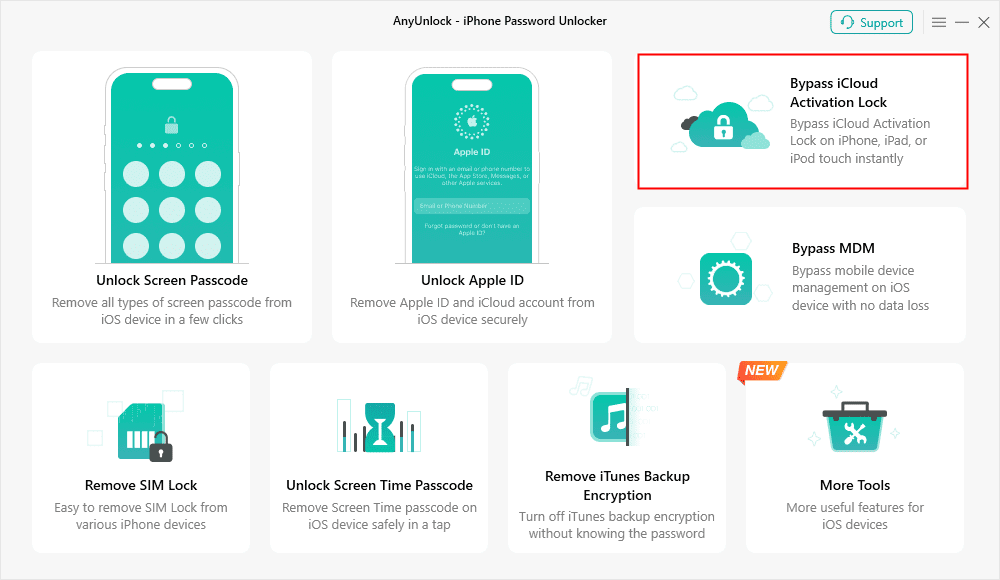
Bypass iCloud Activation Lock
Step 2. Connect your iPad to your PC and click Start Now to start the jailbreaking process.
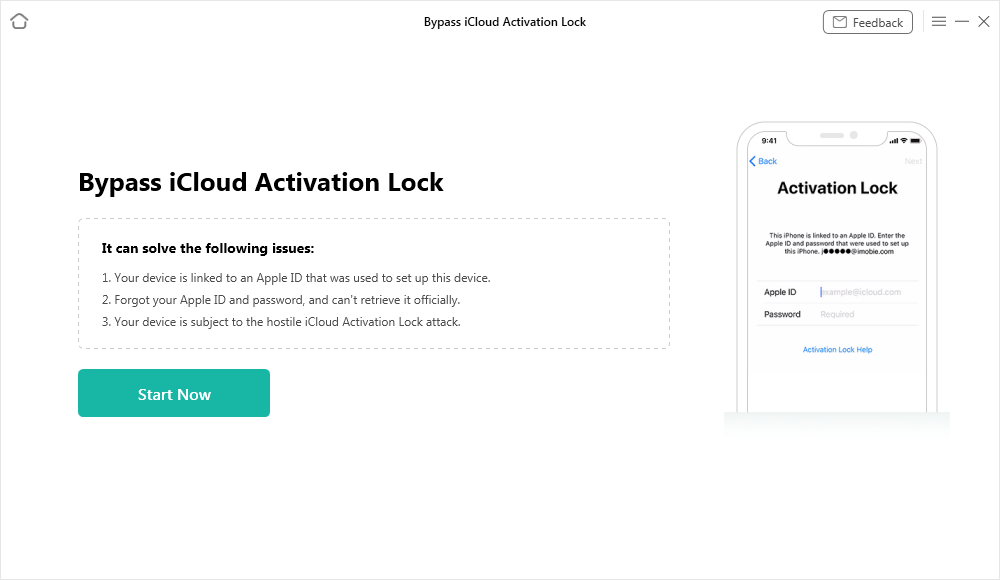
Connect Your iOS Device to the Computer
Step 3. Click on Jailbreak Now to allow AnyUnlock to jailbreak your iPhone.
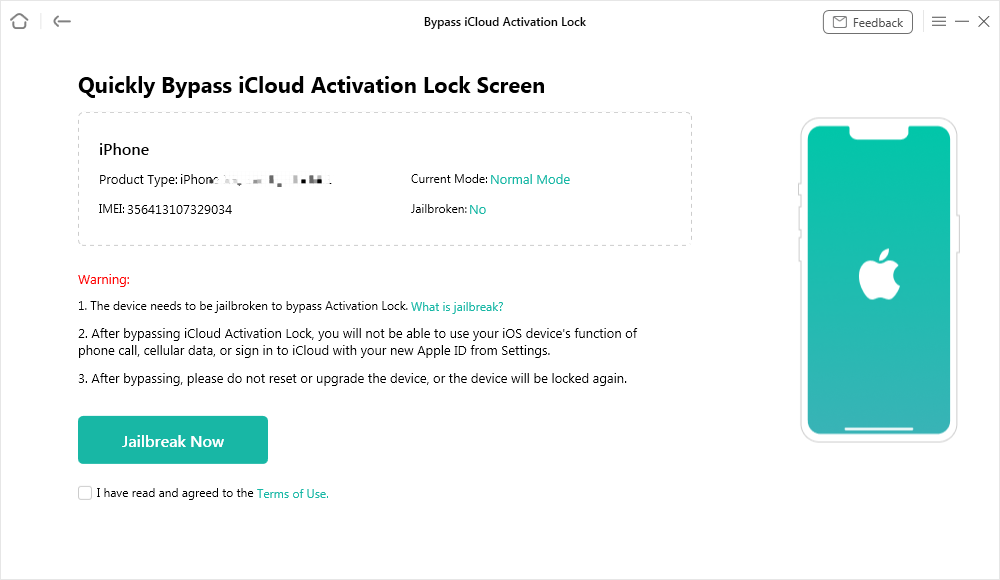
Jailbreak Your Device
Step 4. Once your iPhone has been jailbroken, AnyUnlock will display your device information to help bypass the iCloud lock. Click Bypass Now to continue.
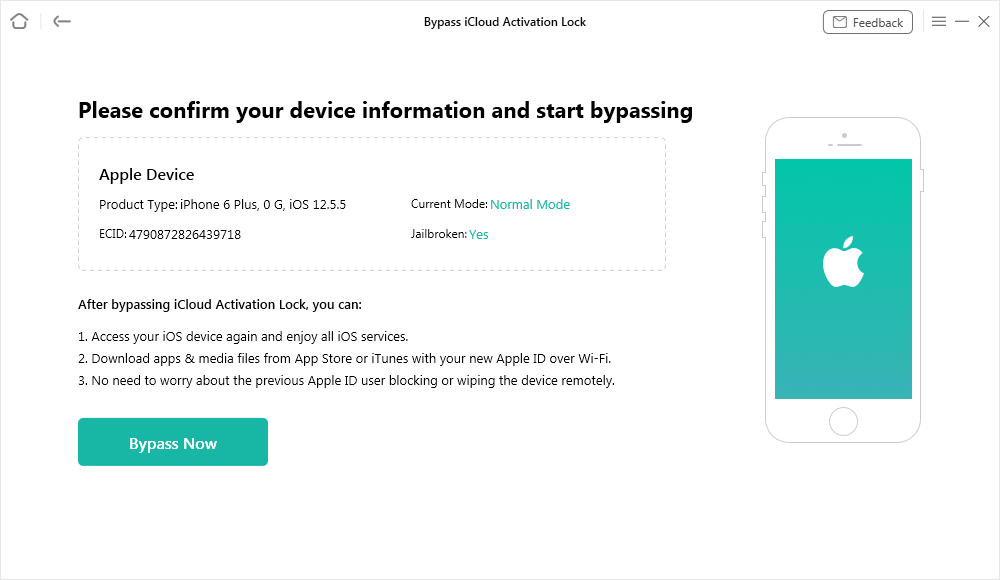
Confirm Your Device Information and Start Bypassing
Step 5. AnyUnlock will now begin bypassing the iCloud activation lock. Keep your iPhone plugged in during the process.
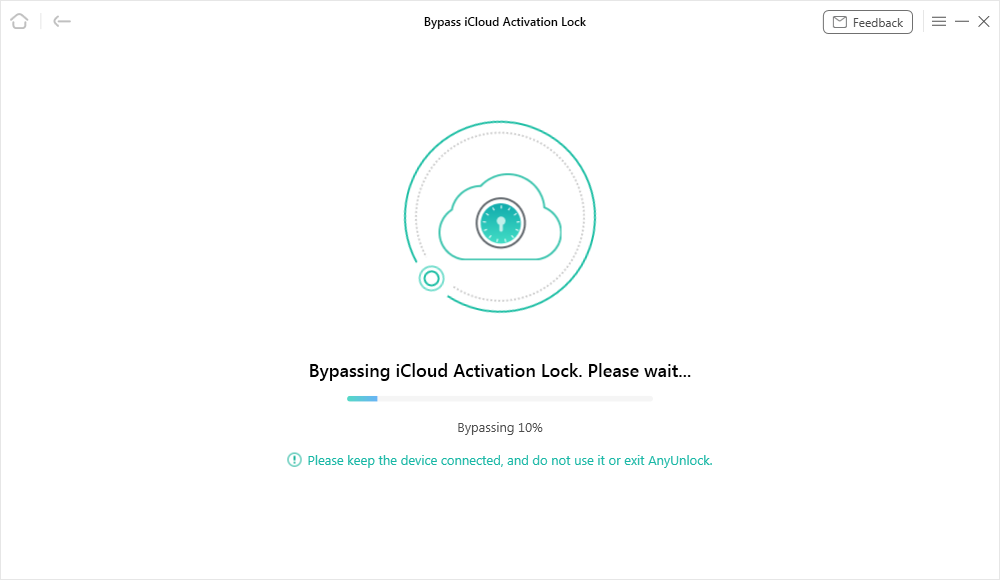
Bypassing iCloud Activation Lock
Step 6. Once the activation lock has been bypassed, you have successfully jailbroke your iPhone 15. Then you can access your device and set up a new Apple ID on it.
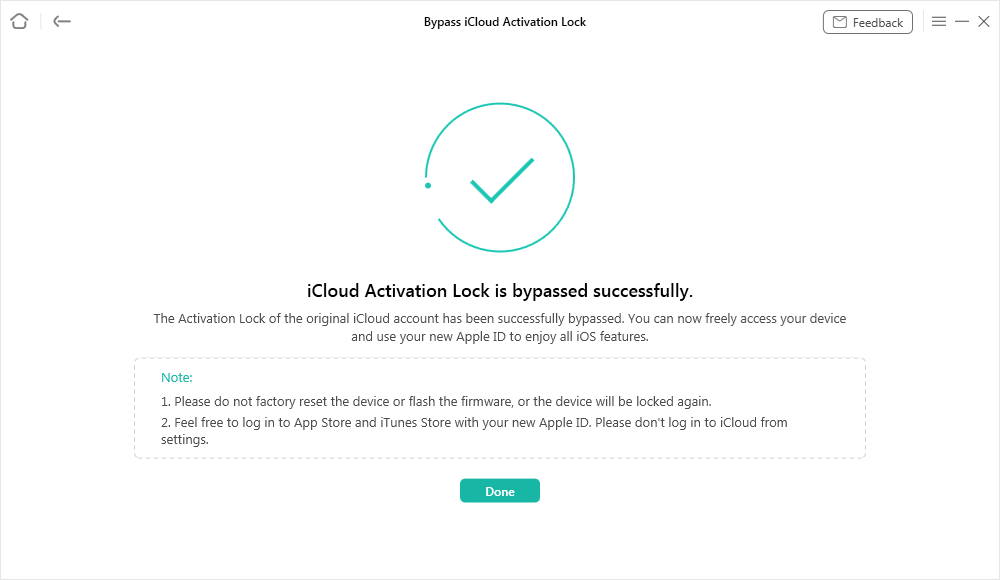
iCloud Activation Lock Is Bypassed Successfully
Tool 2: Jailbreak iPhone 6 with Checkn1x
Checkn1x is another simple Windows program that can jailbreak iPhone 6. It is bootable from a USB drive and compatible with both “32-bit” and “64-bit” operating systems. The installation is not complicated; however, a beginner must be careful in selecting the steps to avoid mistakes. It provides stable jailbreaks for compatible devices while requiring basic PC preparation. Review the following steps to use Checkn1x to perform this process:
Step 1. Download Rufus and Checkra1n on your PC, then insert a USB drive. Open “Rufus” to select the “Checkn1 ISO” file and click “Start” to prepare the bootable drive.
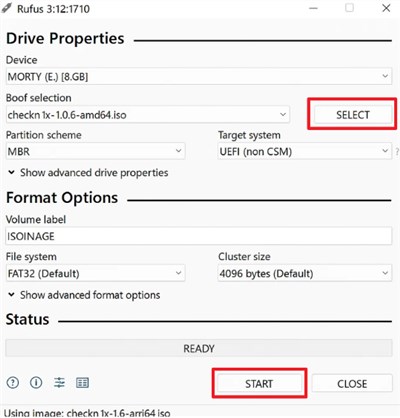
Step 2. When prompted, choose “Write In DD Image Mode” and confirm with “OK.” Wait until the process finishes, then close “Rufus.”
Step 3. Reboot your desktop and repeatedly press “F12” until the boot menu appears. Opt for the “USB Storage Device” option upon seeing the new screen to boot from the drive.
Step 4. Once the “Checkra1n Jailbreak Wizard” loads, connect your iPhone 6 and click “Start.” Follow the instructions to enter “Recovery Mode” and press “Next.”
Step 5. Press Start again and follow the given button prompts precisely. Your smartphone will now enter the necessary mode to begin jailbreaking automatically.
How to Jailbreak iPhone 6 Without a Computer
Unc0ver is a jailbreak utility available for compatible older iPhones, including certain iPhone 5s and iPhone 6 configurations. It supports iOS 11.0 to iOS 14.8, although compatibility can vary depending on the exact device model and iOS version. With Unc0ver, you can install jailbreak tweaks and apps and gain greater control over your iOS device. Before getting started, check whether your specific iPhone and iOS version are supported, and follow the required preparation steps carefully. Then, go through the steps below to use Unc0ver on your iPhone:
Step 1. Open the Unc0ver website on your smartphone’s browser and tap the “Jailbreak” button.
Step 2. Head to the “Profiles” section from your device’s general settings and select “Trust Unc0ver.”
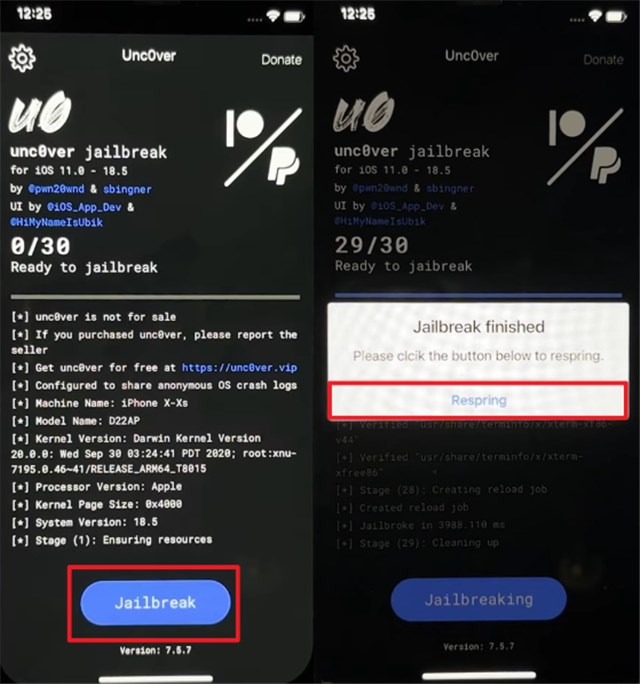
Step 3. Run this installed app and press the “Jailbreak” button from the main screen.
Step 4. As the task completes, tap “Respring” to restart and finalize the process.
FAQs about How to Jailbreak iPhone 6/6 Plus
Q1. Is it okay to jailbreak an iPhone 6?
Jailbreaking an iPhone 6 is possible, but it reduces security, can cause system instability, and voids the warranty. Make sure you understand these risks before proceeding.
Q2. What can you do with a jailbroken iPhone 6 Plus?
With a jailbroken iPhone 6 Plus, you can install custom themes, tweaks, and apps that Apple doesn’t allow. This gives you more control over your device’s appearance and features. It’s mainly used to add flexibility an older model normally lacks.
Q3. Is it worth jailbreaking an old iPhone 6?
Whether jailbreaking an iPhone 6 is worth it depends on your needs. It can extend the device’s usefulness with extra features and customization, but you must accept lower security and possible system issues. Consider the trade-offs before deciding.
Conclusion
To sum up, iPhone 6 Jailbreaking can offer numerous opportunities to customize the phone to be used more practically. It even allows access to applications not found in iOS. Besides, it also carries risks like iPhone app problems and system instability. Therefore, for a safe and easy solution, using AnyUnlock is highly recommended to jailbreak iPhone 6 efficiently. Download and use AnyUnlock now to jailbreak your device without hassle and confusion.
Free Download * 100% Clean & Safe



Joy Taylor is a seasoned technical writer with over a decade of experience in mobile technology. At iMobie, she specializes in producing in-depth content on iOS data recovery, iPhone unlocking solutions, and iOS troubleshooting.
Product-related questions? Contact Our Support Team to Get Quick Solution >
