[Don’t Miss] MDMPatcher Universal Full Review: Download & How to Use
MDMPatcher Universal is a free, open-source tool that removes MDM locks from iPhones and iPads. It works well on macOS for older iOS versions but lacks updates and support for newer devices. Users needing a stable and cross-platform option can use AnyUnlock for a more reliable MDM bypass.
Need a Windows-Compatible MDM Option?
If MDMPatcher Universal does not match your Mac, iPhone/iPad model, or current iOS version, AnyUnlock provides a guided MDM workflow for compatible devices on Windows and macOS. Check compatibility before proceeding.
MDMPatcher Universal is commonly searched by users who encounter Remote Management or an MDM profile on a previously managed iPhone or iPad. Because MDM can represent active organizational ownership, use any MDM patching or bypass workflow only on a device you own or are authorized to manage. If the device still belongs to a company or school, contact its administrator instead.
This review focuses on the original MDMPatcher Universal project: what it is, its documented compatibility, how to download it from its GitHub repository, the basic workflow, its pros and cons, and what to consider if you need Windows support or newer-device compatibility.
Also Read: Compare More MDM Removal Tools for iPhone/iPad >
Part 1. What Is MDMPatcher Universal?
MDMPatcher Universal is an open-source macOS utility hosted on GitHub. The original project is designed to patch MDM-related setup on supported iPhones and iPads without requiring the organization’s login credentials. It should not be confused with permanent organization-side release: if the device remains assigned to an organization, management can return after a later erase or restore.
MDMPatcher Universal: Quick Verdict
| Item | What to Know |
| Cost | Free and open-source |
| Official source | Original GitHub repository |
| Computer | Original GUI project is for macOS |
| Project compatibility wording | README says it should work on iOS 15+ and 64-bit devices up to iPhone 13 |
| macOS requirement | macOS 10.13+; original README mentions Intel or M1 |
| Latest original public release found | v1.0, released March 22, 2023 |
| Main limitation | Old release history and uncertain compatibility with newer devices/iOS versions |
| Windows version | No Windows version is provided by the original MDMPatcher Universal GUI project |
Functions of MDMPatcher Universal
- Free and Open Source: The source code and release assets are publicly hosted on GitHub.
- No Jailbreak in the Documented Workflow: The project is designed around a Mac-to-device patching workflow rather than a traditional jailbreak process.
- Simple GUI: The original application exposes a straightforward patch action after the iPhone or iPad is detected.
- Mac-Focused: The original GUI project targets macOS rather than Windows.
Does MDMPatcher Universal Still Work?
The safest answer is: it can work in some supported setups, but the original project does not provide enough current evidence to promise support for every recent iPhone, iPad, or iOS version.
Its GitHub README uses cautious wording—“should work” on iOS 15+—and also lists 64-bit devices only up to iPhone 13. The original public release history is old, while GitHub issues include reports of patch errors and questions about persistence.
Compatibility check: Do not interpret “iOS 15+” as “all newer iOS versions and all newer iPhones.” Check the project README, release activity, issues, and your exact hardware before relying on it.
What About MDMPatcher for Windows or MDMPatcher Enhanced?
The original MDMPatcher Universal GUI project is macOS-focused and does not provide an official Windows build. This is why searches such as “MDMPatcher for Windows” often lead users to third-party alternatives rather than an official Windows release.
You may also see MDMPatcher Enhanced in search results. It is a newer community fork that describes itself as a modernized version of the original project. Treat it as a separate project: review its own repository, release history, source code, and device support rather than assuming its compatibility is identical to MDMPatcher Universal.
Part 2. Get MDMPatcher Universal Download & How to Use
If you choose to test the original MDMPatcher Universal on a device you own or are authorized to manage, download it from the project’s original GitHub repository rather than an unofficial mirror. Because the project is old and compatibility is limited, review the README and open issues before installing it.
Step 1: Open the original MDMPatcher Universal GitHub repository and review the README, compatibility notes, and Releases page. Download the release asset only if your Mac and device fit the documented requirements.
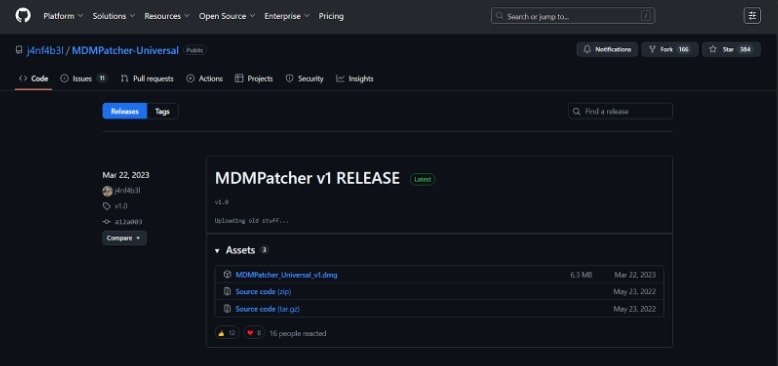
Step 2: Install the downloaded macOS application and review any macOS security prompts carefully. Do not disable security protections merely to force an unfamiliar or unofficial build to run.
Step 3: Connect the authorized iPhone or iPad to the Mac and confirm that the application recognizes the device.
Step 4: Follow the application’s documented patch workflow. If the tool reports an error or your device is outside the documented range, stop and reassess compatibility instead of repeatedly forcing the process.
Step 5: After the application reports completion, verify the device state. Remember that a local patch/bypass is not the same as the organization permanently releasing the device from its MDM service.
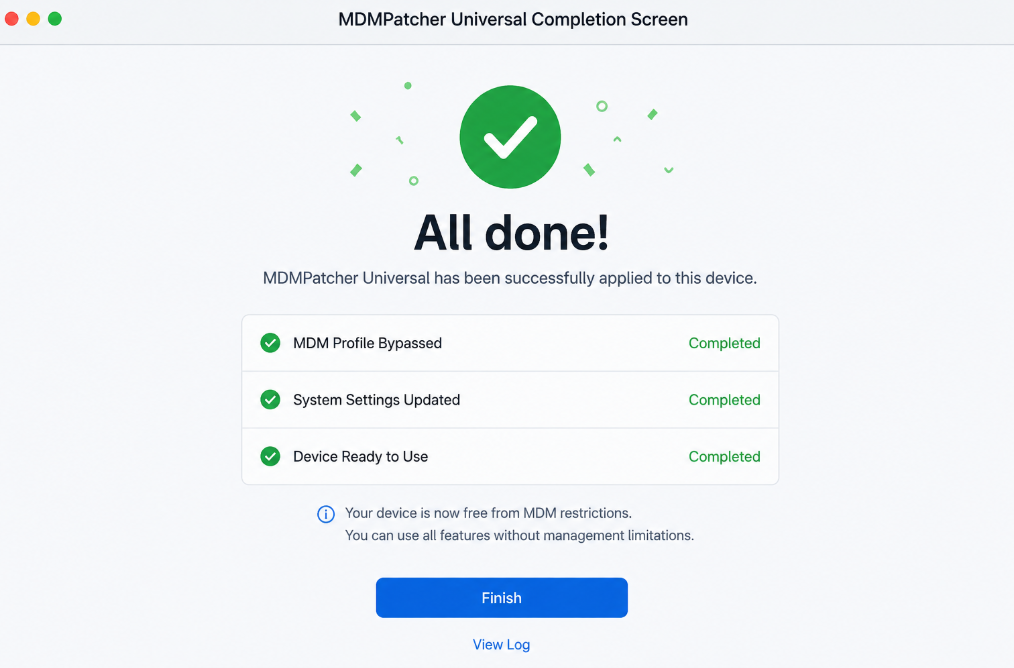
Download safety: The original repository is the best source for checking the project’s code, README, releases, and issues. Avoid repackaged DMG files from unknown download sites.
Part 3. Pros and Cons of MDMPatcher Universal
MDMPatcher Universal remains attractive because it is free and open-source, but its old release history and limited documented hardware range matter more in 2026 than they did when the project first appeared.
Pros
- Free: There is no subscription or license purchase for the original open-source project.
- Open source: Users can inspect the public repository rather than relying on a closed installer from an unknown source.
- Simple concept: The original Mac application provides a straightforward patch-oriented workflow.
- No Windows purchase required: Mac users with a compatible device can test the original project without buying commercial software.
Cons
- Original project is Mac-only: There is no official Windows build of the original MDMPatcher Universal GUI.
- Old public release: The original repository’s visible v1.0 release dates to March 2023, so recent-device support should not be assumed.
- Limited hardware wording: The README says 64-bit devices up to iPhone 13, so newer iPhones are outside the project’s stated device range.
- Uncertain newer-iOS compatibility: “Should work on iOS 15+” is not a guarantee of compatibility with every later iOS version.
- Community support limitations: GitHub issues show patch-error reports and unresolved questions, which matters if you need predictable technical support.
- Bypass is not organization release: If the device remains assigned to an organization, Remote Management can return after a later erase or restore.
Part 4. Bonus. Best MDMPatcher Universal Alternative [Easy & Safe]
If MDMPatcher Universal does not fit your device or computer—especially if you need Windows support or your iPhone/iPad is outside the original project’s documented range—you can compare a commercial alternative such as AnyUnlock.
AnyUnlock provides a guided MDM workflow on Windows and macOS for compatible devices. Unlike the original MDMPatcher project, it has a commercial support and update channel. Check its current device/iOS compatibility and licensing requirements before starting.
Remove Remote Management iPhone/iPad
- Guided Remote Management bypass workflow for compatible iPhone/iPad devices.
- Includes a separate workflow for supported local device-management removal scenarios.
- Available for Windows and macOS; check current device/iOS compatibility before proceeding.
Free Download100% Clean & Safe
Free Download100% Clean & Safe
Free Download * 100% Clean & Safe
For this comparison, the relevant difference is not AnyUnlock’s other unlock modules but its MDM workflow: it is available on both Windows and macOS and provides guided steps for supported MDM cases.
If you choose it as an alternative, follow the current onscreen instructions and confirm that the device you are working on is yours or that you are authorized to manage it:
Step 1: Download AnyUnlock from iMobie’s website and install it on your Windows or Mac system.
Step 2: Start the application and from the main menu select “MDM Bypass”.
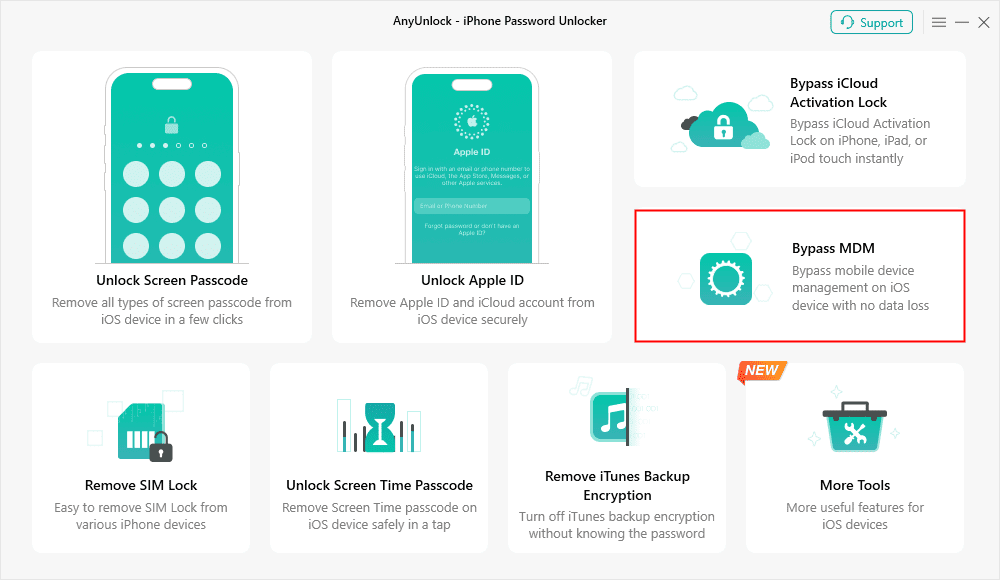
Step 3: Connect your device to the system, and from the next menu select “Start” from the “Bypass MDM” section.
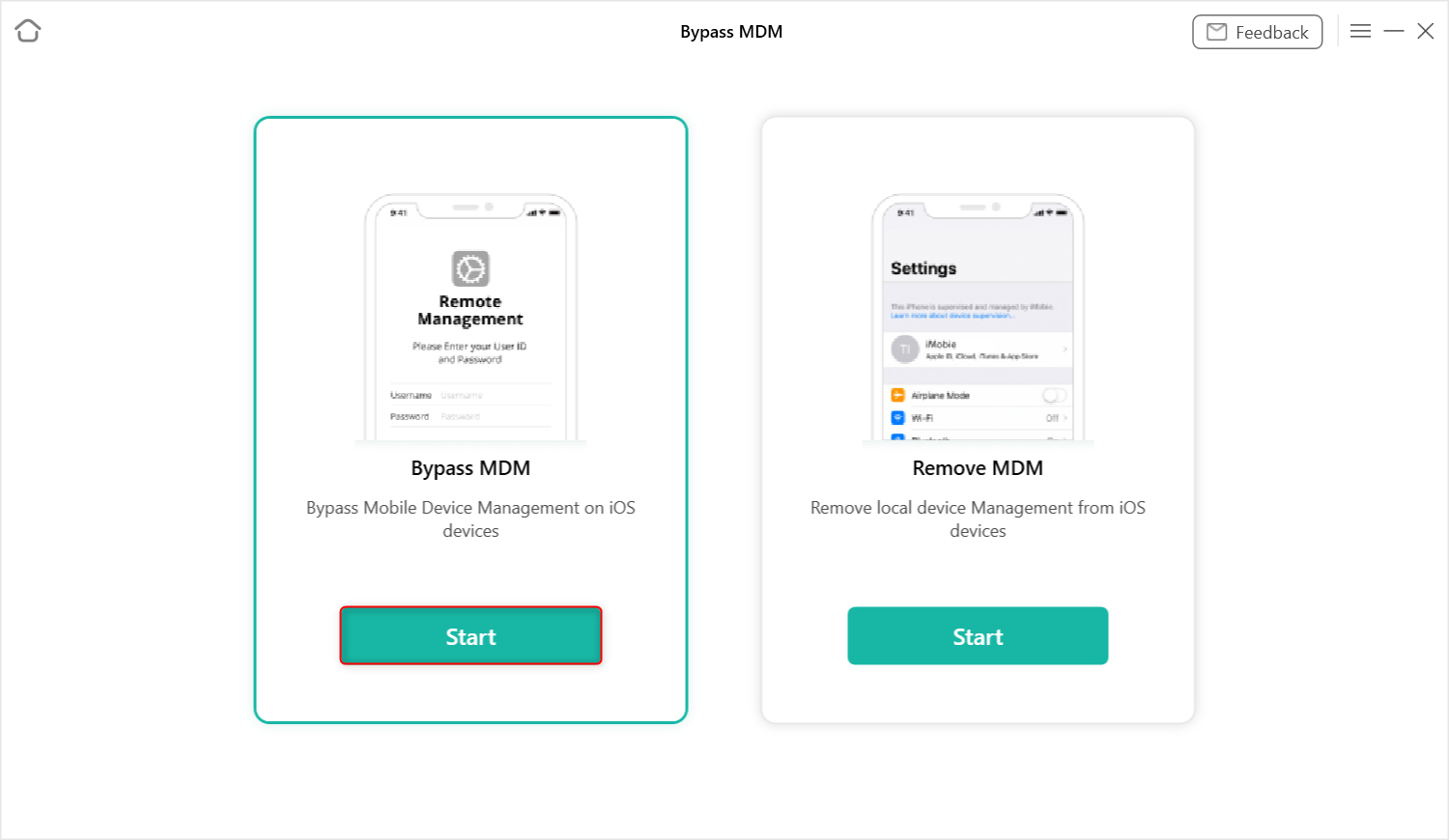
Step 4: The interface will move to the following windows, displaying a few instructions before starting the bypass. Follow those instructions, then click “Bypass MDM”.
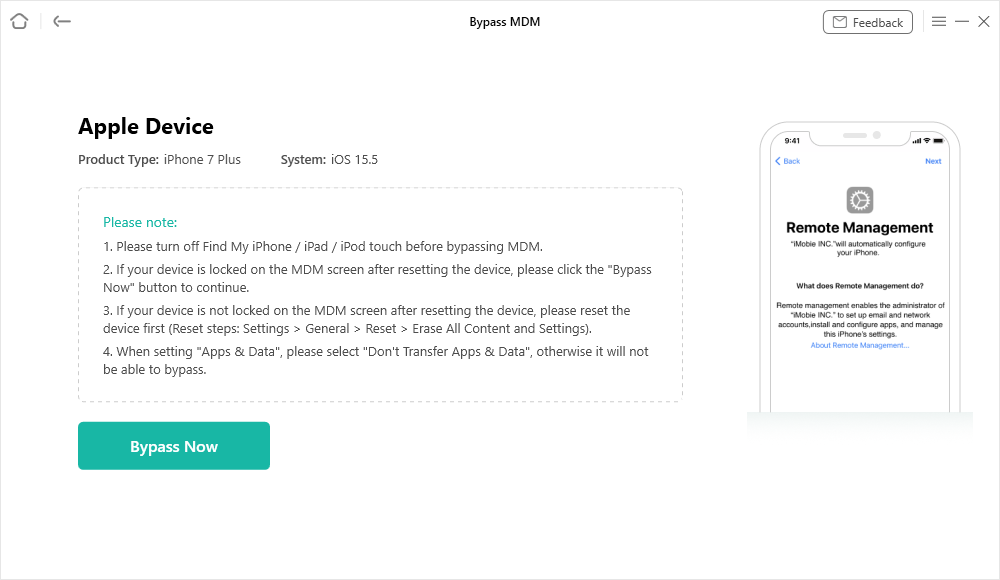
Step 5: Before starting the bypass, the application will ask to put your device into “remote management”. If you don’t know how to do that, click “Please click to view”. After following the displayed instructions, click “Already done”.
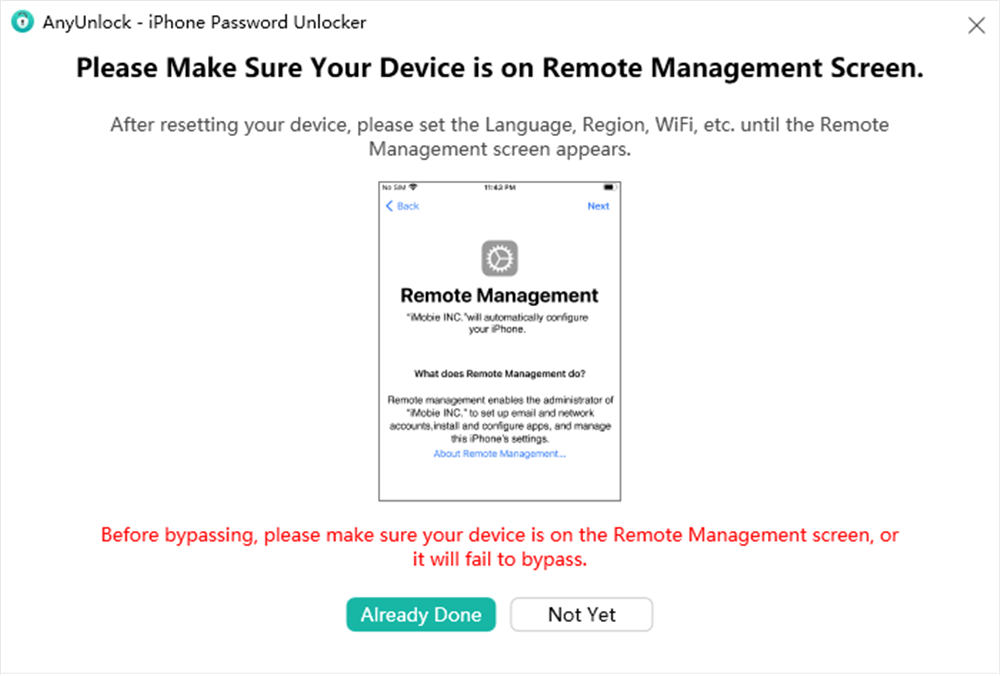
Step 6: Then click “Continue”, followed by confirming that your device is indeed in remote management mode.
AnyUnlock will run the selected MDM workflow. When it reports completion, verify the device state and remember that bypassing Remote Management does not necessarily remove server-side organizational enrollment.
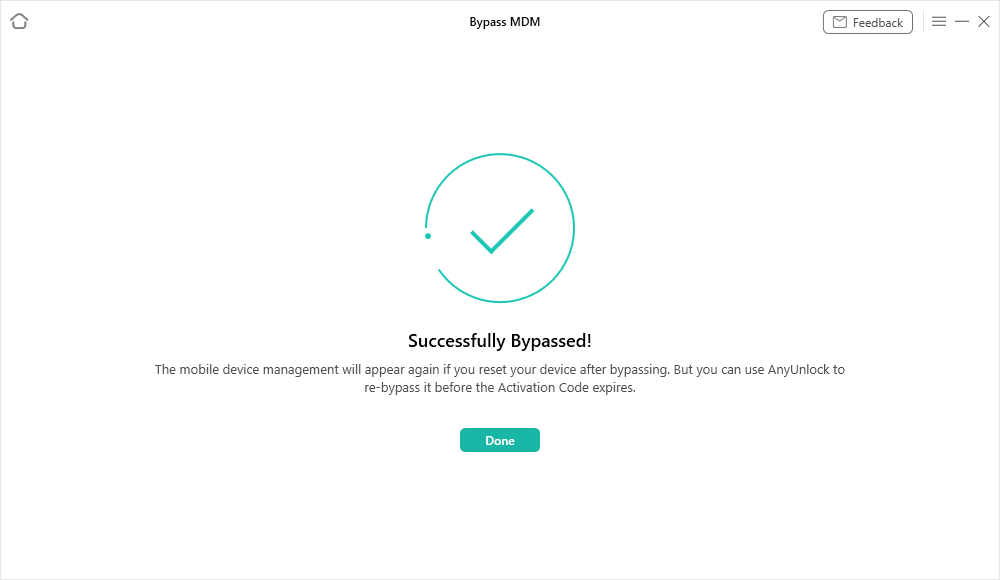
Choose the correct mode: “Bypass MDM” and “Remove MDM” address different device states. A Remote Management setup screen and an already accessible device with a local management profile should not be treated as the same case.
FAQs About MDMPatcher Universal
Is MDMPatcher Universal free?
Yes. The original MDMPatcher Universal project is open-source and its release assets are available from GitHub. Download from the original repository rather than an unofficial mirror.
Is there an official MDMPatcher for Windows?
The original MDMPatcher Universal GUI project is macOS-focused and does not provide an official Windows build. If Windows is required, you will need to evaluate a separate project or a Windows-compatible alternative rather than downloading a file that claims to be an “official” Windows version of the original tool.
What is MDMPatcher Enhanced?
MDMPatcher Enhanced is a separate community project that describes itself as a modernized fork of the original MDMPatcher Universal. Its releases, code, requirements, and compatibility should be evaluated separately from the original project.
Does MDMPatcher Universal support the latest iPhone and iOS?
The original repository says the patch should work on iOS 15+ but also lists 64-bit devices only up to iPhone 13. Those statements are not enough to guarantee support for every later iPhone or iOS release. Check the current repository and issues for your exact device before relying on it.
Part 5. Conclusion
MDMPatcher Universal is still relevant as a free, open-source Mac project, but its original documentation and release history make it a better fit for users who can verify that their exact device falls within the project’s documented range. The original project does not provide an official Windows build, and newer-device support should not be assumed. If you need Windows support, commercial support, or a workflow for a device outside that range, compare a current alternative and confirm compatibility before proceeding.
Free Download * 100% Clean & Safe



Joy Taylor is a seasoned technical writer with over a decade of experience in mobile technology. At iMobie, she specializes in producing in-depth content on iOS data recovery, iPhone unlocking solutions, and iOS troubleshooting.
Product-related questions? Contact Our Support Team to Get Quick Solution >
