UkeySoft Unlocker In-Depth Review and How to Unlock Apple ID/Screen Lock
UkeySoft Unlocker is software designed to help iOS users regain access to their locked devices. It can remove a forgotten screen passcode or even an Apple ID. This review examines what it can do and how to use it. We also explore AnyUnlock as a top alternative solution for broader unlocking needs.
Forgetting your iPhone passcode or buying a second-hand device locked to someone else’s Apple ID can be frustrating. Tools like UkeySoft Unlocker offer a solution by removing screen locks or Apple IDs without requiring the original password. This comprehensive 2026 review evaluates UkeySoft Unlocker’s capabilities, usability, pros, cons, and pricing, while comparing it to AnyUnlock, a robust alternative with broader unlocking features.
Part 1. What is UkeySoft Unlocker?
UkeySoft Unlocker is an iPhone/iPad unlocking software that is available for both Windows and macOS computers alike. It is designed to help users bypass various locks on iOS devices without requiring the original password. However, don’t forget to back up your data while using this software because it will wipe out your entire device.
Key Features:
- Remove Screen Passcodes: Bypasses 4/6-digit PINs, Touch ID, or Face ID and resets the device when you forget the password.
- Unlock Apple ID: Removes a linked Apple ID so you can sign in with your own, with or without “Find My iPhone” enabled (depending on iOS version).
- Bypass Screen Restrictions: Clears forgotten Screen Restrictions passcodes to restore full access.
- Device Compatibility: Works with all iPhone, iPad, and iPod touch models, and runs on both Windows and Mac.
- Ease of Use: Offers a beginner-friendly interface with automated firmware downloads.
Part 2. How to Use UkeySoft Unlocker
You can operate Ukeysoft Unlocker with just a computer, a USB cable, and internet access for firmware download. Here’s how this software works in unlocking your iPhone:
Always back up data via iCloud/iTunes, as unlocking typically erases all content.
To Unlock Screen Passcode/Apple ID:
Step 1: Start by installing UkeySoft Unlocker on your computer and opening the program. Next, select either Unlock Screen Passcode or Unlock Apple ID on the main screen.
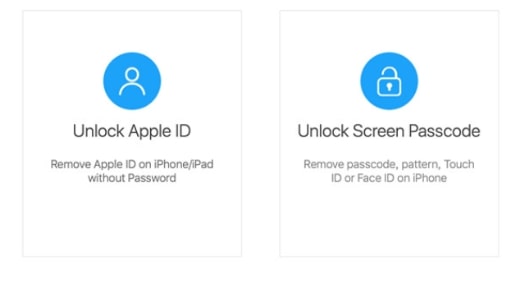
UkeySoft Unlocker Modes
Step 2: Once you select the mode, plug your iOS device into your computer system via a USB cable and click the Next button
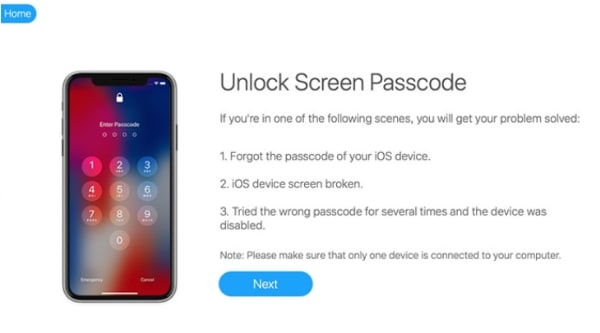
Proceed Unlock Screen Passcode Mode
Step 3: Confirm your device model, then click Download to fetch the iOS firmware package required for unlocking.
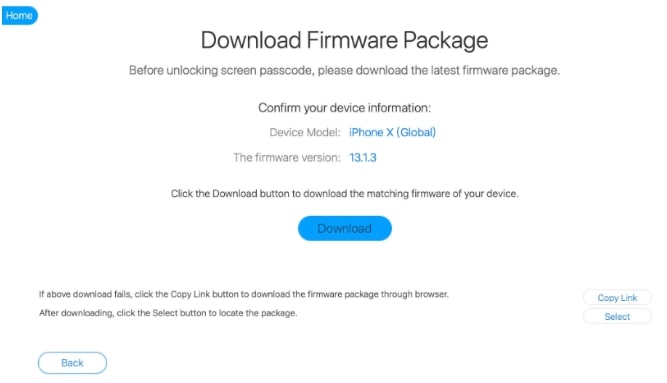
Download iOS Firmware in UkeSoft
Step 4: Once the firmware is ready, click Start Unlock. UkeySoft will erase the lock and restart your iPhone.
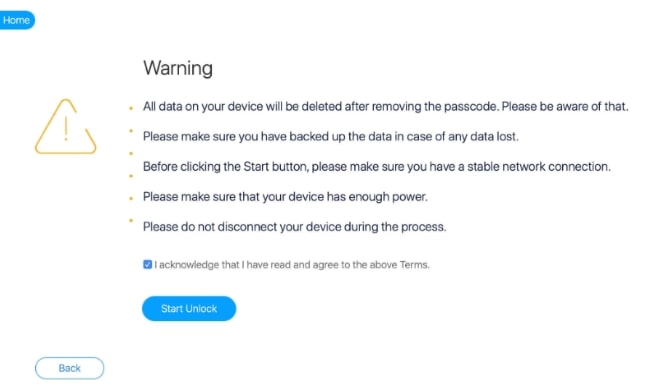
Start Unlock iOS Device in UkeySoft
After unlocking, your iPhone will reset. Set it up as new or restore from backup, followed by signing in with your Apple ID.
Part 3. Pros and Cons of UkeySoft Unlocker
| Pros | Cons |
| Effective Lock Removal: Bypasses screen passcodes and Apple IDs without credentials. | Data Loss: Unlocking wipes all data, requiring backups. |
| User-Friendly: Intuitive interface with clear steps, ideal for beginners. | Limited Features: Lacks MDM, SIM lock, or advanced iCloud Activation Lock removal. |
| Broad Compatibility: Supports all iOS devices (iPhone 4–16, iOS 7–18). | iTunes Dependency: Requires iTunes drivers, may fail without them. |
| Safe and Reliable: Virus-free, trusted by users with a 4.36/5 rating from 135 reviews. | Single Pricing Plan: $59.95 lifetime license, no monthly/annual options. |
| Handles Damaged Devices: Unlocks iPhones with cracked or unresponsive screens. | Success Rate Variability: May fail on newer iPhones or with hardware issues if Find My is enabled. |
| Lifetime License: One-time $59.95 payment for unlimited device unlocks. |
Part 4. Best Alternative to UkeySoft Unlocker: AnyUnlock
You might consider a more comprehensive iPhone unlocking solution if UkeySoft’s limitations give you pause. One of the best alternatives to UkeySoft Unlocker in 2026 is AnyUnlock – iPhone Password Unlocker by iMobie. It is an all-in-one unlocking toolkit that can handle not only screen passcodes and Apple ID removal, but also cover the gaps left by Ukeysoft.
For a more comprehensive solution, AnyUnlock by iMobie outperforms UkeySoft in 2025. It handles screen passcodes, Apple IDs, iCloud Activation Locks, MDM profiles, Screen Time passcodes, and SIM locks, offering broader functionality.
Why AnyUnlock?
- Versatile Unlocking: Covers screen passcodes, Apple ID, iCloud Activation, MDM, SIM locks, and Screen Time.
- Higher Success Rate: Supports the latest iOS 26 and iPhone 17, even with complex locks.
- User-Friendly: Clean interface with step-by-step guides, no tech skills needed.
- Flexible Pricing: Offers monthly, yearly, and lifetime plans.
Free Download * 100% Clean & Safe
How to Unlock Screen Passcode with AnyUnlock
Step 1: Download and Open AnyUnlock
Install the program on your PC/Mac, then select Unlock Screen Passcode on the home screen.
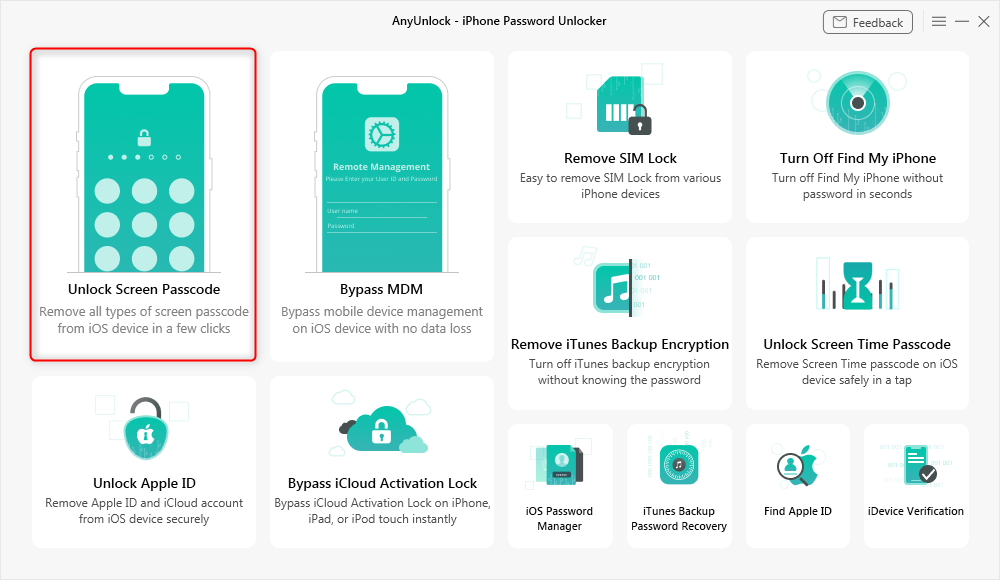
Choose Unlock Screen Mode
Step 2: Connect Device
Plug in your locked iPhone/iPad with a USB cable and click Start Now to continue.
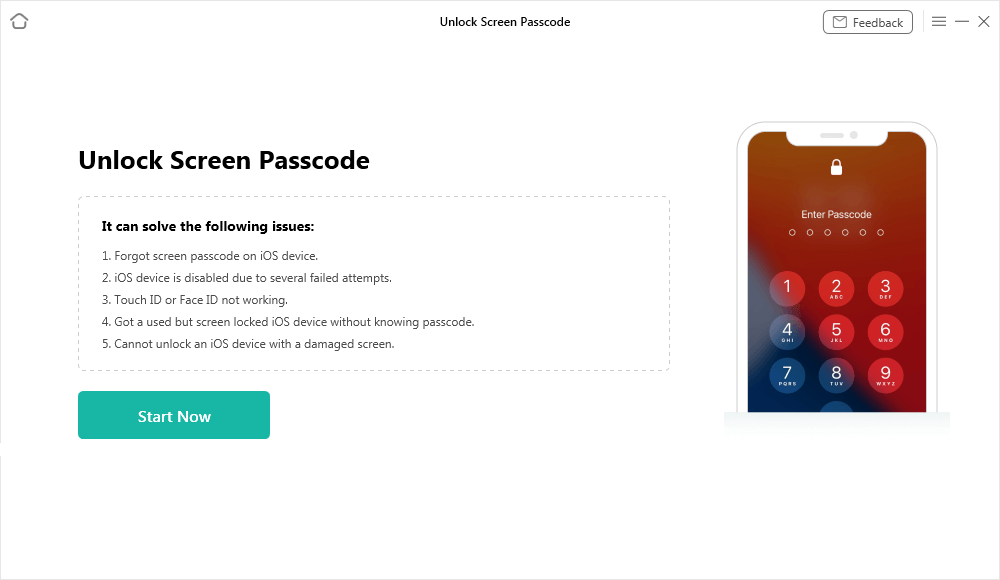
Connect iPhone to Computer
Step 3: Download Firmware
Confirm your device details and click Download to get the required iOS firmware.
Step 4: Remove Lock
After the package is verified, click Unlock Now to erase the passcode and reset your device.
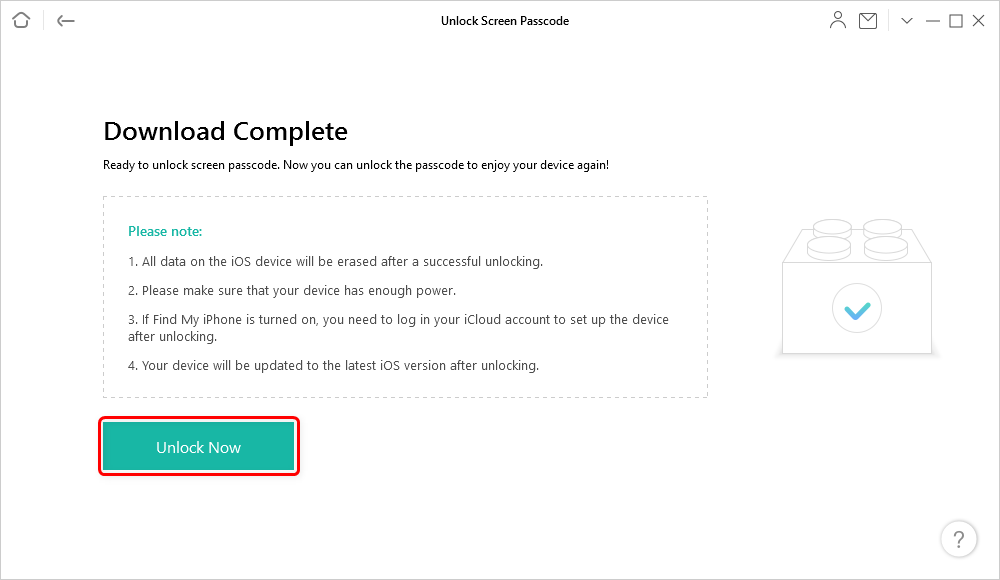
Tap on Unlock Now to Continue
Other Unlocking Features of AnyUnlock
- Apple ID Removal: Lets you unlink an iPhone/iPad from a previous Apple ID and sign in with your own.
- iCloud Activation Bypass: Can bypass the “iPhone Locked to Owner” screen (with limitations on some services).
- MDM Profile Removal: Removes school or company management profiles without data loss.
- Screen Time Unlock: Recovers or deletes forgotten Screen Time passcodes.
- SIM Lock Removal: Unlocks iPhones tied to a single carrier in supported cases.
FAQs
Q1. Is UkeySoft Unlocker safe and legit?
Yes, it’s from a reputable company and virus-free, with a 4.36/5 user rating. Avoid cracked versions, as they risk malware or data leaks.
Q2. Can UkeySoft Unlocker work without data loss?
Only Apple ID removal on iOS 10.2–11.4 with Find My off avoids data loss. Other unlocks erase all data.
Q3. How does AnyUnlock compare in pricing?
AnyUnlock offers flexible plans ($35.99/month, $69.99/lifetime) versus UkeySoft’s $59.95 lifetime-only plan.
Conclusion
All in all, UkeySoft Unlocker can help you by removing the locked screen passcodes or Apple IDs in almost no time. It’s simple to use and supports most iOS devices in 2025. However, its limitations, like data loss, no MDM/SIM lock support, and iTunes dependency, make AnyUnlock a superior alternative with broader features, flexible pricing, and higher success rates. Always back up data and ensure legal ownership before unlocking. Choose the right tool for your iOS unlocking needs in 2025!



Wanda Norris is a junior author in iMobie specializing in iOS tips and solutions. She keeps a close eye on every iOS update to provide practical, easy-to-understand guides that help users solve problems and master their Apple devices.
Product-related questions? Contact Our Support Team to Get Quick Solution >
