Quick Answer: When searching for a “GOT map,” most users are looking for one of three very different experiences:
- The Westeros Fantasy Map: Fans of the Game of Thrones books and show looking to track character journeys and explore fictional geography.
- The Ghost of Tsushima Gaming Map: Console and PC gamers needing an interactive tool to find collectibles, hot springs, and shrines in massive open-world gameplay.
- Mobile LBS (Location-Based Services) Maps: Mobile gamers participating in real-world map events, like the Dragon Egg Hunt in Game of Thrones: Legends, where Google Maps data blends with fantasy gameplay.
Because the term “GOT” shares an acronym between a massive fantasy franchise and a blockbuster PlayStation game, finding the right map tool depends entirely on what you are trying to track. Console and PC gaming maps serve a completely different purpose than fantasy lore trackers. Meanwhile, a new wave of mobile gaming is turning your real-world neighborhood into a live GOT map.
Whether you need to find all the Fox Dens in Tsushima, trace Arya Stark’s path through Westeros, or manage your physical GPS location for a mobile LBS event, this guide will point you to the exact map tool you need.
Interactive Maps for Ghost of Tsushima (Console & PC)
For a massive portion of the gaming community, the “GOT map” refers to the sprawling, beautiful open world of Ghost of Tsushima. Because the game is packed with hidden collectibles, side quests, and upgrades, relying solely on the static in-game map can leave you wandering aimlessly.
If you are trying to achieve 100% completion, MapGenie is widely considered the dominant interactive tracking tool for the game. Available via web browser and mobile app, MapGenie allows you to filter specific icons so you can easily track down every Shinto Shrine, Bamboo Strike, and Hot Spring across the island of Tsushima. You can mark items as “found” to clean up your map view as you progress.
Ghost of Tsushima is strictly a console and PC experience. This means your progression is tied to your controller and in-game avatar. Virtual location changers and GPS spoofing tools do not apply to this game, as there is no real-world geolocation data involved in your gameplay.
Exploring Westeros: Best Interactive Maps for Game of Thrones Fans
If your search for a GOT map is rooted in George R.R. Martin’s fantasy universe, you are likely trying to make sense of the massive scale of Westeros and Essos. The political borders, noble house locations, and character travel paths in Game of Thrones can be deeply confusing when relying on standard paper maps found in the front of the books.
For fantasy fans, Quartermaester is one of the best interactive fan-made maps available. It operates much like Google Maps but for the fictional world. You can zoom in on specific castles, toggle noble house territories, and even track the specific chapter-by-chapter or episode-by-episode journeys of major characters. Using an interactive tracking tool helps fans follow the complex lore without accidental spoilers, as you can often set the map to match your current progression in the story.
Interestingly, the desire to explore Westeros is no longer limited to just staring at a fictional drawing. In recent years, game developers have started integrating this fantasy world directly into real-world maps via location-based mobile gaming.
Game of Thrones: Legends and Real-World Mobile Map Events
The concept of a GOT map is shifting from fiction to reality thanks to Location-Based Services (LBS) in modern mobile games. Zynga’s Game of Thrones: Legends utilizes real-world map data to overlay fantasy elements onto your actual neighborhood.
A Realistic Scenario:
- The Goal: You open the app and see that a rare dragon egg has spawned three blocks away from your house.
- The Mechanic: Because the game integrates real-world Google Maps data, you have to physically walk to that real-world location, open the game, and interact with the point of interest on your mobile device to claim the reward.
- The Experience: Instead of moving an avatar with a controller, you are the avatar. Your physical phone GPS dictates what you can see and interact with on the map.
This creates a highly engaging experience, turning your daily commute or local park into a functional GOT map. However, while LBS games are incredibly immersive, relying on your actual physical location can quickly create a frustrating workflow gap for players who cannot easily travel.
The Challenge of Physical Geolocation in Mobile AR/LBS Games
While real-world map events in games like GOT Legends are exciting, they restrict your progression strictly based on your physical GPS location. If you cannot reach the event spot in the real world, you miss out in the game.
Players frequently face several physical and geographical limitations:
- Location Disadvantage: Living in rural or suburban areas often means fewer map events and points of interest compared to major cities.
- Weather and Time Restrictions: Heavy rain, extreme heat, or late-night event spawns make it unsafe or impossible to walk outside.
- Mobility Issues: Being stuck at home, at work, or dealing with physical mobility constraints prevents active participation in walking-based events.
- Unstable Workarounds: Many players attempt to use traditional “fake GPS” mobile apps to reach these events, only to find they cause rubber-banding, where the map aggressively snaps back and forth, resulting in account warnings, unstable connections, or game crashes.
Because modern mobile AR and LBS games employ strict location-tracking logic, basic mobile spoofer apps or a simple GPS joystick downloaded from an app store often fail. To participate in location-based events without physical travel, players need a stable, desktop-guided virtual GPS solution that simulates natural movement.
Managing Virtual GPS for GOT Mobile Games with Fonelora
When physical limitations prevent you from participating in real-world GOT mobile map events, a dedicated desktop solution is much more reliable than standard mobile fake GPS apps. Fonelora Location Changer provides a guided workflow for iPhone and Android location change, allowing you to access location-based game events under supported conditions.
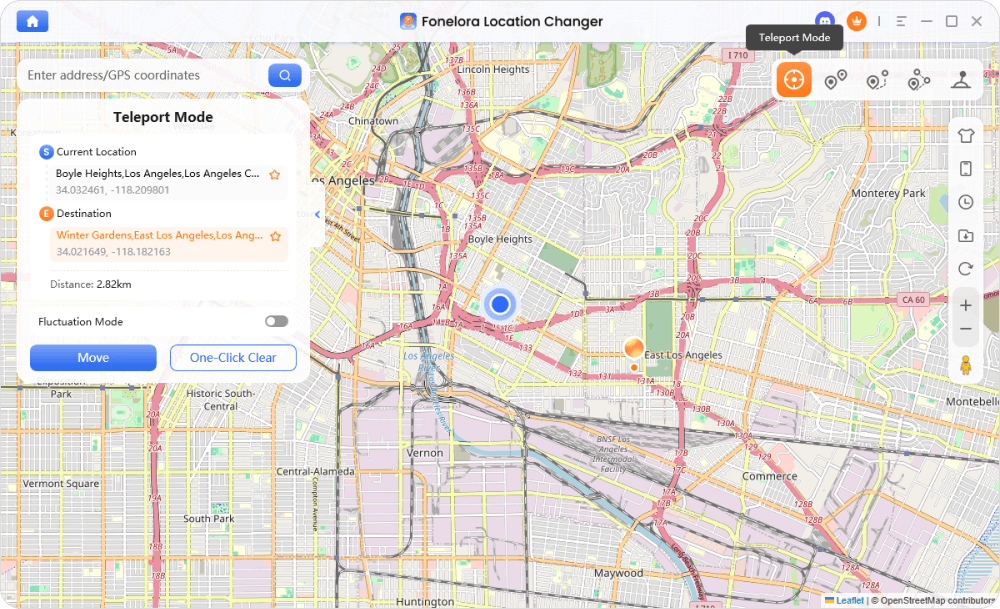
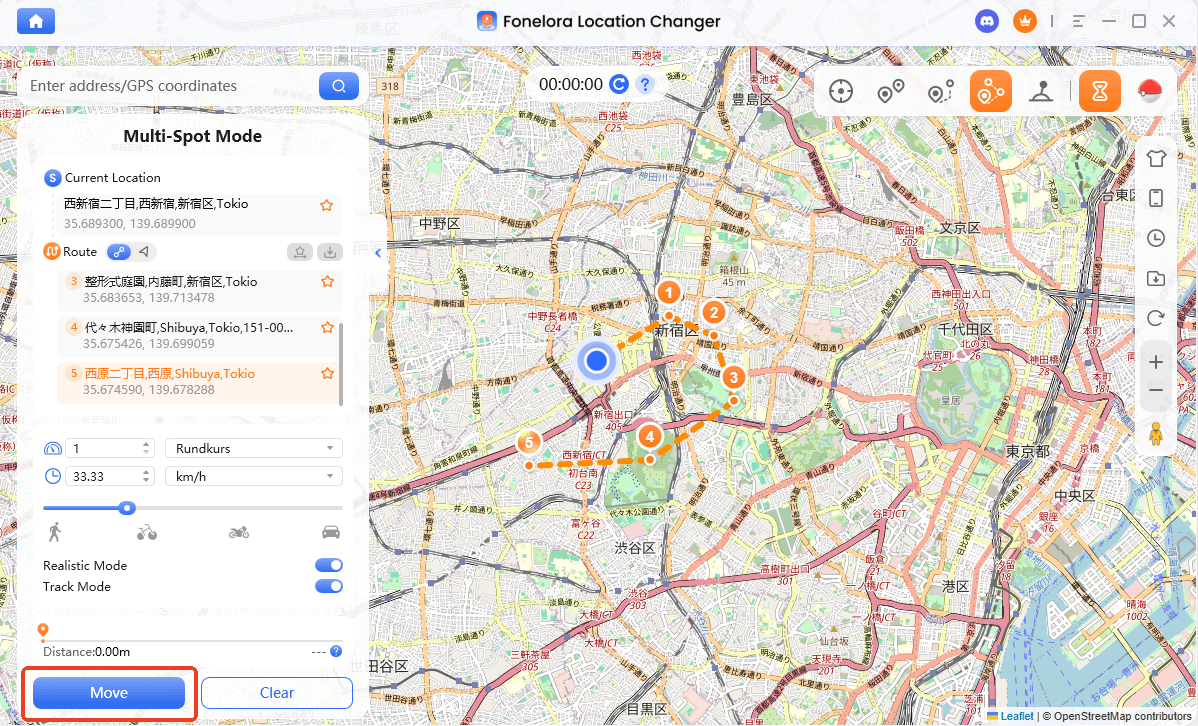
Instead of dealing with unstable mobile apps, Fonelora connects your phone to a computer and allows you to simulate natural movement. You can use Teleport Mode to instantly reach a specific real-world event spot, like a Dragon Egg spawn, or Joystick Mode to make micro-adjustments as if you were walking around the block.
Fonelora Location Changer
Realistic GPS movement simulation, flexible route control, easy no-modification setup, and support for gaming, social, privacy, and location-based testing in one platform.
How to manage virtual movement for AR map games:
- Connect Your Device: Launch Fonelora Location Changer on your PC or Mac and connect your supported iPhone or Android device.

- Select Game Mode: Choose the game-oriented setup to ensure your movement is optimized for LBS applications.
- Choose Your Movement: Select Teleport Mode to jump to a specific coordinate where an event is taking place, or choose Joystick Mode for real-time directional walking.
- Monitor Cooldowns: Use the built-in cooldown timer to ensure you wait a natural amount of time after long-distance teleporting, helping manage account risks through cooldown-aware location change.
- Simulate Movement: Start your virtual movement and interact with the map events directly on your phone screen.
Fonelora Location Changer should be used responsibly under supported conditions. Always check specific app rules regarding virtual location tools. While features like cooldown reminders and realistic movement speeds help simulate natural travel, they do not guarantee zero account risk.
Ready to start? To overcome physical boundaries and participate in real-world map events, check your iOS or Android device’s compatibility and download the desktop client from the official Fonelora Location Changer page.
Frequently Asked Questions About GOT Maps
- Where can I find an accurate Game of Thrones map?
- If you are looking for the fictional map of Westeros, Quartermaester is one of the most popular interactive fan maps available for tracking character journeys and exploring the lore.
- Is there an interactive map for Ghost of Tsushima?
- Yes. MapGenie is highly recommended for Ghost of Tsushima players. It provides an extensive, filterable map to help you track collectibles, hot springs, and shrines across the game’s open world.
- How do I track collectibles on the GOT map?
- This depends entirely on the game. For console games like Ghost of Tsushima, use browser-based tools like MapGenie. For real-world mobile LBS games like GOT Legends, you must navigate to physical locations using your device’s GPS.
- How do you navigate real-world map events like the GOT Legends Dragon Egg Hunt?
- You can either physically walk to the real-world location where the event spawned, or you can manage your virtual location using a desktop-guided GPS tool if you are unable to travel.
- Can I play location-based Game of Thrones mobile events without walking?
- Yes, under supported conditions. By using virtual location tools like Fonelora Location Changer, you can simulate walking routes or teleport to event locations without physically moving.
- What is the best way to manage virtual GPS for AR map games?
- The most reliable method is using a desktop-guided tool like Fonelora Location Changer. It provides a more stable connection than mobile-only fake GPS apps and includes cooldown reminders to help you manage movement responsibly.
Final Thoughts: Choosing Your GOT Map Experience
Ultimately, finding the right “GOT map” comes down to which world you are trying to conquer.
- For Console Gamers: If you are hunting down every last shrine in Ghost of Tsushima, pull up MapGenie on a second screen to seamlessly track your in-game collectibles.
- For Fantasy Fans: If you are trying to understand the massive scale of George R.R. Martin’s universe, Quartermaester is your best bet for an interactive, spoiler-free Westeros experience.
- For Mobile Gamers: If you are navigating real-world map events in games like Game of Thrones: Legends but find yourself restricted by bad weather, rural locations, or a lack of mobility, you need a different kind of tool entirely.
For LBS mobile gamers, physical location shouldn’t lock you out of exciting game events. Fonelora Location Changer offers a stable, desktop-guided workflow to help you manage your iPhone or Android GPS. By utilizing Joystick Mode and cooldown-aware movement under supported conditions, you can safely explore real-world AR maps and collect event rewards without leaving your home.

Fonelora Location Changer
- Bluetooth Hardware Simulation for Safer GPS Spoofing
- Realistic Movement & Route Simulation
- No Root or Jailbreak Required
- All-in-One Solution for Games, Social Apps & Privacy
More Related Articles



