Stepping outside for a daily walk can feel like a missed opportunity when a vibrant digital world is mapped right over your physical neighborhood. If you’ve heard about games like Pokémon GO but never quite understood how they work, you aren’t alone. Difficulty grasping the mechanics, combined with real concerns about data caps, dead batteries, and sparse coverage in rural areas, keeps a lot of players stuck inside.
Getting started shouldn’t feel overwhelming. This guide is built to get you out the door. We’re going to break down how these real-world exploration games actually function, highlight the best titles for your specific playstyle, and share authentic, field-tested tricks to keep your battery alive and your map full of encounters.
Table of ContentsHide
Understanding GPS Location Based Games: Core Mechanics Explained
For many users, the initial point of friction is simply understanding how these applications operate under the hood. Traditional mobile titles rely on on-screen joysticks or touch controls to move a character across a static digital map. GPS location-based games completely invert this standard procedure by requiring physical movement in the real world.
Optimizing your experience requires a firm grasp of the underlying technology. Knowing these mechanics will help you troubleshoot common tracking errors when you’re out in the field.
The Three Core Mechanics of Geolocation Games
- Active GPS Tracking: Instead of an on-screen controller, the game continuously communicates with your device’s internal GPS receiver to update your real-time coordinates. You move your in-game avatar strictly by walking, cycling, or commuting in the real world. Learn how to optimize Android GPS accuracy.
- Point of Interest (POI) Interactions: Developers map digital objects onto real-world landmarks, such as statues, post offices, murals, or public parks. You must physically travel to these specific coordinates to trigger an interaction, collect resources, or battle opponents.
- Augmented Reality (AR) Integration: When interacting with a POI, the application often superimposes 3D digital elements over your phone camera’s live video feed. This technique bridges the digital and physical worlds, creating an immersive experience.
Crucial Device Warning: While most of these games are fully cross-platform (meaning they work equally well on iOS and Android), do not hand your kid a Wi-Fi-only iPad and expect it to work outdoors. Wi-Fi-only tablets typically lack a dedicated GPS chip. Without a Wi-Fi connection to triangulate from, the character will be permanently stranded in place the moment you step out of router range.
The Best Location Based Mobile Games for Every Playstyle
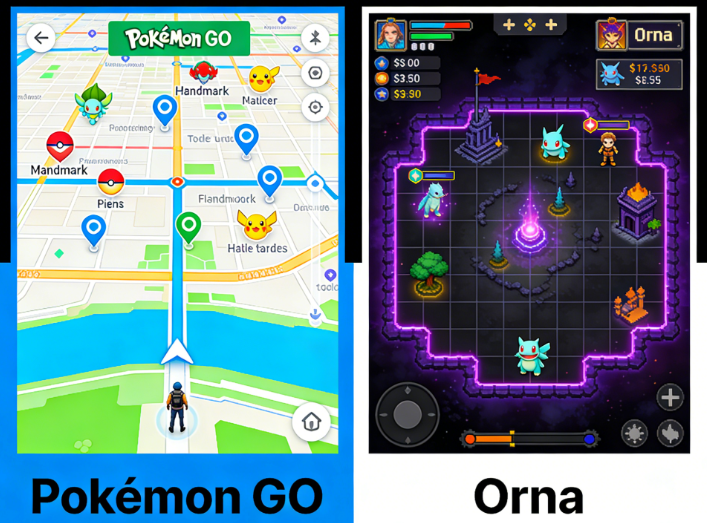
To solve the uncertainty about which titles to try first, we have categorized the top real-world exploration games based on specific playstyles.
1. Casual Exploration: Pokémon GO & Pikmin Bloom
For players wanting a relaxed introduction to GPS gaming, Pokémon GO and Pikmin Bloom (both developed by Niantic) are exceptional choices.
- Pikmin Bloom: Think of this as a highly gamified step-tracker. As you walk, you plant virtual flowers on the global map, leaving a colorful trail behind you. It requires minimal screen time and is perfect for casual walkers looking to add a layer of gentle reward to their daily routines.
- Pokémon GO: Offering slightly more active gameplay, this title requires you to navigate to specific real-world coordinates to catch creatures, spin “PokéStops” for items, and participate in local gym battles. With its massive global community, it remains the most accessible entry point.
2. Action and Fitness: Monster Hunter Now & Zombies, Run!
If your goal is to combine brisk walking with fast-paced action or immersive audio, check out these highly active titles.
- Monster Hunter Now: Instead of catching creatures, you hunt massive monsters mapped to your local neighborhood. The game encourages you to walk to different rotating biomes (forests, deserts, swamps). Real-World Warning: Anyone who actually plays Monster Hunter Now outdoors knows the gritty reality—during the summer, fast-paced 75-second battles can make your phone run incredibly hot, causing your screen to dim from overheating in about 15 minutes. Play in the shade or during cooler morning hours!
- Zombies, Run!: This is the ultimate POI-independent game. It functions entirely through audio. As you walk or jog, you listen to a radio drama about surviving a zombie apocalypse. When the zombies “chase” you, you literally have to speed up your real-world pace. It doesn’t rely on physical landmarks, making it phenomenal for rural players.
3. Deep Storytelling and Strategy: Ingress Prime & Orna
For a more hardcore experience requiring long-term planning, consider these strategy-heavy alternatives.
- Ingress Prime: This game turns your entire city into a global sci-fi battleground. Players join one of two factions and fight for control of real-world landmarks by hacking “portals” and linking them together to create control fields. It requires coordination, map awareness, and teamwork.
- Orna: Orna is a classic, retro-style turn-based RPG layered over a GPS map. It allows you to claim your real-world neighborhood as your own virtual territory, build structures, and fight monsters. It is highly praised for being extremely friendly to rural players, as the game generates enemies constantly, regardless of nearby landmarks.
Decision-Making Guide: Optimizing Your Gameplay Setup
Before heading outside, it helps to know how you want to play. Players generally choose between standard manual gameplay and an “Enhanced Setup” that incorporates premium Bluetooth hardware accessories to catch items while your phone is locked.
Setup Comparison Breakdown: Manual vs. Auto-Catchers
| Feature | Standard Manual Play | Enhanced Setup (Hardware Auto-Catchers) |
|---|---|---|
| How It Works | Keep the app open on your screen and manually tap encounters as you walk. | Connect a Bluetooth accessory (like the Pokémon GO Plus+ or Dual Catchmon) to auto-collect items while your phone is locked. |
| Popular Hardware | None required. | Pokémon GO Plus+ (~$55): Official, supports sleep tracking, but vibration is quite loud. Dual Catchmon (~$80): Pricier, but connects two accounts simultaneously and runs on easy-to-swap AA batteries. |
| Time Cost | High. Requires dedicated, active screen interaction. | Low. Accumulate resources passively during your standard daily commute or grocery run. |
| Safety Risk | Moderate. Requires active situational awareness. | Low. Keeps your phone in your pocket, letting you keep your eyes entirely on your physical surroundings. |
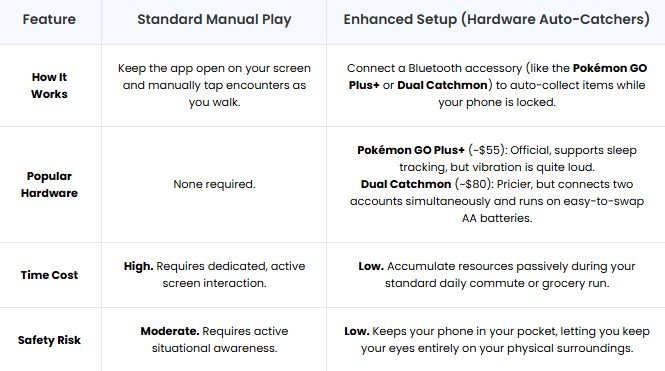
By evaluating these options, you can choose the playstyle that best fits your daily routine. If you are a daily commuter, a Bluetooth auto-catcher is often worth the investment.
How to Actually Maximize Spawns in Rural and Suburban Areas
One of the most frustrating obstacles players face is the stark difference in gameplay quality between dense urban centers and quiet suburban or rural areas. Because points of interest are usually pulled from historical mapping databases, rural players often open their app to find an empty, barren map.
Many beginner guides lazily suggest that you “Submit New Points of Interest” or “Buy Lure Items.” We know that’s terrible advice. Submitting new POIs usually requires grinding for months to reach a maximum account level, and premium Lures cost real-world money. Instead, use these practical workarounds:
- Play POI-Independent Games: If you live miles away from a downtown area, pivot to games that don’t rely on landmarks. Titles like Orna and Zombies, Run! track your distance and spawn enemies based on your current location, meaning you can play them flawlessly in the middle of the woods or a quiet cul-de-sac.
- Utilize Daily Free Spawn Mechanics: Games like Pokémon GO have adapted to rural complaints by offering items like “Daily Adventure Incense.” This free item guarantees spawns for 15 minutes as long as you are actively walking in a straight line, completely bypassing the need for physical landmarks.
- Target High-Traffic Micro-Zones: Cellular data usage mapping influences where digital items naturally spawn. Focus your daily walks around local gathering spots. Small post offices, community centers, strip malls, and church parking lots have a significantly higher mathematical probability of hosting dense spawn clusters.
- Connect with Local Discord/Campfire Groups: You don’t have to map out your town alone. Search for local community groups on the Niantic Campfire app or Discord. Veteran players often know exactly where the hidden “spawn clusters” are in suburban neighborhoods and gladly share community-mapped walking routes.
Essential Safety, Battery, and Data Tips for the Field
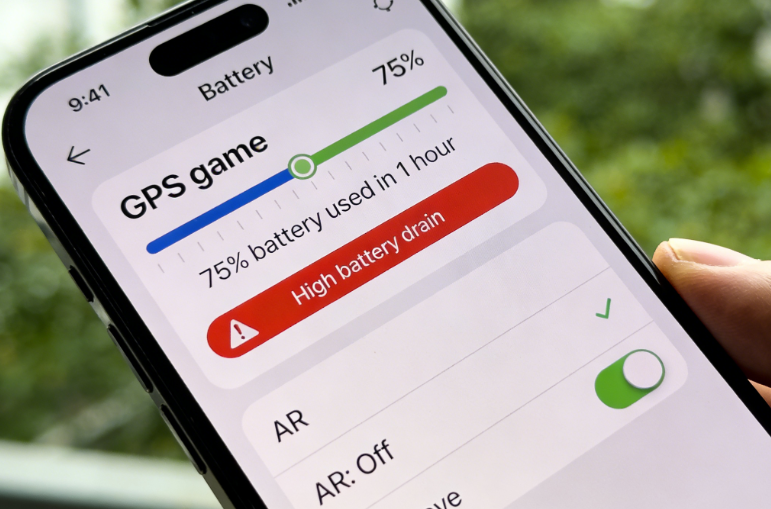
Because these applications simultaneously run your GPS receiver, camera, and mobile data, they consume device resources aggressively. Before you head outside, make these crucial system tweaks.
Optimizing Battery and Data Consumption
- Download All Assets at Home: Dive into the game’s advanced settings menu and select “Download All Assets.” Doing this over your home Wi-Fi drastically reduces the mobile data required to load 3D models and map textures once you are out on the street.
- Use the Native Battery Saver (Niantic Titles): If you are playing Niantic games like Pokémon GO or Pikmin Bloom, enable the built-in battery saver mode in the app settings. Once enabled, simply holding the phone upside down at your side turns the screen completely black. It keeps the GPS active and vibrates for nearby interactions without wasting power on the display.
- Disable AR Modes Entirely: While Augmented Reality is great for a quick photo, rendering live 3D graphics over your camera feed drains the battery exceptionally fast. Real-World Stat: On an iPhone 13, leaving AR mode turned on during an active walk drained the battery by 40% in just 30 minutes. Toggle the AR feature off. It doubles your active playtime and makes interactions much faster to complete.
Safety & Situational Awareness First
Your physical safety is the ultimate priority. Never enter private property to reach a digital coordinate. Strictly avoid interacting with your screen while driving, cycling, or operating heavy machinery. Always pause your walk and step completely out of the flow of pedestrian traffic before engaging in a complex in-game battle.
A Flexible Option for Exploring More Areas
While location-based games are designed to encourage real-world exploration, not every player has the same access to parks, city centers, or high-density points of interest. Players in rural areas, those with limited free time, or anyone dealing with bad weather may find it difficult to reach the locations where the best in-game activities take place.
For those situations, Fonelora Location Changer offers an alternative way to explore different areas through GPS location management and route simulation. The software allows users to create customized walking routes, simulate movement at adjustable speeds, and virtually explore regions that may contain more Points of Interest, events, or gameplay opportunities.
Whether you’re trying to discover new PokéStops, explore a different neighborhood, or make better use of limited playtime, Fonelora Location Changer can provide additional flexibility when enjoying location-based games.

Frequently Asked Questions About Geolocation Games
- What exactly is a location-based game and how does it work?
- A location-based game is a mobile app that uses your smartphone’s internal GPS hardware to track your real-world movements. Instead of using a digital joystick, you must physically walk around your neighborhood to move your character, interact with mapped digital landmarks, and complete objectives.
- What are the best location-based games I can play right now?
- The top recommendations depend on your preferred playstyle. Pokémon GO and Pikmin Bloom are excellent for casual exploration. Monster Hunter Now provides fast-paced action, Zombies, Run! is perfect for immersive fitness, and Ingress Prime and Orna offer competitive strategy for more hardcore players.
- Do location-based games use a lot of battery and data?
- Yes. Running GPS, maximum screen brightness, and live cellular data simultaneously will drain a battery fast. You can mitigate this by downloading game assets over Wi-Fi beforehand, utilizing in-game battery-saver modes, permanently turning off live AR camera features, and carrying a reliable portable power bank.
Conclusion
Transitioning to location-based games doesn’t have to mean dead batteries, empty maps, or missing out on content simply because of where you live. By choosing the right game for your environment, optimizing your device settings, and taking advantage of community resources, you can create a much more rewarding experience. Players looking for additional flexibility may also consider tools such as Fonelora Location Changer, which offers route simulation and GPS location management features that can help make exploration more convenient.
Because map data, spawn mechanics, and AR systems continue to evolve through regular updates, it’s always worth checking official patch notes and community resources to stay informed. Now that you understand how these games work and how to get the most out of them, it’s time to step outside—or plan your next virtual route—and start exploring the digital world around you.


Hot Topics
