Quick Answer: Cliff’s Current Lineup in Pokémon GO
What Pokémon is Cliff using right now?
During the current Team GO Rocket takeover cycle, Leader Cliff’s lineup consists of the following potential Shadow Pokémon:
- Slot 1 (Guaranteed): Machop
- Slot 2 (Random): Aerodactyl, Kingdra, or Gallade
- Slot 3 (Random): Tyranitar, Cradily, or Crobat
Cliff’s lineup changes periodically during official Team GO Rocket events. To defeat him, you need to prepare counters for his guaranteed first Pokémon and have strong backup types ready for his randomized second and third slots. Let’s break down the best optimal and budget counters for each phase.
Phase 1: Best Counters for Cliff’s First Pokémon
How do I beat Cliff’s first Pokémon?
Cliff will currently always send out Shadow Machop first. As a pure Fighting-type, Machop is highly vulnerable to Psychic, Flying, and Fairy-type attacks. Your goal in this first phase isn’t just to knock Machop out, but to use a Pokémon with a fast-charging Charged Attack to “shield bait” Cliff. Team GO Rocket Leaders will always use their two shields on your first two Charged Attacks.
Here are the best optimal and budget counters to burn Cliff’s shields and defeat his Slot 1 Pokémon quickly:
| Pokémon | Type | Fast Move | Charged Move | Strategy Tier |
|---|---|---|---|---|
| Mewtwo | Psychic | Psycho Cut | Psystrike | Optimal |
| Rayquaza | Dragon/Flying | Air Slash | Dragon Ascent | Optimal |
| Togekiss | Fairy/Flying | Charm | Aerial Ace | Optimal |
| Sylveon | Fairy | Charm | Psyshock | Budget / Accessible |
| Alakazam | Psychic | Psycho Cut | Psychic | Budget / Accessible |
| Staraptor | Normal/Flying | Gust | Brave Bird | Budget / Accessible |
Lead with a Pokémon like Sylveon or Alakazam that can fire off Charged Attacks rapidly. Once Cliff’s shields are down early, the rest of the battle becomes much easier to control.
Phase 2: Best Counters for Cliff’s Second Pokémon
What is the best team for Cliff’s second slot?
Once his first Pokémon is down, Cliff will randomly send out Aerodactyl, Kingdra, or Gallade. Because you won’t know which one will appear until the battle starts, it is best to bring versatile counters. If you guess incorrectly and your current Pokémon is at a disadvantage, pivot safely by switching out to preserve your health.
Here are the best counters for each potential Slot 2 Pokémon:
| Slot 2 Pokémon | Primary Weaknesses | Best Counters (Optimal & Budget) | Fast Move | Charged Move |
|---|---|---|---|---|
| Aerodactyl | Water, Electric, Ice, Rock, Steel | Metagross (Optimal) Kyogre (Optimal) Magnezone (Budget) Empoleon (Budget) |
Bullet Punch Waterfall Spark Waterfall |
Meteor Mash Surf Wild Charge Hydro Cannon |
| Kingdra | Dragon, Fairy | Dialga (Optimal) Rayquaza (Optimal) Togekiss (Budget) Sylveon (Budget) |
Dragon Breath Dragon Tail Charm Charm |
Iron Head Outrage Dazzling Gleam Moonblast |
| Gallade | Flying, Ghost, Fairy | Giratina (Origin) (Optimal) Togekiss (Optimal) Gengar (Budget) Honchkrow (Budget) |
Shadow Claw Charm Shadow Claw Snarl |
Shadow Ball Aerial Ace Shadow Ball Sky Attack |
Phase 3: Best Counters for Cliff’s Third Pokémon
How do I beat Cliff’s final Pokémon?
Cliff’s final Pokémon will be Tyranitar, Cradily, or Crobat. By this phase, his shields should be completely depleted, allowing your heavy-hitting Charged Attacks to deal massive damage. You will need bulky attackers with high CP to survive the heavy Fast Attack damage from these Shadow Pokémon.
| Slot 3 Pokémon | Primary Weaknesses | Best Counters (Optimal & Budget) | Fast Move | Charged Move |
|---|---|---|---|---|
| Tyranitar | Fighting (Double Weak), Bug, Fairy, Grass, Ground, Steel, Water | Terrakion (Optimal) Lucario (Optimal) Machamp (Budget) Hariyama (Budget) |
Double Kick Counter Counter Counter |
Sacred Sword Aura Sphere Dynamic Punch Dynamic Punch |
| Cradily | Bug, Fighting, Ice, Steel | Metagross (Optimal) Cobalion (Optimal) Machamp (Budget) Mamoswine (Budget) |
Bullet Punch Double Kick Counter Powder Snow |
Meteor Mash Sacred Sword Dynamic Punch Avalanche |
| Crobat | Electric, Ice, Psychic, Rock | Mewtwo (Optimal) Xurkitree (Optimal) Rhyperior (Budget) Magnezone (Budget) |
Psycho Cut Thunder Shock Smack Down Spark |
Psystrike Discharge Rock Wrecker Wild Charge |
Safety Net Reminder: If you lose the battle, don’t panic. You can instantly rematch Cliff at the same location. Since his lineup is locked for that specific encounter, you will know exactly which Pokémon are in Slots 2 and 3, allowing you to tailor your team perfectly for the rematch.
How to Find Cliff Instead of Arlo or Sierra
How do I find Cliff? I keep getting Arlo and Sierra.
Even with the perfect battle team, one of the biggest frustrations players face is actually finding Cliff. To encounter any Team GO Rocket Leader, you must first equip a Rocket Radar, which is built by collecting six Mysterious Components from standard Grunts.
Once the radar is equipped, you have two official ways to find him:
- PokéStops: Leader spawns at PokéStops are determined daily at 6:00 AM local time and remain locked there until 10:00 PM. If a stop has Arlo or Sierra, it will not randomly change to Cliff later in the day.
- Rocket Balloons: A balloon spawns every 6 hours (12:00 AM, 6:00 AM, 12:00 PM, 6:00 PM). The leader inside the balloon is completely random.
If you find Arlo or Sierra, simply exit the encounter. Your Rocket Radar is only consumed when you successfully win a battle. By ignoring the wrong leaders, you save your radar to force a new balloon or PokéStop check later.
However, for rural players or those with limited time, waiting 6 hours for a balloon or only having one or two local PokéStops to check makes hunting for a specific leader incredibly tedious.
How to Find Cliff Faster: A Workflow for Rural Players
Is there a way to check more PokéStops for Cliff if I don’t live near a city?
If you live in an area with very few PokéStops, getting stuck with Arlo or Sierra means you might wait days for Cliff to spawn. When walking to the next town isn’t physically possible, using a guided Pokémon GO location changer like Fonelora Location Changer provides a practical way to expand your search.
Important Note: Fonelora Location Changer is desktop software and requires a Windows or Mac computer to operate. It is not a standalone mobile app. By connecting your mobile device to your computer, it provides a guided workflow to help you virtually check more PokéStops in nearby cities.
It is also important to remember that location spoofing in Pokémon GO carries account risks, including soft bans and strikes. Fonelora Location Changer uses Game Mode and a built-in Cooldown Timer to help manage distance-jump risks under supported conditions, providing a more controlled environment than unstable fake GPS mobile apps.
Fonelora Location Changer
Realistic GPS movement simulation, flexible route control, easy no-modification setup, and support for gaming, social, privacy, and location-based testing in one platform.
Here is how to use the desktop software to hunt for specific Rocket Leaders:
Connect Your Device: Download and open Fonelora Location Changer on your Windows or Mac computer, then connect your supported iOS or Android device via USB or Wi-Fi.

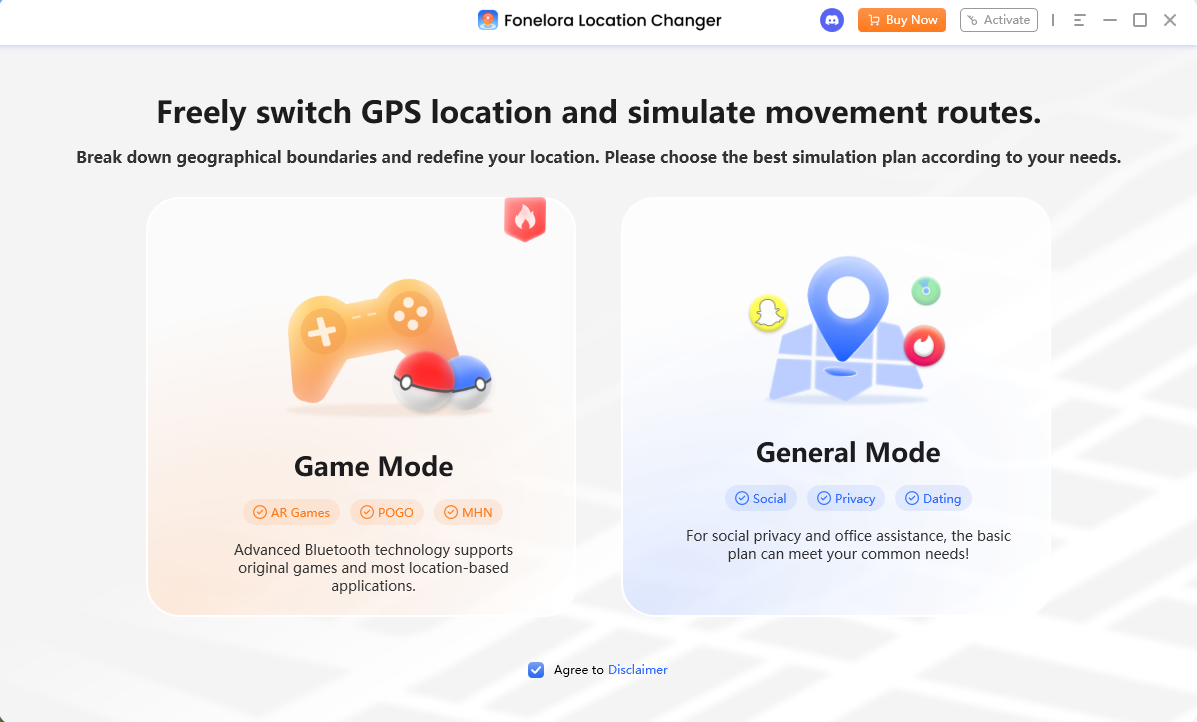
Select Game Mode: Choose Game Mode, which automatically sets up a game-oriented location environment tailored for LBS apps.
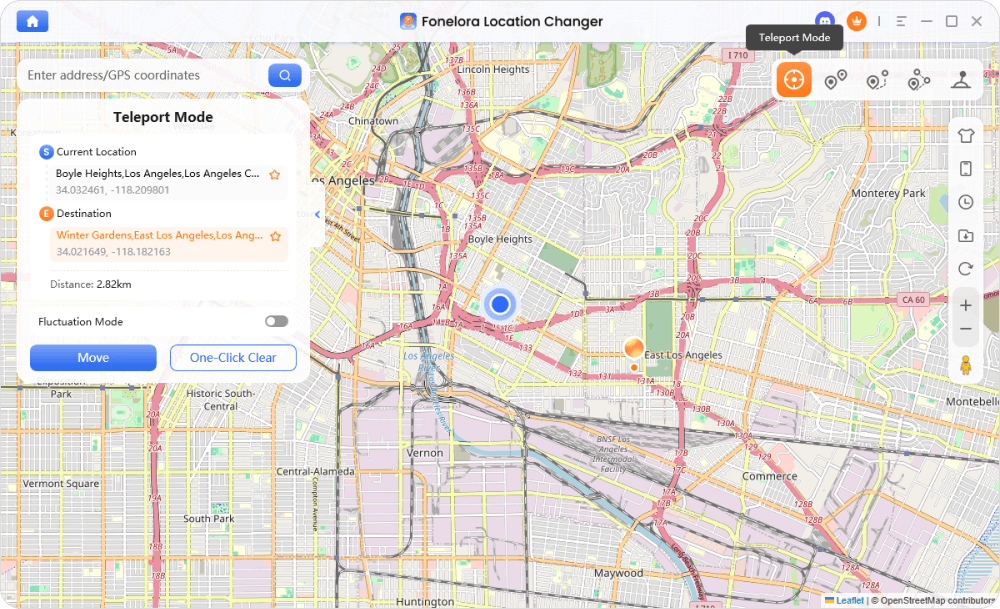
Use Teleport Mode: Enter the name or coordinates of a nearby town or city known for having a high density of PokéStops. Click to teleport your device’s GPS location.
Check the Cooldown Timer: Before spinning stops, catching Pokémon, or battling, wait for the built-in Cooldown Timer to reach zero to respect Pokémon GO cooldown rules and distance-related game restrictions.
Scan for Cliff: Open Pokémon GO on your phone with your Rocket Radar equipped and tap the nearby PokéStops to see if Cliff is hiding there. If you only see Arlo and Sierra, you can safely teleport to another dense area after the cooldown resets.
Next Step: If you are constantly blocked by location limits, check the Fonelora Location Changer official page to confirm your device compatibility and explore Game Mode options for your Windows or Mac computer.
Frequently Asked Questions
- Why does Cliff’s team keep changing?
- Cliff’s lineup changes periodically to keep battles fresh. This usually happens alongside official Team GO Rocket Takeover events, which occur a few times a year.
- Can I fight Cliff using a Team GO Rocket balloon?
- Yes. As long as you have a Rocket Radar equipped, the Team GO Rocket balloons that appear every 6 hours have a random chance to drop off Cliff, Arlo, or Sierra.
- What is the best team to beat Cliff if I don’t have legendaries?
- If you lack legendary Pokémon, rely on accessible budget types. A team like Sylveon (for Slot 1 Machop), Magnezone (for Slot 2 Aerodactyl or Slot 3 Crobat), and Machamp (for Slot 3 Tyranitar or Cradily) is highly effective.
- Does Cliff use shields?
- Yes. Like all Team GO Rocket Leaders, Cliff will automatically use his two shields to block your first two Charged Attacks, regardless of how much damage they would normally do.
- Do I lose my Rocket Radar if I lose to Cliff?
- No. Your Rocket Radar is only consumed when you successfully win the battle. You can lose or retreat as many times as you want without wasting it.
- Can I get a Shiny Shadow Pokémon from Cliff?
- Yes! Defeating Cliff grants you an encounter with his Slot 1 Pokémon (currently Machop), which has a chance to be a Shiny Shadow Pokémon.
Final Thoughts: Ready Your Team
What should I do next to prepare for Cliff?
Defeating Team GO Rocket Leader Cliff is all about preparation and strategy. By checking his current lineup before the battle, equipping a fast-charging Pokémon to bait his shields early, and having strong type-matchups ready for his randomized second and third slots, you can efficiently claim your Shadow Pokémon encounter.
Remember, you can always rematch him knowing his exact lineup if your first team composition fails. If you are geographically restricted and cannot find enough PokéStops to spawn him locally, consider safely expanding your search area under supported conditions using a desktop tool. For more strategies, check out our other Pokémon GO guides. Ready your optimal or budget counters, equip your Rocket Radar, and take Cliff down!
More Related Articles

Fonelora Location Changer
- Bluetooth Hardware Simulation for Safer GPS Spoofing
- Realistic Movement & Route Simulation
- No Root or Jailbreak Required
- All-in-One Solution for Games, Social Apps & Privacy



