Many fans want to experience custom Game Boy Advance games but encounter obstacles when searching for reliable files. Looking for safe downloads often yields broken links, severe emulator compatibility issues, or concerns about malware hidden within pre-patched games. Furthermore, general confusion about how to properly patch files can make the procedure feel overwhelming. Facing a locked device or a corrupted save file when you simply want to enjoy a modified game is incredibly frustrating.
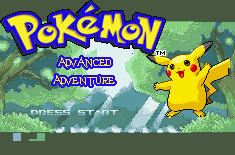
This guide provides a tested, step-by-step solution to safely install custom game patches. By following this method, you will bypass risky downloads, apply modifications securely, and enjoy entirely new adventures with complete peace of mind.
Table of ContentsHide
Decision Guide: Manual Patching vs. Pre-Patched ROMs
Before you begin, you must decide how to acquire your game files. You have two options: downloading a pre-patched game directly from a website, or applying a patch manually to a clean base game. To address the severe concern regarding malware, manual patching via established community tools is the only professional, reliable solution.
Pre-patched files distribute the entire game code, which frequently violates copyright rules. Because of this, they are rapidly removed from safe hosting sites and frequently re-uploaded by malicious third parties who bundle adware or viruses into the download. In contrast, manual patching relies on completely safe, legal patch files (such as .ips, .ups, or .bps). These files contain only the modified data created by the community and carry zero copyrighted material.
Here is an objective breakdown of the key criteria:
| Criteria | Manual Patching (Recommended Solution) | Pre-Patched Downloads (High Risk) |
| Safety Risk | Very Low. Patch files contain zero copyrighted code and are hosted on trusted forums. | High. Frequently bundled with malware or adware. |
| Success Rate | High. Ensures you use the exact version of the base game required, preventing glitches. | Low. Frequently prone to crashing, broken audio, or corrupted save data. |
| Technical Skill | Moderate. Requires a patching tool and following a structured, one-time procedure. | Low. Requires zero technical skill but completely sacrifices device security. |
| Time Cost | Low. Takes two extra minutes upfront but saves hours of troubleshooting broken saves later. | High. Often requires downloading dozens of files to find one working version. |
Always choose the manual patching method. Taking a few extra minutes to patch the file yourself guarantees your device remains secure. Ensure you [scan downloaded files for malware].
How to Patch Your ROM Safely and Correctly
Learning how to patch files properly resolves the most common setup errors. This procedure requires a clean base game file (typically a .gba file obtained from your legally owned cartridge), a patch file (like .ups, .ips, or .bps), and a dedicated patching tool.
Follow these exact steps to execute your setup safely:
1. Acquire the Patch: Download the correct patch file directly from a verified creator’s page on official community forums (such as PokeCommunity) or the developer’s official Discord server.
2. Locate the Base ROM & Verify the Hash: Ensure your clean base game matches the exact version required by the patch documentation. To guarantee you have the correct file, use an online ROM Hasher to check its CRC32 code.
For FireRed hacks: The standard base is usually “FireRed v1.0 (Squirrels).” Its CRC32 hash code must be exactly `1249A2B6`.
For Emerald hacks: Developers often require specific dumps. Always check the developer’s notes to see if you need the standard Emerald 1.0 base or a specific alternative.
3. Open the Patching Tool: Use secure, web-based tools like ROM Patcher JS. This processes the files locally right in your browser without uploading your personal data to a server.
4. Apply the Files: Select your clean base ROM file in the “ROM” field. Next, select your downloaded .ups or .ips file in the “Patch” field.
5. Generate the Game: Click “Apply Patch.” The tool will output a newly modified .gba file. Save this file in an easily accessible directory.
CRITICAL WARNING: v1.0 vs v1.1 Base ROMs
The most common reason a patch fails is using the wrong base game version. If a developer specifies a “v1.0” base ROM, using a “v1.1” file will cause immediate crashes or a corrupted output file. Always verify your CRC32 hash code before applying the patch.
Top Emulators for Cross-Device Compatibility
After successfully applying your patch, you need a compatible emulator. Selecting the correct software optimized for your operating system resolves common graphics and audio glitches. Modern engine modifications require emulators that accurately process complex custom scripts.
Windows PC & Linux
For desktop users, mGBA is the gold standard. It offers incredibly high accuracy, support for modern controllers, and highly stable performance for complex modifications. It processes custom scripts flawlessly and avoids the save file corruption common in older software like VisualBoyAdvance.
Apple iPhone & iPad
Running modified files on iOS devices works best with Delta Emulator. Delta provides a clean interface, robust cloud syncing, and excellent accuracy. You can install it securely via [AltStore] without modifying your device’s core system.
Android & Chromebook
For Android and ChromeOS users, John GBA or RetroArch (using the mGBA core) provide the most stable experiences.
A Note on Web Emulators (Eclipse): Many older guides recommend web-based emulators like Eclipse for Chromebook and iOS users. Do not use Eclipse for modern advanced modifications. Eclipse lacks the necessary memory mapping to run Complete FireRed Upgrade (CFRU) engine hacks like Radical Red or Pokemon Unbound. Attempting to play these on Eclipse will result in frequent crashes and lost save data. Stick to Delta, mGBA, or RetroArch.
For Pokémon GO Players: ROM Hacks and GPS Tools Are Different
ROM hacks and emulators let you play modified Game Boy Advance adventures, but they do not affect real-world location-based games like Pokémon GO. If you also play Pokémon GO and need to manage your GPS location for route testing, map behavior, or location-based gameplay, Fonelora Location Changer can be a useful separate tool.
Fonelora Location Changer works from a Windows PC or Mac and supports iPhone and Android without jailbreak or root. It is designed for GPS location changing, joystick movement, and route simulation in location-based apps, while ROM hacks should still be handled through safe patch files and compatible emulators like mGBA, Delta, or RetroArch.
Featured Hacks: Walkthroughs of New Regions & Mechanics
Experienced developers note that advanced modifications often introduce entire new regions, custom storylines, and modern gameplay mechanics. Verified patches allow fans to explore expanded worlds that the official releases simply do not offer. If you are looking for full walkthroughs of new regions and updated creature lists with new mechanics, here are two of the most popular, high-quality projects available right now:
1. Pokemon Unbound
Pokemon Unbound is widely considered a masterpiece of custom game development. Set in the entirely custom Borrius Region, you explore a historically rich map while untangling a dark, narrative-driven storyline involving a villainous group trying to unleash ancient, sealed powers.

- Updated Mechanics: It features a custom engine that supports Fairy types, Mega Evolution, Dynamaxing, and a highly customizable difficulty system ranging from “Vanilla” to a punishing “Insane” mode. It also includes an extensive quest log and massive quality-of-life updates.
- Expanded Roster: You can encounter and catch creatures from Generations 1 through 8.
- Starter List: You begin your journey by choosing between Beldum, Gible, or Larvitar, setting the stage for a unique, power-focused playthrough.
2. Pokemon Radical Red
If you want to experience the highest tier of challenging gameplay, Radical Red is the premier choice. It takes place in the familiar Kanto Region but completely overhauls the difficulty and trainer artificial intelligence.

- Updated Mechanics: Built on the CFRU engine, it includes the physical/special move split, hidden abilities, reusable TMs, and strict level caps for gym battles to ensure you rely on strategy rather than over-leveling. It even features built-in randomizer and Nuzlocke options.
- Expanded Roster: Features every creature from Generations 1 through 9, including custom regional forms unique to the hack.
- Starter List: At the beginning of the game, you can choose from every single regional starter from Generation 1 up through Generation 9.
Troubleshooting Common Glitches
Even with a perfectly patched file, you may encounter specific obstacles when booting up your game. Understanding how to diagnose and resolve these technical issues ensures you do not lose your progress.
When diving into custom games, many players want to try modifications with new challenges and additional rosters. They find trusted downloads, use a recommended emulator, and successfully boot the game—only to encounter an immediate technical obstacle. By applying the specific fixes detailed below, they recover their progress, allowing them to finally enjoy the modified storylines that reinvigorated their interest in these adventures.
The White Screen of Death
If you launch your game and are greeted by a blank white screen, you likely have a base file mismatch. This is exceptionally common with Hoenn-based modifications. Many users accidentally apply patches meant for an “Emerald 1.0” base to the commonly circulated “Emerald Trashman” dump. You must source the exact dump requested by the developer and verify the hash code to bypass the white screen.
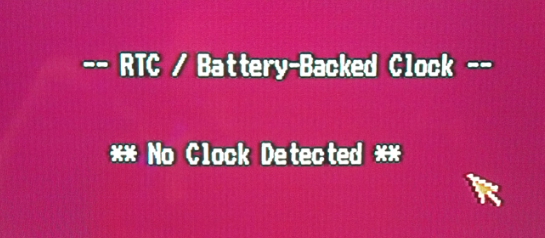
RTC (Real-Time Clock) Errors
If you are playing a game that features day/night cycles or berry-growing mechanics, you might receive an “RTC not found” warning. To fix this, open your emulator’s settings (in mGBA or Delta), navigate to the game configuration, and check the box explicitly labeled “Enable Real-Time Clock.”
CRITICAL FIX: The 128k Flash Save Error
The most devastating error occurs when a player beats the first gym, saves the game, and reloads only to find their file corrupted or missing. Modern custom games require a larger save file format than older emulators use by default.
How to fix it:
1. Open your emulator’s configuration or settings menu.
2. Locate the “Save Type,” “Cartridge Backup,” or “Hardware” options.
3. Change the default save setting to Flash 128k (or 128k Flash).
4. Restart the emulator completely.
5. Create a brand new in-game save. Your progress will now store correctly.
Frequently Asked Questions
To provide a quick reference, here are direct answers to common inquiries regarding these custom modifications.
- What exactly is an advanced ROM hack?
- It is a modified version of a standard Game Boy Advance game. Dedicated community members alter the original code to introduce entirely new regions, modern battle mechanics, updated graphics, and expanded creature rosters.
- Are these modifications safe to download?
- Yes, as long as you download patch files (like .ips or .ups) directly from trusted sources like PokeCommunity. Downloading pre-patched .gba files poses a massive security risk and should be strictly avoided.
- Can I use cheat codes in these games?
- It is highly recommended that you avoid using memory-altering cheats (like GameShark or Action Replay codes). Custom games heavily alter the standard memory addresses. Using old Kanto or Hoenn cheat codes will frequently overwrite vital data, resulting in permanent file corruption.
Conclusion
Finding safe files and understanding how to patch them correctly does not have to be a stressful experience. By strictly choosing the manual patching method, you eliminate the severe risks of malware and adware associated with unsafe pre-patched downloads. Verifying your hash codes and using reliable emulators like mGBA, Delta, or RetroArch also helps keep expanded mechanics, custom regions, and save files stable.
You now have the verified technical steps required to avoid broken downloads, bypass corrupted save files, and safely install Pokémon ROM modifications. For ROM hacks, the most important rules are simple: use trusted patch sources, verify the correct base ROM, choose a compatible emulator, and configure the proper save type before starting your adventure.
If you also play location-based Pokémon games such as Pokémon GO, remember that ROM hacks and GPS tools serve different purposes. ROM hacks run inside emulators, while Fonelora Location Changer is designed to change GPS location on iPhone or Android from a Windows PC or Mac. It can be useful for GPS-based gameplay, route simulation, or location testing, but it will not replace proper ROM patching or emulator setup.
For the safest long-term experience, keep checking official community forums for ROM hack updates, avoid unsafe pre-patched downloads, and use tools like Fonelora Location Changer only when your goal is GPS-level location control in location-based apps.


Hot Topics
