Preparing for a major raid day is one of the most exciting experiences in the game, but staring at hundreds of recent catches in your storage box can quickly feel overwhelming. If you are an intermediate or advanced player, you probably already know that typing the `4` search string into your in-game search bar instantly highlights your 100% IV (perfect) catches in a matter of seconds.
So, if the game already has a built-in search filter, why are we talking about downloading a dedicated Pokémon GO 100 IV finder?
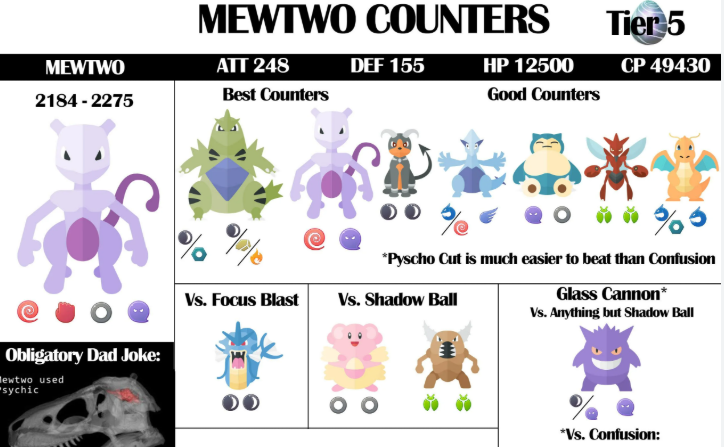
Because true roster optimization goes far beyond simply finding “hundos.” While a 100% IV scanner is the term most of us search for when trying to clean up our storage, competitive players actually rely on these third-party tools for much deeper analysis. We use them to uncover Rank 1 PvP candidates (which often have surprising stat spreads like 0/14/15), calculate exact raid breakpoints, and determine exactly how much Stardust a power-up will cost.
In this guide, I will walk you through exactly how to set up these tools correctly across different operating systems, how to read the data, and how to avoid wasting your hard-earned Stardust.
Table of ContentsHide
Manual Appraisal vs. Dedicated Pokémon GO IV Calculators
When evaluating your daily catches, the in-game appraisal feature is perfectly fine for a quick glance. The team leader pops up, shows you a visual bar graph, and you move on.
However, evaluating a Great League or Ultra League candidate manually is nearly impossible. To know if your 0/15/14 Swampert is Rank 1 or Rank 500, you would have to memorize complex stat product formulas. Automated overlay apps read the pixel data on your screen and do the heavy mathematical lifting for you instantly.
Here is a realistic look at how manual checking compares to an automated overlay app:
| Evaluation Metric | In-Game Manual Appraisal | Automated IV Calculator Overlay |
| Success Rate | Identifies 100% IVs easily, but fails completely at identifying ideal PvP stat spreads. | Reads exact screen data to provide 100% accurate PvP rankings and raid breakpoint math. |
| Time Cost | Filtering by `4` is instant, but calculating power-up costs for a full team takes significant time. | Evaluates, records, and calculates Stardust costs for an entire batch in a fraction of the time. |
| Technical Skill | Requires memorizing which visual bar combinations correlate to good PvP stats. | Requires a brief, one-time initial setup to configure the overlay properly. |
GOLDEN RULE OF ACCOUNT SAFETY:
Never install any software that asks for your Pokémon GO login credentials. Legitimate tools strictly operate as visual screen overlays. They simply “look” at your screen just like you do. Using login-based apps violates the terms of service and will result in an account ban. Stick strictly to visual overlay applications.
For players looking to refine their battle teams, migrating to a specialized ranking app is the most logical step to streamline storage management.
Selecting the Best Apps: Real-World Setup Instructions
The two undisputed industry standards for safely reading screen data on mobile devices are Poke Genie and Calcy IV. They solve the problem of complex stat evaluation safely and effectively. However, iOS and Android handle screen overlays very differently, which often leaves players frustrated during setup.
Here is a breakdown of the apps and exact, OS-specific setup instructions.
The Top Recommendations
- Poke Genie (Excellent for iOS & Android): The core scanning features, raid matchmaking coordination, and move set evaluations are free. The premium subscription removes ads and provides auto-scanning. It is highly intuitive and widely considered the standard for raid coordination.
- Calcy IV (Best for Android): Offers robust free features, including instant encounter scanning (seeing stats before you even throw a Poké Ball). It is incredibly customizable but has a slightly steeper learning curve than Poke Genie.
Setup Guide for Android Users
Android’s operating system natively supports floating overlay buttons, making setup incredibly straightforward.
1. Download Calcy IV or Poke Genie from the Google Play Store.
2. Launch the app and grant the required “Display over other apps” and “Screen Recording” permissions.
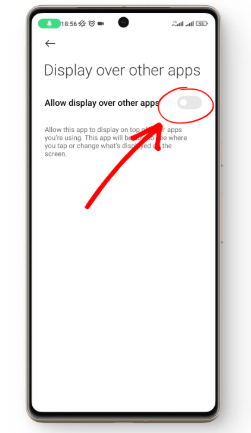
3. Open Pokémon GO. You will now see a small, floating button on your screen.
4. Navigate to a Pokémon’s appraisal screen and tap the floating button. The app will instantly display a detailed stat breakdown, PvP rank, and power-up cost.
Setup Guide for iOS Users (The iVision Workaround)
Apple strictly restricts floating overlay buttons for security reasons. To use Poke Genie on an iPhone, you must use their “iVision” feature, which uses iOS’s native screen-broadcasting function.
1. Download Poke Genie from the App Store.
2. Launch Poke Genie, navigate to the menu, and select the iVision feature.
3. Open your iPhone’s Control Center (swipe down from the top right corner).
4. Press and hold the “Screen Record” icon. A menu will pop up.
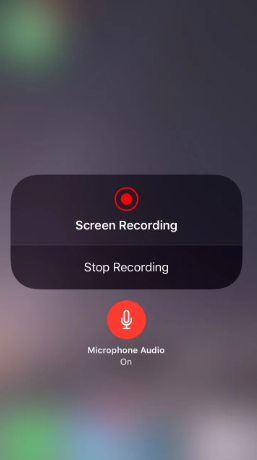
5. Select Poke Genie from the list of broadcasting options, then tap “Start Broadcast.”
6. Open Pokémon GO and navigate to your appraisal screens. A banner at the top of your screen will display the exact stats, PvP ranks, and scan results as you swipe through your collection.
Pro-Tip from Real-World Testing: Running the screen-recording broadcast on iOS drains your battery roughly 20% faster than normal gameplay. If you plan to scan hundreds of catches during a Community Day, always bring a high-capacity power bank.
Maximizing Your Roster: Expert Strategies and Hidden Potential
I frequently raid with Maya, a competitive Pokémon GO trainer, who wanted to prepare her best team for an upcoming raid day. Like many of us, she searched for a reliable Pokémon GO 100 IV finder to quickly locate perfect IV Pokémon in her collection. She already knew how to use the `4` search string to find her hundos, but her real challenge was deciding exactly which of those attackers deserved her limited Stardust and Rare Candies.
By running her top candidates through a recommended tool, she identified several 100% IV attackers and defenders, but more importantly, she calculated their exact raid breakpoints. Breakpoints are specific thresholds where powering up a Pokémon by one more half-level causes their Fast Attack to do one extra point of damage per hit.
Pokémon GO experts explain that IVs (individual values) determine the hidden potential of a Pokémon for attack, defense, and stamina. Perfect IVs (100%) are ideal for competitive play and maximizing raid efficiency. While CP gives a visible estimate of current strength, IVs reveal true, permanent potential.
Tools like these overlay scanners help players quickly identify top candidates, saving time and resources. By focusing her Stardust and candy strictly on the candidates that hit optimal breakpoints, Maya strengthened her team, won multiple raids against a strict timer, and gained total confidence in her strategic approach to optimization.
CP vs. IV: Overcoming Common Evaluation Mistakes
A frequent source of confusion is the relationship between Combat Power (CP) and Individual Values (IV). Does a high CP mean you have a strong Pokémon? Not always.
Here is the easiest way to understand the difference:
- Combat Power (CP) is a visible estimate of a Pokémon’s current strength. It is heavily influenced by the creature’s current level. A high CP Pokémon might perform decently right now, but if it has poor IVs, its maximum growth is severely capped.
- Individual Values (IV) are the permanent, unchangeable genetic code of your Pokémon. They represent the hidden potential.
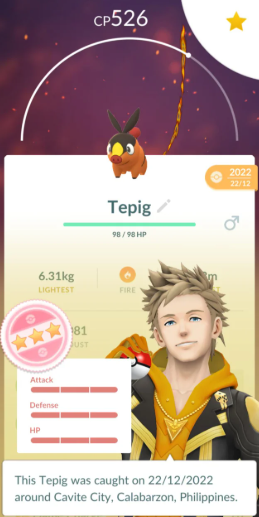
If you catch a 100% IV Dratini at Level 1, it will have a tiny CP. If you catch a 0% IV Dratini at Level 30, it will have a massive CP. However, if you invest Stardust into both of them until they reach Level 50, the 100% IV Dratini will possess significantly higher final stats.
Understanding this dynamic is especially crucial for the Great and Ultra Leagues, which have strict CP caps (1500 and 2500, respectively). Because the Attack stat inflates CP much faster than Defense or Stamina, a Pokémon with an IV spread of 0/15/15 can level up more times before hitting the CP cap than a 15/15/15 Pokémon. This is exactly why you need a dedicated app—to consult accurate PvP stat product formulas before you accidentally transfer a low-attack, high-defense asset.
Best Tool to Find and Catch 100 IV Pokémon in Pokémon GO
Finding a 100 IV Pokémon in Pokémon GO often depends on visiting active spawn locations, participating in global raids, or checking coordinates shared by communities. For players who cannot travel physically, using a reliable GPS location changer can make the process much easier.
FoneLora Location Changer is a popular Pokémon GO GPS spoofing tool that helps players teleport to high-IV Pokémon coordinates worldwide without jailbreak or root.
With this tool, you can instantly switch your GPS location to hotspots where rare or perfect IV Pokémon are spawning.
Why Use FoneLora Location Changer for Pokémon GO 100 IV Hunting?
Here are some reasons why many Pokémon GO players use FoneLora while searching for perfect IV Pokémon:
- Instantly teleport to Pokémon GO 100 IV coordinates
- Access global Pokémon nests and raid locations
- Simulate walking routes naturally
- Built-in joystick mode for flexible movement
- Supports both iPhone and Android devices
- No jailbreak or rooting required
It is especially useful when combined with Pokémon GO IV maps, Discord coordinate groups, or IV finder communities.
How to Use FoneLora Location Changer to Catch 100 IV Pokémon
Step 1. Download FoneLora Location Changer
Go to the official website and install FoneLora Location Changer on your computer.

Step 2. Connect Your iPhone or Android Device
Use a USB cable to connect your device and follow the on-screen instructions to enable location access.

Step 3. Change GPS Location
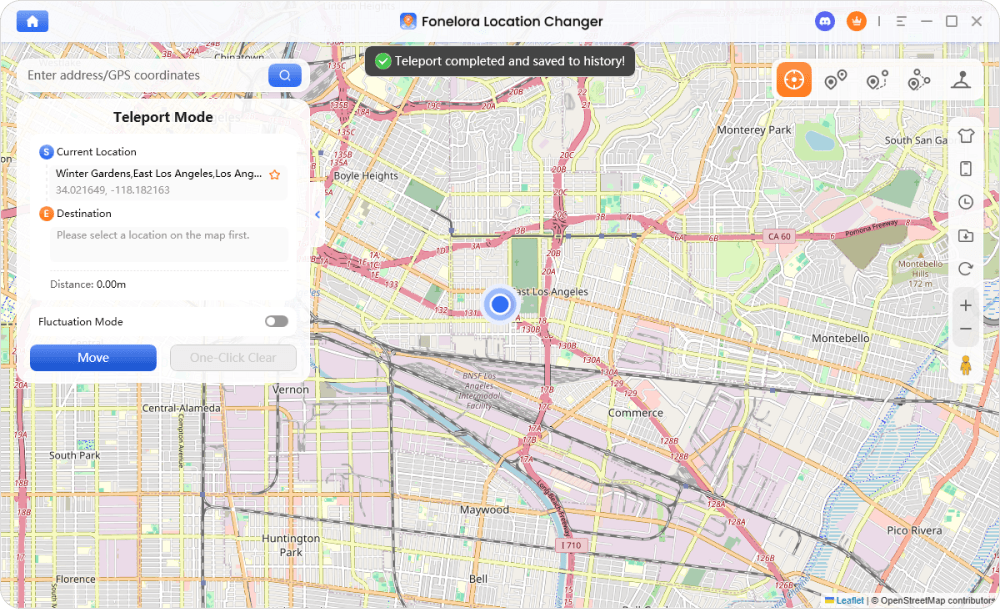
Click “Move” to teleport your GPS location instantly. Then launch Pokémon GO and start catching the target Pokémon.
Frequently Asked Questions About Stat Evaluation
Even with a firm grasp of the mechanics, specific questions often arise when managing a large storage box. Here are the answers to the most common stat and scanner queries.
Which tools are best for checking stats on mobile?
Poke Genie is highly recommended for iOS users, while Calcy IV is a favorite among Android users due to its deep customization. Both operate safely as screen overlays.
How do the visual appraisal and the IV system relate?
The in-game team leader provides visual bars for Attack, Defense, and Stamina. Each bar is divided into three blocks, maxing out at a value of 15. The combination of these bars is exactly what overlay apps read to calculate your precise stat percentages.
How important are perfect stats for raids and PvP?
Perfect 15/15/15 stats are highly important for Master League PvP and Tier 5/Mega Raids, as they maximize your damage output. For Great and Ultra Leagues, a different IV spread (usually low attack, high defense, high stamina) is preferred to maximize bulk under the CP caps.
Note: Top-tier tracking applications like Poke Genie and Calcy IV push database updates within hours of Niantic changing move pools or adjusting CP calculation formulas, ensuring your raid optimization data is always strictly accurate.
Conclusion
Managing a massive collection of catches does not have to be an overwhelming chore. While the in-game search bar is great for quickly filtering out perfect 100% IVs, taking the next step and using a visual overlay app empowers you to make smarter, highly tactical decisions with your resources.
By understanding the relationship between CP, hidden IV potential, and PvP rankings, you can confidently invest your Stardust where it matters most. Take a few minutes to set up an overlay app on your device, keep an eye on your battery life during those long Community Days, and start building a roster that is truly optimized for your next big battle.


Hot Topics
