Sierra’s current lineup for July 2026 always starts with Shadow Amaura. The best universally effective counters to bring include strong Fighting or Steel-types like Lucario, Machamp, or Metagross to break her shields early.
To successfully defeat Sierra, you need a balanced team that can counter her starting Pokémon and adapt to the randomized second and third slots. Below is a complete breakdown of her potential lineup, weaknesses, and the best Pokémon to counter them.
| Slot | Potential Pokémon | Weaknesses | Best Counters (with Movesets) |
|---|---|---|---|
| 1 | Shadow Amaura | Fighting (2x), Steel (2x), Water, Grass, Ground | Lucario (Counter/Aura Sphere), Machamp (Counter/Dynamic Punch) |
| 2 | Shadow Blastoise | Grass, Electric | Kartana (Razor Leaf/Leaf Blade), Xurkitree (Thunder Shock/Discharge) |
| 2 | Shadow Flygon | Ice (2x), Fairy, Dragon | Mamoswine (Powder Snow/Avalanche), Galarian Darmanitan (Ice Fang/Avalanche) |
| 2 | Shadow Ferrothorn | Fire (2x), Fighting | Reshiram (Fire Fang/Fusion Flare), Heatran (Fire Spin/Magma Storm) |
| 3 | Shadow Milotic | Grass, Electric | Magnezone (Spark/Wild Charge), Zarude (Vine Whip/Power Whip) |
| 3 | Shadow Houndoom | Fighting, Water, Ground, Rock | Swampert (Mud Shot/Hydro Cannon), Terrakion (Double Kick/Sacred Sword) |
| 3 | Shadow Steelix | Fighting, Fire, Water, Ground | Reshiram (Fire Fang/Fusion Flare), Lucario (Counter/Aura Sphere) |
Because her backline can vary wildly between a Water-type, a Dragon/Ground-type, or a tough Steel-type, it is highly recommended to bring a core Fighting-type lead, an Ice-type attacker, and a flexible Grass or Electric-type to round out your party. For more general strategies, you can explore other Pokémon GO guides.
How to Find Sierra in Pokémon GO (Official Methods)
To encounter Sierra instead of a normal Team GO Rocket Grunt, you first need to equip a Rocket Radar. You can build a Rocket Radar by defeating six standard Team GO Rocket Grunts and collecting their Mysterious Components.
Once your Rocket Radar is fully assembled and equipped, it changes the way you interact with the map. Activating the radar reveals Leader hideouts at local PokéStops. You can physically walk to these invaded stops and spin them to trigger a Leader battle.
Alternatively, if you are unable to visit physical stops, you can rely on the floating Team GO Rocket balloons. When a Rocket Radar is active, the balloon that spawns near your avatar every few hours will contain one of the three Leaders (Arlo, Cliff, or Sierra) instead of a regular Grunt.
The Problem: Bad Spawn RNG and Lack of PokéStops
Understanding how to find Sierra is straightforward, but actually getting her to appear can be incredibly frustrating. A Rocket Radar does not guarantee Sierra will show up. The specific Leader at any given PokéStop or inside a balloon is entirely randomized.
Scenario 1: The Balloon Waiting Game
If you are stuck at home, you have to rely entirely on balloon spawns. After waiting hours for a balloon to arrive, Arlo or Cliff might show up instead. You have to ignore them and wait another few hours just to get another random 33% chance to see Sierra.
Scenario 2: The Rural Player Struggle
If you decide to go out and check local PokéStops, but only have two or three stops in your neighborhood, your options are severely limited. None of them might be Leader hideouts, or worse, they might all be occupied by the wrong Leader.
To find a specific Leader like Sierra, players typically need to physically travel to multiple invaded stops across a large town. For rural players or those without easy transportation, farming the six Mysterious Components just to encounter the wrong boss is a massive and unfair bottleneck.
How to Farm Components and Find Sierra Faster
If you live in a rural area without enough PokéStops, or if you are tired of waiting hours for the right balloon to spawn, you can bypass the physical friction using Fonelora Location Changer. Available for supported iOS and Android devices, Fonelora allows you to simulate natural walking and explore new areas virtually.
Fonelora Location Changer
Realistic GPS movement simulation, flexible route control, easy no-modification setup, and support for gaming, social, privacy, and location-based testing in one platform.
Using Joystick Mode, you can farm Mysterious Components and check multiple PokéStops for Sierra without leaving your house.
Here is how to use this Pokémon GO location changer to find Sierra faster:
- Connect Your Device: Open Fonelora Location Changer on your computer and connect your supported iPhone or Android device via USB or Wi-Fi.

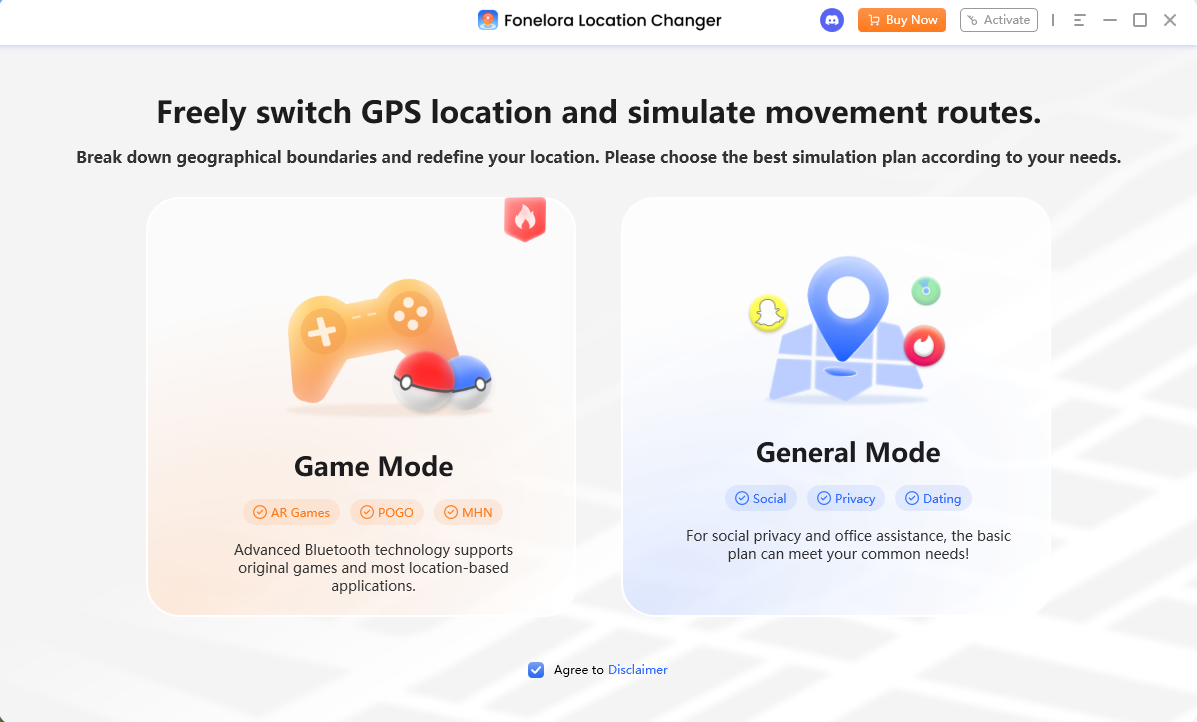
- Select Game Mode: Choose Game Mode to load the map and enable features specifically designed for location-based games.
- Activate Joystick Mode: Select Joystick Mode from the toolkit. Set your simulated movement speed to a realistic walking or cycling pace (e.g., 4 to 10 km/h).
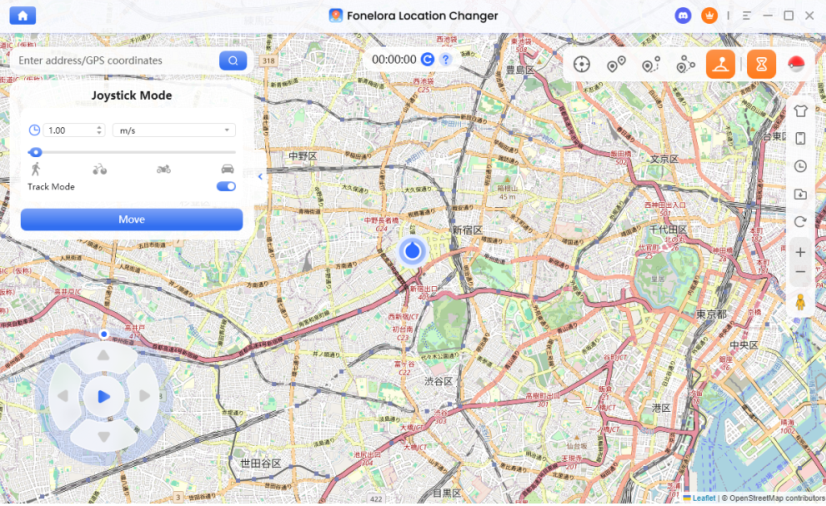
- Explore and Farm Components: Use the on-screen joystick or your keyboard to naturally walk your avatar around a stop-dense virtual neighborhood. Battle nearby Grunts to collect your six Mysterious Components.
- Hunt for Sierra: Once your Rocket Radar is built, continue using the joystick to check multiple invaded PokéStops. If you find Arlo or Cliff, simply move on to the next stop until Sierra appears.
By simulating realistic movement under supported conditions, you can easily gather components and find the exact Leader you need on your own schedule.
Crucial Cooldown Rules and Game Safety
While using a virtual location tool like Fonelora Location Changer solves the problem of finding Sierra, it is important to manage your virtual movement responsibly. Like any location changer, Fonelora is not 100% undetectable and does not guarantee immunity from account bans.
To protect your account from soft bans and safely hunt for Team GO Rocket Leaders, follow these crucial Pokémon GO cooldown rules:
- Do use realistic speeds: Stick to walking or cycling speeds when farming Mysterious Components. Sprinting across the map at unrealistic speeds flags your account.
- Do respect the Cooldown Timer: Fonelora includes a built-in Cooldown Timer. If you use Teleport Mode to jump to a new city to hunt for stops, wait for the suggested cooldown period (up to 2 hours) before spinning a PokéStop or battling a Rocket Grunt.
- Don’t jump long distances frequently: Avoid teleporting between different states or countries in a short timeframe. Instead, teleport once, wait out the cooldown, and use Joystick Mode to hunt for Sierra in one stop-dense local area.
- Do test carefully: If you are new to virtual location changing, consider practicing the Joystick and Game Mode features carefully under supported conditions before heavily farming stops.
Frequently Asked Questions
Q1: What is the weakness of Shadow Amaura?
Shadow Amaura is a Rock/Ice-type Pokémon, which makes it extremely weak to Fighting and Steel-type moves (taking 4x damage). It is also weak to Water, Grass, and Ground attacks. Lead with a fast Fighting-type like Lucario to break Sierra’s shields immediately.
Q2: Can I reroll the Team GO Rocket balloon leader?
No, you cannot reroll the Leader inside a balloon once it spawns. If Arlo or Cliff appears, you must either defeat them (which consumes your Radar) or ignore the balloon and wait hours for the next one to spawn for a new randomized chance.
Q3: How can I get more Mysterious Components without walking?
Without physical walking, your only official option is to wait for standard Team GO Rocket balloons to bring Grunts to your location. Alternatively, you can use Fonelora Location Changer’s Joystick Mode under supported conditions to safely simulate walking around a local area and battle Grunts at nearby PokéStops.
Q4: Will a Rocket Radar be consumed if I lose to Sierra?
No. Your Rocket Radar is only consumed if you successfully defeat the Leader. You can rematch Sierra as many times as necessary to test different counter Pokémon or movesets without losing your Radar.
Final Thoughts: Ready to Defeat Sierra?
Defeating Sierra in July 2026 requires a balanced team that can instantly counter her starting Shadow Amaura while remaining flexible enough to handle bulky backline threats like Milotic or Steelix.
However, for many players, the hardest part of the battle is simply finding her. Relying on rare, randomized balloon spawns or checking a sparse local neighborhood can turn an exciting battle into a tedious waiting game.
If you are tired of wasting hours just to encounter the wrong Rocket Leader, Fonelora Location Changer offers a practical way to take control of your gameplay. By using Joystick Mode to simulate realistic walking, you can easily gather Mysterious Components and check dozens of PokéStops to find Sierra on your own schedule. Check device compatibility and explore Fonelora Location Changer to bypass bad RNG and streamline your next Team GO Rocket encounter.
More Related Articles

Fonelora Location Changer
- Bluetooth Hardware Simulation for Safer GPS Spoofing
- Realistic Movement & Route Simulation
- No Root or Jailbreak Required
- All-in-One Solution for Games, Social Apps & Privacy



