By the Lead Content Editing Team | Featuring hands-on testing with smartphones running Pokémon Go on iPhone (iOS 15–26) and Android (Android 6–16).
Author Note: With years of experience organizing local community raid groups and a deep technical understanding of how crowd-sourced data powers modern tracking tools, I rely on both official companion apps and web-based scanners to optimize event days. My early days as a dedicated raid hunter were frustrating, but finding the right tools completely changed how I play.
I remember the recent Primal Groudon event perfectly. The official Campfire app was lagging heavily due to server overload, and I was exhausted from driving around aimlessly, hoping to spot a legendary egg. The official in-game radar only shows a tiny physical radius, forcing you to guess where the action is happening. If you are tired of wasting gas and staring at an empty nearby screen, you need a working map right now—not just generic advice.
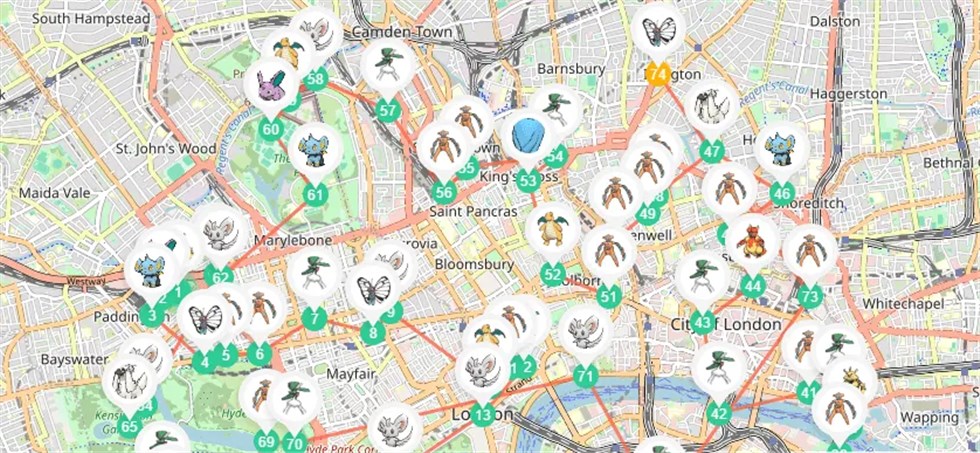
In my early days hunting high-tier bosses, I struggled heavily to find active lobbies in my area. Like many players searching for better ways to change location in Pokémon GO or simply reach more active raid zones, I kept looking for tools that could make raid coordination more efficient. After finally discovering working community trackers and connecting with local chat groups, I successfully joined multiple back-to-back sessions and caught the legendary Pokémon I needed. This guide strips away the fluff to give you an exact, up-to-date list of working third-party maps, coordination bots, and remote apps you can use today.
Table of ContentsHide
Evaluating Your Options: Manual Searching vs. Dedicated Trackers
Players constantly face the obstacle of limited visibility inside the official application. Relying solely on the game screen means you only see gyms within a few blocks. To optimize your gameplay and actually catch legendary targets, you must step outside the main app and use dedicated tools.
A Direct Comparison of Tracking Methods
An objective evaluation reveals clear differences in how you should plan your daily gameplay.
| Evaluation Criteria | Official In-Game Radar | Dedicated Community Raid Finder |
|---|---|---|
| Success Rate | Low. Relies entirely on your immediate physical location. | High. Pulls data from a massive area, drastically increasing target discovery. |
| Time Cost | High. Manually checking gyms consumes hours of potential catch time. | Low. Provides immediate, real-time data for efficient route planning. |
| Technical Skill | None. Requires zero external setup. | Minimal. Requires opening a web browser or downloading a companion app. |
| Safety Risk | Moderate. Driving around aimlessly introduces physical safety hazards. | Low. Checking a map app before leaving home ensures safe, targeted travel. |
Transforming a frustrating guessing game into a precise operation means you confirm locations before you even step out of your front door.
Top Working Tools for Finding Active Bosses
When you need immediate results, here are the specific, working tools the hardcore community actually uses to track gym activity.
1. The Official Route: Niantic Campfire
Campfire is the official companion app built by the game’s developer. It features a fully integrated global map showing every gym, active boss, and egg timer. Because it is official, it never goes down during forced game updates. Although it is the safest option, the interface can sometimes be slow during massive global events.

2. Localized Web Maps (City-Specific Trackers)
Global third-party maps like the old GymHuntr are largely defunct. Today, third-party web tracking is highly localized. Massive cities often have dedicated web maps funded by the local community (for example, NYCPokeMap for New York or SGPokeMap for Singapore). To find out if your city has one, search Google for “[Your City Name] Pokemon Go Map.” These sites operate directly in your browser, showing precise IV spawns, gym control, and active boss timers.
3. Discord and Telegram Scanner Bots (PokeNav & Meowth)
Most hardcore players rely on local Discord servers running specialized bots like PokeNav or Meowth. These bots pull crowd-sourced data and display it in organized chat channels.
How to find them: You cannot find these localized groups in standard app stores. Search Google or Reddit for “Pokemon GO Discord [Your City Name]” to find an invite link.
How to use them: Once inside, check the “Raid Announcements” channel. When a user spots an egg, they command the bot to create a localized lobby card. You simply react to the bot’s message to RSVP, and it instantly connects you with everyone else planning to attend.
Expanding Your Reach: The Power of Remote Raiding
Finding a boss on your local web map is only the first step. The next major challenge occurs when you locate a rare target, but nobody in your local town is awake to help you fight it. This is exactly where remote raiding apps become essential.
Using PokeGenie and GoFriend
If your local community cannot physically travel to the gym, you should pivot to a global remote strategy. Applications like PokeGenie and GoFriend are game-changers for instantly filling your lobby.
Here is the exact procedure to host a successful remote session:
- Walk to the gym and take a screenshot of the active boss on your screen.
- Open the PokeGenie app and upload the screenshot. The app will automatically scan the boss and create a global lobby.
- Wait as five players from around the world are placed into your lobby queue.
- Copy the provided string of trainer codes, switch back to the main game, and paste them to instantly send friend requests.
- Accept their requests, enter the gym, and send them remote invites.
Reddit’s Global Network
If you prefer not to download additional apps, the subreddit r/PokemonGoRaids operates on a similar premise. You simply post your friend code alongside the boss name, and your friend list will flood with requests from international players looking to join via remote passes. By applying these global communication techniques alongside your local map, you ensure your group is always ready for battle.
Expanding Your Reach: The Power of Remote Raiding (Extended Strategy)
Beyond using tools like PokeGenie or local Discord raid groups, some players also explore location simulation tools to better manage location-based testing and accessibility scenarios. One commonly used option is Fonelora Location Changer.
What Is Fonelora Location Changer?
Fonelora Location Changer is a desktop-based tool designed to simulate GPS locations on both iOS and Android devices. It is commonly used for app testing, location-based feature demonstrations, and privacy-related location control.
The tool allows users to select any point on a map and temporarily override the device’s GPS location, making it appear as if the device is operating from a different region.
How to Use Fonelora Location Changer (Basic Steps)
Here is a general step-by-step overview of how the tool works:
1.Install the software
Download and install Fonelora Location Changer on your computer (Windows or macOS).

2.Connect your mobile device
Use a USB cable to connect your iPhone or Android device to the computer and complete any required trust or developer authorization steps.

3.Select a target location
Open the built-in map interface and search for or manually choose the location you want to simulate.

4.Start location modification
Click the “Move” button to apply the new GPS location to your device.
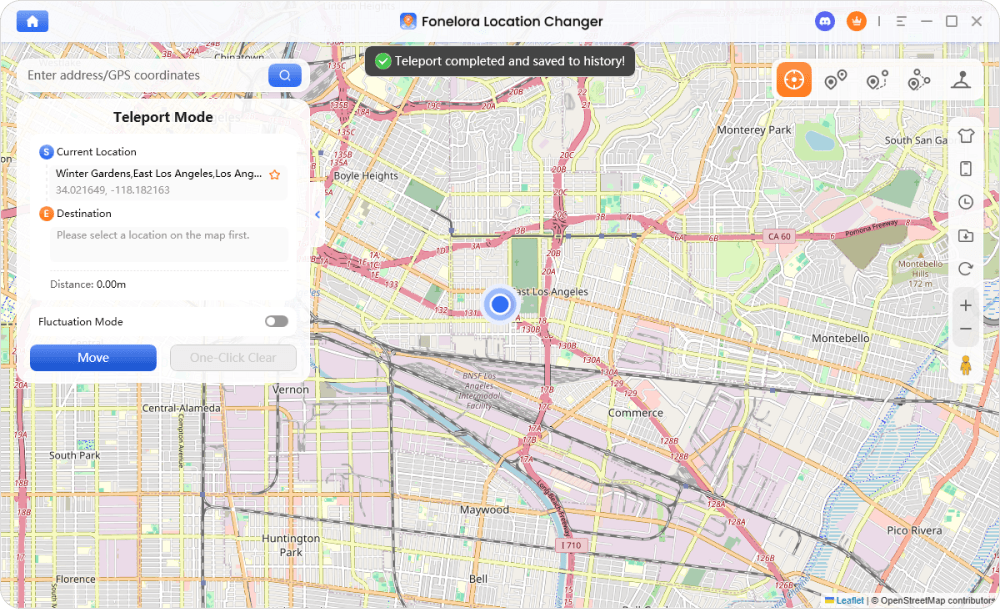
5.Verify the new location
Open a map-based app to confirm that your device’s location has been updated successfully.
How Modern Scanners Gather Data
Understanding the technology behind these scanners helps you set realistic expectations for their performance. Many users assume third-party tools automatically pull live data directly from the official servers, but the reality is quite different.
Here is a critical expert insight: Many modern maps rely entirely on crowd-sourced reports from players rather than automated scanning systems. This means accuracy heavily depends on how active your local player community is. If nobody is reporting data in your specific suburb, your local map will remain blank.
The Shift from Automated Bots to Community Reporting
In the past, thousands of automated bot accounts constantly scanned geographic areas to populate web maps. Due to strict security updates, automated scanning is heavily restricted.
⚠️ IMPORTANT WARNING: Niantic TOS and Third-Party Maps
Using modified apps (like unauthorized joysticks or altered game clients) to find bosses violates the Niantic Terms of Service and will frequently result in severe account bans. Furthermore, whenever the developer forces a new game update, it breaks the API that automated bots rely on. This is exactly why your local Discord bots or web maps might experience sudden downtime. Relying on community-sourced data via web browsers or Campfire is the only fully safe, ban-free method to view gym activity.
When a player spots an active boss today, they log into their local Discord or web interface and manually flag the gym. The platform then broadcasts this data to all other users in the region. Your best strategy is to contribute to these reporting systems yourself.
Finding Legendary Targets During Global Events
Special events introduce a high-paced environment where event spawns appear and disappear rapidly. Navigating these requires precise route planning and a firm grasp of game mechanics.
Reading Egg Timers and Route Planning
To optimize your time during a designated Raid Hour, you must understand how to read the map effectively before an egg even hatches, especially when using a raid finder Pokémon GO tool to plan the fastest route between active Gyms.
- Identify the Tier: A pink egg means a standard boss, yellow means mega, and dark purple indicates a legendary target.
- Watch the Clock: Maps display a countdown timer. You want to coordinate your group to arrive exactly as the egg hatches, because public lobbies fill up fastest in the first five minutes.
- Map Your Trajectory: Draw a logical route between active eggs scheduled to hatch sequentially. Downtown districts and large parks usually host the highest density of gyms.
This strategic approach is exactly how I master global events. By combining sequential route planning with real-time crowd-sourced data, you bypass the manual search and focus entirely on the battles.
Frequently Asked Questions
- What is the best tool to find active gyms right now?
- The best immediate option is the official Campfire app for general visibility. For faster, more localized organization, a local Discord server running the PokeNav bot is highly recommended.
- How do I find localized Discord groups or web maps?
- Search Google specifically for “Pokemon GO Discord [Your City Name].” You can also check community directory sites or ask players you meet in person at major downtown parks.
- Are third-party web trackers accurate?
- Their accuracy depends entirely on user input. As noted earlier, modern trackers rely on community reporting. If your local player base is highly active, the data will be incredibly accurate.
- Why do some of my local Discord bots randomly stop working?
- Changes to the official game’s code break automated scanning API. This forces bot developers to rebuild their systems, causing temporary downtime until the community updates the software.
Conclusion
Overcoming the frustration of a limited in-game radar requires shifting your strategy toward the tools and coordination methods experienced players rely on. By using the official Campfire app, joining localized Discord servers with bots like PokeNav, and organizing remote sessions through PokeGenie, you can significantly reduce uncertainty and coordinate raids more efficiently without relying on random exploration.
For users who also need broader location control for testing or app demonstration purposes, some people additionally use tools such as Fonelora Location Changer, which allows a device’s GPS position to be simulated in a controlled environment. This type of tool is typically used for development, debugging, or privacy-related scenarios, where verifying location-based behavior across different regions is required.
Instead of struggling with empty lobbies or wasting time driving around in search of active raids, these community-driven platforms help streamline coordination and make it easier to assemble full groups quickly. By combining reliable raid coordination tools with better planning and communication, you can make gameplay more efficient, structured, and predictable.


Hot Topics
