Many players search for the “unknown” alphabet when trying to complete their Pokédex, but in the Pokémon universe, these ancient, hieroglyph-like creatures are officially spelled Unown.
If you are wondering exactly how many forms exist, there are exactly 28 unique Unown variants to collect:
- Letters: A through Z (26 forms)
- Punctuation: ! (exclamation mark) and ? (question mark)

These enigmatic Pokémon first appeared in Generation II and have remained a fan favorite for their deep lore. However, in Pokémon GO, completing this 28-letter alphabet is one of the most difficult challenges a trainer can face.
Why is Unown So Hard to Catch in Pokémon GO?
Where do Unown usually spawn, and why can’t you seem to find them naturally? The reality is that wild Unown have a near-zero spawn rate outside of specific promotional windows. For most players, completing the alphabet without global travel is practically impossible manually.
Here is a quick look at why catching them locally is so frustrating:
| Spawn Type | Availability | Difficulty to Find | Typical Scenarios |
|---|---|---|---|
| Wild Spawns | Extremely rare, random locations | Almost impossible locally | Random daily spawns; players can play for years without seeing one. |
| Event Spawns | Common, but geographically locked | Easy if you are physically there | GO Fest, Safari Zones, or localized physical events (e.g., comic conventions). |
Because of this massive disparity, players who cannot afford to travel the globe for physical events are left at a severe disadvantage.
How Players Track Unown Using Live Radars
How do players know where an Unown is spawning if they are so rare? The answer lies in third-party live coordinate radars. Tools like ARSpoofing or community-run local Discord bots scan the map and broadcast the exact GPS coordinates of rare spawns in real-time.
However, rare spawns in Pokémon GO despawn quickly—often within 15 to 30 minutes. This means you must act fast once an Unown is reported. But there is a major catch: knowing the coordinates is only half the battle. Unless the Unown happens to spawn down your street, you still need a way to reach that specific location in-game before it disappears. This leads many players to seek out Pokémon GO spoofing resources and virtual travel options to bridge the gap.
The Golden Rule of ‘Sniping’: Cooldown Timers
How do you snipe Unown coordinates safely? First, you must understand the concept of “sniping.” Sniping refers to the practice of virtually teleporting to a specific coordinate to catch a specific rare Pokémon.
The golden rule of sniping is the Cooldown Timer. If you teleport long distances, you are subject to a mandatory in-game waiting period before you can interact with the map again. For global jumps, this cooldown can last up to 2 hours.
Ignoring this rule is the number one reason players get their accounts flagged. If you skip the cooldown and attempt to catch a Pokémon immediately after a long jump, you will trigger a soft ban: Pokémon will instantly flee, and PokéStops will not spin. Therefore, anyone attempting to virtually travel must understand Pokémon GO cooldown rules and use a method that carefully tracks this cooldown time automatically.
How to Catch Unown Using Fonelora Location Changer
For players unable to travel globally to Pokémon GO events, combining a live radar with a guided location changer is a practical workaround. Fonelora Location Changer provides a desktop-tethered workflow to safely teleport to radar coordinates on supported iOS and Android devices. Unlike risky, direct-install modified APKs that often trigger immediate warnings, a desktop-tethered tool offers a more controlled environment with built-in cooldown protection.
Fonelora Location Changer
Realistic GPS movement simulation, flexible route control, easy no-modification setup, and support for gaming, social, privacy, and location-based testing in one platform.
Here is how you can use a Pokémon GO location changer like Fonelora to catch rare Unown:
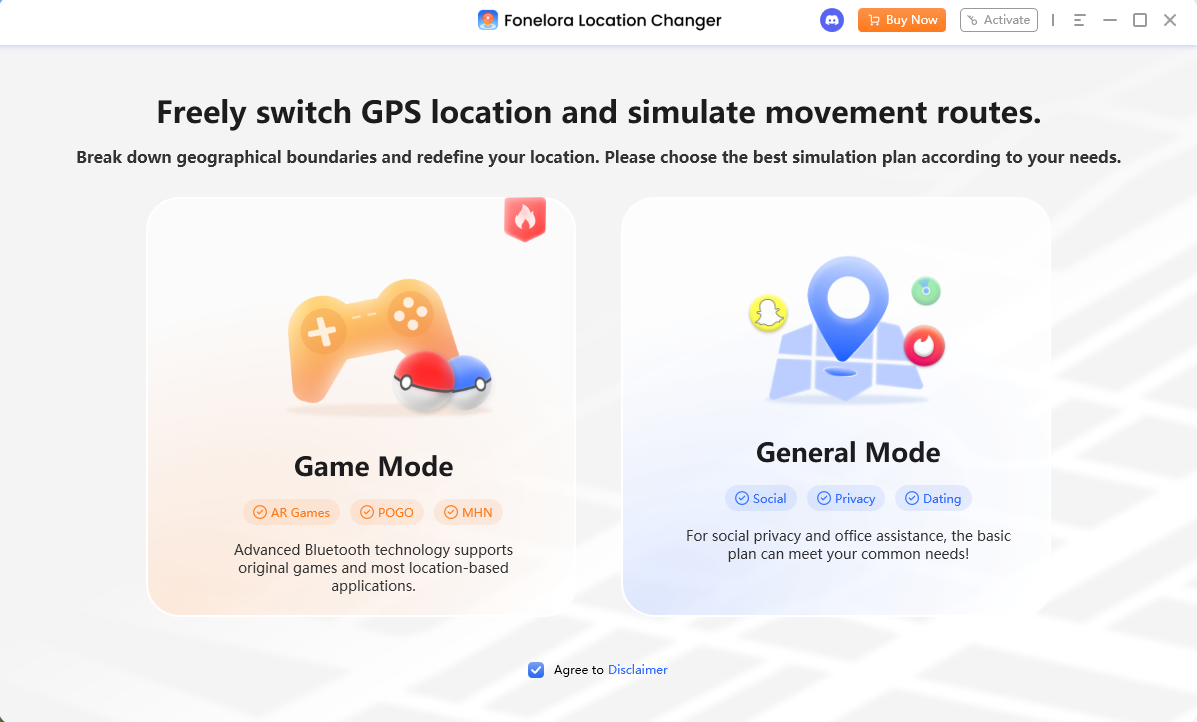
1. Connect Your Device: Open Fonelora Location Changer on your computer, select Game Mode, and connect your supported device. (Note: Setup may require enabling Developer Mode on iOS or USB Debugging on Android.)

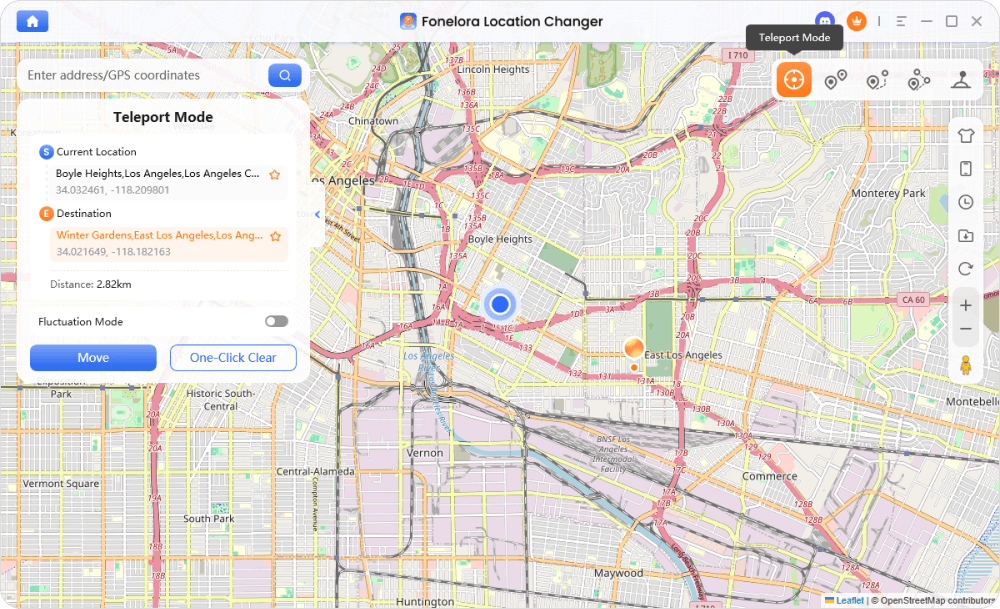
2. Enter Teleport Mode: Once the map loads, copy the exact Unown coordinates from your live radar and paste them into the search bar.
3. Check the Cooldown Timer: Before you catch the Unown or spin any PokéStops at the new location, look at Fonelora’s built-in Cooldown Timer. If the timer indicates you need to wait, leave the game idle until the countdown reaches zero.
4. Catch the Unown: Once the cooldown period is safely over, tap the Unown on your screen and catch it to add a new letter to your Pokédex.
If you are missing letters and cannot travel to global events, check compatibility for iPhone and Android location change to download Fonelora Location Changer and start safely navigating to live radar coordinates today.
Important Limitations and Account Risk
Is it completely safe to teleport to catch Unown? The transparent answer is no. Using any location changer violates Niantic’s Terms of Service and is done entirely at your own risk.
Before you attempt to snipe coordinates, keep these realistic boundaries in mind for safe GPS spoofing on Android and iOS:
- No 100% Anti-Ban Guarantee: Neither Fonelora nor any other tool can guarantee complete undetectability or a permanent bypass for Error 12.
- Cooldowns Are Mandatory: The built-in timer helps remind you, but actively waiting out the suggested time is your responsibility.
- Avoid Unnatural Jumps: Teleporting back and forth across the globe multiple times a day is highly suspicious and increases detection risk.
- Use Authorized Hardware Connections: Stick to desktop-tethered GPS changing rather than downloading unverified, cracked game clients directly to your phone.
Frequently Asked Questions
Q1: What are all the letters of the Unown alphabet in Pokémon?
There are exactly 28 forms in total: the 26 letters of the English alphabet (A through Z), plus an exclamation mark (!) and a question mark (?).
Q2: How do you catch all the Unown in Pokemon GO?
Completing the alphabet locally is extremely difficult. Most players acquire them by attending global events (like GO Fest) or by using live coordinate radars paired with a location tool to virtually visit active spawns.
Q3: How long is the cooldown when teleporting to an Unown spawn?
The required wait time depends on the distance you travel. Short local jumps take a few minutes, while long-distance or global teleports require a maximum wait time of 2 hours. A tool like Fonelora Location Changer provides a Cooldown Timer to help track this automatically.
Final Thoughts: Completing Your Unown Alphabet
Completing the 28-form Unown alphabet is a massive achievement, but the extreme rarity of wild spawns makes it nearly impossible to do without traveling. By combining live Unown radars with a cooldown-aware virtual travel strategy, completing your Pokédex becomes an attainable goal.
For players who need a guided desktop setup to handle teleportation safely, Fonelora Location Changer is a practical option. With its built-in Cooldown Timer and Teleport Mode for supported devices, it helps you manage the strict rules of in-game movement. To finally collect those missing letters, set up your Pokémon GO location changer to carefully bridge the gap between live radars and local gameplay. Just remember to respect cooldown rules and assess account risks before you start hunting.

Fonelora Location Changer
- Bluetooth Hardware Simulation for Safer GPS Spoofing
- Realistic Movement & Route Simulation
- No Root or Jailbreak Required
- All-in-One Solution for Games, Social Apps & Privacy
More Related Articles



