PGSharp iPhone Guide: Finding the Right iOS Spoofing Setup
Struggling with PGSharp iPhone limits? Skip risky sideloads and bans. Learn to securely change IP address on iPhone and simulate GPS movement using official apps for safe, seamless gaming.
Facing a confusing mobile ecosystem when all you want to do is play your favorite game is incredibly frustrating. I originally searched for a PGSharp iPhone solution hoping to access a joystick and teleport features, only to discover the app is officially designed for Android. This technical barrier pushes many players toward outdated tutorials or sketchy downloads. The fear of Pokémon GO account bans, combined with the hassle of sideloading third-party apps, left me anxious and stuck.
After realizing a direct port wasn’t an option, I began testing alternative location-changing tools that work through a desktop connection. Within an hour, I was able to simulate custom walking routes securely while keeping the official game app entirely intact.
Comparing iOS Spoofing Methods: Modified Apps vs. Desktop Tools
If you don’t want to jailbreak your iPhone or deal with revoked enterprise certificates, you need to understand the difference between modified applications and tethered desktop software. Most confusion around PGSharp iPhone searches comes from the fact that the application is built specifically for Android architectures.
Experienced spoofing communities often recommend iOS users rely on computer-assisted location changers rather than modified game clients (like iPogo or SpooferPro). This approach typically reduces compatibility issues with Apple security updates and keeps the official Pokémon GO app intact.
To make an informed decision, consider the differences in this comparison:
| Feature | Modified iOS Apps (e.g., iPogo) | Desktop Tethering Tools (Recommended) |
| Safety Risk | High. Modifies game code, increasing detection risk. | Low. Uses the official, untampered App Store game. |
| Success Rate | Variable. Certificates frequently get revoked by Apple. | High. Maintains a stable virtual location connection. |
| Technical Skill | Moderate to High. Requires managing sideloading tools. | Low. Requires a simple USB or Wi-Fi computer connection. |
| Time Cost | High continuous maintenance to reinstall revoked apps. | Low. Setup takes minutes with minimal ongoing maintenance. |
By choosing external software over a risky app sideload, you minimize account risks while gaining reliable GPS features.
My Recommended PGSharp iPhone Alternative
Since PGSharp is officially limited to Android devices, iPhone users typically rely on desktop-based GPS location changers to access similar joystick and teleport features safely.
Compared with modified Pokémon GO apps, desktop tethering tools are generally considered more stable because they keep the official App Store version of Pokémon GO completely intact.
Fonelora Location Changer is one of the most practical options for iPhone and Android users who want to simulate movement, teleport safely, and create custom walking routes without jailbreaking or sideloading modified game clients.
Key features include:
- Teleport Mode for instant GPS changes
- Joystick movement controls
- Multi-spot route simulation
- Adjustable walking speeds
- GPX route import support
- iPhone and Android compatibility
- No jailbreak or root required
Unlike modified apps that frequently lose certificates or trigger compatibility problems after iOS updates, desktop-based GPS tools provide a more stable long-term solution for Pokémon GO players.
Step-by-Step: How to Use Fonelora as a PGSharp iPhone Alternative
Step 1. Download and install Fonelora Location Changer on your Windows PC or Mac.
Step 2. Connect your iPhone to the computer using a stable USB data cable.

Step 3. Unlock your device and tap Trust This Computer if prompted.
Step 4. Open Fonelora and wait for the map interface to load your current GPS location.
Step 5. Choose one of the movement modes:
- Teleport Mode
- Joystick Mode
- Multi-Spot Route Mode

Step 6. Search for a Pokémon GO hotspot or manually drop a pin on the map.
Popular locations include:
- Zaragoza
- New York
- Tokyo
- Pier 39
Step 7. Adjust movement speed to realistic walking levels (typically under 10 km/h).
Step 8. Open Pokémon GO and begin exploring using the official game app.

Recommended Safety Settings
To reduce soft-ban risks:
- Keep movement speeds realistic
- Avoid repeated instant teleports
- Wait appropriate cooldown periods
- Close Pokémon GO before long-distance teleports
- Use route simulation instead of static GPS positions
Simulating realistic movement patterns is one of the safest ways to use location-changing tools on iPhone without relying on modified Pokémon GO clients.
Account Safety: Expert Cooldown Guidelines
Understanding how to spoof safely is critical if you want to avoid an account ban. Keeping the official game application intact by using an external tether is only the first step; simulating human behavior is the second. Experts emphasize slower movement speeds, realistic travel patterns, and strict cooldown periods to reduce account risk.
A cooldown is the mandatory waiting period after performing an in-game action (like catching a Pokémon, dropping a Gym defender, or spinning a PokéStop) before you can interact with the game at a distant location.
Teleporting long distances without waiting at least two hours is the number one trigger for account bans. If you catch a Pokémon in New York, you must wait at least two hours of real time before catching one in Tokyo. When in doubt, let your account rest overnight before making a massive geographical jump.
To further protect your profile, follow these advanced guidelines:
- Maintain Realistic Speeds: Keep your movement speed below 10 kilometers per hour. Moving at vehicle speeds (50+ km/h) while attempting to hatch eggs will result in tracking errors and temporary soft bans.
- Close the App Before Teleporting: If you are going to teleport across the city, force close the game on your iPhone first. Apply the new coordinates via your desktop tool, and then reopen the game.
- Beware of Rubberbanding: If your USB cord disconnects while you are playing, your phone’s GPS will violently snap back to your real-world location. If you interact with the game during this snap, you will trigger a cooldown violation. Always ensure a secure physical connection.
Related: Understanding Pokémon GO Cooldown Rules
Most soft bans happen because players teleport too quickly between distant locations without respecting cooldown timers. Using realistic travel patterns together with route simulation tools can help reduce account risk significantly.
Helpful guides:
Why a Direct PGSharp iOS Download Doesn’t Exist
A major obstacle for new users is the simple fact that PGSharp is an APK (Android Package Kit). Apple’s closed operating system architecture physically cannot read or install Android executable files.
Because of this technical barrier, many online tutorials are outdated or intentionally misleading. You will frequently encounter YouTube videos offering an “official PGSharp iPhone install guide” or websites claiming to host a direct download. These are almost always scams designed to bypass your device’s security.
When attempting to download these fake iOS versions, you are usually redirected to pages requiring you to complete surveys, install ad-heavy applications, or download malicious configuration profiles. Installing unverified configuration profiles gives third parties dangerous access to your personal data and network traffic. There is no hidden method to force an Android application onto an Apple device.
Troubleshooting Your iOS Spoofing Setup
Even with top-tier desktop tools, you may encounter obstacles during the initial connection.
If your PC or Mac fails to recognize your phone, the issue is usually your cable or your drivers. Always test a second Apple-certified cable. If the hardware is fine, ensure your iTunes software (or Finder on Mac) is updated to the latest version. Desktop location spoofers rely on Apple’s official drivers, which are installed alongside iTunes, to communicate with your device.
The most frequent issue for users on newer software involves Apple’s system permissions.
FIX: HOW TO ENABLE DEVELOPER MODE (iOS 16 & iOS 17)
Apple requires users to manually authorize external location testing on newer operating systems. If you are running iOS 16 or later, your virtual location tool will not function until Developer Mode is active.
1. Open the Settings app on your iPhone.
2. Scroll down and tap on Privacy & Security.
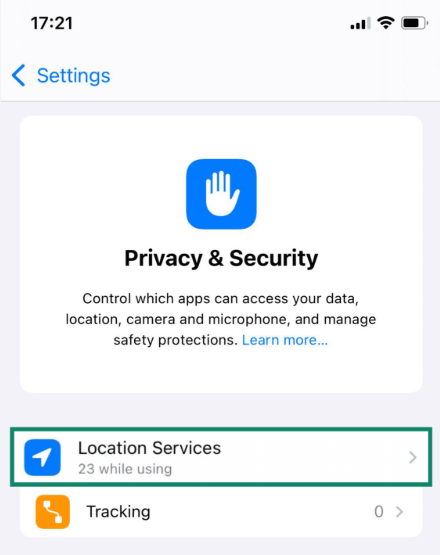
3. Scroll to the very bottom of the menu and locate the Security section.
4. Tap on Developer Mode.
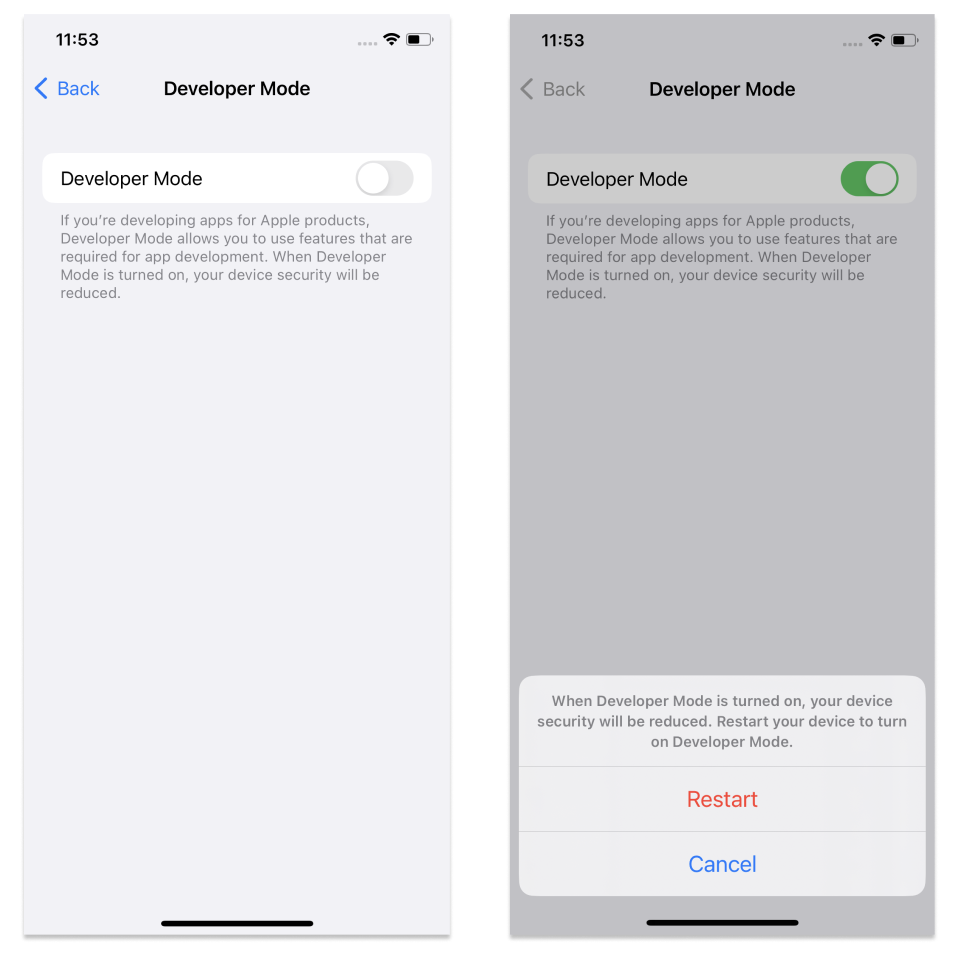
5. Toggle the switch to the On position.
Your device will prompt you to restart. After the reboot, your phone will ask you to confirm the activation by entering your passcode.
Once enabled, your desktop software will successfully push location data to your device without further interruptions.
Frequently Asked Questions About iPhone Spoofing
Players searching for these tools primarily want the features—like joystick movement and custom routing—rather than the specific brand name. Below are clear answers to the most common questions regarding location modification on Apple devices.
What Is the Best PGSharp Alternative for iPhone?
Because PGSharp is Android-only, most iPhone users rely on desktop GPS location changers instead of modified Pokémon GO apps.
Desktop-based tools like Fonelora Location Changer allow users to:
- Simulate joystick movement
- Create walking routes
- Teleport safely
- Use the official Pokémon GO app
- Avoid jailbreak requirements
Can you spoof on iPhone without a jailbreak?
Yes. Modern desktop location tools rely on Apple’s built-in developer testing features to change your coordinates. This completely bypasses the need for a jailbreak or the hassle of sideloading revoked applications.
Will location spoofing get my account banned?
If performed recklessly, yes. However, maintaining slower movement speeds, observing strict two-hour cooldown periods for long-distance jumps, and keeping the official App Store version of the game installed drastically reduces your risk of receiving an account strike.
Conclusion
Discovering that PGSharp does not officially support iPhone can initially feel frustrating, especially for players searching for joystick controls, teleportation, and safer route simulation features on iOS. However, understanding this limitation helps users avoid dangerous APK scams, fake download pages, revoked certificates, and unstable sideloaded applications.
Instead of modifying the Pokémon GO app itself, many experienced players now prefer desktop-based GPS location changers because they work directly with the official App Store version of the game while providing more stable virtual movement controls.
For iPhone and Android users looking for a reliable PGSharp alternative, tools like Fonelora Location Changer offer features such as Teleport Mode, joystick movement, custom walking routes, adjustable movement speeds, and GPX route simulation without requiring jailbreak or root access.
Combined with realistic movement behavior and proper cooldown management, these tools provide a significantly safer and more stable way to explore Pokémon GO hotspots, hatch eggs, join raids, and simulate natural gameplay patterns.
More Related Articles



Joy Taylor is a seasoned technical writer with over a decade of experience in mobile technology. At iMobie, she specializes in producing in-depth content on iOS data recovery, iPhone unlocking solutions, and iOS troubleshooting.
Product-related questions? Contact Our Support Team to Get Quick Solution >
