2026 Full Review on Cheetah Tool Pro & Its Alternative
Explore more information on Cheetah Tool (Pro), including its main functions, features, and how to download and use. Alternatively, you will get an easier Cheetah Tool alternative with FRP Bypass guide.
Fixing or unlocking an Android phone isn’t always easy, especially with how quickly phone technology keeps changing. That’s where Cheetah Tool Pro can really help. It’s a simple but practical tool that makes it easier to do things like bypass FRP locks, unlock networks, and update or fix phone software.
In this guide, we’ll show you what Cheetah Tool Pro can do, which phones it works with, and how to download and use it step by step. We’ll also share an easier alternative on both Windows & Mac at the end in case you want something more beginner-friendly.
Android Software Repair
Part 1. What is Cheetah Tool?
Cheetah Tool Pro is a practical solution for resolving common Android issues, such as bypassing FRP, flashing firmware, and removing screen locks. It is designed to perform Android’s software repairs efficiently with minimal steps.
1. Cheetah Tool Functions
The following features highlight why Cheetah Tool is a powerful option for Android unlocking and repair needs:
- Firmware Flashing: A firmware upgrade or reset may correct software errors and optimize your device’s performance.
- QCN Read/Write: Manage Qualcomm Network Configuration (QCN) files to optimize network performance.
- Screen Lock Reset: Quickly unlock devices with forgotten screen passwords without data loss.
- FRP Reset (ADB): Bypass Factory Reset Protection using ADB to regain access to devices after a reset.
- IMEI Repair: Address IMEI-related problems to restore full device functionality and network compliance.
- EFS Reset: Reset the EFS partition to its factory state to resolve network and security issues.
Network Decode: Decode and analyze network configurations to troubleshoot connectivity challenges.
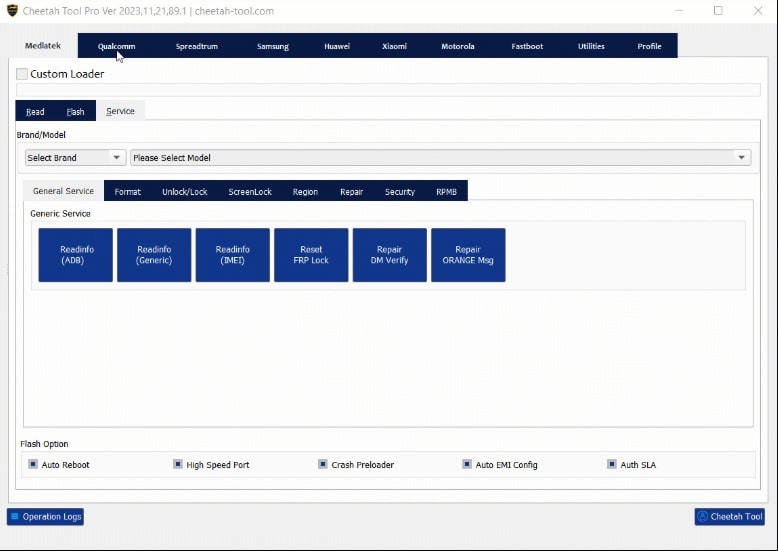
Cheetah Tool Dashboard
2. Supported Devices
The Cheetah Tool Pro supports one of the widest ranges of Android devices for mobile software repairs. Some of the popular ones are:
- Samsung: All flagship Galaxy S and Note models, along with the budget-friendly A Series.
- Xiaomi: All Note, Redmi, and POCO devices.
- Nokia: Wide range of C, & G series phones, and T series tablets.
- Oppo: A big selection of flagships and mid-rangers from Oppo, Vivo, Realme, and OnePlus.
- Huawei: Multiple models of Huawei and Honor.
3. Pros & Cons
Pros:
- Offers a wide array of tools to address various device repair and maintenance needs.
- Supports a wide range of Android brands and models.
- Regularly updated to ensure compatibility with the latest devices and software versions.
- Designed for ease of use, making it accessible to both beginners and advanced users.
Cons:
- Some of its key features are locked behind a 12 or 6-month subscription.
- Critical problems require a learning curve to solve.
Part 2. Cheetah Tool Latest Version Free Download & How to Use
Here’s how you can access Cheetah Tool Pro and take advantage of its main feature: FRP bypass.
Downloading the official and updated version of Cheetah Tool Pro is important to ensure smooth performance and avoid unexpected issues.
Step 1. Visit the official Cheetah Tool website.
Step 2. Go to the Downloads section, choose the version that works with your computer, and follow the steps to install the tool.
Step 3. After installation, complete the registration process. If you purchase credits, you’ll receive a Credit ID and Password.
Step 4. Log in to the Cheetah Tool website, go to your Dashboard, enter your Credit details, and click Activate to unlock the tool.
Step 5. Launch Cheetah Tool Pro and sign in using your registered email and password.
Step 6. In the main interface, select your device’s brand and model.
Step 7. Choose the FRP Reset option and follow the on-screen prompts to complete the process.
One thing to keep in mind, that the tool can require additional files to be downloaded depending on your problem, which can be found on the downloads page of the Cheetah tool Pro.
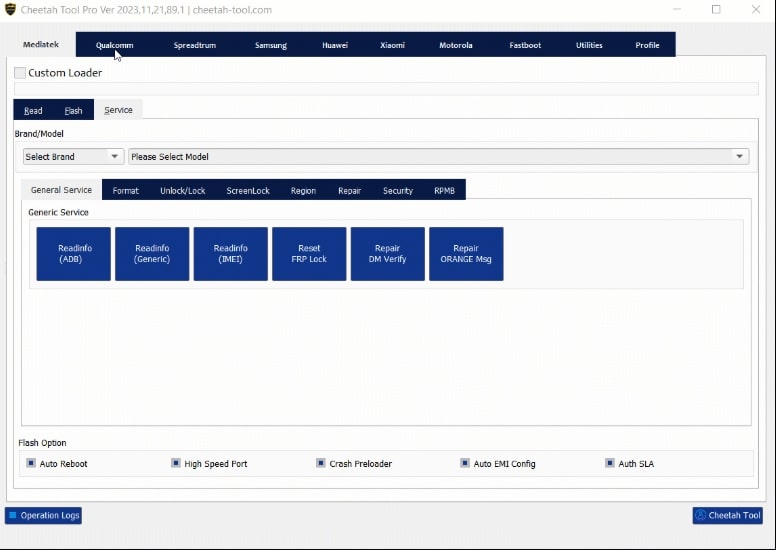
Selecting brand from the Cheetah Tool Dashboard
Part 3. Bonus: Best Cheetah Tool Alternative-DroidKit
Although Cheetah Tool is a reliable solution for many Android repair scenarios, it’s not always the best fit for everyone. Some users might find it too limited in terms of macOS compatibility, while others may struggle with its occasionally technical interface.
This is where DroidKit- an All-in-one Android Toolkit comes in. It’s a simple and easy-to-use tool that does many of the same things but in a more user-friendly way. Unlike complicated technician platforms, DroidKit uses a mobile-first design that empowers casual users to carry out advanced repairs with ease.
Why DroidKit is a Strong Alternative to Cheetah Tool?
DroidKit is more than just another Android tool. With one tool offering countless fixes, DroidKit helps you regain access, resolve system issues, and recover data quickly, all without needing advanced technical skills.
Here is what makes it better:
- Recover all or selected deleted data
- Fix Android system issues without requiring root access
- Remove various types of screen locks like PIN, fingerprint, face ID and etc.
- Transfer, manage, and back up your Android data
How to Use DroidKit for FRP Bypass
If you’re locked out of your Android because of FRP, you can use DroidKit to bypass it by following these steps:
Step 1: First download DroidKit now. You can choose Windows or Mac, depending on your computer.
Free Download * 100% Clean & Safe
Step 2: Launch the software and select “FRP Bypass” from the main dashboard.

DroidKit FRP Bypass
Step 3: Connect your Android device to your computer via a USB cable, and click on “Start”. Choose the brand of your Android phone.
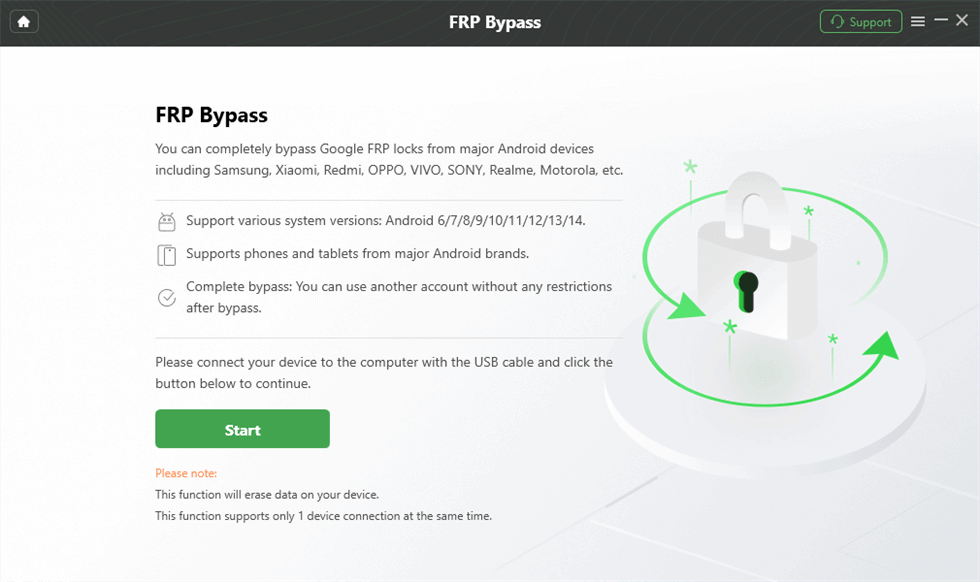
Launch the FRP Operation
Step 4. Wait for the configuration file prepared, and tap on the “Start to Bypass”.
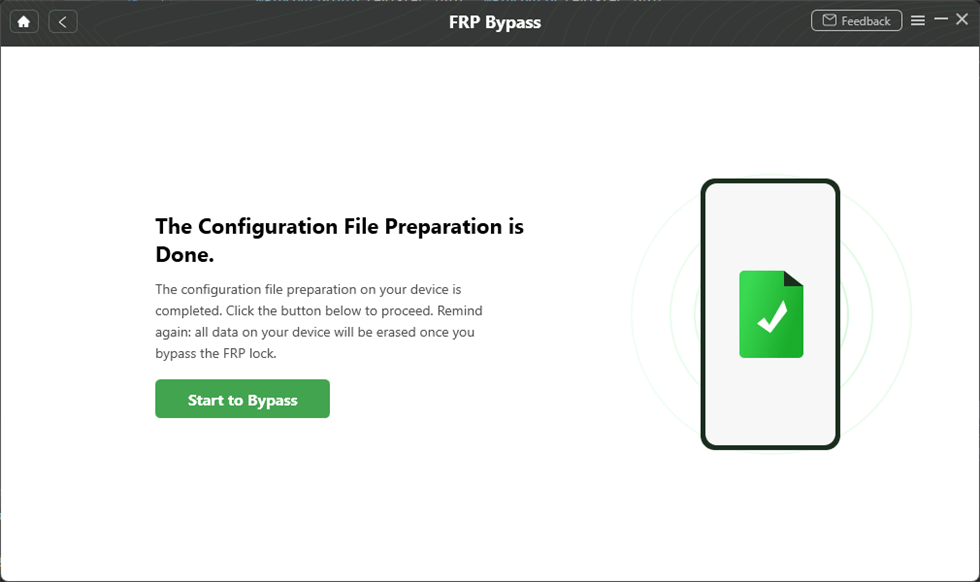
Tap on Start to Bypass
Step 5. Please find the number shown on your device and select the right system version. Then, please click the “Next” button.
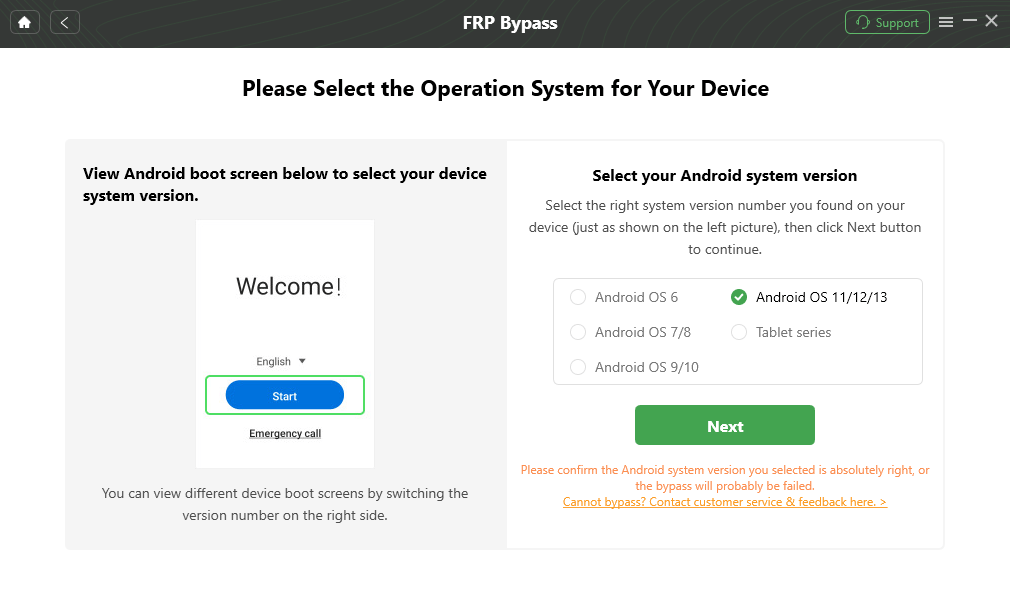
Select the Correct System Version
Step 6. Then, please follow the instructions to complete the corresponding Settings. After completing the steps above, the device will be restarted and the FRP Lock is also removed successfully.

FRP Bypass Complete
Conclusion
If your Android phone is locked, not working right, or having problems after a reset, Cheetah Tool Pro can help you fix it at home. It works with almost all phones and keeps getting better with updates.
You will need to buy credits and do a little setup. If that sounds tricky, DroidKit is easier to use and still fixes most of the same problems. Both tools can save your phone and help you avoid a trip to the repair shop.
Free Download * 100% Clean & Safe


Roger Smith is a senior technical writer with years of experience in providing Android solutions. He loves to help users solve various problems such as Android unlock, Android data recovery, and Android system repair.
Product-related questions? Contact Our Support Team to Get Quick Solution >
