Jailbreak iPhone Without a Computer [5 Ways]
This article guides you through easy, safe ways to jailbreak iPhone without a computer. It covers free tools, computer methods, risks, and FAQs. Learn trusted methods and discover why AnyUnlock stands out as the best, most secure option for effortless unlocking and smooth jailbreaking.
Many iPhone users want to jailbreak their devices without a computer to gain more customization freedom beyond Apple’s restrictions, or remove Activation Lock without previous owner. Yet, conflicting information about jailbreak tools has left many unsure of what’s safe or effective. A recent Reddit user asked, “How would I be able to jailbreak my iPhone without a PC?”, reflecting the growing interest in simple, PC-free jailbreak methods. This article explores 5 trusted ways to jailbreak iPhone without a computer.
What Does Jailbreaking an iPhone Do?
Jailbreaking refers to the process of unlocking the native restrictions that are imposed by Apple phones. It lets users change the phone’s look or use apps unavailable on the App Store. Some also use it to unlock their iPhones for other networks or remove pre-installed apps. Through this process, users can explore extra features and deeper customization options. It gives advanced access but may also affect system stability or security.
Risks of Jailbreaking iPhone
The act of jailbreaking may be enticing, but it presents quite a number of risks you should understand first. These risks can apply to your iPhone, whether you jailbreak your device without a computer or not:
- Security Threats: It removes Apple’s protections, making your phone more open to malware.
- Warranty Void: Apple does not support devices that have been jailbroken by users.
- Update Issues: You may lose jailbreak features or face errors during iOS updates.
- Data Loss: Errors during jailbreaking can delete contacts, photos, or essential system data.
- System Instability: Modified files can crash apps or cause frequent phone restarts.
After knowing the potential risks, let’s move to the ways to jailbreak iPhone without a computer.
How to Jailbreak iPhone Without a Computer for Free?
When you wish to explore iOS beyond Apple’s limits, several safe tools can help. The following sections will help you learn how to jailbreak iPhone without a computer for free:
Tool 1: Sileem Repo Extractor
Sileem Repo Extractor is a handy tool to jailbreak your smartphone running iOS 16 to 18.3. It helps users install external apps and tweaks not found on the App Store. Also, you can access different repositories and customize your phone’s look. Follow the given guide to find out how you can jailbreak iPhone without a computer through Sileem:
Step 1. Navigate to the “Safari” browser to access the “Sileem Repo Extractor” and tap “Download Sileem App Installer.”
Step 2. Launch the installer and tap “Official Sileem Theme” from the “All Repos” tab. Press the “Copy” button, paste it onto the “Home” tab, and tap “Extra A Repo.”
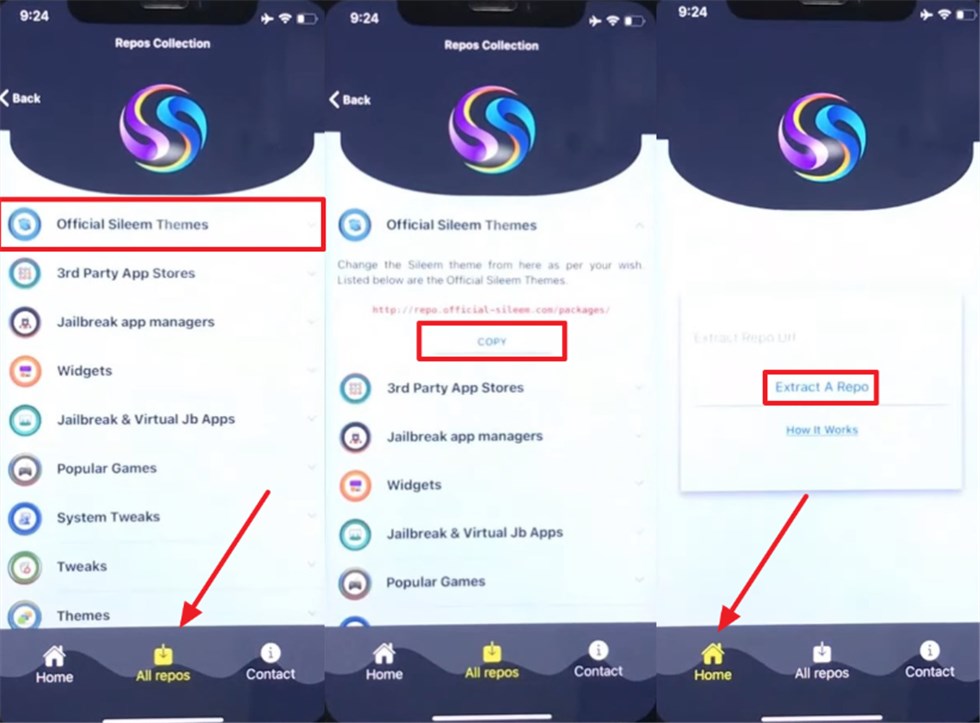
Step 3. After extracting, tap the active “Sileem” app, and you will jailbreak your phone.
Tool 2: Palera1n Virtual Jailbreak
Palera1n Virtual Jailbreak offers an easy way to enjoy iPhone customization without complex steps. It supports many iOS versions, including iOS 15 to iOS 18. This tool works entirely on your device with no cables or PC needed. You can add custom themes and tweaks using the Sileo app. Go through the following steps to use it and jailbreak iPhone without a computer:
Step 1. Access Bestjailbreaks websites and press the “Get It Now” button. When launched, hit the “Install” to download the “Palera1n” app.
Step 2. Upon completing the process, hit the “Install Sileo” button and let the app start jailbreaking your phone.
Tool 3: Unc0ver
Unc0ver is another famous tool that lets users safely customize their iPhones. Unc0ver supports iOS versions from 11 to 18 across many device models. You can jailbreak iPhone without a computer using trusted app stores like TweakBox or Unc0ver.vip. This semi-untethered method may need reactivation after rebooting. Adhere to the steps below to install the Unc0ver app to jailbreak your phone:
Step 1. Open the Unc0ver site on your smartphone and press the “Jailbreak” button. Navigate to the “General” section from your device’s settings to access “Profiles” and tap “Trust Unc0ver.”
Step 2. As it’s installed, run the “Unc0ver” app and press the “Jailbreak” button. Wait for a few seconds and tap “Respring” to reboot and Jailbreak your device.
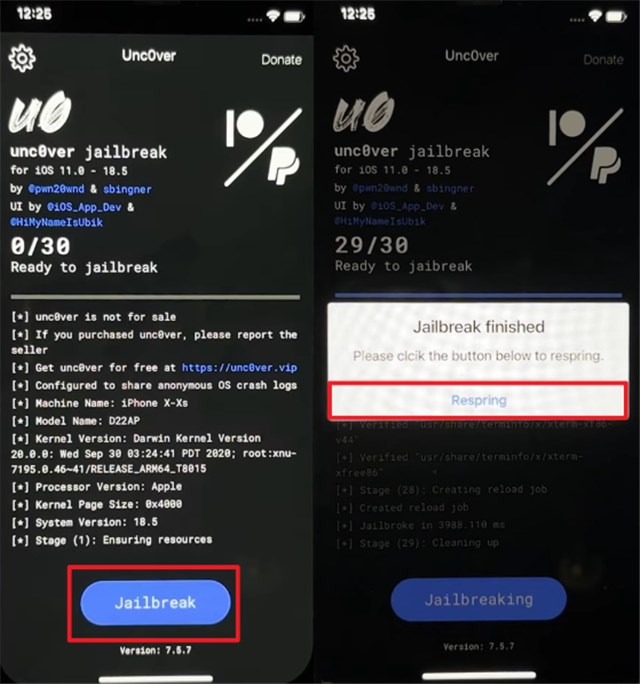
The official Uncover can be installed via AltStore — a computer is required for the first setup, but once AltStore is installed, you can install or update Unc0ver directly on your iPhone without using a computer.
How to Jailbreak an iPhone with a Computer
Although many want to jailbreak iPhone without a computer, it is safer to use a computer for jailbreaking. This section discovers computer-based methods that make the jailbreak process effortless:
Tool 1: Jailbreak iPhone With a Computer via AnyUnlock [Easy & Secure]
As a professional iPhone unlocker, AnyUnlock offers a secure and stable solution for jailbreaking iOS devices, allowing users to gain full control and customization freedom with just a few clicks. Its intuitive design makes the jailbreak process simple, fast, and beginner-friendly — no complex commands or technical expertise required. Beyond jailbreaking, AnyUnlock also supports removing screen passcodes, Apple ID, MDM, and iCloud Activation Lock for a complete device management experience.
Main Benefits of AnyUnlock:
- Uses secure methods to keep all phone data safe.
- Works smoothly with most iPhone models and iOS versions.
- Protects files, photos, and contacts during the process.
- Finishes unlocking or jailbreaking faster than most tools.
Free Download * 100% Clean & Safe
Follow the given guide to use AnyUnlock to cater to these needs:
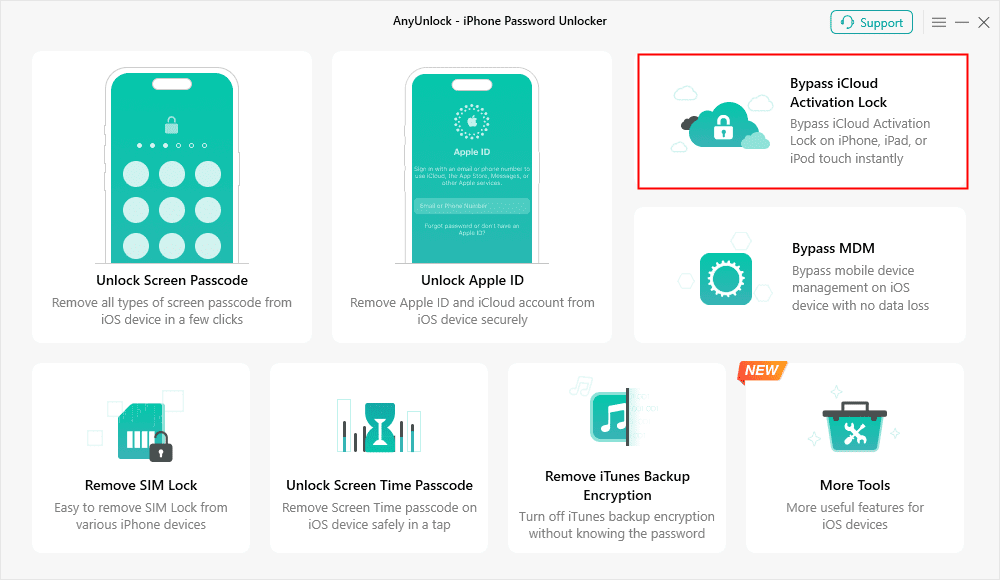
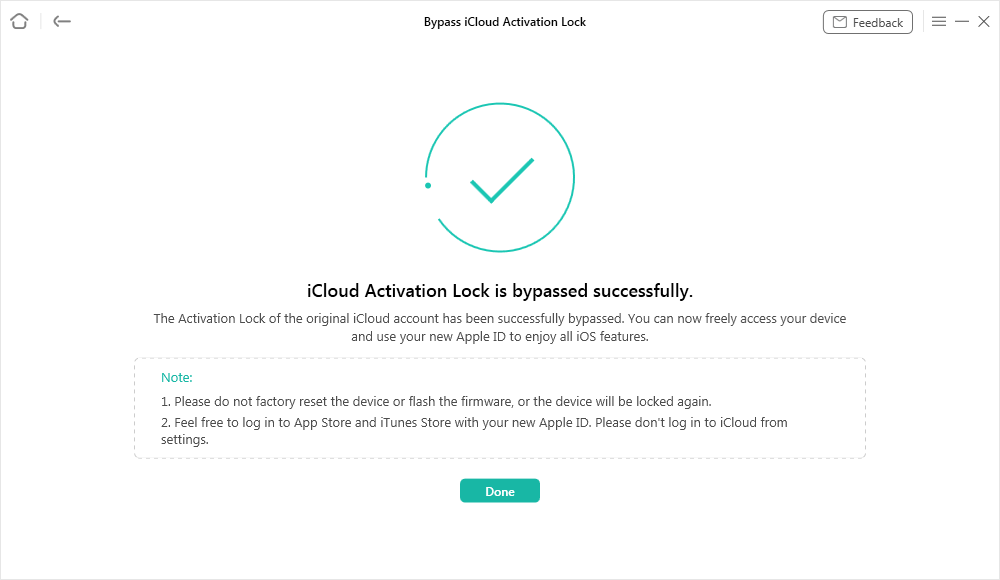
Step 1. Download and launch the “AnyUnlock” tool, head to the “Bypass iCloud Activation Lock” feature.
Step 2. Link your phone to the computer and press the “Start Now” button. Once your device is detected, hit the “Jailbreak Now” button and move forward.
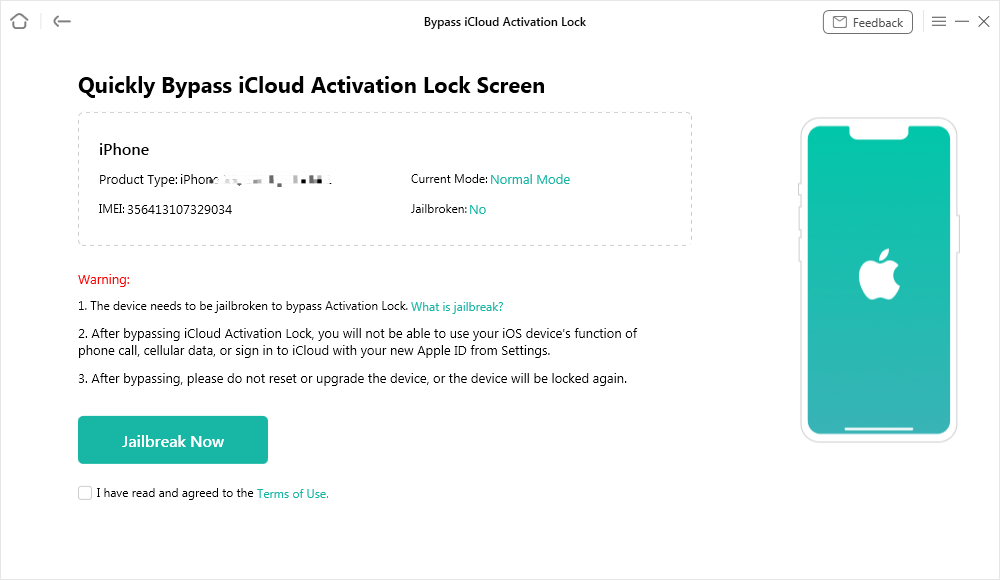
Step 3. Place your phone in the DFU mode. Once the activation lock has been bypassed, you have successfully jailbroke your iPhone.
Tool 2: Checkra1n
Checkra1n is another dependable jailbreak tool designed for users who prefer computer-based methods. The method works well on Windows 7 and subsequent editions on 32-bit and 64-bit editions. It will also need a USB flash disk with a minimum memory capacity of 2 GB. Although the setup involves several complicated steps, thus it seems challenging for beginners to complete successfully. You can follow the given steps if you still want to use Checkra1n for jailbreaking:
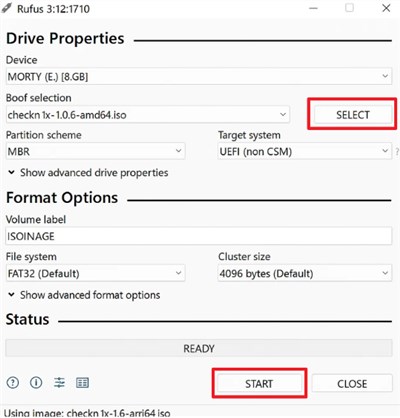
Step 1. Download “Rufus” and “Checkra1n” on your computer and connect a USB driver to it. Run the “Rufus” program and press “Select” to choose the “checkn1” ISO file and hit the “Start” button.
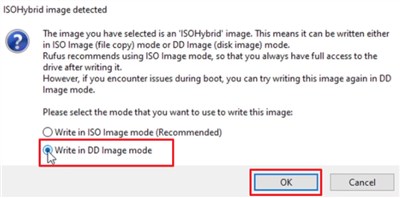
Step 2. Upon seeing a dialogue box, choose “Write in DD Image mode” and click the “OK” button. Once it is successfully installed, press the “Close” button.
Step 3. Restart your computer and keep pressing the “F12” key as you see the logo screen. After entering the Boot Mode, click “USB Storage Device.”
Step 4. When you see the “Checkra1n Jailbreak Wizard” screen, connect your iPhone to the PC and hit “Start.” As your device enters Recovery Mode, press the “Next” button.
Step 5. Click the “Start” button and press your phone’s keys as shown according to the instructions to start jailbreaking.
FAQs about Jailbreaking iPhone Without a Computer
Q1. Does jailbreaking require a computer?
The process does not always require a computer, as some tools work directly on iPhones. Nevertheless, some solutions require a computer to be initially configured or have higher capabilities.
Q2. Is it possible to unlock an iPhone without a computer?
The device can actually be unlocked without a computer while using online tools. Most advanced apps and services have provided the iPhone with an online unlocking option.
Q3. How to jailbreak iPhone without computer iOS 16?
You can use trusted options like Sileem Repo Extractor or Palera1n Virtual Jailbreak. The tweaks and customizations can be installed inside these types of apps, making your phone easy to access.
Conclusion
In summary, this article explained 5 effective tools to jailbreak iPhone without a computer safely. While several tools help jailbreak your device, risks still exist. For a safer and smoother experience, try AnyUnlock to handle everything securely and avoid jailbreaking fails. Download AnyUnlock now for an easy and secure jailbreaking experience, giving you the flexibility to use your iPhone your way.
Free Download * 100% Clean & Safe



Joy Taylor is a seasoned technical writer with over a decade of experience in mobile technology. At iMobie, she specializes in producing in-depth content on iOS data recovery, iPhone unlocking solutions, and iOS troubleshooting.
Product-related questions? Contact Our Support Team to Get Quick Solution >
