How to Use Bumble Snooze Mode: A Tested Guide
Discover how to use Snooze Mode on Bumble to temporarily pause your profile without losing your existing matches. This step-by-step guide explains how to hide your profile, what others can see, and what happens to your conversations while you’re away.
Feeling overwhelmed by constant notifications, but worried you’ll lose your matches and conversations if you delete your account? That concern is completely valid. The confusion between taking a temporary break and permanently deactivating is the main reason people hesitate. This guide provides a clear, tested solution using Bumble Snooze mode. We’ll show you exactly how to Bumble pause profile activity, what happens to your account, what your matches see, and—most importantly—how to come back when you’re ready.
This procedure was verified on an iPhone 15 (iOS 17) and a Google Pixel 8 (Android 14) using the latest version of the Bumble app to confirm the steps are accurate for both major platforms.

How to Turn On Snooze Mode: A Step-by-Step Guide
Activating Snooze mode is the best way to temporarily hide your profile. The process is simple, but following these steps ensures you do it correctly, as the interface can have minor differences between devices.
Activating Snooze on an iPhone (iOS)
1. Open the Bumble App: Launch the app and tap the gray Profile icon in the bottom-left corner.
2. Access Settings: Tap the gear icon in the top-right corner to open the main settings menu.
3. Select Snooze: The Snooze option is the first choice at the top of the list. Tap it to proceed.
4. Choose Your Duration: Select how long you want to pause your profile. Options include 24 hours, 72 hours, a week, or “Indefinitely.”
5. Set Your Away Status: Bumble requires you to set a status that your existing matches will see. This is a great way to manage expectations. You can choose from pre-set options like “I’m traveling,” “I’m focused on work,” “I’m on a digital detox,” or “I’m prioritizing myself.” You cannot write a custom status. Once you confirm, your profile is snoozed.
Activating Snooze on an Android Device
1. Open the Bumble App: Tap the Profile icon (the person silhouette) at the bottom-left of the screen.
2. Access Settings: Select the gear icon in the top-right corner to go to the settings screen.
3. Select Snooze Mode: Tap on Snooze mode, which is presented as the first option in the menu.
4. Choose Your Duration: Pick the length of your break: 24 hours, 72 hours, a week, or indefinitely.
5. Set Your Away Status: Just like on iOS, you must select an “away” status to inform your current matches about your break. After confirming, your account will enter Snooze mode, hiding you from new users.
How to Turn Off Snooze Mode and Reactivate Your Profile
Coming back from your break is just as easy as starting it. If you choose a set duration (like 24 hours), Snooze mode will turn off automatically. If you chose “Indefinitely” or want to return early, here are the steps to reactivate your profile manually.
1. Open the Bumble App: Go to your profile screen.
2. Go to Settings: Tap the gear icon in the top-right corner.
3. Disable Snooze Mode: Tap on Snooze mode at the top of the menu. You will see a button to “Turn off Snooze mode.”
4. Confirm: Tap the button, and your profile will be instantly active and visible in the discovery queue again.
What Happens to Your Profile in Snooze Mode?
The biggest relief for most users is knowing what Snooze mode actually does—and doesn’t do. Its core function is to temporarily adjust your dating app profile visibility while protecting everything you’ve already built. It removes your profile from the discovery queue, also known as the swipe deck.
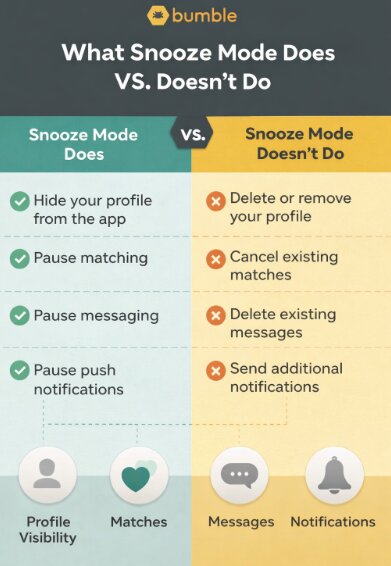
| What Snooze Mode DOES | What Snooze Mode DOES NOT |
| ✅ Hides your profile from new potential matches. | ❌ Delete your profile or account data. |
| ✅ Pauses your ability to appear in the discovery queue. | ❌ Delete your existing matches. |
| ✅ Allows you to continue chatting with existing matches. | ❌ Erase your chat history. |
| ✅ Lets you turn it off at any time to become active again. | ❌ Send a push notification to your matches about your status. |
| ✅ Shows your chosen “”away”” status inside your chats. | ❌ Prevent your current matches from messaging you. |
Essentially, Snooze mode creates a private space where you can focus on your current conversations or step away entirely, confident that your profile will be exactly as you left it when you return.
What Do Your Matches See When You’re in Snooze Mode?
This is the most important question, and where the fear of “ghosting” comes from. We tested this with two accounts to see exactly what happens.
Your matches do not get a notification that you have entered Snooze mode. However, if they open your chat conversation, they will see your chosen “away” status (e.g., “I’m on a digital detox”) displayed in a small gray banner at the top of the chat window.
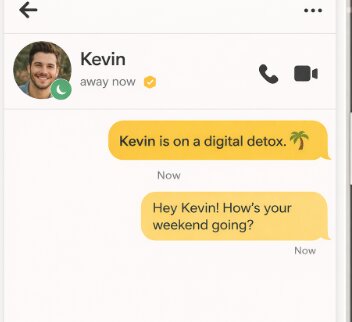
This is an elegant solution. It prevents you from seeming like you disappeared without explanation, but it’s subtle enough not to draw unnecessary attention. Your matches can still message you, and you can still reply, but they have context for why you might be less active.
Bumble Snooze Mode vs. Deleting Your Account
Choosing the right option for your break is critical. Using Snooze mode is a temporary pause, whereas deleting your account is a permanent, irreversible action that erases all your data.
Here is a clear comparison to help you make an informed decision:
| Feature | Bumble Snooze Mode | Deleting Your Account |
| Data Preservation | Preserves 100% of your data. All matches, chat history, photos, and profile information remain intact and accessible. | Permanently erases all data. Your profile, matches, and all conversations are gone forever with no possibility of recovery. |
| Reversibility | Completely reversible. You can disable Snooze mode at any time from the settings menu to instantly reactivate your profile. | Irreversible. The only way to return to Bumble is to create a brand-new profile from scratch, losing all previous connections. |
| Profile Visibility | Temporarily hidden from new users. Existing matches can still see your profile and interact with you. | Permanently removed. Your profile is no longer visible to anyone on the app, including former matches. |
| Best Use Case | Ideal for vacations, busy work periods, managing dating app fatigue, or focusing on a promising new connection. | Suited only for when you have decided to permanently leave the platform, such as after entering a committed relationship. |
4 Practical Reasons to Hide Your Profile with Snooze
Knowing when to use Snooze mode adds a strategic layer to managing your online life. This tool is more than just an off switch—it’s a practical solution for a variety of real-world scenarios.
1. Zone in on Work and Life Goals
When a major deadline looms or you’re navigating a new job, distractions from dating apps can be counterproductive. To Bumble, temporarily deactivating your profile visibility allows you to pause incoming notifications and the urge to swipe, helping you dedicate your full mental energy to your goals.
2. Travel Without Location-Based Matches
If you’re traveling and don’t want to match with people in a location you’re only visiting briefly, Snooze is perfect. It prevents your profile from being shown in a new city, so you can enjoy your trip without accumulating matches that aren’t geographically practical.
You May Also Like: How to Use a Bumble Fake Location (Safely)>
3. Manage Dating App Fatigue
Feeling burned out from the cycle of swiping, matching, and messaging is completely normal. A digital detox is essential for mental well-being. Snooze mode provides a guilt-free way to take a mental health break. You can return to the app with a fresh perspective when you feel ready.
4. Explore a Promising Connection
When you’ve met someone promising, you may want to give that budding connection your undivided attention. Snoozing your profile is a clear way to focus your energy and prevents new matches from complicating the delicate early stages of a potential relationship.
We are committed to keeping this guide updated. The Bumble app interface and features can change over time, and this article will be revised to reflect any new options or procedural adjustments.
A Smarter Alternative: Control Your Location Without Going Fully Invisible
While Bumble Snooze mode is perfect for taking a complete break, it may not always be the ideal solution—especially if you still want to stay active but avoid irrelevant matches while traveling. In some situations, hiding your profile isn’t enough—you may want to use a fake GPS for Grindr and other dating apps to change your location entirely.
In this case, using a location control tool can offer more flexibility.
One practical option is Fonelora Location Changer, a GPS location tool designed for both iOS and Android devices. Instead of hiding your profile entirely, it allows you to appear in a different city, helping you stay active while matching more intentionally.
How to Use Fonelora Location Changer:
1.Download and install Fonelora Location Changer on your computer.

2.Connect your iPhone or Android device using a USB cable.

3.Launch the program and choose mode.
4.Enter your desired city or select a point on the map.
5.Click “Move” to update your device’s GPS location instantly.

Once applied, apps like Bumble will reflect your new location, allowing you to continue matching without relying solely on Snooze mode.
Frequently Asked Questions
Here are direct answers to the most common questions about the Bumble Snooze feature.
Q1. What is Bumble Snooze mode?
Bumble Snooze is a feature that lets you temporarily pause your profile’s activity. It is a form of Bumble privacy mode that hides you from new potential matches without deleting your account, messages, or existing connections.
Q2. How do I turn Snooze mode on and off?
You can turn Snooze on by going to Profile > Settings and tapping “Snooze.” To turn it off, you follow the same steps and select “Turn off Snooze mode.”
Q3. Will my matches know I snoozed my profile?
They will not receive a direct notification, but if they view your chat conversation, they will see a small banner with the “away” status you selected (e.g., “I’m traveling”).
Q4. Can I still receive messages in Snooze mode?
Yes, your existing matches can still send you messages, and you can reply to them as usual. You will still receive push notifications for these messages unless you disable them in your phone’s settings.
Q5. Does Snooze hide my profile completely?
Snooze mode hides your profile from the main discovery queue, so no new users will see you. However, your existing matches can still see your profile and send you messages. It is not a complete Bumble offline mode, but a pause on public visibility.
Q6. Does Snooze delete my messages or matches?
Absolutely not. Snooze mode does not delete any of your data. All your existing matches and conversation histories are preserved and remain fully accessible.
Q7. Is Snooze mode different on iOS and Android?
The function is identical on both iOS and Android. The only potential difference is a minor variation in the user interface used to access the Bumble app settings, as detailed in our step-by-step guide.
Conclusion: Take Control of Your Dating Experience
Navigating online dating should happen on your terms. With Snooze mode on Bumble, you can step back anytime without losing your matches or conversations, making it easier to manage burnout and return when you’re ready.
If you don’t want to go completely invisible, there’s also a more flexible option. Tools like Fonelora Location Changer let you stay active while controlling your location, so you can avoid irrelevant matches or connect in places that suit you better—without relying only on Snooze mode.
More Related Articles

Joy Taylor


Joy Taylor is a seasoned technical writer with over a decade of experience in mobile technology. At iMobie, she specializes in producing in-depth content on iOS data recovery, iPhone unlocking solutions, and iOS troubleshooting.
Product-related questions? Contact Our Support Team to Get Quick Solution >
