How to Find Someone’s Location on Instagram: A Realistic Guide for 2026
Learn how to find someone’s location on Instagram with our realistic 2026 guide. We show you tested, ethical ways to see locations shared in posts & stories.
Trying to figure out how to find someone’s location on Instagram can be a frustrating experience, filled with misleading online advice. You might be trying to confirm a local business is actually nearby before visiting, only to be met with confusing articles that create uncertainty and a real fear of crossing privacy boundaries.
Let’s be clear: the idea of real-time, secret tracking on Instagram is a myth. This guide cuts through that noise. We provide only realistic, tested methods to see location information that users have voluntarily shared through posts, stories, and their profile. We will show you exactly what’s possible—and what isn’t—so you can find the information you need safely and ethically.
Method 1: How to See Location from Instagram Posts Using Geotags
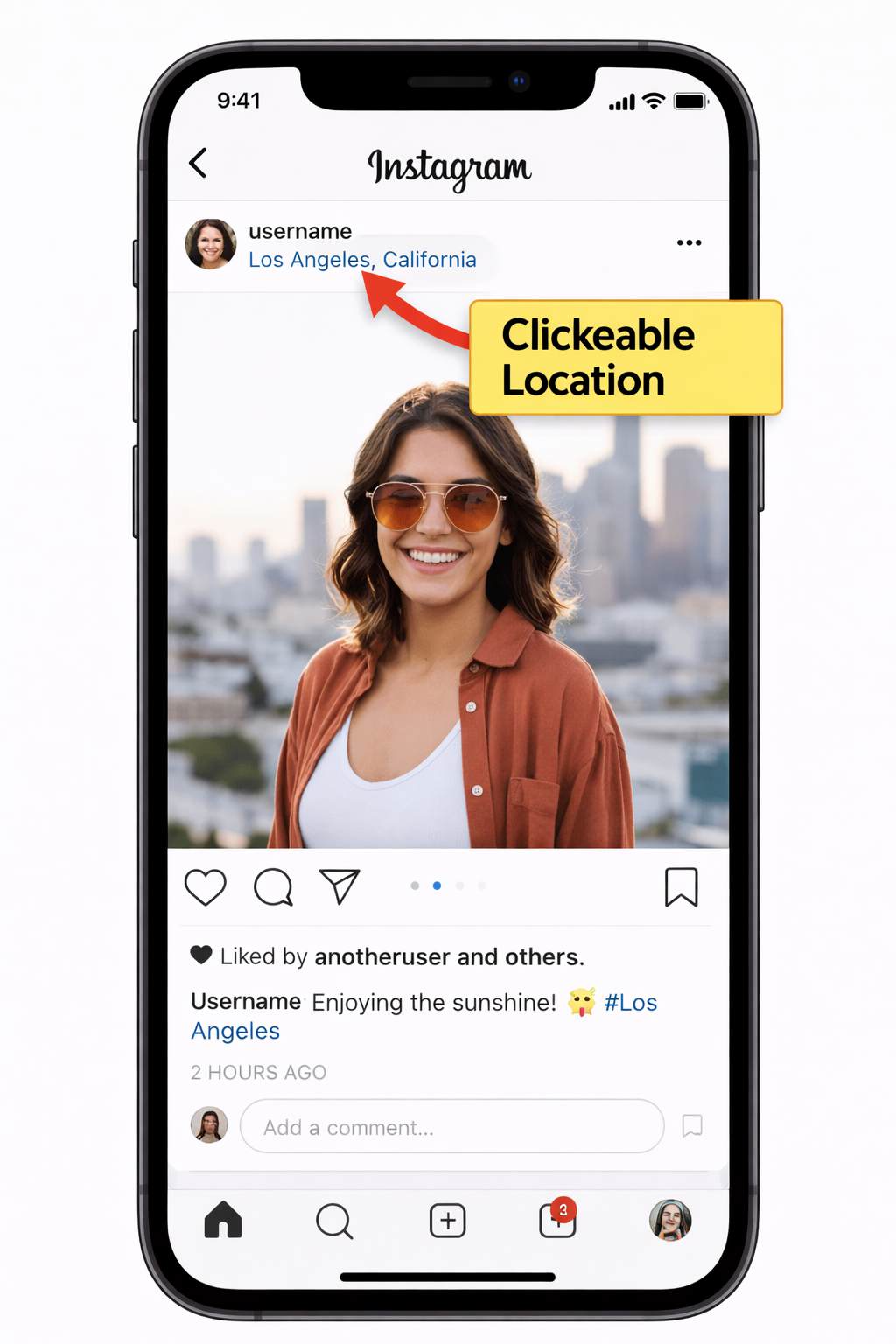
The most direct way to find a location is to check a user’s feed posts for a geotag. A geotag is a specific, clickable location—like a city, business, or landmark—that the user has manually added to their photo or video. It’s crucial to remember this location is user-selected and reflects where the post was tagged, not necessarily the user’s live position.
For instance, if you were checking a local shop’s profile, this would be your first logical step. Here is the exact procedure to follow:
- Open the Instagram app and navigate to the target account’s profile.
- Scroll through their feed. Look for a location name in small, clickable text directly below their username on any given post.
- If a location is present, tap on it. This action opens a map showing the tagged location and will also display other public posts that have been tagged with the same location.
This method is highly effective for identifying places a user has visited or wants their business to be associated with. However, remember that users can tag any location they choose, regardless of where they actually were when they posted.
Be Mindful of Broad Tags Businesses and influencers often use broad geotags, like an entire city (“Los Angeles, California”), to increase their post’s visibility. This may not be their exact storefront or location. Always double-check their bio for a specific street address or link to their website to confirm.
Method 2: Finding Location Stickers in Instagram Stories
Another common feature for sharing location is the “location sticker” within Instagram Stories. Much like post geotags, users manually add these interactive stickers to display a specific place. They are a time-sensitive clue, as stories typically disappear after 24 hours unless the user saves them to a profile Highlight. This is a key feature for anyone wondering about a localisation Instagram story.
Here’s how to check stories for location information:
- View the user’s story by tapping on their profile picture when it has a colored ring around it.
- Look for a sticker that explicitly names a place. It is often stylized but will contain readable text identifying a business, neighborhood, or city.
- Tap the location sticker. This will open a new screen showing a map of the area and, in some cases, other public stories tagged at that same location.
This technique is useful for seeing where someone was at a specific moment in the last 24 hours. However, the feature relies entirely on the user’s choice to add the sticker. If no sticker is present, the story itself provides no geographical data.
Method 3: How to Find Location on an Instagram Profile
When posts and stories lack explicit tags, you can often find clues by carefully examining the user’s profile. This method involves investigating publicly shared information for indirect hints about their location. It is not a direct feature but a way to deduce a location based on the content a user has chosen to share. It’s a common question for users in any language, including those asking, “comment trouver la localisation de quelqu’un sur Instagram”.
Here are the key areas on a profile to investigate:
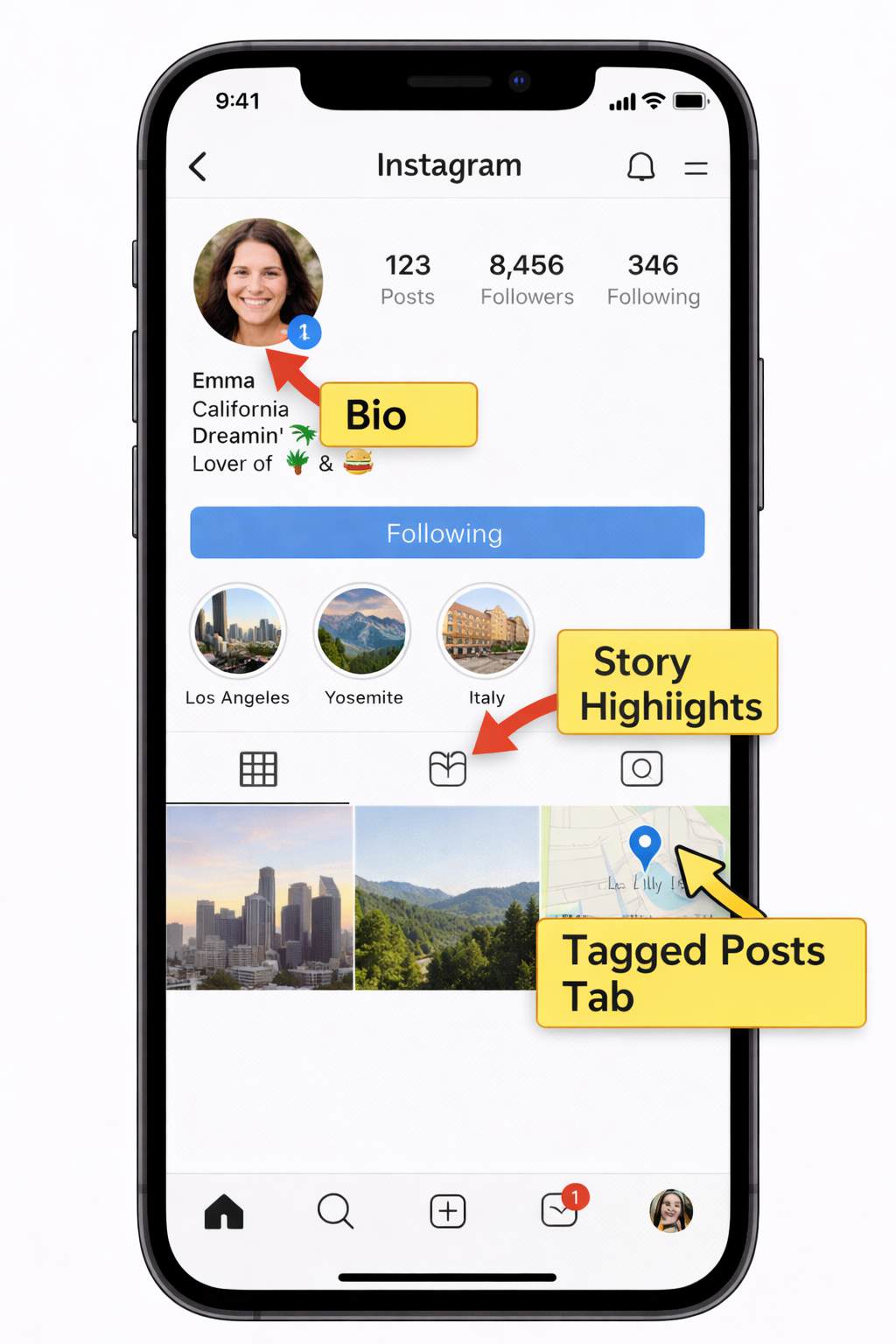
- The Instagram Bio: This is the most common place for users to state their city, state, or country. Look for text like “LA | NYC” or “Based in London.”
- Hashtags in Post Captions: Users often include local hashtags like #austintexas or #chicagofoodie. Analyzing these can reveal a pattern of activity in a specific area.
- Tagged Posts: On their profile, tap the right-most tab above their photo grid (it looks like a square with a person’s silhouette inside). This shows all the posts where other accounts have tagged them. These photos may have their own geotags from events or venues, revealing locations the person frequents.
- Story Highlights: Examine the curated story collections (the circles below the Instagram bio). Highlights with titles like “Travel,” “NYC Trip,” or a local landmark can provide a detailed history of places they’ve been.
This approach requires more interpretation, but it can build a clear picture of a person’s or business’s primary location over time.
Method 4: Take Full Control of Your Instagram Location (Advanced Privacy Method)
If you’re concerned about how your location appears on Instagram, simply turning off permissions may not always feel like enough. While disabling location access stops the app from collecting new data, it doesn’t give you control over how your location might appear across other apps or shared content.
For users who want a more flexible and proactive way to manage their digital footprint, tools like Fonelora Location Changer offer a more advanced solution. Instead of just hiding your real location, it allows you to actively control and customize your GPS position, giving you an extra layer of privacy and control.
This can be especially useful if you want to:
- Prevent apps from accessing your real location entirely
- Appear in a different city or region for privacy reasons
- Maintain consistency across location-based apps and social platforms
- Avoid revealing your actual movement patterns
Unlike basic system settings, Fonelora works on both iOS and Android without requiring jailbreak or root. It supports multiple location simulation modes, including instant teleportation, real-time joystick control, and multi-spot route simulation, allowing your location behavior to appear natural rather than static or restricted.
How to Use This Method
Getting started is simple, even if you’ve never used a location tool before:
Step 1: Connect Your Device
Download and launch Fonelora Location Changer on your Windows or Mac computer, then connect your iPhone or Android device via USB, Wi-Fi, or Bluetooth.

Step 2: Choose a Location Mode
Select the mode that fits your needs.

Step 3: Set and Apply Your Location
Enter your desired destination or GPS coordinates, then click “Move” to update your device’s location across apps instantly.

💡 Pro Tip: Using route simulation with slight speed variations can make your virtual location appear more realistic and consistent over time.
By combining this method with Instagram’s built-in privacy settings, you gain complete control over what location information is visible—and what stays private.
The Truth: Why You Can’t Track a Live Location on Instagram
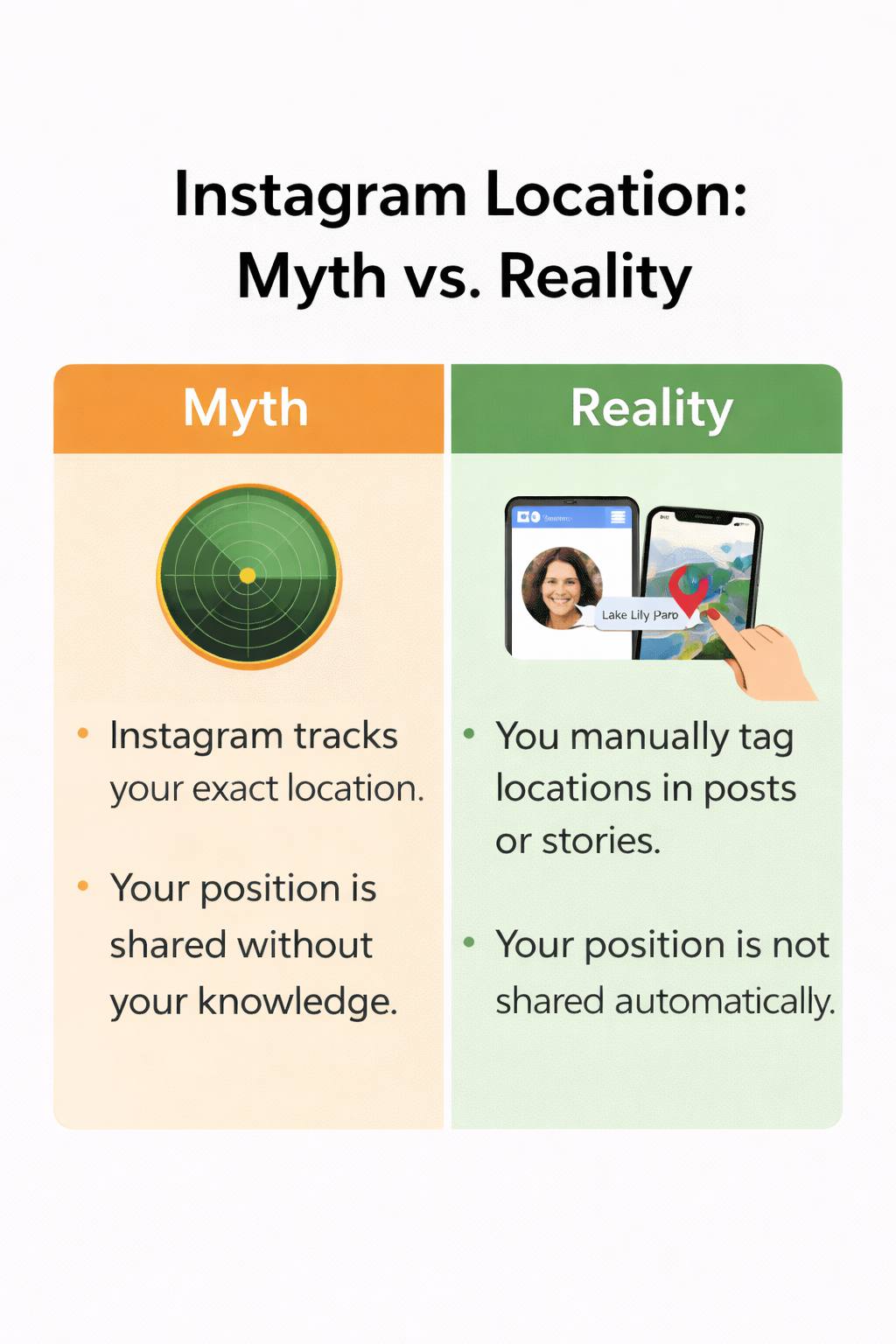
Let’s directly address the biggest source of confusion: Instagram does not have a feature that allows you to see someone’s real-time, live location. Any app, tool, or service claiming to offer this is misleading, likely unsafe, and violates user privacy. Understanding this is key to using the platform ethically.
Here is the critical distinction: a geotag on an Instagram post is not a live GPS coordinate. A common misconception is that Meta Instagram can reveal a user’s precise location. In reality, the platform only displays a position publique (public position) when a user explicitly and manually adds a location.
This is often a broad place, like a city or restaurant, chosen from a list—not a precise coordinate from their phone’s GPS. This privacy-first design is intentional and essential for user safety. If a user doesn’t tag a location, there is no built-in Instagram method to find it.
Your Privacy: How to Hide Your Own Location on Instagram
Understanding how location data is shared naturally raises questions about your own digital safety. The good news is that you have complete control over your confidentialité Instagram settings. Preventing the app from accessing your phone’s location is a simple and effective procedure.
By disabling location access, you stop the app from automatically suggesting nearby places when you create a post, giving you total control over what you share. Here’s how to adjust these paramètres de localisation.
For iPhone (iOS 16, 17, and 18):
- Open the Settings app on your iPhone.
- Scroll down and tap on Privacy & Security.
- Select Location Services.
- Find and tap on Instagram in the list of applications.
- To maximize privacy, select Never. This completely revokes the app’s access to your location data.
For Android users, the steps are very similar: go to Settings > Apps > Instagram > Permissions > Location and select Deny.
By following these steps, you can use Instagram with confidence, knowing your location is only shared when you deliberately choose to add it to your content.
Learn More:How to Fix Instagram Not Working on Android>
Frequently Asked Questions
Here are concise answers to the most common questions about finding locations on Instagram.
Can I see someone’s real-time location on Instagram?
No. Instagram has no feature for tracking anyone’s live location. All location information is manually added by the user and represents a past place and time.
How do I find the location from an Instagram post or story?
On a feed post, look for a clickable location name (a geotag) below the username. In an Instagram story, look for a location sticker. Tapping either will show you a map of the tagged place.
Does Instagram show location in profiles or bios?
Instagram does not have a dedicated location field in the profile. However, users often voluntarily add their city or country in their Instagram bio text.
Can I find someone’s location if they didn’t tag it?
No. If a user does not add a geotag, location sticker, or mention their location anywhere on their profile, there is no way to find their location using Instagram’s features.
Does Instagram track my location without me knowing?
Instagram only accesses your location data if you grant it permission in your phone’s settings. It uses this to suggest nearby places for tagging, but it does not track you continuously or secretly.
How can I hide my own location on Instagram?
Go to your phone’s Settings > Privacy & Security > Location Services > Instagram and select ‘Never‘ (on iPhone) or ‘Deny‘ (on Android). In addition, simply refrain from adding location tags or stickers to your posts and stories.
Conclusion
Finding a location on Instagram is about interpreting the clues people choose to share, not about secret tracking. By using the straightforward, legitimate methods outlined above, you can confidently find the public information you need without compromising anyone’s privacy—or your own. You now have a clear understanding of what’s possible, empowering you to navigate the platform safely and effectively.
Instead of relying on guesswork or questionable third-party tools, you are equipped with verified procedures to get the right information directly from the source. This knowledge allows you to use Instagram with greater confidence and respect for digital boundaries.
More Related Articles



Joy Taylor is a seasoned technical writer with over a decade of experience in mobile technology. At iMobie, she specializes in producing in-depth content on iOS data recovery, iPhone unlocking solutions, and iOS troubleshooting.
Product-related questions? Contact Our Support Team to Get Quick Solution >
