Monster Hunter Now Cheats: Tested Methods for Safe Progression in 2026
If you’re struggling with empty maps in Monster Hunter Now, some players explore alternative methods to improve access to spawns. This guide covers commonly used workarounds, including location simulation techniques, along with practical tips to reduce risks and play more smoothly from home in 2026.
Author Note: This guide is based on rigorous hands-on testing across a variety of hardware. Primarily, testing was conducted on Android smartphones (Samsung Galaxy S21/S22/S23 series, Google Pixel 6/⅞, OnePlus devices) running Android 12~16. We also tested extensively on iOS hardware, including the iPhone 11~17 series on iOS 16~26. By testing these exact environments, we identified exactly which system restrictions currently impact location spoofing.
Living in an area with sparse monster spawn zones can make progressing in the game feel impossible. If walking long distances daily is unrealistic for your schedule, you are likely looking for a straightforward way to play from home. However, trying random tools often brings new frustrations.
Consider the scenario of Alex, a 28-year-old office worker living in a suburban area. With virtually zero large monsters spawning near his house, he reached a severe progression limit. Hoping for a simple fix, he downloaded a modified game file from an unverified website, which immediately crashed his phone. Next, he tried a generic fake GPS app, but because he didn’t follow proper movement logic, he triggered an instant soft ban. Alex’s experience is incredibly common. The fear of losing an account you have invested hours into is valid.
This guide moves past generic advice to provide a tested procedure for 2026. We will examine exactly how to safely change your coordinates, troubleshoot specific Monster Hunter Now errors (like Network Error 6-4), and avoid the account suspension risks associated with older tools.

Comparing Your Options: Mod APKs vs. Location Changers
Before altering your device settings, you need a clear, realistic breakdown of the available methods. Many players waste hours on crashing applications because they do not understand the underlying risks.
To help you make an informed decision, we evaluate these methods based on Success Rate, Technical Skill, Safety Risk, and Cost.
| Method Type | Success Rate | Technical Skill Required | Safety Risk | Cost / Setup |
| Unverified Mod APKs | Very Low | Low | Critical (Immediate permanent ban risk) | Free |
| Free Mobile GPS Apps | Low | Low | High (Easily flagged by background scans) | Free |
| Root/Jailbreak Tweaks | Moderate | Very High | Moderate (System instability, complex setup) | Free / Time Intensive |
| PC-Tethered Software | High | Low | Low (Requires following specific cooldowns) | Paid (approx. $10-$15/mo) |
1.Modded APK Files: These are modified game clients. Because Niantic forces frequent version checks and server-side authentication, these files are flagged almost immediately. They pose a critical safety risk and expose your device to malware.
2.Free On-Device GPS Apps: Simple mobile applications downloaded directly to your phone. While free, modern game security scans easily detect these running in the background.
3.Professional PC-Tethered Software: These desktop applications alter your device’s global GPS coordinates via a computer connection. They offer the highest stability because the location manipulation happens externally, hiding it from the game’s native security scans.
How to Safely Change Your Location with Fonelora (Step-by-Step Workflow)
If you decide that a PC-tethered solution is the best fit for your hardware, tools like Fonelora Location Changer are currently the most reliable. Transparency note: Fonelora operates on a premium model, typically costing around $9.99 per month. While free mobile apps exist, they lack the external masking required to bypass 2026 security checks.
Using PC software requires a very specific order of operations. If you change your location while the game is actively tracking you, you will immediately trigger a red flag on your account.
The Correct Spoofing Workflow
1.Force Close the Game: Before doing anything, completely swipe away and close Monster Hunter Now on your phone. Do not leave it running in the background.
2.Connect Your Device: Open Fonelora Location Changer on your Windows or Mac computer. Connect your smartphone using a high-quality data USB cable. (A loose cable can cause your location to snap back to your real address, which is highly dangerous for your account).

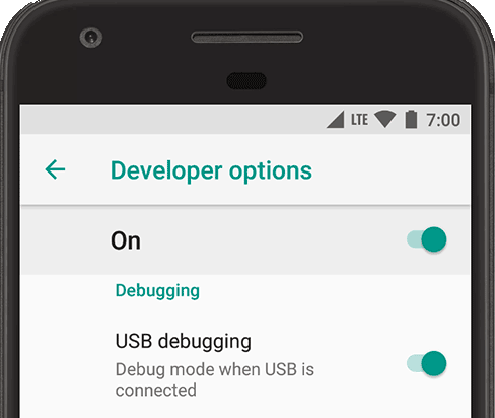
3.Configure Settings (Android Only): If you are using Android, Fonelora will prompt you to enable USB Debugging in your Developer Options. Note: You do not need to assign a “Mock Location App” in your phone settings when using this tethered software. The PC handles the override via the USB connection.
4.Change Your GPS Location: Enter your desired coordinates or use the map interface to select a destination. Click “Move.”

5.Launch Monster Hunter Now: Only after the software confirms your location has changed should you open the game.
WARNING: PREVENTING LOCATION SNAPPING
Ensure your phone screen does not turn off or lock while tethered, and do not bump the USB cable. If the connection drops while the game is open, your GPS will instantly snap back to your real-world location. Traveling thousands of miles in a split second guarantees an instant soft ban.
Monster Hunter Now Specific Mechanics: Speed-Locks and Cooldowns
A crucial expert insight to understand for 2026 is this: most users get flagged not because the game detected their specific tool, but because of behavioral anomalies. Modern anti-cheat detection systems focus on impossible movement patterns.
Monster Hunter Now handles movement differently than other augmented reality games. You cannot simply apply generic cooldown rules here.
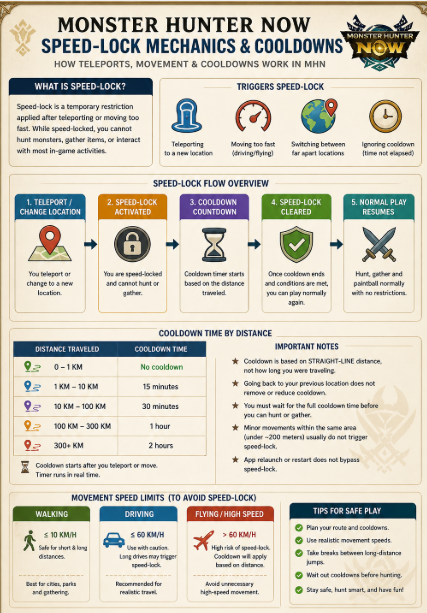
The 10 km/h Speed-Lock (Disappearing Monsters)
If you use a joystick feature to “walk” around the virtual map, you must monitor your speed. If you move faster than roughly 10 to 15 km/h, the game’s speed-lock engages.
- The Result: All large monsters will instantly disappear from your map, leaving it entirely blank.
- The Fix: Lower your joystick speed in the software to a walking pace (around 4-6 km/h). Wait a few minutes, or restart the game, and the monsters will populate again.
You May Also Like:Monster Hunter Now Joystick: The Ultimate Guide to Playing Without Walking>
Teleport Cooldown Times
If you teleport long distances, you must follow strict waiting periods before interacting with the map (fighting a monster, collecting from a node). Interacting too soon causes a soft ban (Network Error 6-4 or monsters instantly fleeing).
- Short Jumps (1-5 miles): Wait 5 to 15 minutes before opening the game.
- Medium Jumps (10-50 miles): Wait 30 to 60 minutes.
- Long Jumps (Cross-Country/International): You must wait a full 2 hours.
Always track your last in-game interaction. If you slay a Rathalos in New York, you must wait at least two hours before fighting a monster in Tokyo.
Real Error Scenarios and Troubleshooting
Even with the safest tools, you might encounter strange game behaviors. Here is how to handle the most common issues in 2026.
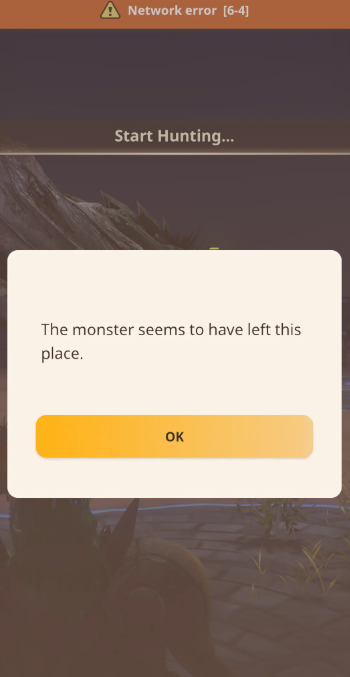
“Network Error 6-4”
This error almost exclusively happens when your device’s location data conflicts with the game’s server data. It usually means you tried to fight a monster during a cooldown period, or your internet connection stuttered while your GPS location was being altered.
Action: Close the game entirely. Wait 15 minutes, ensure your PC tether is stable, and relaunch.
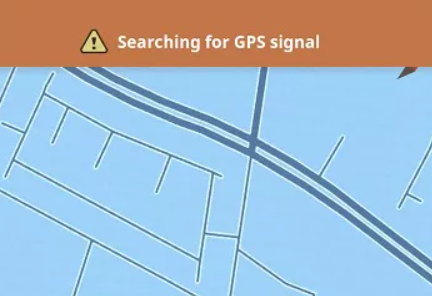
Red Banner: “Searching for GPS Signal”
This banner appears when the game detects that your location services are, or if your tether connection drops. On some Android builds, Niantic’s background scanning detects if “USB Debugging” is left actively transferring files without a secure bridge.
Action: Check your USB cable. If the error persists, restart your phone, reconnect to the PC, and re-establish the location before opening the game.
The Map is Completely Blank
If the map is rendering streets but zero nodes or monsters, you have triggered a soft ban or the speed-lock.
Action: Do not try to interact with anything. Close the application, wait for your cooldown timer to clear (up to two hours), and lower your simulated walking speed.
Device Setup: Clarifying iOS vs. Android Requirements
The procedure for configuring your hardware varies significantly depending on your operating system.
Android OS Facts
As mentioned in the workflow, PC-tethered programs use USB debugging to securely override your location. However, if you attempt to use a free, on-device mobile app instead of a PC, you must go into Developer Options and manually select that app under “Select mock location app.”
IMPORTANT FOR ANDROID USERS:
Using the “Mock Location App” setting with a free mobile application is highly detectable in 2026. The game’s security software actively scans for this setting. This is exactly why PC-tethered alternatives that bypass this specific on-device setting are the recommended standard.
iOS System Limitations
Apple devices running iOS 16, 17, or 18 operate under strict security sandboxing. Standard applications cannot natively alter the device’s global location data from within the phone. This strict architecture means you cannot simply download an app from the App Store to change your location. A computer must act as a secure bridge to feed modified GPS coordinates to the iPhone externally.
Frequently Asked Questions
When exploring game modifications, accurate information prevents costly mistakes.
Is there a way to play without walking in 2026?
Yes, by using professional PC-tethered location simulation tools that mimic realistic movement. Avoiding bans requires strictly following cooldown timers and keeping your simulated walking speed under 10 km/h.
Do mobile mod APKs actually work?
No. While you can install them, they are frequently flagged by security updates, leading to swift and permanent account bans. They are not worth the risk.
Why did I get a soft ban after using a joystick?
Soft bans occur when your account exhibits behavioral anomalies. If your joystick was set to a driving speed (over 15 km/h) or you jumped across a city while the game was open, the system flagged the impossible movement.
What do I do if the map goes empty after I change my location?
An empty map means you triggered the speed-lock or a cooldown flag. Close the game completely, clear the app cache (on Android), wait at least 30 to 60 minutes depending on how far you jumped, and try again.
Can Niantic detect fake GPS apps running on my phone?
Yes. Modern background scanning easily detects basic fake GPS applications running natively on your mobile device, which is why external PC manipulation is currently the standard.
Disclaimer: Modifying your gameplay experience violates the Terms of Service set by the game’s developers. Beware of scams advertising unlimited Zenny, item generation, or auto-combat bots; currency and combat data are stored securely on server-side databases and cannot be hacked. While the external GPS methods described aim to reduce detection risks by simulating natural movement, all software modifications carry inherent account risks. Always proceed with caution.
Conclusion
Reaching a progression limit because of your physical location is frustrating, especially when daily travel isn’t an option. The fear of account bans and the confusion surrounding which methods actually function in 2026 only adds to the stress.
Avoiding risky mod APKs and understanding exact movement logic—like the 10 km/h speed-lock and mandatory game-closure workflows—is essential. By choosing a secure, PC-tethered location changer (like Fonelora Location Changer) and strictly following cooldown rules, you can resolve the problem of empty map zones without blindly risking your account. Regain control of your gameplay experience today by using reliable simulation tools, and safely explore global zones from the comfort of your home.
More Related Articles



Joy Taylor is a seasoned technical writer with over a decade of experience in mobile technology. At iMobie, she specializes in producing in-depth content on iOS data recovery, iPhone unlocking solutions, and iOS troubleshooting.
Product-related questions? Contact Our Support Team to Get Quick Solution >
