Soft Ban in Pokémon GO: What It Is and How to Fix It
Learn everything about soft bans in Pokémon GO, including common symptoms, causes, duration, and expert tips to fix and prevent them.
If you’ve been playing Pokémon GO and suddenly notice Pokémon fleeing instantly, PokéStops giving no items, or gyms acting unresponsive, you may be experiencing a soft ban. Understanding what a soft ban is, why it happens, and how to fix it is essential for staying in the game and avoiding unnecessary frustration.
What Is a Soft Ban in Pokémon GO?
A soft ban is a temporary restriction placed on a Pokémon GO account that limits certain in-game actions. Unlike permanent suspensions or shadow bans, a soft ban is not a permanent punishment. It is a safety mechanism designed to prevent cheating or unusual activity, protecting both your account and the integrity of the game.
Several factors can trigger soft bans:
- Rapid location changes (traveling long distances too quickly)
- Using GPS spoofing tools or third-party apps
- Performing excessive interactions in a short period
- Other unusual activity that Niantic flags as suspicious
During a soft ban, affected players will notice that Pokémon flee immediately, PokéStops yield no items, and gyms may not allow interactions. The restriction is temporary and usually resolves itself without requiring account intervention.
Common Symptoms of a Soft Ban
Recognising a soft ban is straightforward if you know what to look for. Common symptoms include:
- Pokémon escaping instantly – Even low-level Pokémon flee on the first throw.
- PokéStops not giving items – Spinning a PokéStop shows it is empty or won’t yield rewards.
- Gym interactions failing – You may not be able to battle or place Pokémon.
- Cooldown messages – Sometimes, the game displays a temporary cooldown warning.
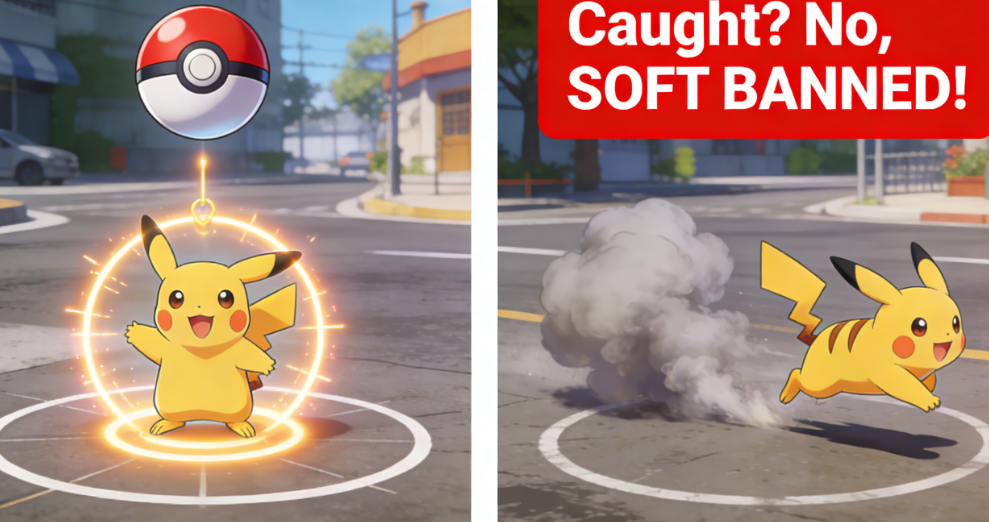
It’s worth noting that soft bans can be mistaken for normal cooldown periods or technical issues, so careful observation of your gameplay behavior is key.
How Long Does a Soft Ban Last?
The duration of a soft ban varies depending on the cause:
| Distance (KM) | Required Cooldown Time |
| 1 KM | 1 Minute |
| 5 KM | 2 Minutes |
| 10 KM | 6 Minutes |
| 50 KM | 20 Minutes |
| 100 KM | 35 Minutes |
| 500 KM | 60 Minutes |
| 1000 KM | 80 Minutes |
| 1500 KM+ | 120 Minutes (Maximum) |
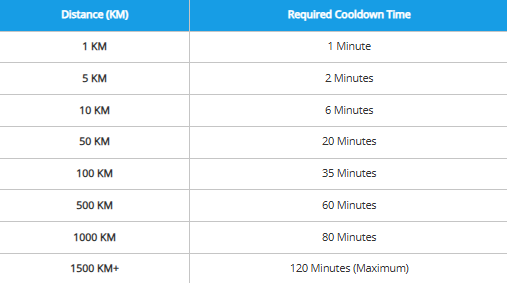
Any travel over 1500 KM requires a full 2-hour wait before you can catch Pokémon or spin stops again. Understanding realistic movement behavior and cooldown timing is one of the most important ways to avoid repeated restrictions. You can learn more in this detailed Pokémon GO GPS Joystick Guide
How to Fix a Soft Ban
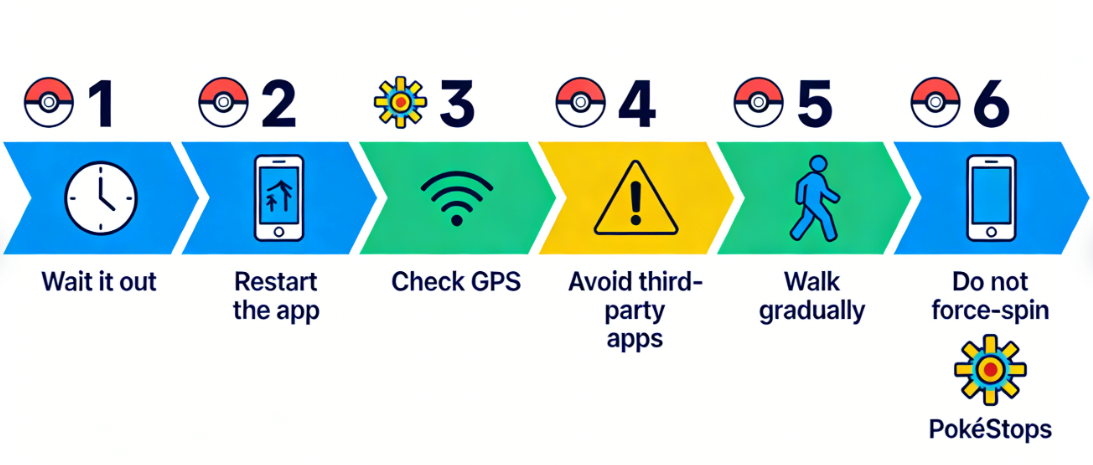
Here are several methods to resolve or minimize the impact of a soft ban:
- Wait it out – Most soft bans expire automatically. Avoid trying to bypass the system, as this could trigger further restrictions.
- Do NOT force-spin PokéStops – Old myths suggest spinning a stop 40 times can lift a ban. This no longer works and may flag your account for suspicious activity.
- Restart the app – Closing and reopening Pokémon GO may refresh your session and restore normal gameplay.
- Check your location accuracy – Make sure GPS is enabled and accurate; sometimes, soft bans appear due to signal errors.
- Avoid third-party apps – Tools for GPS spoofing or auto-catching can trigger soft bans. Stick to official app features only.
- Walk around in small distances – Instead of teleporting repeatedly across countries, simulate realistic walking behavior with stable movement speeds and route simulation. This approach helps reduce cooldown triggers and soft bans. Detailed setup methods can be found in this How to Change Location in Pokémon GO Guide.
Pro Tip: Following the cooldown chart above based on your travel distance can help predict when you will regain normal gameplay functionality, reducing frustration.
Many Pokémon GO players trigger soft bans because of unrealistic teleportation behavior or unstable GPS spoofing tools. Instead of using modified game apps or risky jailbreak methods, many users now prefer desktop-based GPS tools that work with the official Pokémon GO app.
One option frequently used by players is Fonelora Location Changer, a location simulation tool compatible with both iPhone and Android. Unlike modified Pokémon GO clients, it changes your GPS location externally while allowing you to keep the official game installed, which helps reduce detection risks.
Key features include:
- Bluetooth and USB connection support for stable positioning
- GPS teleport mode for changing locations instantly
- Joystick movement simulation for more natural walking behavior
- Multi-spot route planning to simulate realistic travel
- No jailbreak or root required
- Compatible with recent iOS and Android versions
How to Use Fonelora Location Changer Safely for Pokémon GO
Step 1: Install Fonelora Location Changer on your PC or Mac and connect your iPhone or Android device.

Step 2: Select a movement mode such as Teleport Mode or Joystick Mode.

Step 3: Search for the destination or enter GPS coordinates manually.
Step 4: Before opening Pokémon GO, respect the proper cooldown time based on travel distance.
Step 5: Launch Pokémon GO and move gradually instead of making repeated long-distance jumps.

Following realistic movement patterns and cooldown rules can significantly reduce the chances of triggering a soft ban while improving gameplay flexibility.
Soft Ban vs Cooldown vs Shadow Ban
It’s important to differentiate between the types of restrictions:
- Soft Ban – Temporary account restriction affecting Pokémon, PokéStops, and gyms, caused by suspicious activity.
- Cooldown – Triggered when traveling large distances too quickly; usually displays a timer indicating when you can interact again.
- Shadow Ban – Limits spawn rates or certain Pokémon for your account without notification; harder to detect.
Understanding these differences ensures you can accurately diagnose and respond to in-game restrictions.
Learn More:iTools Dongle Pokémon Go: The Complete User Guide>
Preventing Soft Bans in Pokémon GO
To avoid soft bans in the future:
- Travel realistically – Avoid rapidly jumping between cities or countries in the game. Following realistic cooldown behavior and avoiding GPS “rubberbanding” are key anti-ban practices explained in this Best Mock Location Apps Android Guide.
- Use only official apps – Third-party GPS spoofing, bots, or auto-catch tools will trigger restrictions.
- Respect game limits – Avoid over-spinning PokéStops or catching excessively in a short period.
- Check your GPS settings – Ensure your device’s location services are accurate and running in the background.
- Be mindful of public Wi-Fi or VPNs – Sudden IP changes can sometimes flag your account for unusual activity.
Following these practices will reduce the likelihood of future soft bans and ensure smoother gameplay.
Key FAQs About Soft Bans
Q1: What exactly is a soft ban in Pokémon GO?
A soft ban is a temporary restriction on your account to prevent unfair gameplay. It affects Pokémon, PokéStops, and gyms.
Q2: How do I know if I’m soft banned or just in a cooldown period?
Cooldowns are usually distance-based and predictable, while soft bans involve immediate failures like Pokémon fleeing and empty PokéStops.
Q3: Can I fix a soft ban faster than waiting it out?
You can try spinning local PokéStops, walking short distances, or restarting the app — but avoid third-party tools.
Q4: Will soft bans contribute to permanent bans?
A single soft ban does not affect your permanent status, but repeated triggers from spoofing or rule violations could lead to stricter penalties.
Expert Insight
Many players confuse soft bans with the cooldown system. In reality, soft bans are temporary safety mechanisms, not punishments. Recognizing the difference allows you to plan safe gameplay strategies and avoid unnecessary worry. For example, understanding how distance and GPS accuracy affect cooldown timers can help you anticipate restrictions before they happen.
Conclusion
Soft bans in Pokémon GO are temporary restrictions designed to protect fair gameplay and prevent suspicious activity. Understanding the symptoms, cooldown rules, and safe movement practices can help you avoid unnecessary interruptions and continue playing smoothly.
To reduce the risk of future soft bans, always avoid unrealistic teleportation, modified game clients, and unsafe third-party tools. Many players now prefer safer GPS simulation solutions such as Fonelora Location Changer, which works with the official Pokémon GO app and supports realistic movement modes like joystick walking and route simulation without requiring jailbreak or root access.
By respecting cooldown timers, traveling naturally, and using stable location tools responsibly, you can enjoy a more flexible and safer Pokémon GO experience while minimizing the chances of triggering soft bans or account restrictions.
More Related Articles



Joy Taylor is a seasoned technical writer with over a decade of experience in mobile technology. At iMobie, she specializes in producing in-depth content on iOS data recovery, iPhone unlocking solutions, and iOS troubleshooting.
Product-related questions? Contact Our Support Team to Get Quick Solution >
