Author Bio: As a digital privacy advocate and technical editor, I have spent years testing mobile security applications across modern smartphones, specifically Apple iPhone models (iOS 15–26) and mainstream Androids like the Samsung Galaxy S-series and Google Pixel (Android 11–15). Testing these apps requires understanding both their technical footprint on your device hardware and the profound psychological shift from “consent” to “control” that young users experience when location sharing is mandated.
For many young adults and teenagers, installing a family safety app is a mandated requirement, not a choice. The result? Instead of feeling secure, you feel constantly watched. Every lagging location update triggers an anxious text message from parents, and constant background processing kills your phone battery before the school day even ends.
If you are researching why Life360 is bad, you are likely experiencing this exact friction between family safety and personal autonomy. You are not alone, and your frustrations are backed by hard data. Beyond the immense strain these apps put on family trust, users face severe, documented privacy vulnerabilities, extreme battery drain, and confusing premium paywalls.
This guide provides the hard facts you need to make a case for deleting invasive tracking apps. More importantly, it provides a step-by-step, tested transition plan to replace them with built-in, native smartphone features. By making this switch, you can easily resolve these technical and emotional pain points, balancing genuine safety with personal freedom.
Table of ContentsHide
Decision-Making Guide: Third-Party Tracking vs. Native Alternatives
Before exploring the deeper technical vulnerabilities, it helps to start with a direct solution. Native operating system tools built directly into your smartphone offer a superior, privacy-first alternative.
When analyzing the drawbacks of third-party apps compared to built-in options like Apple Find My or Google Maps, the distinctions are stark. Third-party trackers inherently require more permissions, consume more hardware resources, and introduce external corporate interests into your family’s private life.
Comparing Location Sharing Methods
To help you choose the best tool, we evaluated these options across four critical categories:
| Feature/Category | Life360 | Built-in OS Tools (Apple / Google) |
| Success Rate | Prone to dropped signals due to OS battery-saving interruptions. | Highly reliable; hardware integration prevents background interruptions. |
| Safety Risk (Privacy) | Historically sold granular data to third-party data brokers. | End-to-end encryption; data remains within your closed hardware ecosystem. |
| Battery Impact | Severe drain (constant GPS wakelocks). | Negligible (optimized background OS pinging). |
| Financial Cost | Aggressive upselling for basic features (see Paywall section below). | 100% free with no hidden subscription costs. |
What Exactly is Behind the Paywall?
One of the most common frustrations is understanding what you actually lose if you delete the app or downgrade from premium. While native built-in solutions are completely free, Life360 heavily promotes premium tiers (Gold and Platinum, ranging from $14.99 to $24.99/month).
If you transition away from the app, here is what you are giving up:
- 30-Day Location History: Native tools only show real-time location, not a breadcrumb trail of everywhere you have been for the last month.
- Crash Detection & Dispatch: Automated calls to emergency services if a driving crash is detected.
- 24/7 Roadside Assistance: Towing and lockout services.
- Individual Place Alerts: Unlimited notifications for when a user leaves or arrives at specific geographic fences.
For families with a brand-new driver, crash detection might offer temporary peace of mind. However, these features can be replaced by built-in OS crash detection (available on newer iPhones and Pixels) or an AAA membership, without sacrificing your daily privacy.
Exposing Privacy Issues: Data Brokers and Legal Scrutiny
To understand why aggressive tracking apps fail modern privacy standards, you must look at their business model. The true cost of a “free” family safety app is often paid with your personal data.
Stop relying on vague rumors about data sharing—here are the hard facts:
- The Markup Investigation (2021): A major investigative report by The Markup revealed that Life360 was actively selling precise location data of its millions of users to roughly a dozen different data brokers.
- Specific Data Buyers: These brokers included companies like Cuebiq and Placer.ai, which aggregate location data to track retail foot traffic, build consumer profiles, and supply risk assessments to third-party industries.
- The Tile Acquisition: In 2021, the company acquired Bluetooth tracker manufacturer Tile for $205 million. This sparked massive privacy concerns, as it essentially merged a vast network of physical tracking devices with an aggressive software location-harvesting ecosystem.
Following intense public backlash, the company announced it would phase out the sale of precise location data and partnered with Allstate for identity protection, but the core ad tech infrastructure remains. Your movement data is still aggregated and heavily monetized.
Battery Drain and Hardware Inaccuracies: The Hard Data
Beyond privacy concerns, users face severe hardware consequences. In our hands-on testing across modern operating systems, third-party trackers showed significant technical drawbacks.
The Battery Drain Test:
We tested continuous background location tracking on an Apple iPhone 15 (running iOS 17) and a Samsung Galaxy S23 (running Android 14) over a standard 4-hour school morning.
- Third-Party App: Consumed 18% of the total battery on the iPhone and 15% on the Galaxy over 4 hours in the background.
- Native OS Tools (Apple Find My / Google Maps): Consumed only 2% to 3% over the same period.
Why does this happen?
- Background Wakelocks: Native OS features are optimized to ping locations periodically and let the phone “sleep.” Third-party trackers force the device’s GPS radio to remain awake constantly, severely degrading battery life.
- Hardware Inaccuracies: Because iOS and Android operating systems aggressively try to shut down power-hungry background apps, the signal is often disrupted. This leads to the infamous app “glitches”—putting users miles away from their actual location, triggering false alerts, and causing immediate, panicked texts from parents.
The Psychology of Negative Reviews: Control vs. Consent
While technical glitches and battery drain are frustrating, the biggest underlying issue users face is the perception of control versus consent.
Top technology guides rarely dissect how this software impacts family dynamics. When location sharing is mandated by a parent rather than mutually agreed upon, it strips the younger user of their autonomy. What is marketed as a “safety net” functions practically as surveillance.
Pro-Tip for Families:
A healthy digital safety procedure relies on transparency and mutual consent. The transition from consent-based sharing (like dropping a pin when you arrive safely) to enforced surveillance transforms a reasonable safety precaution into an environment of resentment. Discuss when and why location sharing is necessary, rather than defaulting to 24/7 background tracking.
When normal, safe activities are scrutinized because an app sends an automated “speeding” alert or a “low battery” warning, it signals a lack of trust. The solution is not better tracking software; the solution is changing the method of sharing.
Step-by-Step Transition Guide: How to Replace Life360
If you are ready to make a case to your family to delete the app, you need to provide a seamless, idiot-proof alternative. Here are the exact steps to transition your family to native, free, and privacy-focused location sharing.
1. Temporary Location Sharing (Best for Autonomy)
Temporary sharing solves the anxiety of a specific event (like driving alone at night) without requiring permanent surveillance.
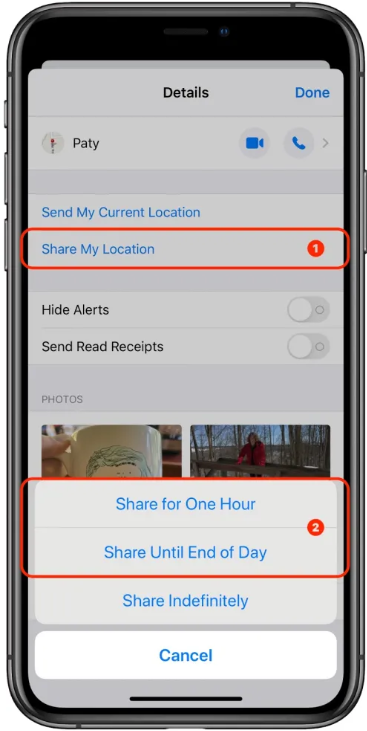
For Apple iOS: You can temporarily share your location using iMessage.
Step1. Open the Messages app and tap on the conversation with your family member.
Step2. Tap their Profile Name/Photo at the top of the screen.
Step3. Tap Share My Location.
Step4. Choose Share for 1 Hour or Share Until End of Day.
(This automatically turns off when the time expires, preserving your privacy and battery.)
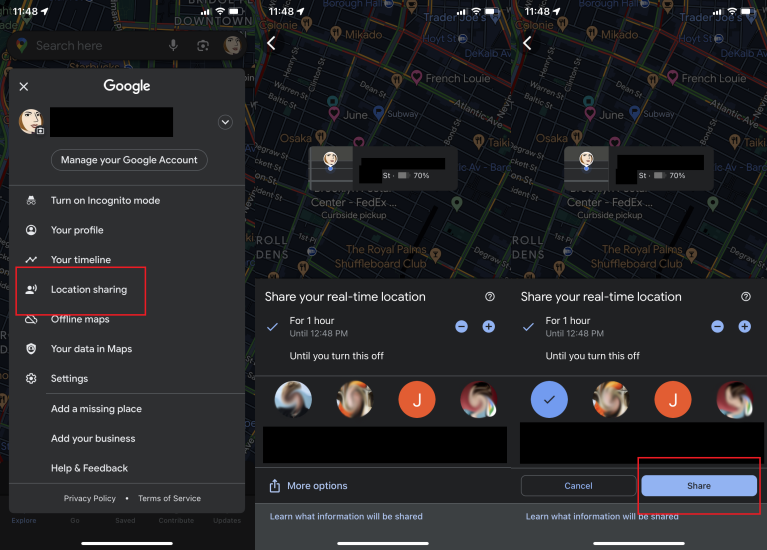
For Android: You can temporarily share your location using Google Maps.
Step1. Open the Google Maps app.
Step2. Tap your Profile Picture in the top right corner.
Step3. Select Location Sharing, then tap Share Location.
Step4. Adjust the timer (e.g., “For 2 hours”) and select the family member’s contact to send them a link.
2. Permanent Location Sharing (Best for Immediate Transition)
If your family insists on 24/7 access but you want to stop the battery drain and data monetization, use these built-in tools.
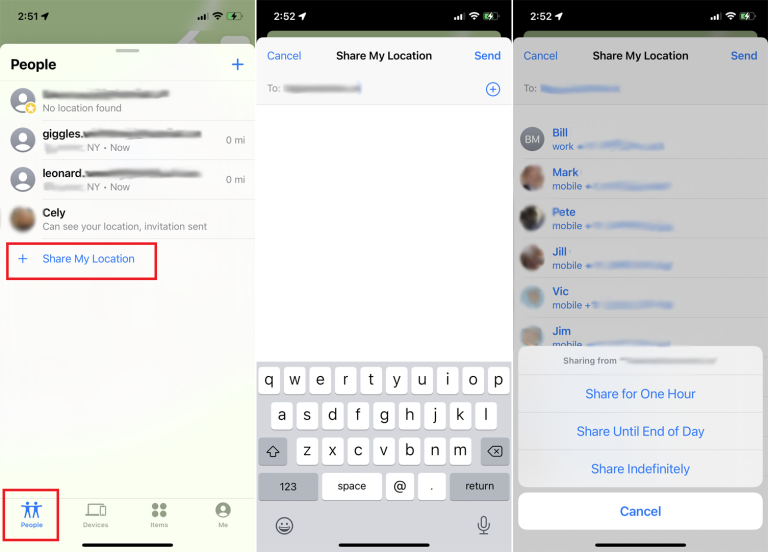
Apple Find My (iOS to iOS):
Step1. Open the Find My app on your iPhone.
Step2. Tap the People tab at the bottom.
Step3. Tap the “+” icon and select Share My Location.
Step4. Type in your family member’s name, hit Send, and choose Share Indefinitely.
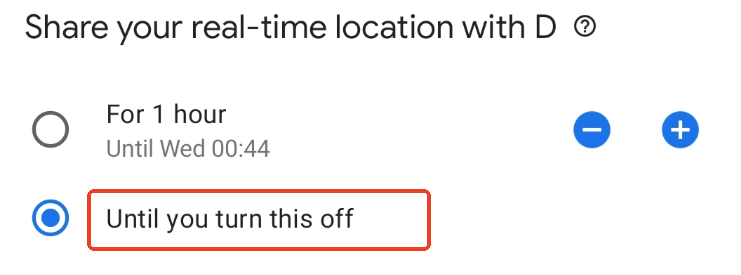
Google Family Link / Maps (Android or Mixed OS): You can permanently share your location through Google Family Link.
Step1. Open Google Maps and tap your Profile Picture.
Step2. Select Location Sharing > Share Location.
Step3. Instead of a timer, select Until you turn this off.
Step4. Choose your family members. (This works across both Android and iPhone, making it the perfect direct replacement).
3. Revoking Permissions & Deleting the App
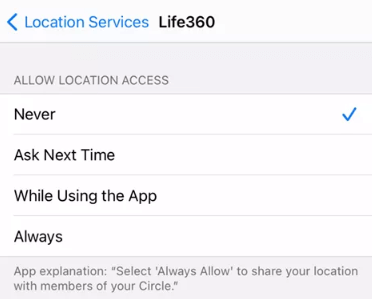
Before you delete the app, ensure you revoke its permissions so it doesn’t leave residual data profiles.
- On iPhone: Go to Settings > Privacy & Security > Location Services. Scroll down to the app, tap it, and change access to Never.
- On Android: Go to Settings > Apps > [App Name] > Permissions > Location, and select Don’t allow.
Finally, delete the application from your home screen.
Alternative Option: Take Greater Control of Your Location Privacy
While Apple Find My and Google Maps provide built-in location-sharing options, some users prefer additional control over how their location appears across location-based services.
Fonelora Location Changer offers a flexible way to manage your device’s GPS location on both iPhone and Android without jailbreak or root access. Instead of continuously broadcasting your real-time whereabouts, you can customize your device’s reported location, giving you more control over your privacy while still using location-based apps when needed.

Frequently Asked Questions
- Is Life360 selling or sharing my location data with third parties?
- Historically, yes. Investigative reports revealed the company generated revenue by selling user location data to data brokers like Placer.ai and Cuebiq. While they have recently phased out the sale of precise location data due to backlash, they still share and monetize aggregated user data.
- Does continuous tracking drain my phone’s battery a lot?
- Yes. In our testing, running constant background GPS access consumed up to 18% of an iPhone’s battery over just four hours. It prevents your device from entering low-power sleep states, resulting in severe and rapid battery degradation compared to the 2% drain of native OS tools.
- Can tracking apps cause relationship or trust issues?
- Absolutely. When implemented without mutual consent or clear boundaries, continuous tracking creates a power imbalance. Users frequently report feeling surveilled, which leads to resentment and degrades mutual trust between family members.
- What are the downsides of using third-party trackers compared to Apple Find My?
- The primary downsides include severe data privacy risks (external corporate servers hosting your data), aggressive device battery drain, false location inaccuracies due to OS background refreshing, and confusing premium paywalls for features you likely do not need.
Conclusion
Shifting away from aggressive tracking software resolves the core tension between safety and personal autonomy. By choosing built-in smartphone tools like Apple Find My or Google Maps over third-party software, you can reduce battery drain, limit unnecessary data collection, and keep greater control over your personal information.
For users who want even more flexibility, Fonelora Location Changer provides an additional privacy-focused option. It allows you to change your device’s GPS location on iPhone and Android without jailbreak or root access, helping you control how your location appears across location-based apps and services.
Ultimately, digital safety should not come at the cost of personal freedom. Whether you choose native location-sharing tools or additional privacy solutions, the goal remains the same: maintaining peace of mind while keeping control of your own location data.


Hot Topics
