How to Check If a Used iPhone is Activation Locked
The most reliable way to check if a used iPhone is iCloud locked is to complete the initial setup process. If you see “iPhone Locked to Owner” or an Apple ID login request, Activation Lock is still active. Although many buyers look for IMEI-based online checks, Apple discontinued its official Activation Lock checker years ago. Physical setup verification remains the safest and most accurate method before purchasing a used iPhone.
The quickest and most reliable way to check a used iPhone is to complete the setup process. If you see “iPhone Locked to Owner”, the device still has Activation Lock enabled. Although some buyers search for iPhone unlock Activation Lock or iPhone locked to owner how to unlock solutions online, physical setup verification remains the safest way to confirm a device is ready for a new owner.
How to Check Activation Lock In-Person (The Most Reliable Method)
If you are meeting a seller in person, never hand over your money before physically verifying the iPhone’s lock status. Follow these exact steps to ensure the device is not tied to someone else’s account:
- Power on the iPhone: Turn the device on and look for the standard “Hello” screen in multiple languages. If the phone asks for a lock screen passcode or goes straight to the home screen with apps already installed, it has not been properly erased. Ask the seller to factory reset it right then and there.
- Start the Setup Process: Swipe up (or press the Home button) on the “Hello” screen to begin setup. Choose your language and region.
- Connect to Wi-Fi: The phone must connect to Apple’s servers to verify its lock status. Insert an active SIM card or connect to a Wi-Fi network.
- Watch for the Lock Screen: Continue through the initial data and privacy screens. If you reach a screen that says “iPhone Locked to Owner” or “Activation Lock” asking for an Apple ID email and password, stop immediately.
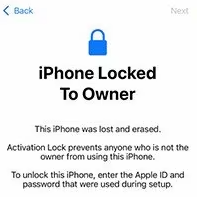
Refuse the purchase if the seller cannot or will not enter their credentials to remove the lock. A legitimate seller can easily type in their password, finish the bypass, and erase the device properly for you.
How to Check Activation Lock Online (When Buying Remotely)
Buying an iPhone from eBay, Facebook Marketplace, or Swappa means you cannot check the physical setup screen yourself. Because Apple no longer provides an official IMEI checker, buyers often rely on third-party websites like iUnlocker or Sickw.
While these sites can sometimes tell you if “Find My iPhone” is toggled on, you must use them with caution. They rely on cached data, may not reflect the real-time status of the device, and are not 100% accurate. If you are researching these tools, reading an iUnlocker review can help you understand the risks and limitations of third-party IMEI checkers.
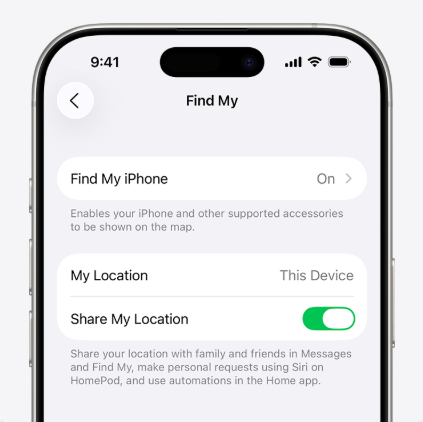
To safely verify lock status remotely, use this checklist with the seller:
- Ask for a live setup video: Request a video showing the seller powering on the device to the “Hello” screen, connecting to Wi-Fi, and successfully passing the activation step without an Apple ID prompt.
- Request the IMEI/Serial Number: Run the provided number through a reputable third-party IMEI checker, but treat the result as a secondary clue, not an absolute guarantee.
- Check for mismatched details: Ensure the IMEI displayed in the seller’s video (dialing *#06# or tapping the “i” icon on the Hello screen) matches the one they typed out for you.
- Use protected payment methods: Only buy on platforms with strong buyer protection policies (like eBay Money Back Guarantee or PayPal Goods & Services). Never use wire transfers, crypto, or peer-to-peer cash apps for mailed items.
Crucial Differences: Activation Lock vs. Carrier Lock vs. Blacklist
One of the most common mistakes second-hand buyers make is confusing different types of device locks. Fixing one type of lock does absolutely nothing to fix the others. Use this table to diagnose exactly what is wrong with your device:
| Lock Type | What It Is | What It Prevents | How to Resolve |
|---|---|---|---|
| iCloud Activation Lock | A security feature tied to the previous owner’s Apple ID via Find My. | Prevents anyone from setting up or using the device without the owner’s password. | Requires the previous owner’s Apple ID credentials or an Apple Support request with the original receipt. |
| Carrier SIM Lock | A network restriction applied by carriers like AT&T, Verizon, or T-Mobile. | Prevents you from using SIM cards from competing cellular networks (shows “SIM Not Supported”). | Requires contacting the original carrier to request an unlock, or using specialized IMEI unlock software in eligible scenarios. |
| IMEI Blacklist (Bad ESN) | A global database entry for devices reported stolen, lost, or carrying unpaid bills. | Prevents the phone from connecting to cellular towers to make calls or use mobile data, even if unlocked. | Only the original owner or the carrier that blacklisted the device can remove it. |
If you are stuck on a screen asking for an Apple ID, you are dealing with an Activation Lock, not a carrier or blacklist issue.
Troubleshooting: What to Do If You Already Bought a Locked iPhone
If you recently received a second-hand iPhone only to discover it is locked to an owner, do not panic. Follow this troubleshooting flow from easiest to most advanced:
Step 1: Contact the seller immediately
The seller may have simply forgotten to log out. They do not need to be physically present to fix this. Ask them to log into iCloud.com, go to “Find My”, select the iPhone, and click “Remove from Account”. Once they do this, restart the phone and the lock will disappear.
Step 2: Utilize platform buyer protection
If the seller is unresponsive, unhelpful, or deleted their account, you may have been scammed. File a return or refund request immediately through eBay, Swappa, or PayPal. Activation locked phones are effectively “not as described” under most buyer protection policies.
Step 3: Submit an Activation Lock support request to Apple
If you bought the phone from a legitimate business or have the absolute original proof of purchase (showing the serial number and original buyer details), you can submit an Activation Lock removal request directly to Apple Support. Note that Apple strictly rejects third-party invoices or second-hand transaction receipts.
If the seller has ghosted you, buyer protection has expired, and Apple rejected your request, you are left with a device you cannot use through official channels. In this frustrating scenario, a tool-assisted recovery path becomes your final option for eligible devices.
A Tool-Assisted Recovery Path: Using AnyUnlock to Bypass Activation Lock
When you lawfully own the device but the seller has disappeared and Apple cannot help, AnyUnlock provides a guided desktop workflow to attempt an iCloud Activation Lock bypass.
AnyUnlock is not a magic universal unlocker, and success depends heavily on your specific iPhone model, iOS version, and current lock state. However, for supported devices, it offers a structured recovery path to help you regain access to the setup screen.

AnyUnlock – One-stop iOS Unlocker
What if you get locked out of your iPhone? Or what if you forgot your Apple ID and its password? No worries, AnyUnlock unlocks any iOS lock for you with 1 click. No technology required. Only 3 steps.
Here is how the workflow works:
1. Download and open AnyUnlock: Install the software on your PC or Mac and select the Bypass iCloud Activation Lock module.
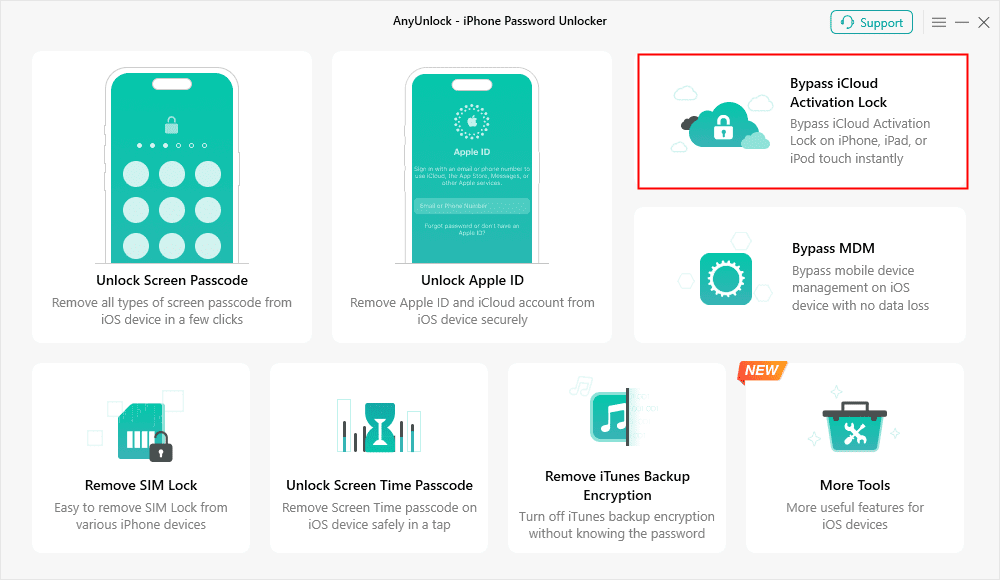
2. Connect your device: Plug your lawfully owned iPhone into the computer using a USB cable.
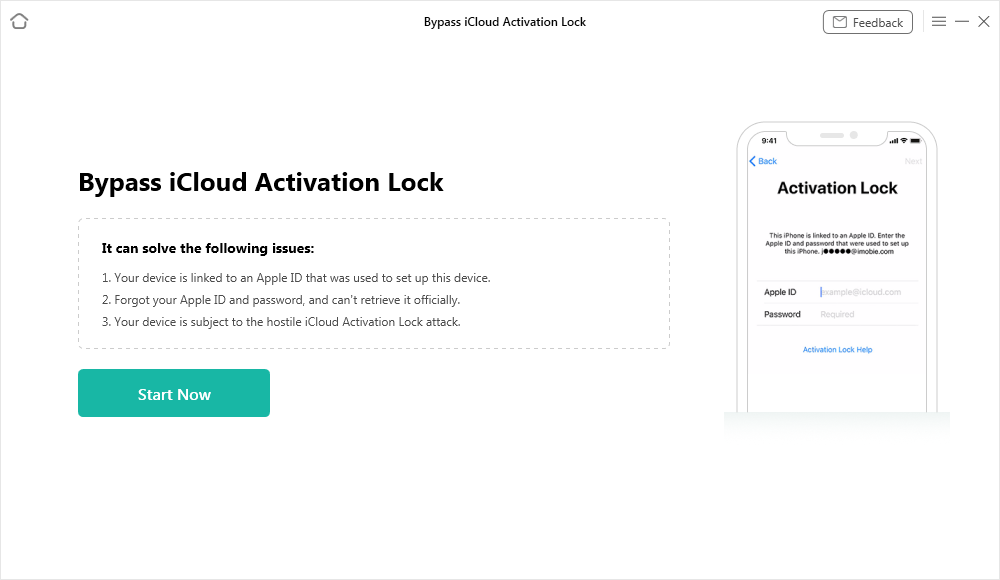
3. Verify compatibility: Before you proceed, explicitly check the official AnyUnlock compatibility page on their website to confirm your exact iPhone model and iOS version are supported. Once confirmed, AnyUnlock will detect your device and guide you through the necessary prerequisites, including jailbreak requirements for certain older models.
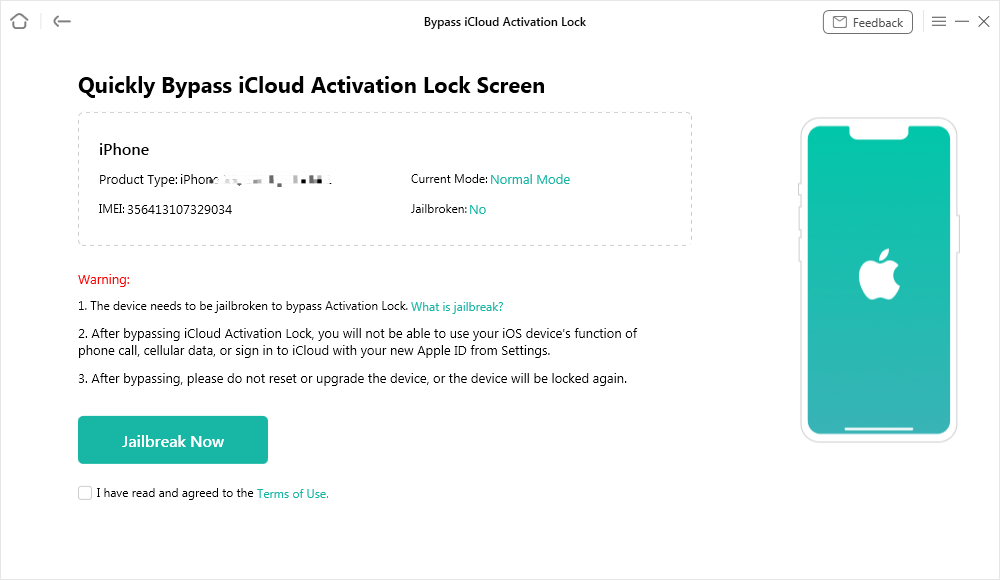
4. Follow the on-screen guidance: Click “Start Now” and follow the guided prompts to attempt the bypass.
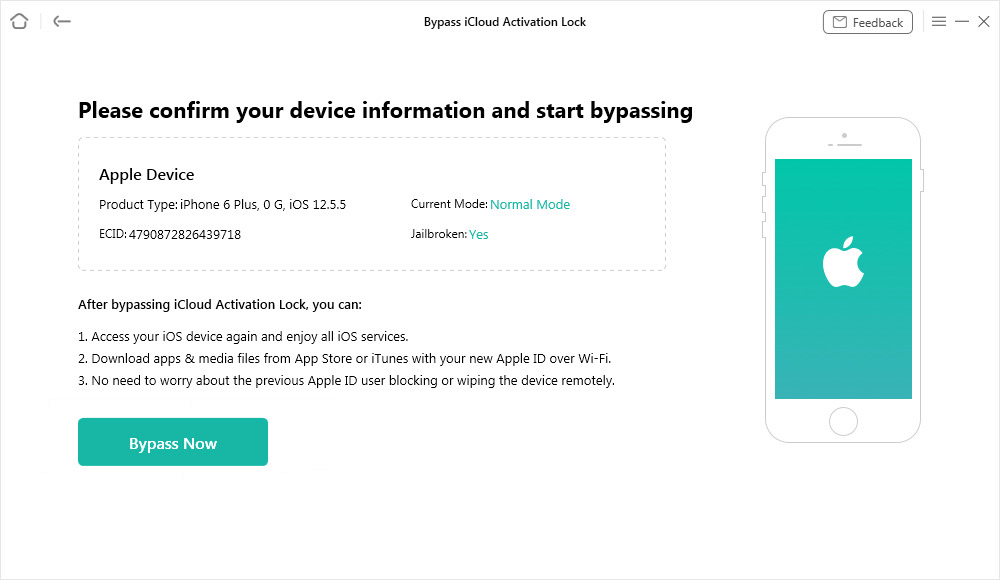
5. Check the result: If successful, you will be able to bypass the “Locked to Owner” screen and enter the device interface.
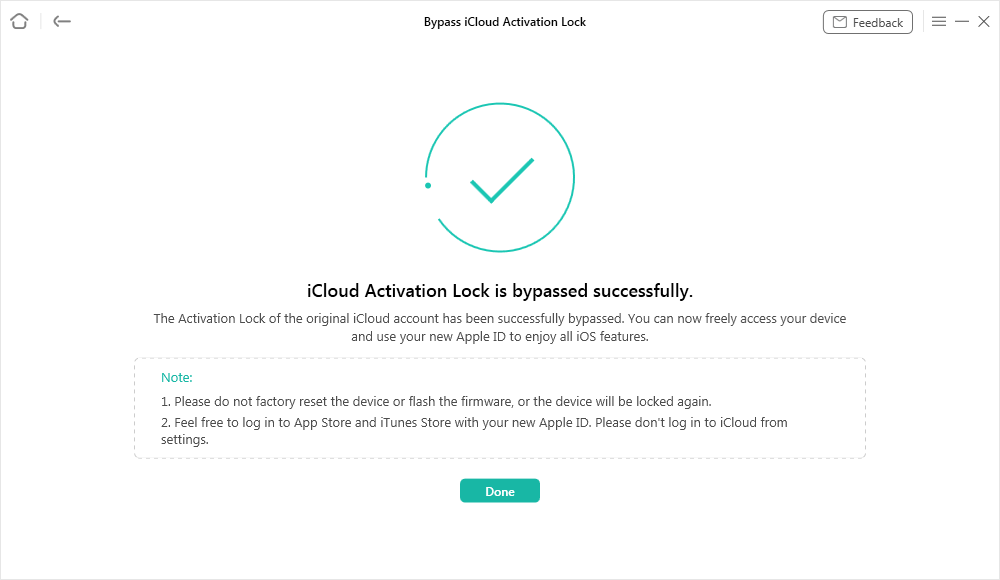
Because compatibility varies by iOS update and hardware generation, always verify the module’s requirements for your specific iPhone model before beginning the process.
Frequently Asked Questions
Did Apple bring back the Activation Lock checker tool?
No. Apple discontinued its official, free iCloud Activation Lock status checker via IMEI in 2017. Any site claiming to be the “official Apple checker” is a third-party service.
Can you check Activation Lock without turning the phone on?
The only way to check the status without turning the phone on is by running the IMEI or Serial Number through a third-party checking website. However, because these rely on cached databases, they carry risks and may not reflect the real-time status of the device.
Are third-party IMEI checkers safe and accurate?
They should be used with caution. While some reputable sites provide decent estimates, they are not 100% accurate or endorsed by Apple. Never use them as your only proof before making a high-value purchase.
Can a factory reset remove the Activation Lock?
No. In fact, a factory reset is exactly what triggers the Activation Lock to appear if “Find My” was previously enabled by the owner. The lock is stored on Apple’s servers, not locally on the device’s storage.
The Bottom Line for Second-Hand iPhone Buyers
Navigating the second-hand iPhone market requires vigilance, especially since Apple removed its official IMEI checker. The safest approach is to verify the setup process in person and avoid future issues like iPhone unlock Activation Lock, iPhone locked to owner how to unlock, or Bypass SIM lock iPhone.
If you are buying remotely, always ask for live video proof of the setup process and stick to platforms with strong buyer protection guarantees.
Unfortunately, scams still happen. If you find yourself stuck with an unresponsive seller and a locked device—and you have exhausted all official Apple Support options—you are not entirely out of luck. For eligible devices and iOS versions, AnyUnlock offers a guided desktop workflow to attempt an Activation Lock bypass as a last-resort recovery tool.
AnyUnlock – Unlock Any iOS Password
Quickly and easily unlock your iPhone/iPad/iPod touch from various locks such as screen lock, MDM lock, iCloud activation lock, Apple ID, iTunes backup password, and more.
Free Download for all windows & 100% safe
Free Download for all mac & 100% safe
Free Download 100% Clean & Safe
Related Articles



Wanda Norris is a junior author in iMobie specializing in iOS tips and solutions. She keeps a close eye on every iOS update to provide practical, easy-to-understand guides that help users solve problems and master their Apple devices.
Product-related questions? Contact Our Support Team to Get Quick Solution >
