What Is Secure Enclave on iPhone? Passcode and Face ID Security Explained
Secure Enclave iPhone manages iPhone passcode encryption and supports Face ID security to protect sensitive data. It separates passcode, biometrics, and encryption keys for stronger protection. If the passcode is forgotten, access cannot be restored directly, and recovery typically requires erasing the device and restoring from backup.
Secure Enclave Is the iPhone’s HardwareBacked Security Guard
Secure Enclave is a protected security subsystem inside modern Apple devices. On iPhone, it helps handle sensitive operations connected to the passcode, Face ID, Touch ID, encryption keys, and lockout protection.
In plain English, it helps keep private data protected even if the main operating system is under pressure. It is not an app you can open, clear, or reset manually.
The key idea is this:
- Your passcode is what you type.
- Face ID or Touch ID is a convenient way to unlock when conditions allow.


- Encryption keys protect the actual data stored on the device.
- Secure Enclave helps manage sensitive security operations around those keys.
That is why forgetting a passcode is serious. The iPhone cannot simply show you the old code or bypass the protection without changing the device state.
Passcode, Face ID, and Encryption Keys Are Not the Same Thing
Many people confuse the passcode, biometric unlock, and encrypted data. They work together, but they are not the same.
| Term | What it means | What users often misunderstand |
| Passcode | The numeric or alphanumeric code you enter | It is not just a screen password; it helps protect access to data |
| Face ID / Touch ID | Biometric convenience unlock | It does not replace the passcode forever |
| Encryption keys | The protection around stored data | They cannot simply be recovered like a website password |
| Secure Enclave | A protected hardwarebacked security system | It is not something users can manually bypass |
This distinction explains why iPhone may still ask for your passcode after restart, after too many biometric failures, or before sensitive account changes.
Why iPhone Needs Your Passcode After Face ID Fails
Face ID and Touch ID are convenient, but the passcode remains the core fallback. iPhone may require the passcode after restart, after several failed biometric attempts, when changing security settings, or when the device needs stronger verification.
This does not mean Face ID is broken. It means iOS is switching back to the stronger knowledgebased credential: the passcode.
A practical rule:
- Use Face ID or Touch ID for convenience.
- Remember that the passcode is still the recovery key for daily device access.
- Do not change your passcode casually without storing it safely in memory.
- If you forget it, recovery normally requires erasing the iPhone.
How Secure Enclave Relates to Security Lockout
When too many wrong passcodes are entered, iPhone can delay further attempts or show Security Lockout / iPhone Unavailable. Secure Enclave is part of the hardwarebacked security design that helps enforce passcode protections and protect encrypted data.
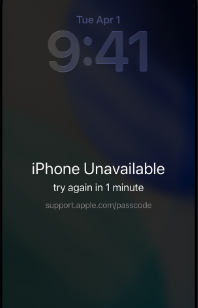
That is why common “tricks” do not solve a real lockout:
- Restarting does not reveal the passcode.
- Changing the clock does not remove the lockout.
- Apple Account recovery does not show your screen passcode.
- A desktop unlock workflow cannot preserve local data when removing a forgotten screen passcode.
If you no longer know the passcode, the realistic recovery path is erasebased. You can restore data only if you have a backup.
What Secure Enclave Does Not Do
Secure Enclave is sometimes described in a mystical way, which creates confusion. It does not mean every iPhone issue is hardwarerelated, and it does not mean every lock can be removed without consequences.
Secure Enclave does not:
- Store your passcode in a way that can simply be shown to you.
- Make Face ID a replacement for knowing your passcode.
- Remove Activation Lock from a previous owner’s Apple Account.
- Delete an organization’s MDM enrollment record.
- Fix a physically broken Face ID or Touch ID component.
This matters because different iPhone locks belong to different systems. Passcode lockout, Activation Lock, MDM, and SIM lock are separate problems.
Where AnyUnlock Fits
For a Secure Enclave explanation page, the product role should stay practical and limited. AnyUnlock can help with certain access recovery workflows, such as removing a forgotten screen passcode, bypassing iCloud Activation Lock on supported devices, bypassing MDM locally, removing Screen Time passcodes, and recovering or removing iTunes backup passwords.
For screen passcode removal, the most important point is data loss: removing a forgotten iPhone screen passcode erases the device. This is a security consequence of how iPhone protects local data, not a product limitation that can be ignored.
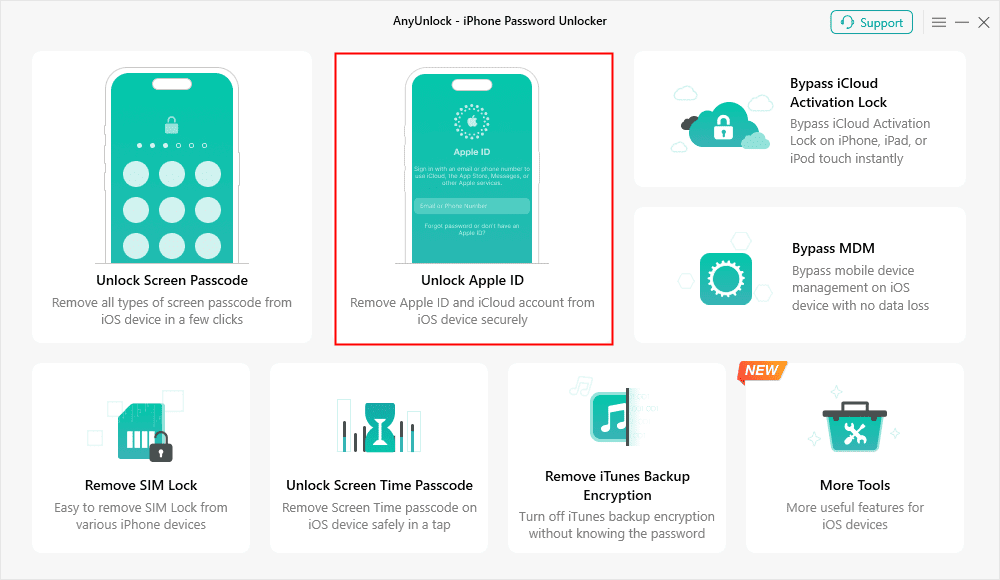
Consider AnyUnlock when you legally own the device and want a guided desktop workflow. Do not expect any tool to reveal a forgotten passcode, bypass hardware security without a reset, or fix damaged biometric hardware.

AnyUnlock – One-stop iOS Unlocker
What if you get locked out of your iPhone? Or what if you forgot your Apple ID and its password? No worries, AnyUnlock unlocks any iOS lock for you with 1 click. No technology required. Only 3 steps.
FAQ
What is Secure Enclave on iPhone?
Secure Enclave is a protected security subsystem that helps handle sensitive operations related to passcodes, biometric authentication, encryption, and lockout protection.
Is my passcode stored inside Secure Enclave?
The passcode is used in the device’s security process, but it is not available as plain text for Apple, a tool, or the user to simply read back.
Why does iPhone ask for passcode even when Face ID is enabled?
Because Face ID is a convenience layer. The passcode remains the core credential for many securitysensitive situations, including restart, failed biometric attempts, and some settings changes.
Can Secure Enclave be bypassed without erasing data?
For a forgotten iPhone screen passcode, you should not expect a datasafe bypass. Removing the passcode normally requires erasing the device.
Is Secure Enclave the same as Activation Lock?
No. Secure Enclave relates to local hardwarebacked security and passcode protection. Activation Lock is tied to Find My and Apple Account verification during activation.
Can AnyUnlock fix Secure Enclave problems?
AnyUnlock is not a hardware repair tool and does not fix Secure Enclave hardware. It can help with supported access recovery workflows, such as screen lock removal, while respecting the data erase requirement for forgotten passcodes.
Final Takeaway
Secure Enclave helps explain why iPhone passcode security is strong and why forgottenpasscode recovery usually means erasing the device. Face ID and Touch ID make unlocking easier, but the passcode remains the foundation of device access.
AnyUnlock – Unlock Any iOS Password
Quickly and easily unlock your iPhone/iPad/iPod touch from various locks such as screen lock, MDM lock, iCloud activation lock, Apple ID, iTunes backup password, and more.
Free Download for all windows & 100% safe
Free Download for all mac & 100% safe
Free Download 100% Clean & Safe



Wanda Norris is a junior author in iMobie specializing in iOS tips and solutions. She keeps a close eye on every iOS update to provide practical, easy-to-understand guides that help users solve problems and master their Apple devices.
Product-related questions? Contact Our Support Team to Get Quick Solution >
