If you are looking for the best car simulator on unblocked games 66 to pass the time during a free period, there are a few standout titles that typically bypass basic school network filters.
Top Browser Car Simulators:
- Drift Hunters: A highly popular 3D drifting game featuring customizable cars and multiple tracks.
- Madalin Stunt Cars 2: Offers an open-world sandbox experience perfect for practicing jumps and stunts.
- Scrap GL: A vehicle sandbox where you can build obstacle courses and test driving physics.
How Unblocked Games 66 Works:
Unblocked Games 66 and similar portals often host these games using Google Sites. Because many schools use Google services for education, IT departments cannot simply block the entire Google domain without disrupting schoolwork. This loophole allows these proxy game sites to slip through firewalls.
However, it is important to set realistic expectations. While these browser games are free and easy to access, they are built on basic WebGL frameworks. They will not have the advanced graphics, stability, or deep progression systems found in premium PC or mobile titles.
The Problem with Browser Games on School Wi-Fi
While finding a working proxy link feels like a victory, playing browser games on a school or work network comes with constant frustrations.
First, school IT departments are engaged in a constant game of cat and mouse. They frequently update web filters, meaning the unblocked link you saved yesterday might be completely broken or restricted today.
Second, hardware limitations ruin the experience. Most school-issued Chromebooks are built for basic word processing, not rendering 3D physics. When you try to run games like Drift Hunters on a low-end Chromebook, you will likely experience severe lag, dropped frames, and frozen screens right as you approach a jump.
Finally, the search for unblocked games can be a security risk. Search results are often cluttered with SEO spam—fake app store listings or sketchy redirect sites that trick users into downloading malware or adware instead of launching a browser game. This makes the hunt for a simple driving game both annoying and potentially unsafe.
Network Unblocking vs. GPS Unblocking: A Better Gaming Alternative
When unblocked browser games become too laggy or constantly get blocked, many users look for a better, lag-free way to play games while stuck at a desk. The answer often lies in shifting your focus from bypassing network restrictions to bypassing physical movement restrictions in high-quality mobile games using virtual location resources.
Here is how the two concepts of “gaming freedom” compare:
| Feature | Network Unblocking (Browser Games) | GPS Unblocking (Mobile AR Games) |
|---|---|---|
| Core Goal | Bypassing school/work Wi-Fi firewalls to load gaming websites. | Simulating physical movement so you can play location-based mobile games anywhere. |
| Game Quality | Basic 3D graphics, limited physics, high chance of lagging on Chromebooks. | Premium, high-quality graphics and deep gameplay (e.g., AR catching or exploration games). |
| Stability | Low. Proxy links are constantly found and blocked by IT departments. | High. Games are played on your personal mobile device, independent of the school’s web browser. |
| The Catch | Ad-heavy, frequent freezing, and potential malware risks from fake sites. | Requires a desktop tool to simulate movement if you cannot physically walk around. |
Switching to mobile location-based services (LBS) or AR games provides a much richer experience. However, because these games usually require you to walk outside, you need a way to move your virtual location while sitting at your desk.
How to “Drive” in Mobile AR Games Without Walking Using Fonelora
If you want to play high-quality location-based mobile games but are stuck inside without the ability to walk around, you need a way to take control of your device’s virtual location. This is where Fonelora Location Changer becomes a practical next step.
Fonelora Location Changer
Realistic GPS movement simulation, flexible route control, easy no-modification setup, and support for gaming, social, privacy, and location-based testing in one platform.
Fonelora Location Changer is a guided desktop-tethered solution that acts as a GPS location changer for supported iOS and Android devices. Instead of settling for a freezing, ad-filled browser game, you can launch a premium AR game on your phone and use Fonelora’s virtual joystick to “drive” or walk your character around the map in real time, allowing you to control movement in Monster Hunter Now and similar LBS games.
Important Distinction: Fonelora Location Changer bypasses physical movement constraints under supported conditions by changing your device’s GPS coordinates. It does not unblock network firewalls, act as a VPN, or bypass school web filters. It is designed to give you gaming freedom on your personal mobile device by letting you simulate movement anywhere in the world, safely and naturally, while you stay seated.
Setting Up Joystick Mode for Your Mobile Games
Using Fonelora Location Changer to simulate driving or walking in your favorite LBS game is straightforward.
Important Hardware Note: Because school-issued Chromebooks heavily restrict software installations and lack necessary system requirements, Fonelora Location Changer requires a personal Windows or Mac computer. You cannot install this directly on a locked-down school Chromebook. This desktop-tethered setup is ideal for after school or if you brought your own personal laptop with you.
Here is how to set up Joystick Mode to take real-time control of your virtual movement:
- Connect Your Device: Open Fonelora Location Changer on your personal Windows or Mac computer and connect your supported iOS or Android device following the on-screen prompts.

- Select Joystick Mode: Once the map loads, choose the Joystick Mode icon from the main interface.
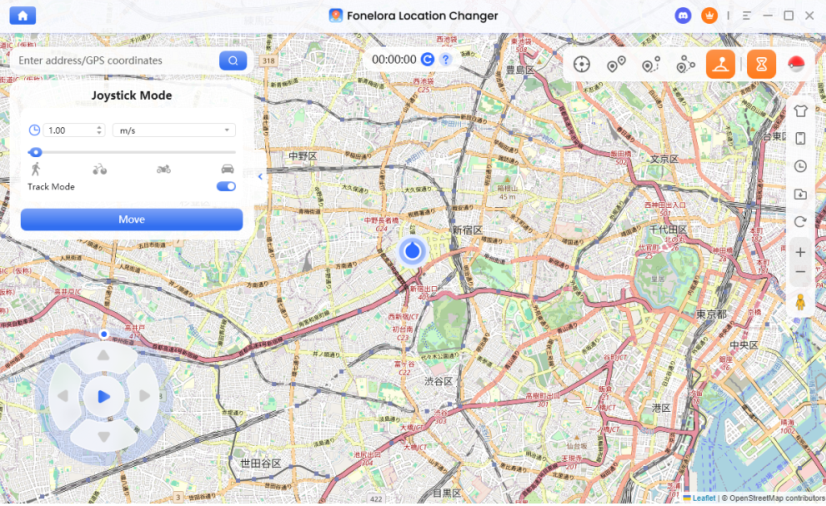
- Adjust Your Speed: Set your movement speed to simulate walking, cycling, or driving. For a more natural experience, keep the speed at a realistic pace for the game you are playing.
- Start Driving: Use the on-screen joystick or your keyboard to steer your virtual location in real time.
- Monitor the Cooldown Timer: If you plan on teleporting long distances before driving, always check Fonelora’s built-in Cooldown Timer to practice cooldown-aware location change and avoid triggering account risk flags.
Note: Always check your specific game’s rules and device compatibility before proceeding, as results may vary based on OS version and app risk controls.
Browser Car Games vs. Mobile AR Games with a GPS Changer
Should you keep looking for unblocked browser games or try mobile AR gaming with a GPS simulator? Use this decision table to compare the two workflows:
| Decision Factor | Browser Car Games (Unblocked Sites) | Mobile AR Games + Fonelora Location Changer |
|---|---|---|
| Game Experience | Often ad-heavy, repetitive gameplay with basic WebGL graphics. | Immersive, progression-based mobile gaming without the lag of a Chromebook browser. |
| Setup & Access | Simple click (if the proxy link isn’t broken or blocked yet). | Requires tethering your phone to a personal Windows/Mac desktop or laptop. |
| Network vs. GPS | Relies on evading school/work IT network firewalls. | Relies on changing mobile GPS location (does not bypass network firewalls). |
| Best Fit For… | Users who want a quick distraction and don’t mind heavy lag or ads. | Users seeking a stable, premium gaming experience who want real-time virtual movement control. |
Frequently Asked Questions
- How can I play car simulator on unblocked games 66?
- You can search for Unblocked Games 66 on Google Sites and look for popular titles like Drift Hunters. However, be aware that school IT filters may frequently block these proxy pages.
- What are the best driving games that aren’t blocked at school?
- Games hosted on educational domains or obscure Google Sites, such as Madalin Stunt Cars 2 or Scrap GL, often bypass initial blocks, though they are prone to lagging on school hardware.
- How do you unblock restricted games on a school Chromebook?
- Most users rely on proxy sites or alternative DNS settings, though IT departments constantly update their firewalls. For a better gaming experience, many switch to playing mobile games on their personal devices.
- Is Drift Hunters unblocked safe to play?
- Playing the game on a legitimate proxy site is generally safe, but users must be cautious of SEO spam sites offering fake “unblocked game” downloads that actually contain malware.
- How can I play location-restricted mobile games without walking?
- You can use a guided desktop tool like Fonelora Location Changer, acting as an iOS GPS spoofer and Android location changer, to simulate walking or driving on supported devices, allowing you to control your movement via a virtual joystick.
- Can a location changer bypass school internet filters?
- No. Tools like Fonelora Location Changer only change your device’s GPS location to bypass physical movement requirements in LBS games. They are not VPNs and do not unblock restricted websites or school web filters.
Summary: Level Up Your Free-Time Gaming
While searching for a car simulator on unblocked games 66 can provide a quick distraction during your free time, it often leads to frustration. Between broken proxy links, aggressive school firewalls, and laggy Chromebook performance, browser gaming has clear limits.
If you want to level up your free-time gaming, switching to high-quality mobile AR and location-based games offers a vastly superior experience. You do not have to be limited by physical movement constraints or bad weather. By using a tool like Fonelora Location Changer under supported conditions, you can securely take control of your virtual location. With its real-time Joystick Mode, you can “drive” anywhere in your favorite mobile games right from your desk.
More Related Articles

Fonelora Location Changer
- Bluetooth Hardware Simulation for Safer GPS Spoofing
- Realistic Movement & Route Simulation
- No Root or Jailbreak Required
- All-in-One Solution for Games, Social Apps & Privacy



