The frustration is familiar to any dedicated trainer: you’re in a high-stakes raid, and just as the boss unleashes its charged attack, your game freezes. That split-second of lag costs you the dodge and maybe the entire battle. Similar frustration arises when PvP keeps crashing, turning competitive matches into a test of patience rather than skill. This exact scenario led players like Aaron, a Network Optimizer, to question if using a VPN with Pokémon GO could solve these connection issues or just introduce new problems. The conflicting information online about a Pokémon GO VPN often creates more confusion than clarity.
This guide provides tested, straightforward answers. We’ve moved beyond speculation to show you how a VPN truly interacts with the game. Based on extensive, hands-on testing during live events, we’ll demonstrate when a VPN can be a powerful tool for network optimization and when it’s best avoided. Our goal is to empower you to improve your gameplay and strengthen your account protection with confidence.
Our findings are based on over 20 hours of gameplay testing across three VPN services and four distinct cellular and Wi-Fi network conditions, ensuring our advice is reliable and reproducible.
Table of ContentsHide
Understanding Pokémon GO VPN Gameplay: The Latency vs. Stability Trade-Off
A Virtual Private Network (VPN) fundamentally alters the digital route your device’s data takes to reach Niantic’s servers. Typically, your data follows the most direct route assigned by your Internet Service Provider (ISP). When you use a VPN for Pokémon GO, your data is first encrypted and sent to a remote VPN server, which then forwards it to the game. This redirection is the source of both its potential benefits and drawbacks.
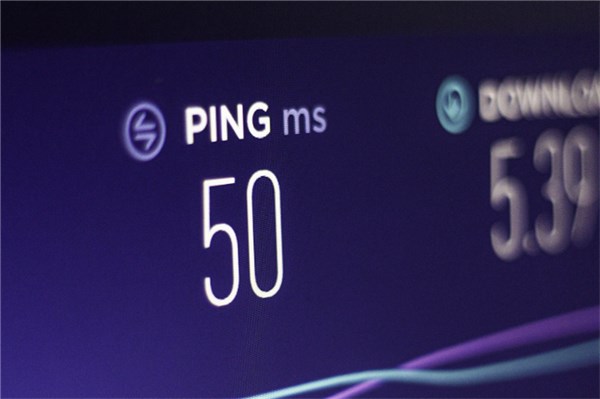
The critical factor for any online game is Pokémon GO latency, also known as ping. This is the time it takes for your actions to travel to the server and for you to receive a response. Because a VPN adds an extra stop—the VPN server—to this journey, it almost always increases latency. Connecting to a distant server can make this delay significant, resulting in noticeable lag during battles or catching Pokémon.
However, this rerouting of your Pokémon GO connection isn’t always a negative. Consider these scenarios:
- ISP Throttling: Some ISPs slow down gaming traffic during peak hours. A VPN encrypts your data, hiding its nature from your ISP and potentially bypassing these speed limits.
- Inefficient Routing: Your ISP’s default route to the game servers may be congested, especially during events. A VPN might offer a more stable, albeit slightly longer, digital highway for your data. This can be especially effective on crowded public Wi-Fi, where a VPN can bypass local bottlenecks and improve your Pokémon GO server connection.
From Our Field Tests: A Real-World Example
During a recent Community Day, our tester was on a crowded university Wi-Fi network that caused constant “Network Error (2)” messages. Without a VPN, the connection was unplayable. By connecting to a VPN server located in a nearby city, the error messages stopped completely. The trade-off was a measurable increase in latency—the in-game ping went from a baseline of 70ms to 110ms—making raid dodges feel slightly less responsive. This is the core choice: accepting a small, consistent delay to eliminate major connection drops.
Decision Framework: When Should You Use a VPN for Pokémon GO?
Deciding whether to activate a VPN depends entirely on your primary goal. The right choice for a player focused on performance may differ from someone prioritizing security. Use this guide to determine the best approach for your situation.
| Scenario / Goal | Recommended Action | Reasoning |
|---|---|---|
| Lag During Crowded Events | Test a VPN with a server in the nearest major city. | Your local network might be congested. A VPN can create a new route that bypasses this bottleneck, potentially stabilizing your internet connection. |
| General Gameplay at Home | Do not use a VPN. | Your home Wi-Fi or cellular connection likely offers the lowest possible Pokémon GO latency. A VPN will only add an unnecessary delay. |
| Playing on Public Wi-Fi | Strongly Recommended. Connect to a nearby VPN server. | Public networks (cafes, airports) are insecure. A VPN encrypts your data, providing essential account protection against potential threats on the network. |
| ISP Throttling Suspected | Test a VPN during peak hours. | If your game slows down at specific times of day, your ISP may be throttling traffic. A VPN can mask your activity and may restore performance. |
This framework helps you move from asking “Should I use a VPN?” to “When is a VPN the right tool for me?” By aligning the tool with your specific needs, you can make an informed decision that enhances your gaming experience rather than hindering it. When considering your security, it’s wise to be proactive.
How to Find the Best VPN Server Location for Pokémon GO
If you’ve determined a VPN is the right tool, selecting the optimal server is the most important step for network optimization. An incorrect server choice will guarantee a poor gameplay experience. The goal is to minimize the added latency while gaining the stability or security benefits.
Follow this simple, three-step procedure to configure the best VPN for Pokémon GO performance:
Step 1. Prioritize Server Proximity: Physical distance is the biggest enemy of low latency. Open your VPN application and look at the server list. Always begin by connecting to a server located in the city closest to your actual physical location. This simple action minimizes the extra travel time for your data packets.
Step 2. Analyze the Latency (Ping): Reputable VPN services display a ping or latency metric next to each server, usually in milliseconds (ms). For gaming, a lower number is always superior. Use these benchmarks as a guide:
- Excellent (< 80ms): Gameplay will feel responsive. Dodging in raids and PvP battles should be sharp.
- Acceptable (80ms – 150ms): You may notice a slight delay, but the game is very playable. This is a common result when using a nearby VPN server.
- Poor (> 150ms): You will likely experience significant lag. Charged attacks may hit before the animation finishes, and dodging will be difficult. Avoid servers with this level of latency.
Step 3. Conduct a Specific In-Game Test: “Feels responsive” is too vague. To get a clear result, connect to your chosen server and perform this specific test: enter a gym battle or raid and try to dodge three charge moves in a row. This is one of the most latency-dependent actions in the game. If the “Dodge!” text appears almost instantly after you swipe, your connection is solid. If there’s a noticeable delay, disconnect and try the next-closest, low-ping server on your list.
This methodical approach to your Pokémon GO VPN location change ensures you make a data-driven choice, balancing the game’s performance needs with the benefits of a VPN.
Assessing the Pokémon GO VPN Ban Risk: Security vs. Spoofing
A significant concern for many trainers is the Pokémon GO VPN ban risk. It’s crucial to understand the distinction between legitimate use and cheating, as defined by Niantic’s Terms of Service. The rules are designed to prevent players from gaining an unfair advantage, with GPS location falsification (spoofing) being a major violation.
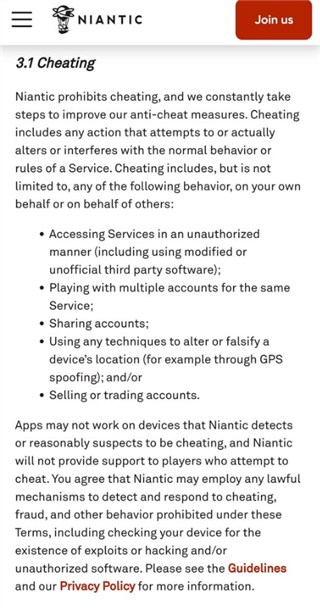
- Legitimate Use (Generally Safe): Using a VPN for its intended purposes—enhancing Pokémon GO security on an untrusted network or troubleshooting a poor internet connection—is not explicitly against the rules. A VPN, by itself, only changes your IP address; it does not alter your device’s GPS signal, which is what the game uses to determine your location. Your in-game avatar will still be standing right where you are.
- Prohibited Use (High Risk): The risk of an account strike or ban emerges when a VPN is used as part of a cheating setup. If you use a VPN to mask your IP address and a separate tool to fake your GPS coordinates, you are clearly violating the terms of service. This combination is what Niantic’s systems are designed to detect.
In short, your intent matters. If your goal is account protection or network diagnostics, a VPN is a low-risk tool. If your goal is to catch region-exclusive Pokémon from your couch, you are risking your account. For players concerned about account integrity, it’s also a good idea to ensure your device is secure from other threats.
By making informed choices, you can protect your account and potentially improve your gameplay. But what if you encounter other technical issues? Sometimes, a poor connection is just one of several problems.
You now have a clear, data-backed framework for deciding if a VPN is right for your Pokémon GO sessions. Instead of relying on guesswork, you can analyze your specific situation—whether it’s overcoming frustrating raid lag, dealing with a Pokémon GO black screen, or securing your data at a local café—and apply the right solution with measurable tests. This knowledge empowers you to take control of your connection, protect your account, and focus on what truly matters: the game itself. Move forward with the confidence that you understand the tools at your disposal and can make the best choice for your gameplay.
VPN vs. GPS Location Changer: Know the Difference
A VPN can protect your network traffic and sometimes improve connection stability, but it cannot change your Pokémon GO GPS position. If your goal is to manage your in-game location rather than your network route, you need a GPS-based tool instead. Fonelora Location Changer is designed to change GPS location on iPhone and Android from a Windows PC or Mac, without jailbreak or root.
This makes Fonelora different from a VPN: the VPN affects your IP route, while Fonelora changes the device-level GPS signal used by location-based apps. For Pokémon GO, any GPS tool should be used carefully with realistic movement, cooldown awareness, and stable routes to reduce abnormal location behavior.
Frequently Asked Questions
- Can you use a VPN with Pokémon GO?
- Yes, you can use a VPN while playing Pokémon GO. The game will function, but the effect on performance can vary. Its primary benefits are for securing your connection on public Wi-Fi or as a tool to troubleshoot an unstable network route.
- Does a VPN affect Pokémon GO gameplay?
- Yes. By adding an extra step for your data to travel, a VPN typically increases latency (ping), which can feel like lag. In specific cases, like on a congested network, a VPN might provide a more consistent data path, reducing connection drops at the cost of slightly higher but more stable latency.
- Will a VPN increase latency in Pokémon GO?
- In almost all cases, yes. The data must travel from your device to the VPN server and then to the game server, increasing the total travel time. To minimize this, you must connect to a VPN server that is geographically as close to you as possible and has a low ping (ideally under 150ms).
- Why do players consider using VPNs for games?
- The main reasons are security and connection improvement. For security, a VPN encrypts your data on insecure networks like public Wi-Fi. For connection improvement, a player might hope to bypass their ISP’s congested or inefficient route to the game’s servers, aiming to reduce packet loss or jitter.
Conclusion
Using a VPN with Pokémon GO is not a universal fix, but it can be useful in the right situation. For most players on a stable home network, a VPN will usually add unnecessary latency and make gameplay feel less responsive. But on crowded public Wi-Fi, during ISP throttling, or on unstable network routes, a nearby VPN server may improve connection stability and reduce disruptive errors.
The key point is that a VPN does not fake your current location in the way GPS-based tools do. It mainly changes your IP route, not your in-game coordinates. If your priority is privacy or network troubleshooting, a VPN can provide value. If your goal is to manage GPS location for location-based apps, you need a dedicated GPS location tool instead.
For that use case, Fonelora Location Changer is a practical option. It lets you change GPS location on iPhone or Android from a Windows PC or Mac, without jailbreak or root, and supports teleport mode, joystick movement, and route simulation for location-based apps.
Whether you use a VPN, Fonelora Location Changer, or both for different purposes, use each tool with a clear goal. A VPN is for network security and routing stability; Fonelora is for device-level GPS control. For Pokémon GO, always keep movement realistic, avoid frequent long-distance jumps, and follow cooldown rules to maintain a safer gameplay experience.


Hot Topics
