If you are trying to complete your Kalos Pokédex, you likely want to know exactly which Gen 6 new Pokémon are available in Pokémon GO right now. While many Gen 6 additions spawn globally, some of the most sought-after catches are heavily restricted by geographical borders.
Quick Answer: Gen 6 Pokémon Availability
Most of the Kalos (Gen 6) Pokédex is now available globally in Pokémon GO, including popular evolution lines like Froakie, Fennekin, and Chespin. However, a specific group of Gen 6 Pokémon is entirely region-locked. The hardest targets for players to catch are:
- Klefki: Locked to France and immediate border areas.
- Hawlucha: Locked exclusively to Mexico.
- Flabébé: Spawns globally, but specific flower colors (Blue, Red, Yellow) are restricted to different continents.
For players who want a complete Pokédex, these regional restrictions are the biggest hurdle.
Gen 6 Region-Exclusive Pokémon: Who They Are and Where They Live
Unlike globally available spawns, region-exclusive Gen 6 Pokémon will never appear in the wild outside of their designated real-world borders. They also do not hatch from standard Eggs obtained outside those regions.
Here is a clear reference guide to which Kalos regionals are locked and where you must go (or virtually travel) to find them:
| Pokémon | Region-Lock Boundaries | Spawn Notes |
|---|---|---|
| Klefki | France (and immediate neighboring borders) | High spawn rate in major French cities like Paris. |
| Hawlucha | Mexico | Spawns heavily in urban areas like Mexico City. |
| Flabébé (Blue) | Asia-Pacific (APAC) | Exclusive to countries like Japan, Australia, and Singapore. |
| Flabébé (Red) | Europe, Middle East, Africa (EMEA) | Found across Europe and Africa. |
| Flabébé (Yellow) | The Americas | Exclusive to North, Central, and South America. |
Because these Pokémon are strictly geofenced, completing your Kalos Pokédex requires either a plane ticket, a wealthy trading partner, or a reliable way to simulate your device’s location.
Exact Coordinates to Catch Kalos Regionals
If you are planning a trip or preparing to simulate your location, simply knowing the country isn’t always enough. You need specific, high-density spawn areas (hot-spots) to maximize your chances of finding these regionals quickly at some of the best Pokémon GO spoofing locations.
Here is a checklist of exact coordinates for the most highly requested Gen 6 regionals. Be sure to copy these coordinates for your future hunting sessions:
- [ ] Klefki (Champ de Mars, Paris, France):
48.8584, 2.2945– This iconic park near the Eiffel Tower has a massive cluster of Pokéstops, making it the perfect place to hunt for Klefki. - [ ] Hawlucha (Zócalo, Mexico City, Mexico):
19.4326, -99.1332– The historic center of Mexico City is deeply lured and frequently spawns Hawlucha. - [ ] Flabébé Blue (Shinjuku, Tokyo, Japan – APAC):
35.6895, 139.6917– A densely packed area for Pokémon GO players in the Asia-Pacific region. - [ ] Flabébé Red (Trafalgar Square, London, UK – EMEA):
51.5080, -0.1281– A central London hotspot for the European exclusive red flower. - [ ] Flabébé Yellow (Central Park, New York, USA – Americas):
40.7851, -73.9683– One of the most famous hunting grounds for American spawns.
The Problem: Travel Costs vs. High Trading Stardust
Knowing where Klefki and Hawlucha are is only half the battle. Actually acquiring them without physically flying to France or Mexico presents a massive challenge for everyday players.
Currently, players typically weigh two official options, both of which have severe drawbacks:
Option 1: Physically Traveling
- Pros: 100% safe and complies with Niantic’s rules.
- Cons: Completely unfeasible for most players. Spending thousands of dollars on international flights just to catch a Gen 6 Pokémon is not a realistic solution.
Option 2: Trading with a Traveling Friend
- Pros: No travel required on your part.
- Cons: High Stardust costs. Since region-locked Pokémon like Klefki will be unregistered in your Pokédex, trading for one can cost up to 1,000,000 Stardust (or 40,000 if you are Best Friends). Furthermore, you have to actually find someone local who has been to these countries recently.
Because of these steep barriers, catching them directly on your own device is the ideal scenario. This creates a natural need for a virtual location workaround—but doing so requires strict attention to game rules.
Understanding Spoofing Risks: Soft Bans and Cooldown Timers
Before you jump straight to Paris for a Klefki, you must understand how Pokémon GO monitors player movement. Altering your GPS location (spoofing) violates Niantic’s Terms of Service and carries inherent account ban risks. No tool is 100% undetectable.
If you decide to simulate your location, the most critical concept to grasp is the Cooldown Timer.
The game calculates the physical distance between your last in-game action (like spinning a Pokéstop or catching a Pokémon) and your next one. If you catch a Pokémon in New York and instantly teleport to France to catch a Klefki, the game recognizes this as impossible travel.
This results in a soft ban, meaning:
- Pokémon will flee instantly upon being hit by a Pokéball.
- Pokéstops will spin but give no items.
- Gym battles will be locked.
Additionally, players using unstable mobile spoofing apps often encounter Error 12 (Failed to detect location). To minimize these risks, any virtual travel must be managed responsibly by following Pokémon GO cooldown rules and using tools that actively track your mandatory wait periods.
How to Catch Region-Locked Gen 6 Pokémon (Without Traveling)
If you cannot travel and cannot afford the Stardust for trades, using a desktop-guided location changer is a practical workaround to change location in Pokémon GO. Unlike unstable mobile apps that trigger Error 12, Fonelora Location Changer offers a safer, computer-tethered workflow for supported iOS and Android devices.
Fonelora Location Changer
Realistic GPS movement simulation, flexible route control, easy no-modification setup, and support for gaming, social, privacy, and location-based testing in one platform.
Crucially for Pokémon GO players, Fonelora features a built-in Cooldown Timer and a dedicated Game Mode to help you manage long-distance jumps (like flying to France for Klefki) more responsibly.
Here is how to use the guided workflow to catch Gen 6 regionals:
Connect Your Device: Open Fonelora Location Changer on your Mac or PC and connect your supported iPhone or Android device via USB or Wi-Fi. Note: Depending on your device, you may need to ‘Trust This Computer’, enable Developer Mode (iOS), or turn on USB Debugging (Android) to establish the connection.

Select Teleport Mode: Choose Teleport Mode from the main interface and enter the exact coordinates for the regional you want (e.g., 48.8584, 2.2945 for Paris, France).
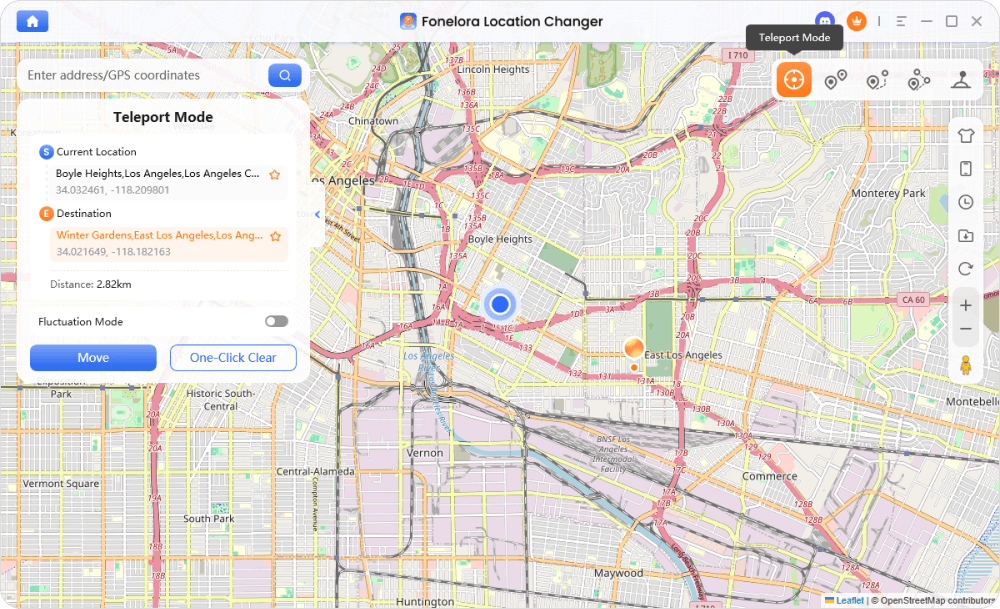
Wait for the Cooldown Timer: Before opening your game or interacting with the map, check Fonelora’s on-screen Cooldown Timer. If you recently played in your hometown, you must wait the suggested time (up to 2 hours for international jumps) before catching anything.
Catch the Regional: Once the cooldown has passed safely, open the game and catch your Klefki.
Use Joystick Mode (Optional): If the Pokémon isn’t exactly on the coordinate, use Fonelora’s Joystick Mode to simulate natural walking around the Parisian hot-spot until it spawns.
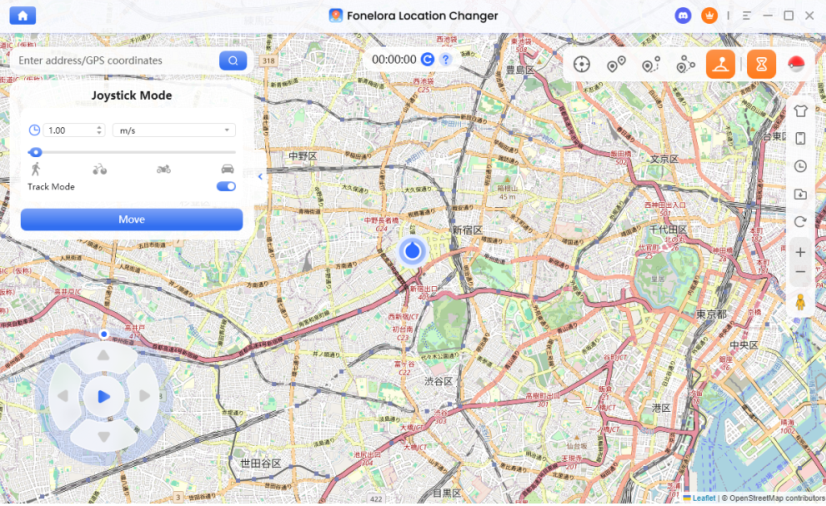
Note: While Fonelora Location Changer provides cooldown reminders and realistic movement, altering GPS still violates Niantic’s terms. Always use these tools responsibly and strictly adhere to cooldown rules.
Frequently Asked Questions
- How do I catch Klefki in Pokémon GO?
- Klefki is a Gen 6 regional locked to France and its immediate borders. To catch it, you must physically travel to France, trade with someone who has, or use a location changer tool to simulate your device’s GPS to a French hot-spot like Paris.
- Where are the best places to find Gen 6 regionals?
- For Klefki, the Champ de Mars in Paris (
48.8584, 2.2945) is highly recommended. For Hawlucha, the Zócalo in Mexico City (19.4326, -99.1332) provides high spawn densities.
- Can I get Kalos regionals without traveling to France?
- Yes. You can trade with friends who have visited the region, though this costs a significant amount of Stardust if unregistered. Alternatively, players use desktop-guided GPS changers to virtually travel there.
- What are the Gen 6 region-exclusive Pokémon?
- The main Gen 6 regionals in Pokémon GO are Klefki (France), Hawlucha (Mexico), and the regional color variants of Flabébé (Blue in APAC, Red in EMEA, Yellow in the Americas).
- How does the cooldown timer work when teleporting for Pokémon GO?
- The cooldown timer is a mandatory wait period based on the distance you virtually jump. An international jump (like US to France) requires a strict 2-hour waiting period before you can spin stops or catch Pokémon. Failing to wait results in a soft ban.
- Is it safe to use a location changer for Pokémon GO?
- No tool is completely risk-free, as altering your GPS violates Niantic’s Terms of Service. However, using a desktop-based tool with built-in cooldown tracking is generally safer than using modified third-party mobile apps, which are easily detected.
Ready to Complete Your Kalos Pokédex?
Completing the Gen 6 Kalos Pokédex is a major milestone, but geographical region-locks on Pokémon like Klefki and Hawlucha make it incredibly difficult for the average player. Knowing the exact coordinates for hot-spots in Paris or Mexico City is a great start, but execution is what matters.
If traveling globally isn’t an option and you don’t want to drain your Stardust on trades, virtual travel is a practical alternative. Just remember that patience is key—always respect the cooldown timer to protect your account from soft bans.
For a guided, cooldown-aware way to simulate travel to these exact locations on supported iOS and Android devices, Fonelora Location Changer provides the necessary Teleport Mode and movement controls to get the job done. Download Fonelora Location Changer today to check device compatibility, manage your virtual travel responsibly, and finally catch your missing Kalos regionals.
More Related Articles

Fonelora Location Changer
- Bluetooth Hardware Simulation for Safer GPS Spoofing
- Realistic Movement & Route Simulation
- No Root or Jailbreak Required
- All-in-One Solution for Games, Social Apps & Privacy



