Quick Answer: Is iOSGods Safe?
Is iOSGods safe to use? The short answer depends entirely on what you mean by “safe”—there is a massive difference between the safety of your physical device and the safety of your game accounts.
Device Safety: If you download directly from the official iOSGods website, it is generally safe for your iPhone or iPad. It is highly unlikely to infect your phone with a virus or malware.
Game Account Safety: iOSGods is highly unsafe for your actual game accounts. The platform provides tweaked and modified apps, which inherently violate game Terms of Service. In server-side AR games, using these modified game clients frequently results in instant account warnings or permanent bans.
Furthermore, because these apps bypass the official App Store, Apple frequently revokes their enterprise certificates. This means apps downloaded from iOSGods will randomly crash and require you to completely delete and reinstall them.
What is iOSGods and How Does Sideloading Work?
iOSGods is a popular third-party platform and community forum that offers modified versions of standard iOS apps and games. These modified files are known as “tweaked IPAs” (iOS App Store Package files) and usually include built-in cheats, unlocked premium features, or location spoofing capabilities.
Because Apple does not allow modified apps on the official App Store, users must bypass standard installation restrictions—a process known as sideloading. To run these tweaked IPAs on a non-jailbroken iPhone or iPad, iOSGods relies on enterprise certificates or personal developer accounts to “sign” the app and convince Apple’s system that the software is trusted. However, this workaround is exactly why iOSGods faces constant stability and account risk issues.
The Real Risks: Malware, Account Bans, and Revokes
While many users worry about viruses, the most realistic dangers of using iOSGods revolve around account bans and frustrating stability issues. Before you download anything, review these core risks:
- Account Bans (Anti-Cheat Triggers): This is the highest risk. Modified IPAs inject unauthorized code directly into the game client. Modern server-side anti-cheat systems detect this altered code easily, often resulting in swift account warnings or permanent bans. For comprehensive risk management, refer to dedicated Pokémon GO guides.
- Certificate Revocations (App Crashes): Apple actively hunts down and revokes the third-party enterprise certificates iOSGods uses. When a certificate is revoked, the sideloaded app will immediately crash upon opening. This is a revoke issue, not a malware symptom, but it forces you to delete and reinstall the app constantly.
- Malware & Spyware: The risk is generally low if you stick to the official iOSGods community. However, there are countless fake mirror sites that package malware into IPAs. Downloading from the wrong link can compromise your device.
- Data Privacy Concerns: Tweaked apps bypass official App Store privacy guardrails. You cannot verify exactly what user data the modified code is scraping or transmitting in the background.
Why iOSGods is Highly Risky for AR Games (Like Pokémon GO)
If you are downloading iOSGods primarily to spoof your location in Location-Based Services (LBS) or AR games like Pokémon GO, you are taking a massive gamble with your account.
Games like Pokémon GO rely on aggressive server-side anti-cheat mechanisms designed specifically to detect tampered game files. Downloading a modified Pokémon GO IPA from iOSGods almost guarantees you will receive an Error 12 flag, a 7-day strike, or a permanent ban.
Tweaking the actual game files is the fastest way to get caught by Niantic or other AR game developers. Because the modified app behaves differently from the official version, the anti-cheat system flags your account before you even have a chance to catch anything. If your goal is to change location in Pokémon GO safely, you need a method that does not modify the official game client.
A Safer Alternative for Location Spoofing: Fonelora Location Changer
For users whose primary goal is location spoofing in AR games, risking your account with a modified iOSGods IPA is unnecessary. A much safer approach is to use the official, unmodified game from the App Store and change your device’s GPS coordinates externally.
This is where Fonelora Location Changer comes in. As a guided desktop-based iOS GPS spoofer, Fonelora modifies your device’s location via a secure USB or Wi-Fi connection. Because you are playing on the official App Store game client, you significantly reduce the risk of anti-cheat triggers associated with sideloaded apps.
Fonelora Location Changer
Realistic GPS movement simulation, flexible route control, easy no-modification setup, and support for gaming, social, privacy, and location-based testing in one platform.
How to use Fonelora Location Changer for safer virtual movement:
- Connect Your Device: Open Fonelora on your computer and connect your supported iOS or Android device via USB or Wi-Fi.

- Open the Official Game: Launch the unmodified, official App Store version of your game (e.g., Pokémon GO).
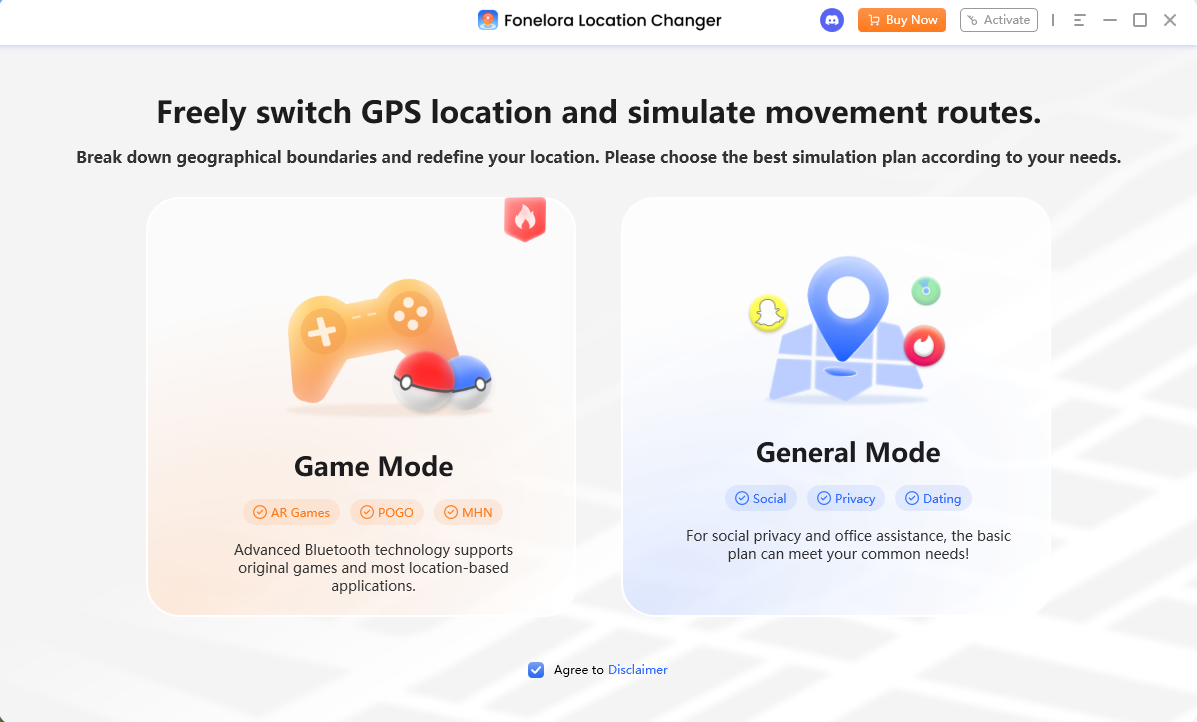
- Select Game Mode: Choose the game-oriented setup in Fonelora to optimize the connection for LBS games.
- Choose Your Movement: Use Teleport Mode to jump to a specific coordinate, or use Joystick Mode to simulate natural walking and control your direction in real-time.
- Monitor Cooldowns: Rely on Fonelora’s built-in Cooldown Timer to remind you how long to wait between long-distance jumps, further protecting your account.
Modified IPAs (iOSGods) vs. Desktop GPS Tools
To understand why a guided desktop tool is better suited for AR games than iOSGods, it helps to look at the differences side-by-side:
| Feature / Criteria | Modified IPAs (iOSGods) | Desktop GPS Tools (Fonelora) |
|---|---|---|
| Game Client Used | Unofficial, modified app | Official, unmodified App Store app |
| Account Ban Risk | Very High (tampered code is easily detected) | Reduced (uses the official game client) |
| App Stability | Frequent crashes due to Apple certificate revokes | Stable desktop connection, no revokes |
| Setup Process | Requires profile trust, sideloading, and updates | Guided USB/Wi-Fi desktop connection |
| Movement Control | Often clunky, on-screen injected menus | Dedicated Joystick Mode and adjustable speed |
If your only goal is changing your GPS location for location-based games, using a desktop tool offers a much more stable and manageable experience without the constant headache of app revokes.
Frequently Asked Questions About iOSGods
- Is iOSGods safe from viruses and malware?
- Yes, the official iOSGods website is generally safe and free from viruses. However, you must be extremely careful to avoid fake mirror sites that distribute malware-infected files.
- Will I get banned in Pokémon GO if I use a spoofer from iOSGods?
- Yes, it is highly likely. Pokémon GO’s anti-cheat system specifically looks for modified game clients. Using an injected IPA from iOSGods frequently triggers Error 12 or an outright account ban.
- Are there safe alternatives to iOSGods for location spoofing?
- Yes. Instead of downloading modified apps, you can use a desktop GPS location changer like Fonelora. This allows you to spoof your location while playing on the official, safe App Store version of the game.
- Why do iOSGods apps crash after a few days?
- Apple regularly hunts down and revokes the third-party enterprise certificates that iOSGods uses to bypass the App Store. When a certificate is revoked, the app crashes and must be redownloaded.
- How do I fix the untrusted developer error?
- When you first sideload an app, iOS blocks it for safety. To fix this, go to your iPhone’s Settings > General > VPN & Device Management, find the developer profile, and tap “Trust.”
- Do I have to pay for iOSGods VIP to remove ads?
- Yes. While iOSGods offers a free tier, it often injects ads into the modified apps or limits download speeds. Users must pay for a VIP subscription to remove these ads and access premium downloads.
Final Verdict: Should You Use iOSGods?
While iOSGods is not a hub for viruses, it is far from a safe or reliable option for dedicated gamers. The severe risk of permanent game bans, combined with the endless frustration of Apple certificate revocations and crashing apps, makes sideloading tweaked IPAs a poor choice for anyone who values their game account.
If your primary goal is location simulation—especially for AR games like Pokémon GO or Monster Hunter Now—you should avoid modifying your game files entirely.
Instead, we recommend using Fonelora Location Changer. By allowing you to simulate movement and spoof your GPS coordinates through a stable desktop connection, Fonelora lets you play safely on the official App Store game client. You get all the benefits of Joystick control and virtual movement without the constant fear of tweaked-app bans.
Ready to spoof your location with less risk? Explore GPS location changer guides to learn more about setting up a safer, more stable virtual location experience today.
More Related Articles

Fonelora Location Changer
- Bluetooth Hardware Simulation for Safer GPS Spoofing
- Realistic Movement & Route Simulation
- No Root or Jailbreak Required
- All-in-One Solution for Games, Social Apps & Privacy



