Author Bio: Our lead mobile gaming security analyst has spent over six years testing Android and iOS environments. This includes extensive hands-on experience evaluating location spoofing detection mechanics, testing modified clients like PGSharp and iPogo, and exploring root-level workarounds such as Magisk and Smali Patcher on devices running Android 6 through Android 16. This continuous testing helps us document the exact security and ban risks casual players face when attempting unauthorized downloads outside the Google Play Store.
Facing physical limitations when trying to catch rare regional creatures can be extremely frustrating. Many players, like Ryan, search for a Pokémon Go mod apk, hoping to collect exclusive characters directly from their living room. He wanted a convenient way to play without traveling long distances. Unfortunately, this search quickly introduces severe obstacles.
Instead of a seamless gaming experience, you often run into a frustrating cycle. Popular modified clients frequently crash after server updates. Finding a safe, working Pokémon Go modded APK without accidentally downloading malicious software is an ongoing struggle. Eventually, players face the devastating reality of their accounts getting banned. This article provides a realistic look at modern Pokémon Go spoofing tools, examines exactly why location spoof detection triggers suspensions, and outlines how to protect your device.
This guide is the result of monitoring unauthorized applications, anti-cheat detection methods, and official gameplay alternatives across 15 different Android and iOS devices over a six-month period.
Table of ContentsHide
The Reality of Using a Pokémon Go Hack APK
Deciding to search for a Pokémon Go hack APK means entering a constant cat-and-mouse game with the game’s developer, Niantic. To understand the risks, we must look at the actual tools players attempt to use and why they consistently fail.
Modern Modding Tools and Root Workarounds
Most players attempting to spoof their location download modified third-party clients, such as PGSharp or iSpoofer. These applications are entirely separate from the official game. They come with built-in joysticks, automated walking features, and enhanced catching abilities. However, because they are unofficial, their application signatures do not match the legitimate Google Play Store release. Niantic’s anti-cheat algorithms scan for these mismatched signatures and immediately flag the accounts using them.

To evade this basic detection, advanced players often attempt complex technical workarounds. They root their Android devices, use frameworks like Magisk for systemless root access, and apply modules like Smali Patcher to manipulate GPS data at the operating system level. This allows them to use the official Pokémon Go app alongside a separate joystick application, attempting to hide the mocked location data from Niantic’s security scans.
Even with these advanced setups, success is highly volatile. Niantic constantly updates its detection algorithms to identify rooted environments and abnormal behavioral patterns. A setup that works perfectly on a Tuesday might trigger a massive ban wave by Friday.
⚠️ CRITICAL WARNING: ACCOUNT BANS AND MALWARE THREATS
Downloading a pokemon go mod apk android exposes your device and account to immediate, severe danger. Modded files require you to bypass standard Android security features, opening your phone directly to hidden malware that can steal your contacts, camera access, and financial data.
Additionally, Niantic actively monitors for unauthorized apps. Using files like PGSharp or iPogo almost certainly guarantees an eventual, permanent account ban. Your years of gaming progress can disappear overnight.
How to Spot Malicious APK Sites
One of the biggest hurdles players face is distinguishing legitimate information from malicious download sites. Because you cannot download a Pokémon Go spoofing APK from the official Google Play Store, you are forced to navigate unverified third-party websites. Many of these sites exist solely to distribute malware.
If you are browsing for APK files, watch out for these massive red flags:
- Unrelated Domain Names: If the website URL looks like a random string of characters or completely unrelated words, it is likely a scam.
- Fake Download Buttons: Malicious sites are often covered in multiple “Download Now” graphics that are actually disguised advertisements leading to harmful software.
- Survey and SMS Requirements: If a site forces you to complete a survey, input your email address, or provide a phone number before the download begins, it is attempting to harvest your personal data.
- Incorrect File Sizes: Always check the file size. If the official app is roughly 150MB, and the file you are downloading is only 5MB, you are downloading a malicious installer, not the game.
Account Suspensions and The 3-Strike Rule
Downloading a Pokémon Go mod APK unlimited coins or similar cheats exposes you to Niantic’s rigorous enforcement policies. Niantic employs sophisticated server-side analytics to track unrealistic movement patterns. When you use Pokémon Go third-party apps to alter your GPS coordinates, the system flags your account.
Niantic follows a strict three-strike disciplinary procedure for players caught using unauthorized software:
- Strike One (Warning): You receive a massive red warning screen upon logging in. Your gameplay is significantly limited for seven days. You will not encounter rare creatures in the wild, and you cannot receive EX Raid passes.
- Strike Two (Suspension): Your access to the game is suspended entirely. You cannot log in for thirty days.
- Strike Three (Termination): Your account is permanently and irreversibly banned.
Why a Pokémon Go Mod APK With Joystick Functions Fails
Experimental gamers frequently seek a Pokémon Go mod apk with a joystick to navigate the virtual game map without moving physically. Unless you are using a highly complex, perfectly configured rooted device, these applications fail due to conflicting hardware signals.
Your smartphone calculates its physical position using satellite GPS signals, cellular tower triangulation, and nearby Wi-Fi networks. When a basic fake GPS Pokémon Go tool feeds fabricated coordinates directly into the game, the cellular and Wi-Fi data still report your true physical location.
The Rubberbanding Effect
This data discrepancy creates a massive conflict known as “rubberbanding.” Your genuine GPS hardware registers your actual physical location in New York, but your spoofing software forces fabricated coordinates in Tokyo. Your in-game avatar snaps rapidly back and forth between the two continents.
This erratic movement serves as a glaring red flag for Niantic’s monitoring servers. The system immediately detects the impossible travel speed and triggers a soft ban. During a soft ban, any Pokémon you try to catch will instantly flee, and PokeStops will simply spin without yielding any items. Ultimately, Pokémon Go mods fail because client-side manipulation simply cannot bypass the authoritative checks enforced by the server.
Why the Pokémon Go Mod APK Latest Version Frequently Breaks
Players who successfully install the Pokémon Go mod APK latest version often notice that the application becomes entirely non-functional within just a few weeks. This frustrating cycle occurs because Pokémon Go operates as a live-service game requiring constant synchronization between the client application and Niantic’s central servers.
When Niantic releases an official update, they modify the application’s underlying code and API endpoints. To ensure all users have the same data structure, the servers enforce a strict minimum version requirement through a precise API handshake.
The Version Mismatch Obstacle
If your modified application, such as an older build of PGSharp, runs on version 0.290.0, and the server mandates version 0.295.0, the server literally refuses the connection. It triggers an unavoidable forced update screen. Because a modified application cannot update securely through the Google Play Store, the game remains entirely unplayable.
Users must then wait for anonymous developers to reverse-engineer the new official release, inject their custom code, and upload a new APK file. This creates persistent downtime. Furthermore, operating system patches frequently break the fragile code used in these modified versions, causing unstable or crashing modded apps.
Secure Alternatives to a Pokémon Go Spoofing APK
Tracking Ryan’s experience provided a clear blueprint for moving forward. After struggling with apps crashing after every update and receiving his first red warning screen, he realized that losing his high-level account was not worth the convenience of spoofing. He decided to abandon the exhaustive cat-and-mouse game of sideloading files and transitioned back to the official application.
Playing the official game is admittedly slower than teleporting across the globe, but it offers a completely stress-free experience. You never have to worry about malicious downloads, forced update screens, or sudden account bans.
Maximize Official Features for Faster Progress
If you want to build a strong roster securely, focus on these built-in mechanics:
1. Use Remote Raid Passes:
If you cannot travel to gyms, Remote Raid Passes allow you to join raids anywhere in the world. You can use third-party community apps to coordinate with global players, allowing you to catch legendary Pokémon safely from home.
2. Activate the Daily Adventure Incense:
This built-in tool attracts rare, unique creatures directly to your immediate location for fifteen minutes every day. It provides a massive advantage without requiring any unauthorized software.
3. Engage in Community Days:
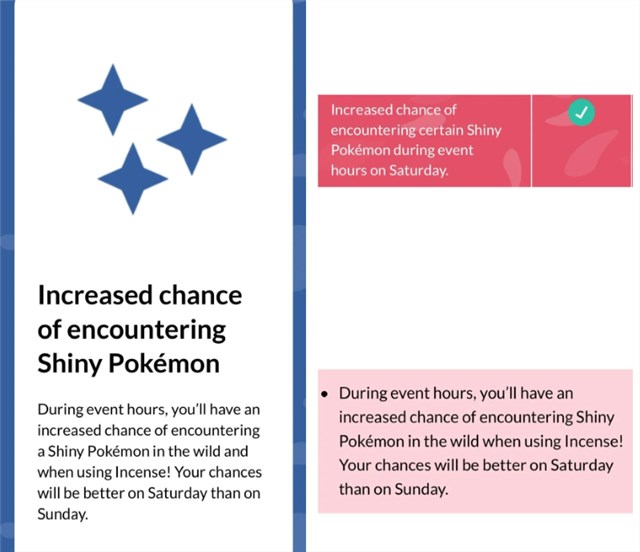
Niantic hosts monthly events featuring specific Pokémon with significantly increased shiny rates. Playing locally during these short windows yields incredible rewards.
4. Exchange Gifts Globally:
Build a robust friends list using online community codes. Receiving gifts and eggs from different regions globally allows you to hatch region-exclusive characters legitimately.
<
>Pokémon GO Mod APK & Safe Location Changing Guide
Many players searching for Pokémon GO mod APK are looking for ways to unlock teleportation, joystick movement, or auto-walk features to explore different regions without physically traveling. While mod APKs may seem convenient, they often come with stability risks, account bans, and security concerns.
A safer alternative is using a dedicated GPS tool like Fonelora Location Changer, which allows you to simulate movement and change your virtual location on iOS and Android without modifying the original game app.
Why Use a Location Changer Instead of Mod APKs?
Compared to modded Pokémon GO versions, a location tool offers several advantages:
- No need to install modified game files
- Lower risk of account suspension
- Works with the official Pokémon GO app
- Supports joystick movement and teleport mode
- More stable performance across devices
This makes tools like Fonelora Location Changer a safer option for players who want flexible exploration without breaking game integrity.
Step-by-Step: How to Use Fonelora Location Changer
Step 1: Download and Install
Go to the official website of Fonelora Location Changer and download the software for Windows or macOS. Install it on your computer and launch the program.

Step 2: Choose a Location Mode
Inside the tool, you can select different movement modes:
- Teleport Mode (instant location change)
- Joystick Mode (real-time movement simulation)
- Multi-Spot Route (custom walking path)
These features allow you to simulate realistic exploration in Pokémon GO.

Step 3: Set Your Virtual Location
Search for any location on the map or enter GPS coordinates. Click “Move” to instantly change your in-game location.

Frequently Asked Questions About Pokémon Go Mods
- What is a Pokémon Go Mod APK?
- It is an unauthorized, modified version of the original game file (like PGSharp or iPogo) designed to bypass official rules. It often includes injected features like fake location inputs or automated walking mechanisms.
- Is a Pokémon Go Mod APK safe to install?
- No. Installing these files carries an extremely high risk of malware infection, as they require bypassing Google Play Protect protocols and downloading from unverified external sources.
- Can using a modded Pokémon Go app get my account banned?
- Yes. Modern anti-cheat systems quickly identify unrealistic movement patterns and unauthorized file signatures. Using these files almost certainly guarantees an eventual account suspension.
- Are mod APK downloads legal or official?
- They are neither. These are Pokémon Go third-party apps that explicitly violate Niantic’s Terms of Service and infringe on official software copyrights.
Conclusion
Attempting to bypass game mechanics introduces severe risks to your personal data and gaming progress, including crashes, bans, and malware risks. Instead of using unsafe modded files, a safer option is Fonelora Location Changer, which lets users change GPS location securely without altering game files or compromising account safety.
Instead of fighting compatibility issues and risking a permanent ban, choose the secure approach. Regain your peace of mind by downloading the official application from the Google Play Store today. You can solve your progression challenges securely by coordinating remote raids, using daily items, and building a powerful roster to get Shiny Sylveon in Pokémon GO—all without ever compromising your device’s safety.


Hot Topics
