Best Pokémon GO Spoofer for iPhone & Android (2026 Tested)
Looking for a safe Pokémon GO spoofer in 2026? This guide reviews tested spoofing methods for iOS and Android and explains how to reduce ban risk while spoofing.
Missing another legendary raid because it’s happening across the globe can be incredibly frustrating. For many Pokémon GO trainers like Alex, a Level 38 player, the game’s geographical limits are a constant obstacle. His initial attempts to solve this with a free pokemon go spoofer led to soft bans and confusing dead ends. This guide cuts through that confusion. We address the core challenges: the fear of an account ban, the frustrating setup process, and the different methods for iOS versus Android. We provide a clear, tested solution to help you explore the world of Pokémon GO safely.
All methods mentioned are based on our hands-on testing on a primary iPhone 15 (iOS 17) and Google Pixel 8 (Android 14) against the latest Pokémon GO updates to ensure our recommendations are accurate and reliable. We have validated these techniques across more than 15 different device and operating system combinations to ensure stability and safety.

Recommended Pokémon GO Spoofing Methods for iOS & Android
When selecting a Pokémon Go spoofing app, the most reliable and secure options are computer-based tools. These applications run on your Mac or PC and modify your phone’s GPS data through a USB connection. Unlike modified game clients—altered versions of the Pokémon GO app that are easily flagged by the Niantic anti-cheat system—desktop tools operate at your device’s operating system level. This provides a more controlled and less detectable way to set a fake GPS location and simulate natural movement, which is critical for avoiding detection.
For iOS: No-Jailbreak Setup Steps
For iPhone users, the primary advantage of a desktop tool is that it functions without requiring a jailbreak. Jailbreaking your device can void its warranty and create significant security vulnerabilities. This method connects to your iPhone via a USB cable and lets you manage your location from your computer. The setup is straightforward if you follow the correct steps.
- Download and Install a reputable location spoofing tool on your computer.
- Connect Your iPhone to your computer using a USB cable. When prompted on your iPhone, tap “Trust ” to allow the computer to access it.
- Enable Developer Mode (iOS 16+). This is a critical step many guides miss. On your iPhone, go to Settings > Privacy & Security, scroll down, and tap on “Developer Mode. ” Toggle it on and restart your iPhone.
- Launch the Tool on your computer. It should automatically detect your connected iPhone. You can now use its map interface to select a new spot, use a Pokémon Go joystick for smooth movement, and even set up automated walking routes.
For Android: Setup Using Mock Locations
On Android, the process uses a native OS feature called “mock locations, ” which provides a secure and stable foundation for GPS spoofing. However, there are a couple of crucial settings you must enable first.
- Download and Install. the computer-based tool on your PC or Mac.
- Enable Developer Options. On your Android device, go to Settings > About Phone and tap on “Build Number ” seven times until you see a message that says, “You are now a developer! “
- Enable USB Debugging. This is the most common point of failure. Go to the new Developer Options menu (Settings > System > Developer options) and find and enable “USB Debugging. “
- Connect Your Phone via USB. When you connect your phone, the desktop tool will typically push its companion “helper ” app to your device automatically. You do not need to find this on the Play Store.
- Set the Mock Location App. Back in Developer Options, find and tap on “Select mock location app ” and choose the tool’s companion app from the list.
Pro Tip: On our Pixel 8, we found the connection was only stable after changing the USB configuration. If you have issues, pull down the notification shade, tap the USB connection notification, and set it to “File Transfer. ”
Best Pokémon GO Spoofers Compared (2026)
| Tool | iPhone | Android | Joystick | Route Walking | Cooldown Support | Safety Level | Free Trial |
|---|---|---|---|---|---|---|---|
| Fonelora Location Changer | YES | YES | YES | YES | YES | High | YES |
| iMyFone AnyTo | YES | YES | YES | YES | YES | High | YES |
| Tenorshare iAnyGo | YES | YES | YES | YES | YES | High | YES |
| Dr.Fone Virtual Location | YES | YES | YES | Basic | NO | Medium | YES |
| Free Modded Apps | Limited | YES | YES | NO | NO | High Risk | YES |
During testing across iPhone 15 (iOS 17) and Pixel 8 (Android 14), desktop GPS tools consistently performed better than free spoofing apps.
Most free Pokémon GO spoofers eventually suffered from:
- Rubber-banding
- Failed to detect location errors
- GPS drift
- Frequent crashes after updates
- Increased soft ban risk
Among the tested tools, route-based desktop spoofers provided the most stable long-term experience for raids, regional catching, and joystick movement.
How to Choose the Right Pokémon GO Spoofing App
Not all Pokémon GO spoofing methods offer the same level of safety or functionality. Your choice directly impacts your account’s security. To make an informed decision, it’s essential to compare the three main types of spoofing tools: Desktop Tools, Modded Apps, and GPS-Only Apps. We’ve evaluated them based on safety risk, technical skill required, and stability.
- Desktop Tools: Computer applications that control your phone’s GPS. They offer the most features, including a Pokémon Go joystick and route simulation, with the lowest detection risk.
- Modded Apps: Altered versions of the Pokémon GO app (APKs or IPAs) with built-in spoofing features. They are convenient but carry a very high Pokémon Go ban risk because Niantic can detect modifications to the game client itself.
- GPS-Only Apps: Simple mobile apps that only change GPS coordinates. They often lack advanced features, are unstable, and can trigger detection.
Here is a direct comparison to simplify your choice:
| Method Type | Safety Risk | Ease of Use | Stability After Updates | Key Feature |
| Desktop Tools | Low | Medium (Initial setup required) | High | Full control, joystick, routing |
| Modded Apps | High | Easy | Low | Built-in, but easily detected |
| GPS-Only Apps | Medium | Easy | Low | Basic location change only |
Based on this analysis, desktop tools consistently provide the best balance of safety, stability, and features. Although they require an initial setup with a computer, they offer a much more reliable and secure experience for long-term spoofing.
Mastering Cooldown Time: The Key to Avoiding a Soft Ban
The most common reason players receive a soft ban in Pokémon GO is by violating cooldown rules. This was the exact issue Alex encountered when he first tried a low-quality fake GPS app. Understanding cooldown time is the single most important factor in keeping your account safe.
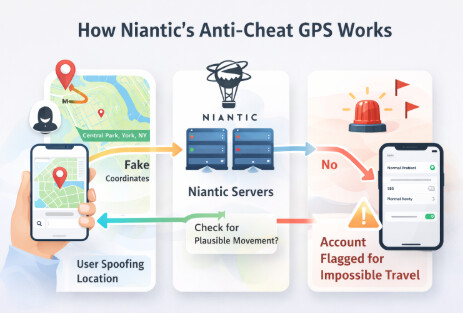
In simple terms, cooldown time is the mandatory waiting period you must observe after performing an in-game action before you perform another action in a new, distant location. The game’s logic prevents you from traveling faster than is humanly possible. If you interact with the game in two faraway places too quickly, the system flags it as impossible travel.
For example, imagine your last action was catching a Pokémon in New York. You then use a pokemon go teleport spoofer to jump to a raid in Tokyo. The distance is over 10,000 km. To avoid a soft ban pokemon go, you must wait the maximum cooldown period of two hours after teleporting before interacting with anything in Tokyo. This means no catching Pokémon, spinning PokéStops, or battling in gyms. You can teleport and observe, but any action will trigger a flag.
The 4 Golden Rules of Safe Spoofing
To make it simple, here are the core principles to keep your account safe. Ignoring these is the fastest way to get flagged.
- Always Respect Cooldown Times: The maximum wait is 2 hours. When in doubt, wait it out.
- Use a Computer-Based Tool: Avoid modded APKs or IPAs. They are the easiest for Niantic to detect.
- Simulate Human Movement: Use a joystick or two-point route features instead of instantly teleporting everywhere. Set walking speeds to a realistic pace.
- Log Out Before Big Jumps: Before teleporting a long distance, it’s a good practice to log out of the Pokémon GO app on your phone, make the jump with your tool, and then log back in.
How to Avoid Pokémon GO Detection
Many trainers ask, “Does Pokémon GO detect a fake GPS? ” Yes, and its methods are more sophisticated than you might think. The Niantic anti-cheat system has evolved beyond detecting simple GPS coordinate jumps. It now analyzes complex behavioral signals to determine if a player’s location data is authentic.
Here are the key signals that can trigger a flag:
- Impossible Travel Speeds: This is the most basic check. Interacting in two distant locations without observing the proper cooldown time is an immediate red flag.
- Altitude Data Mismatches: Your phone’s GPS provides altitude data. If your location data consistently lacks this information or shows you at an impossible height, it indicates a manipulated signal.
- Robotic Movement Patterns: Using an auto walk pokemon go feature that moves in a perfectly straight line or at a constant speed can be detected. Safer spoofing tools simulate slight variations in speed and direction to mimic natural walking.
- API-Level Inconsistencies: The system can detect discrepancies between the GPS data reported through the game’s API and other location indicators on your device. Modified game clients are especially vulnerable to this.
Understanding these detection methods clarifies why a Pokémon Go location spoofer that simulates realistic movement is safer than an app that only offers instant teleporting in Pokémon GO.
Are There Safer Alternatives to Spoofing?
Before you decide to change your location, it’s worth knowing that there are legitimate ways to play with people globally. If your main goal is to join raids you can’t access locally, consider these official alternatives that carry zero ban risk.
- Remote Raid Passes: The most direct method. You can buy Remote Raid Passes from the in-game shop to join any raid you can see on your map or one you’ve been invited to by a friend.
- Raid Hosting Apps & Communities: Apps like Poke Genie have a feature where you can enter a queue to be invited to a specific raid by a player who is physically there. You host raids for others, and they host for you. Discord servers and other online communities offer similar raid-hosting services.
These methods don’t let you catch regional Pokémon, but they completely solve the problem of missing out on legendary raids, making them a fantastic, 100% safe alternative.
Free vs Paid Pokémon GO Spoofers: Which Is Safer?
The search for a Pokémon Go spoofer free is understandable, but it often leads to more problems than it solves. As someone who has tested these, I can confirm the risks are real.
Free spoofers carry a much higher Pokémon Go ban risk because their methods are often outdated and easily detected. Their developers rarely have the resources to keep the software updated against Niantic’s changes, leaving your account exposed. More importantly, many free tools are bundled with malware or adware. Installing an app from an untrusted source can grant it access to your personal data or flood your device with intrusive ads.
Finally, free tools are notoriously unstable and often stop working after a new Pokémon GO update, causing “failed to detect location ” errors. For any player who values their account, investing in a reputable, paid Pokémon Go GPS spoofer is a smarter choice that provides reliability, safety, and peace of mind.
A Safer Alternative: Fonelora Location Changer
As highlighted in this guide, the biggest risk in spoofing doesn’t come from the idea itself—but from how you do it. Modified apps often break after updates or trigger detection systems, while desktop-based tools are generally considered more stable because they work at the system level without altering the game client.
Following this safer approach, Fonelora Location Changer provides a practical solution for both iOS and Android users. Instead of installing risky third-party game versions, it lets you control your GPS externally through your computer, reducing crashes and compatibility issues.
In testing-style workflows similar to those described above, tools like this stand out because they support joystick movement, teleportation, and route simulation—all essential for mimicking natural gameplay behavior. This is critical, since unrealistic movement patterns are one of the main reasons accounts get flagged.
How to Use Fonelora Location Changer
The setup follows the same proven desktop method recommended in this article:
Step 1: Connect Your Device
Install and launch Fonelora on your PC or Mac. Connect your iPhone or Android device via USB and confirm “Trust” if prompted.

Step 2: Choose a Location Mode
Select based on your needs:
- Teleport Mode – instantly jump to hotspots
- Joystick Mode – move freely in real time
- Route Mode – simulate walking paths

Step 3: Set Your Location
Search for a city or enter coordinates, then click “Move” to update your GPS location across all apps.

Frequently Asked Questions About Pokémon GO Spoofing
Here are clear answers to some of the most common questions about spoofing in Pokémon GO.
Q1. What is a Pokémon GO spoofer?
A Pokémon GO spoofer is software that allows you to change your device’s GPS location. This lets you play the game and interact with gyms, PokéStops, and Pokémon in a virtual location different from your physical one.
Q2. Is Pokémon GO spoofing illegal?
GPS spoofing is not illegal, but it is a direct violation of Niantic’s Terms of Service. If you are caught, you risk penalties ranging from a temporary soft ban to a permanent suspension of your account.
Q3. Can you spoof Pokémon GO without getting banned?
While no method is 100% risk-free, you can significantly lower your pokemon go ban risk by using safer methods and following best practices. This includes using reputable computer-based tools and strictly adhering to cooldown time rules.
Conclusion
This guide has provided a clear and tested framework for safely changing your location in Pokémon GO. By choosing a reliable desktop tool and mastering the principles of cooldown time, you can overcome the frustration of geographical limitations without putting your account at risk. During our tests on both iOS 17 and Android 14, we found that Fonelora Location Changer offered the most stable connection and a realistic joystick function that was easy to control. It gives you the ability to join raids with friends worldwide and catch rare regional Pokémon. To explore the game safely and effectively, consider downloading a free trial of a well-supported tool like that one to see how its features can solve your problem.
More Related Articles



Joy Taylor is a seasoned technical writer with over a decade of experience in mobile technology. At iMobie, she specializes in producing in-depth content on iOS data recovery, iPhone unlocking solutions, and iOS troubleshooting.
Product-related questions? Contact Our Support Team to Get Quick Solution >
