You know the feeling: Community Day just ended, your storage box is completely full, and you are staring down a daunting backlog of 300 new catches. Sorting through them manually to find your best fighters is an incredibly slow and tedious chore. When you just want to build a winning roster for an upcoming Raid Hour or GO Battle League set, wasting time appraising every single catch is a massive roadblock.
Take a lesson from competitive players prepping for major events: manually checking hundreds of catches using the in-game appraisal screen is simply too slow. By installing a trusted screen-reading tool on a modern smartphone, competitive players instantly identify their strongest catches with near-perfect stats. Prioritizing these superior fighters secures victories in challenging raid battles and vastly improves overall gameplay strategy.
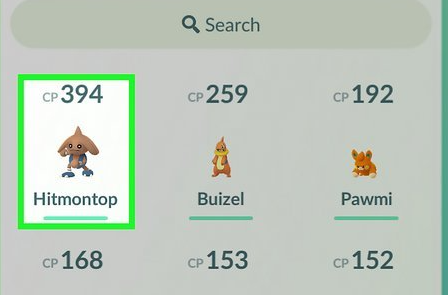
This guide provides a detailed, practical procedure to eliminate the guesswork. We will review the top, safe screen-reading apps, show you exactly how to operate them on iOS and Android, and help you efficiently optimize your team for victory. If your broader goal is to build stronger teams and level up fast in Pokémon GO, IV checking is one of the most important habits to build early.
Table of ContentsHide
Understanding Stats: Why Combat Power Doesn’t Equal Battle Potential
A common obstacle for many players is the assumption that a creature with a massive CP (Combat Power) number is automatically the best fighter. However, understanding the underlying mechanics reveals why this is not always true, and why relying solely on CP limits your potential.
Combat Power is an aggregate number indicating a creature’s current, approximate strength, heavily influenced by its current level. If you catch a high-level monster in the wild, its CP will naturally be higher. Conversely, Individual Values (IVs) represent the creature’s hidden genetic potential. These permanent stats are divided into three core categories: Attack, Defense, and Stamina. Each stat ranges from a minimum of 0 to a maximum of 15.
Think of CP as a car’s current speed, while IVs represent the engine’s maximum horsepower capability. A low-level creature might have a low CP but possess perfect 15/15/15 IVs. If you invest your stardust and candies into leveling it up, its final maximum CP will be significantly higher than another creature of the exact same species that started with a high CP but poor IVs.
Game analysts explain that while CP shows approximate strength, IVs reveal true battle potential. Using screen-reading tools allows trainers to quickly identify top-tier candidates, optimize stardust investment, and plan effectively. Experts recommend focusing on both perfect individual values and type advantages for maximum efficiency in your gameplay strategy.
How IVs Impact PvP Battles
For intermediate players trying to grasp PvP stat products, the rules change entirely depending on the league. In PvE (Raids), you always want perfect 15/15/15 stats because maximum attack saves valuable seconds and secures wins against raid bosses. However, CP-capped PvP leagues flip this logic upside down.
- The CP Formula: The game’s formula for calculating Combat Power weighs the Attack stat much more heavily than Defense or Stamina.
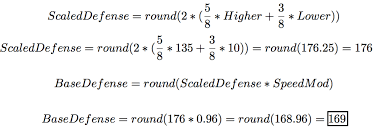
- The PvP Strategy: Because the Attack stat inflates CP so quickly, a Pokemon with a high Attack IV will hit the 1500 CP cap (for Great League) at a lower overall level.
- The Solution: By finding a Pokemon with a low Attack IV and high Defense/Stamina IVs (e.g., 0/15/15), you can power it up several more times before it hits the CP limit. This results in a much bulkier, higher-level fighter that can survive longer in battle.
Understanding this mechanic makes finding specific stat distributions absolutely critical for competitive play.
CRITICAL SAFETY WARNING: Niantic’s Ban Policy
Never use an app or website that asks for your Pokemon GO login credentials. Giving a third-party application direct access to your account violates Niantic’s Terms of Service and will frequently result in a permanent ban. You must only use safe, third-party screen-reading overlay apps. These trusted applications operate entirely outside of the game’s code. They simply record your screen or take screenshots to read the stats visually, keeping your account entirely secure. The same safety principle applies to device modifications: before using any unsupported setup, understand the risks of playing Pokémon GO on jailbreak or rooted environments.
The Top IV Checkers: Poke Genie vs. Calcy IV
To actually solve the problem of sorting through hundreds of catches, you need a specific, trusted application. While the in-game appraisal feature is fine for checking one or two isolated catches, dedicated scanner apps drastically reduce your time cost for bulk processing. Here are the top two safe, screen-reading tools on the market:
1. Poke Genie (iOS & Android)
Poke Genie is widely considered the gold standard for most players due to its clean, incredibly user-friendly interface. It excels on both operating systems, offering precise stat percentage breakdowns, PvP rank checking, and even built-in raid matchmaking. If you want a smooth, highly polished experience that tells you exactly how good your catch is for Great League, Ultra League, or Raiding, Poke Genie is our top recommendation.

2. Calcy IV (Android primarily, available on iOS)
Calcy IV is beloved by hardcore Android users for its lightning-fast scanning speed and deep customization options. It provides a massive amount of data right on the screen overlay, including catch rate probabilities and raid boss counter suggestions before you even throw a Pokeball. While its interface is slightly more cluttered than Poke Genie, its speed during Community Day bulk-sorting is unmatched on Android devices.

Step-by-Step Procedure: Scanning with Poke Genie
Operating a screen-reading app streamlines your evaluation process. Here is exactly how to safely install and run Poke Genie on both major operating systems to process your catches in minutes.
How to Use Poke Genie on an iPhone (iOS)
Because iOS has strict security limits on screen overlays, Poke Genie uses Apple’s built-in Screen Broadcast feature to read your appraisals in real-time.
1. Install the App: Download Poke Genie from the Apple App Store.
2. Setup Control Center: Go to your iPhone’s Settings > Control Center. Ensure “Screen Recording” is added to your active controls.
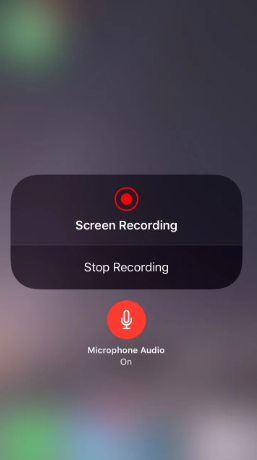
3. Start the Broadcast: Swipe down from the top right of your screen to open the Control Center. Long-press (press and hold) the Screen Record icon. A menu will pop up. Select “Poke Genie” from the list and tap “Start Broadcast.”
4. Appraise in Game: Open Pokemon GO and navigate to the creature you want to check. Tap the in-game “Appraise” button so your team leader displays the visual stat bars.
5. Read the Banner: Poke Genie will instantly read the broadcasted screen and drop a banner notification from the top of your phone. This banner displays the exact IV percentage, the PvP rank, and the stat distribution. Swipe to the next creature, and a new banner will appear instantly.
How to Use Poke Genie on Android
Android allows apps to display information directly over other active applications, making the process slightly simpler.
1. Install and Grant Permissions: Download Poke Genie from the Google Play Store. When you open it, follow the prompts to grant screen recording permissions and allow “Display over other apps.”
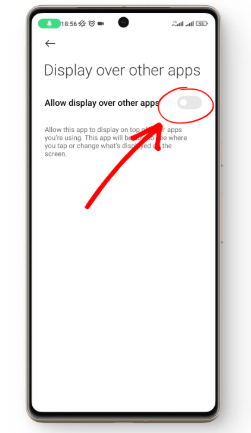
2. Activate the Overlay: Tap the “Start” button inside Poke Genie. A small, floating Poke Genie button will appear on the edge of your screen.
3. Appraise in Game: Open Pokemon GO and navigate to the creature you wish to evaluate. Open the in-game appraisal screen so the stat bars are visible.
4. Tap to Scan: Tap the floating Poke Genie button. A small card will pop up on your screen detailing the exact stats, maximum CP potential, and PvP viability.
Expert Strategies: Sorting and Tagging Your Collection
Once you have installed Poke Genie or Calcy IV, the next step is organizing your storage to maximize efficiency. Using your scanner alongside the in-game tagging feature prevents you from accidentally transferring highly valuable combatants to the Professor.
To execute this strategy successfully, create the following custom in-game tags:
- 100% IV (Hundos): For perfect 15/15/15 stats.
- Great League: For creatures with low Attack and high Defense/Stamina suited for the 1500 CP limit.
- Ultra League: For PvP candidates suited for the 2500 CP limit.
- Raid Attacker: For high-level, high-stat monsters ready for PvE battle.
After running your scanner app during a clear-out session, immediately apply these tags to the creatures that score highly. This systematic approach allows you to confidently invest your resources into candidates that will yield the highest return. Instead of spreading your stardust thin across multiple mediocre fighters, you ensure you only evolve base forms that possess the absolute highest potential.
Need More Control Over Pokémon GO Location and Routes?
IV checkers help you decide which Pokémon are worth keeping, powering up, and tagging. But for many players, building a stronger team is not only about reading stats after the catch. Your location also affects what you can catch, which raids you can join, how easily you collect candy, and how efficiently you prepare for events.
If your next bottleneck is not IV scanning but GPS-based gameplay, Fonelora Location Changer can fit naturally into your broader Pokémon GO toolkit. It helps iPhone and Android users manage their device GPS location from a computer without jailbreak or root access. You can select a location on the map, simulate movement along a route, or use joystick-style control when you need more flexible GPS management.
This can be useful when you want to test location-based gameplay, plan routes for resource collection, or manage movement more steadily during event preparation. If your game shows a GPS problem such as failed to detect location on Pokémon GO, you should first check permissions, signal quality, and device settings. Once your phone location is working normally, a desktop GPS tool like FLC can provide more controlled location management for advanced use cases.
Use location tools responsibly. IV checkers like Poke Genie and Calcy IV only read your screen and are safer for normal team building. GPS tools affect your device location, so avoid unrealistic jumps, respect cooldown logic, and understand that abnormal behavior may carry account risk.
Frequently Asked Questions
Players often have questions about how these hidden numbers affect their daily gameplay. Below are clear, factual answers to common inquiries regarding stats and evaluation.
- Can IV be changed after catching a pokemon?
- Generally, no. The only exceptions are through trading, which randomly rerolls the stats, or by purifying a Shadow creature, which permanently adds +2 to each of the three stat categories.
- Does CP always indicate a strong pokemon?
- No. CP reflects current level and strength, but poor underlying stats mean the creature will eventually be outperformed by another of the same species with higher potential.
- Do these overlay apps drain my battery?
- Yes, running a screen recording broadcast (iOS) or an active overlay (Android) alongside a GPS-heavy game will increase battery drain. It is highly recommended to run these bulk-scanning sessions while charging your phone at home, rather than while actively walking around outdoors.
Secure Your Wins with the Right Tools
Overcoming the frustration of a cluttered storage box does not have to be a painful process. By stepping away from manual evaluations and adopting a trusted screen-reading app like Poke Genie or Calcy IV, you remove the guesswork entirely. You no longer have to wonder if a catch is better suited for Great League or a Raid battle; the precise math is done for you in seconds.
For broader progress, combine accurate IV scanning with smart resource planning, safe gameplay habits, and realistic event preparation. If you also need controlled GPS management for route planning or location-based testing, Fonelora Location Changer can complement your toolkit, while your IV checker remains the core tool for deciding which Pokémon deserve investment.
Equip yourself with an accurate, safe scanning solution to instantly uncover your most powerful fighters. Regain control of your gaming experience, apply proper tags, and step into your next raid with a squad engineered for success.


Hot Topics
