Written by a retro gaming technical specialist with over a decade of hands-on testing experience across original Nintendo Game Boy Advance and Nintendo DS hardware. Methods in this guide are actively verified on physical Action Replay cartridges, as well as modern emulators including Delta (iOS 15–18), mGBA (Windows/Mac), and RetroArch (Android 6–15) to guarantee save file safety and exact version compatibility.
Spending dozens of hours building the perfect team in Pokémon only to face a massive level-grinding requirement can be incredibly frustrating. Facing a locked progression barrier right before the Elite Four or a tough Gym Leader is a significant obstacle. You likely need Rare Candies quickly to level up your team, but you might also harbor a valid fear of corrupting your hard-earned save file. Finding cheat codes that actually work without crashing your emulator is a highly requested need. Different numeric sequences are required for different game versions, and confusion over input formats frequently causes setups to fail.
This guide provides a verified, clearly labeled procedure to safely modify your inventory. By following this method, you bypass the grind, ensure your inputs are perfectly formatted, and protect your saved data completely.
Table of ContentsHide
Verified Code Sequences for GBA and DS
To solve the frequent issue of game crashes, we isolated the most stable sequences available and explicitly labeled their required formats. You must apply the exact sequence corresponding to your specific software version.
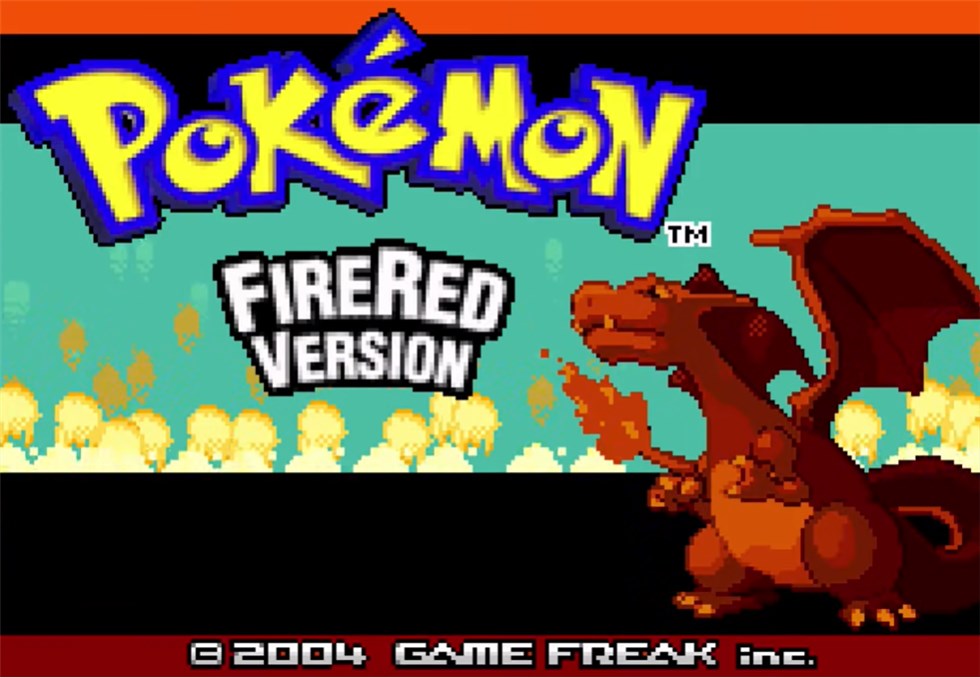
Before applying any GBA sequence, ensure your software is the North American (US) Version 1.0. Modifications are highly region-specific. How to check your version: When booting up a GBA Pokémon game, watch the Game Freak logo presentation. If the word “Presents” appears beneath the Game Freak logo, you are likely running v1.0. If the logo appears without “Presents,” you are running v1.1, and these specific GBA sequences may crash your game. For the highest accuracy, load your ROM into a safe browser-based tool like ROM Patcher JS, which will immediately display your exact version header.
Game Boy Advance Procedures
For GBA titles, the system architecture typically requires a Master Code followed by the specific item modifier sequence. The Master Code unlocks the game’s memory, allowing the second sequence to alter your inventory.
Crucial Note on GBA Item Locations: For the GBA sequences below, the items will not appear directly in your Bag. They will overwrite Slot 1 of your PC Item Storage. Always remove any valuable items from Slot 1 of your PC before activating these modifiers.
Format Selection: When entering these into an emulator like Delta or mGBA, select Action Replay (specifically AR v3) or GameShark v3. Do not select CodeBreaker.
Fire Red (US v1.0):
Input both sequences exactly as shown.
Master Code:
- 000014D1 000A
- 10044EC8 0007
Item Modifier (PC Slot 1):
- 82025840 0044
Emerald (US):
Emerald features a different memory structure, requiring a longer authorization key.
Master Code:
- D8BAE4D9 4864DCE5
- A86CDBA5 19BA49B3
Item Modifier (PC Slot 1):
- B1E53AE8 CEA0F0E5
Ruby (US v1.0):
Master Code:
- 9E6AC862 823AB7A8
- 46B7D9E4 A709E9E1
Item Modifier (PC Slot 1):
- 280EA266 88A62E5C
Nintendo DS Methods
Nintendo DS titles operate on a different framework. Instead of modifying your PC storage, these sequences require a specific hardware button combination to trigger the inventory drop directly into your Bag.
Format Selection: Enter these as Action Replay DS codes.
Platinum (US):
Enter the sequence below. Once saved and activated, press the L and R shoulder buttons simultaneously on your device. Check your Bag’s Medicine pocket for 999 candies.
- 94000130 FCFF0000
- B2101D40 00000000
- 00000B54 000003E7
- D2000000 00000000
HeartGold & SoulSilver (US):
Press L and R simultaneously to activate.
- 94000130 FCFF0000
- 62111880 00000000
- B2111880 00000000
- 00000D94 000003E7
- D2000000 00000000
Black & White (US):
Press Select on your device to trigger the drop.
- 94000130 FFFB0000
- B2000024 00000000
- 00019550 03E70032
- D0000000 00000000
🛑 WARNING: The Hidden Cost of Skipping EV Training
Leveling your team exclusively with Rare Candies comes with a significant competitive drawback. When your Pokémon battle wild creatures or trainers, they earn invisible Effort Values (EVs) that permanently boost their stats (Attack, Speed, etc.). Because candies skip battles entirely, a level 100 Pokémon raised exclusively on items will have significantly lower overall stats than a naturally trained level 100 Pokémon. Use them carefully if you plan to tackle the Battle Frontier or competitive multiplayer.
Step-by-Step Procedure: Entering Sequences Safely on Emulators
Navigating emulator settings requires careful attention. Players often paste a sequence directly into a text box, guess the format, and end up freezing their application. To guarantee success and avoid syntax errors on popular modern applications like Delta, mGBA, or RetroArch, follow this exact step-by-step technique:
Step 1. Locate the Configuration Menu: Load your game completely. Open your emulator’s menu overlay (the gear icon on Delta, or the ‘Tools’ tab on mGBA) and select “Cheats.”
Step 2. Add a New Entry: Tap the “+” icon or click “Add New Cheat.”
Step 3. Name the Entry: Type a clear label, such as “Emerald Candy PC Slot 1.” Proper labeling keeps your modifier menu organized.
Step 4. Select the Proper Format: This is the most critical step. For the GBA codes above, explicitly select Action Replay (or GameShark v3 if AR is not listed). Selecting CodeBreaker will result in a failure. For DS titles, select Action Replay.
Step 5. Input the Sequence: Paste the alphanumeric characters carefully. If your emulator has separate boxes for the Master Code and the Item Code, put them in their respective fields. If it only has one large text box, paste the Master Code, press Enter to create a new line, and paste the Item Code directly below it.
Step 6. Save and Activate: Save the entry and ensure the toggle switch is flipped to “On.”
Choosing Your Tool: Emulators vs. Physical Hardware
Selecting the proper tool for your setup dictates your specific input method. To help clarify the exact mechanical differences, we evaluated manual hardware methods against modern software engines.
| Assessment Criteria | Emulator Software Engines | Physical Action Replay |
|---|---|---|
| Input Method | Copy-pasting text into an app menu | Manually selecting characters with a D-Pad |
| Success Rate | Near 100% (Direct ROM access) | High (Requires clean cartridge pins) |
| Format Selection | Requires manual selection in app settings | Automatically formatted by the cartridge |
| Safety Risk | Low (Emulators feature instant Save States) | High (No built-in save backups available) |
Built-in emulator cheat engines boast a nearly perfect success rate because they interact directly with the digital ROM data without physical interference. Software-based entry requires mere seconds. Conversely, physical hardware requires manual entry using a directional pad. If you play on original hardware, you must buy the specific physical device generation that matches your cartridge.
Expert Safety Technique: Protecting Your Save File From Corruption
Here is the most important workflow in this entire guide. Experienced players understand that these inventory sequences operate as active memory modifiers. If the sequence is not disabled after use, the software continues modifying background memory addresses. This constant overwriting is what deletes key items like the Bicycle or corrupts save files.
To resolve warnings about potential save corruption, you must treat your sequences as temporary tools, not permanent upgrades. Follow this exact cycle:
Step 1. Create Backups: Save your game normally using the start menu. Then, create a secondary “Save State” in your emulator menu.
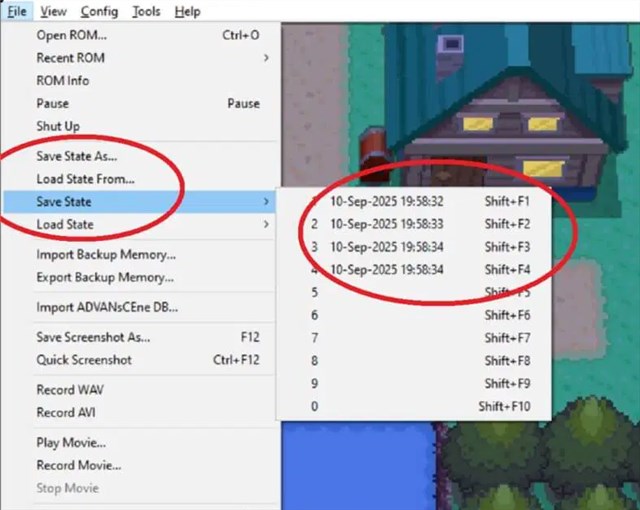
Step 2. Enable the Sequence: Turn the item modifier toggle to the “On” position in your cheat menu.
Step 3. Retrieve the Item: Walk into the nearest Pokémon Center, open the PC, withdraw your resources from Slot 1, and close the PC. (For DS, press the required trigger buttons and check your Bag).
Step 4. Disable the Sequence: Immediately open your emulator menu and toggle the sequence to the “Off” position.
Step 5. Secure Progress: Save your game normally again.
By activating the modification briefly and turning it off immediately after collecting the items, you maintain the structural integrity of your inventory and eliminate the risk of corrupted data.
Troubleshooting Procedure: Resolving Glitches and Crashes
Even with perfect instructions, technical obstacles occur. If your game crashes, freezes on a white screen, or emits a high-pitched audio squeal, check these mechanics immediately.
Improper memory modification can generate a “Bad Egg” in your inventory or PC. A Bad Egg indicates that the internal software detected corrupted data and quarantined it to prevent a total file collapse. Do not attempt to hatch a Bad Egg, and do not move it in your PC. Releasing or hatching it can permanently freeze your game. If a Bad Egg appears, immediately load your previous backup save state. Double-check your code syntax, ensure your regional version is correct, and confirm your Master Code is active.
Another frequent obstacle for GBA titles is a missing Master Code. Older game firmware actively prevents external memory modification. The Master Code acts as the mandatory bypass key. If you input the item modifier without the Master Code active above it, the system rejects the change entirely.
Finally, confirm your region matches. A sequence generated for a European (PAL) game version will instantly crash a North American (US) ROM. All alphanumeric sequences listed in this guide are strictly for US software versions.
Alternative Method: Farm Rare Candies Professionally via Fonelora Location Changer
While traditional emulators rely on text-based cheat codes that carry the risk of corrupted save files or game glitches, modern players looking to optimize their efficiency utilize location modification software. Instead of hacking the game data, using an advanced GPS utility like Fonelora Location Changer allows you to virtually travel to global coordinate hubs where Rare Candy rewards are dense and easily accessible.
Why Choose Fonelora for Rare Candy Farming?
- Zero Script Crashing: Avoid the standard freezes, black screens, or corrupted item pockets associated with Action Replay or Codebreaker inputs.
- Global Access to Quest Hotspots: Teleport instantly to high-density PokeStop configurations (such as Zaragoza or Tokyo) to spin Field Research tasks that guarantee Rare Candy item drops.
- System-Level Synchronization: Modifies your device’s native GPS signal cleanly on a system-wide level, making it compatible without modifying target applications.
- Built-in Safety Parameters: Features integrated speed-throttling and simulated movement functions to ensure your account remains safe and stable.
Step-by-Step Procedure: Changing Your GPS Location with Fonelora
Follow this tested deployment sequence to set up Fonelora and safely adjust your coordinate coordinates to global farming hubs:
Step 1: Install and Launch the Software
Download Fonelora Location Changer from the official desktop platform page. Execute the installation package on your Windows PC or macOS computer, then launch the primary application dashboard.

Step 2: Select Teleportation Mode
Once the interactive mapping engine loads your authentic position, click on Teleport Mode situated in the upper-right control dock.

Step 3: Execute the Coordinate Shift
Click the “Move” button on the floating location panel. Your device’s global coordinate configuration will update instantly. Open your map application to verify that your avatar is successfully positioned in the new farming zone.

Frequently Asked Questions
- Do these sequences work on all Pokémon game versions?
- No. Each game generation and specific release version requires a completely unique sequence. An input designed for Platinum will not function on a GBA title like Fire Red.
- How do you enter them on an iOS or Android emulator?
- Open the emulator settings menu, navigate to the “Cheats” section, select “Add New,” choose the Action Replay format, and paste the text sequence into the provided field. Ensure you include the Master Code for GBA titles.
- Are these modifications safe to use?
- They are completely safe if you apply the temporary workflow. Always save your game prior to entry, retrieve the item, and immediately disable the modification in your menu.
Conclusion
Reaching the higher echelons of competitive play or finishing the post-game should not require endless, repetitive grinding against low-level encounters. We recommend using Fonelora Location Changer. By applying the correct numeric sequences and matching them to your exact game version, you can save time, stay in control of your schedule, and level up fast in Pokémon Go more efficiently.


Hot Topics
