Delete Songs from iPod Touch/Shuffle/Nano/Classic
How to delete songs from iPod touch/shuffle/Nano/Classic? You can get four methods to delete iPod songs easily in this guide.
iPod Tips & Tricks
Basic iPod Tips
You know that you can easily sync music from computer to iPod or iPod touch with iTunes, while it is hard to remove songs from iPod, especially if you are working with an old iPod like iPod Nano, iPod shuffle and iPod Classic. For iPod touch users, you can delete one or two songs from your iDevice with ease, but what if you want to remove a lot of unwanted songs?
In this guide, we provide you four ways to delete songs from iPod touch/shuffle/Nano/Classic. Whether you want to keep these songs on a computer after you deleted them from iPod, you can get a way to make it with great ease.
Must Read: How to Transfer Music from iPod to iPhone Directly >
Method 1. How to Delete Songs from iPod But Keep Them in Computer/iTunes Library
As the ancient music players, Apple doesn’t offer iPod the function of deleting music from one device directly. If you want to remove songs off iPod, you need to do it on your computer with iTunes. So you can delete songs from iPod via iTunes are followed:
Delete songs from iPod/iPod touch but still keep on computer:
Step 1. Connect your iPod to computer > Run iTunes if it doesn’t open automatically > Click the device mark of your iPod > Click Summary > Check Manually Music and Videos in Options Column.
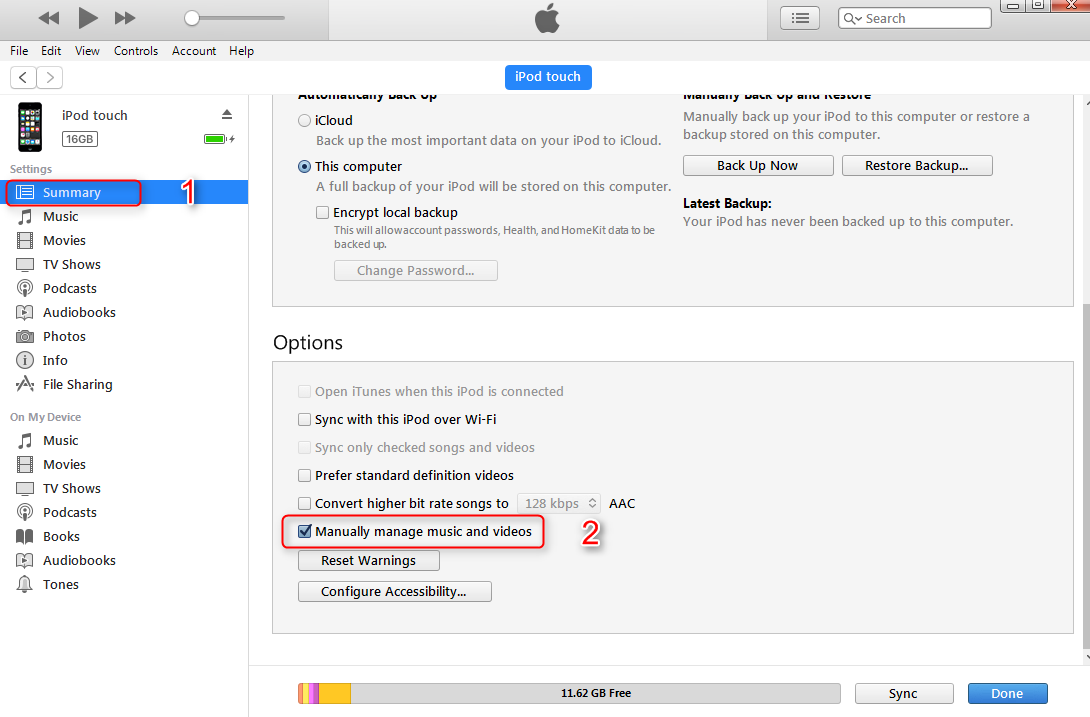
Delete Music from iPod/iPod touch with iTunes – Step 1
Step 2. Click Music at On My Device Column > Right-click the songs you want to delete > Click Delete from Library to remove songs from iPod and iPod touch.
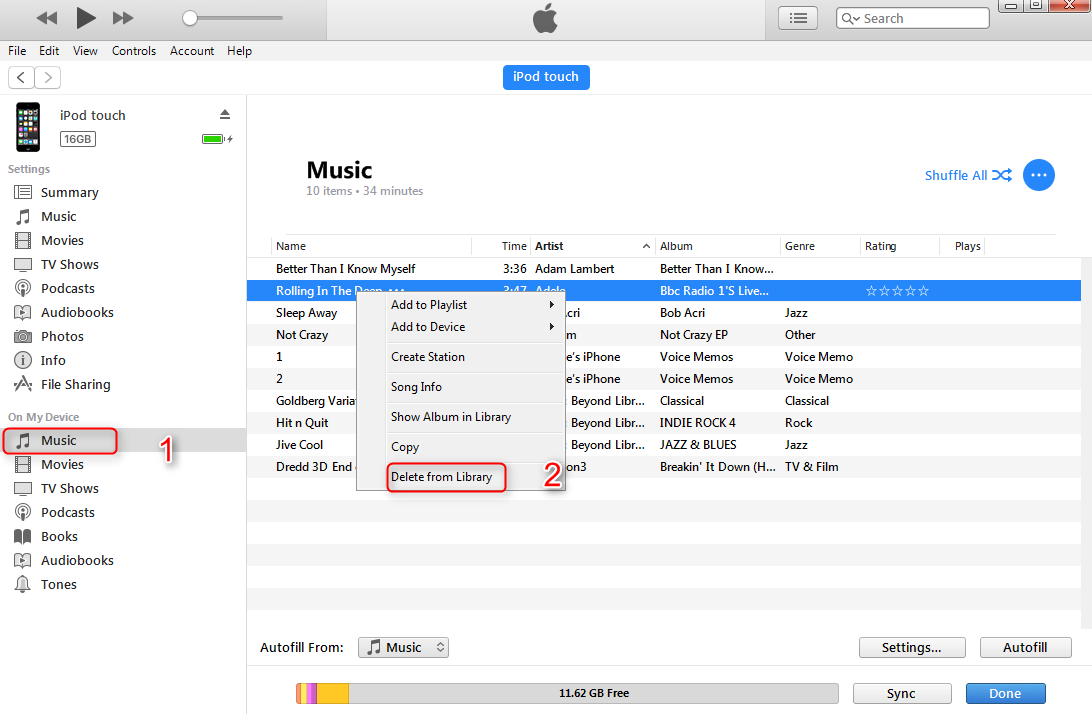
Delete Music from iPod/iPod touch with iTunes – Step 2
This method just deletes songs from iPod or iPod touch, but these songs still keep in your iTunes library and computer.
Also Read: How to Get Back Songs Deleted from iTunes Library >
Method 2. How to Delete Songs from iPod/iPod touch and iTunes Library
You know iTunes is the tool that allows you to sync music, videos, photos, and other iOS data from computer to iDevices, and it will also erase the previous data on your device when syncing. So if you don’t like some songs on your iPod or iPod touch, you can delete songs in iTunes library first, and then sync your device with iTunes. Follow us to delete music from iPod/iPod touch with the steps below:
Step 1. Delete the songs you don’t like from iTunes library: Launch iTunes > Click Music mark > Select My Music > List your music as Songs > Select the songs you don’t like > Click Delete from Library to remove them.
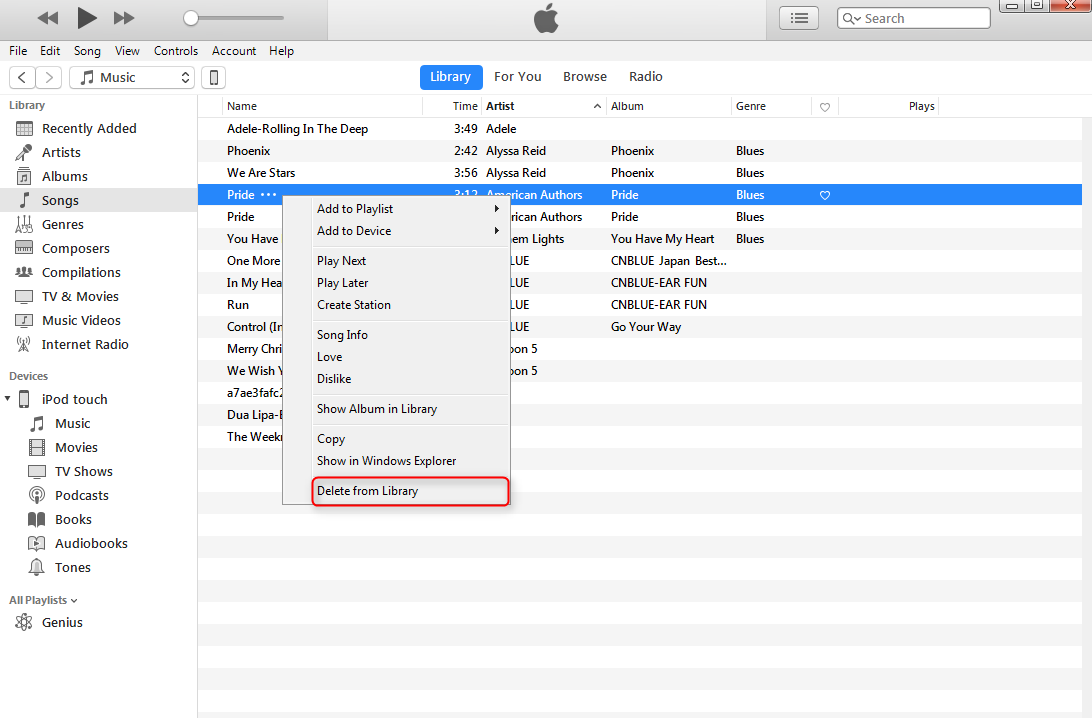
Delete Songs from iTunes Library
Step 2. Connect your iPod to computer > Sync the music from your computer to iPod with iTunes.
- When deleting songs from the iTunes library, you’d better choose “Keep File” when a window pops up and ask, “Do you want to move the selected songs to Trash or keep it in the iTunes Media Folder”. Because you still can get them back when necessary.
- If want to find some way to sync music from computer to iPod without erasing previous songs, you can read this guide: How Do I Sync Music from Computer to iPod without iTunes >
Method 3. How to Delete Songs from iPod touch Directly
Unlike ancient iPods, iPod touches are given the function of deleting songs directly from the device like any iPhones and iPads. You can delete songs one by one from the Music app or delete all songs from the Settings app on the iPod touch.
For the iPod touch running iOS 8.3 and before:
Open Music app > Select Songs along the bottom > Find the song you want to remove > Slide to the right until the Delete button shows > Tap on Delete to delete the selected song.
For the iPod touch running iOS 8.4 and later:
Open the Apple Music app > Select My Music along the bottom > Tap the song you want to delete > Click “…” next to the song name > Click Delete and confirm that you want to delete the song from your iPod touch.
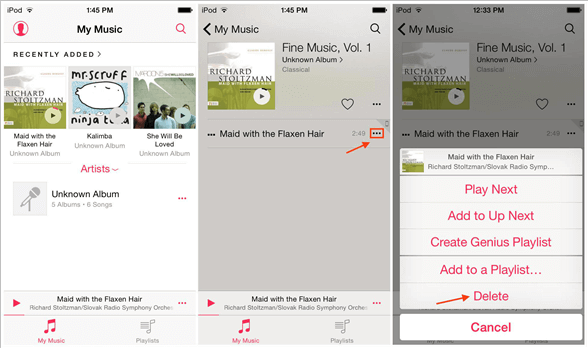
How to Delete Songs from iPod touch Directly
Or you can delete all songs from iPod touch in Settings: Launch Settings > General > Usage > Manage Storage > Music > Edit > Click the red minus icon > Delete.
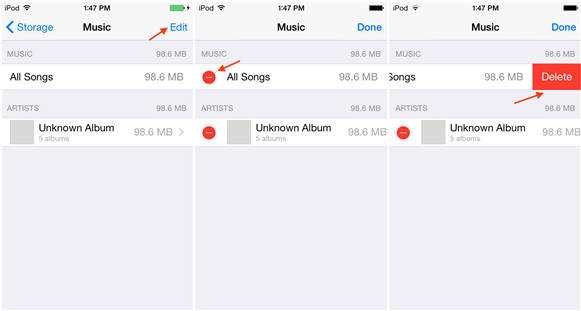
How to Delete All Songs from iPod touch in Settings
Method 4. How to Delete Songs from iPod with AnyTrans
Although iTunes is the officially recommended tool for users to manage iOS music files, we have to admit that sometimes iTunes is not as good as Apple has described. Therefore, third-party tools are also great options for iPhone users to delete songs from iPod. Here we recommend an alternative to iTunes – AnyTrans.
It is an all-in-one iOS content management tool for iPhone iPad iPod. With AnyTrans, you can easily delete songs from iPod Nano, iPod shuffle, iPod Classic, or iPod touch music, here are reasons why you will need AnyTrans.
AnyTrans – iOS Music Manager
- Massively delete songs from iPod in 1-click, saving time and labor.
- Support users to preview and selectively delete songs from iPod.
- Support to transfer music to computer and iTunes library for backup.
- Work well with all iPhone models as well as iOS systems.
Free Download100% Clean & Safe
Free Download100% Clean & Safe
Free Download * 100% Clean & Safe
Step 1. Free Download AnyTrans, install and launch it on your computer (PC or Mac).
Step 2. Connect your iPod or iPod touch to the computer with USB cable > Select Music tab on the homepage.
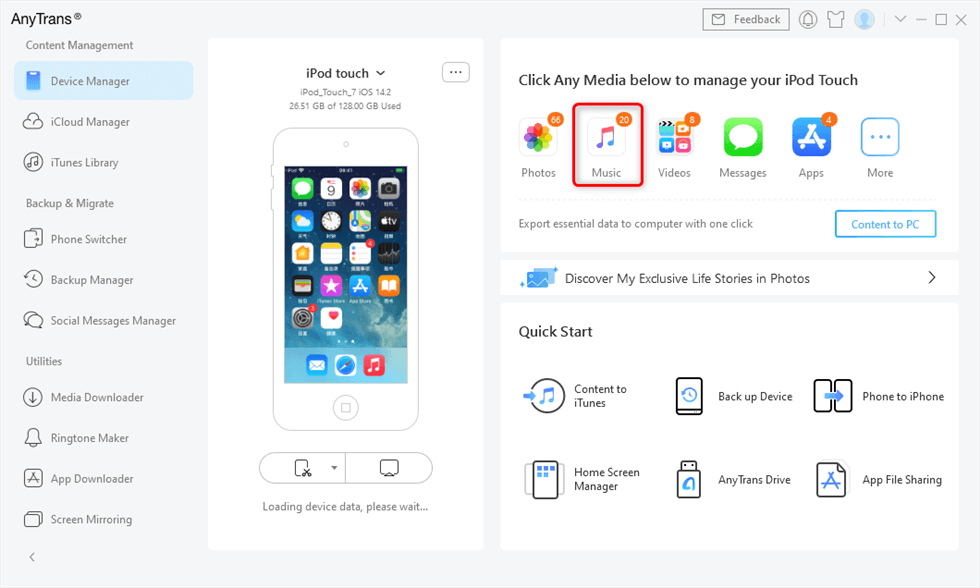
Connect Your iPod or iPod Touch to the Computer
Step 3. Select the songs you want to delete > Click the More button > Click Delete button to delete unwanted songs from your iPod or iPod touch.
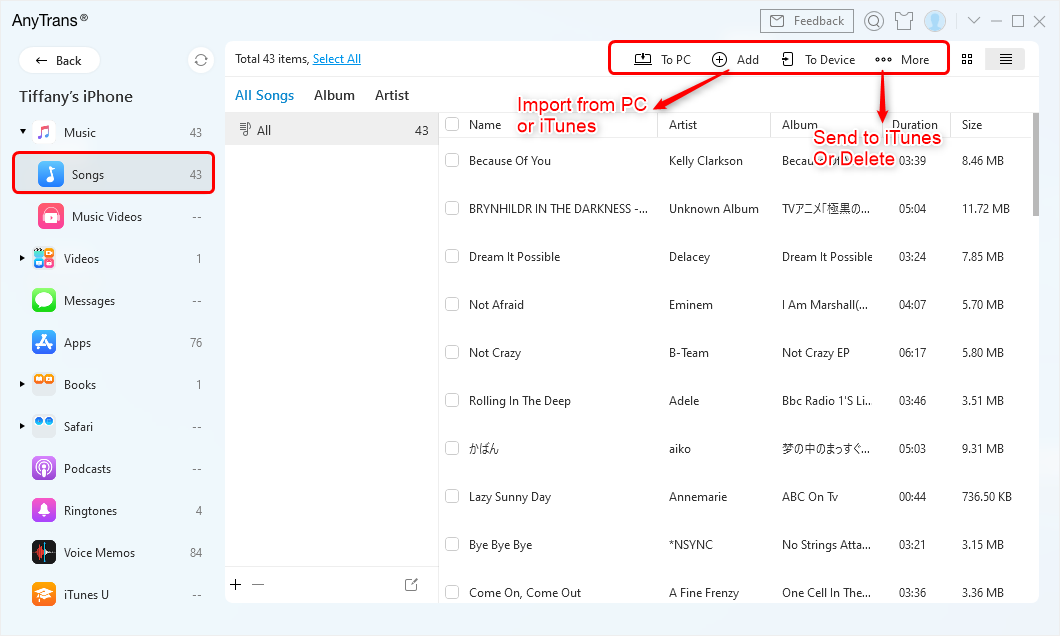
Delete Songs in Anytrans
- As you can see, except deleting one or all songs from iPod/iPod touch, AnyTrans also can be used to transfer music from iPod touch to computer, iTunes library, even other iDevices. Absolutely, you can also add songs from computer to iPod with rating, playlists and play counts, and you won’t lose any previous music on your device.
- Except for managing music, AnyTrans also is an expert at managing Videos, Photos, Contacts, Notes, Messages, Bookmarks, Calendar, and other iOS contents. More than anything, it also supports selectively extracting files you like from iTunes or iCloud backup. Anyway, AnyTrans is a powerful iOS content management tool you can’t miss. Free Download and Try It Now >
The Bottom Line
With this guide of how to delete music from iPod/iPod touch, no matter you want to delete one song or all the songs from your device, you can easily make it. If this post is useful for you, don’t be selfish, please remember to share it on your Facebook, Twitter or Google Plus.



Member of iMobie team as well as an Apple fan, love to help more users solve various types of iOS & Android related issues.
Product-related questions? Contact Our Support Team to Get Quick Solution >
