Android FRP Lock Removal – What It Is and How It Works
Android FRP lock removal explained. Learn how Factory Reset Protection works, when FRP is triggered, official Google verification methods, and common FRP bypass tools and limitations.
Android FRP lock removal refers to the process of regaining access to a device that has been locked by Factory Reset Protection after a factory reset.
FRP (Factory Reset Protection) is a security feature built into Android devices to prevent unauthorized activation.
There is no single universal solution for factory reset protection bypass.
The correct approach depends on the Android version, device brand, security patch level, and whether the original Google account credentials are available.
This page provides an overview of Android FRP unlock, including:
- What FRP lock is and why it exists
- When FRP lock appears
- Whether FRP can be removed
- Common FRP bypass tools and methods
- Limitations, risks, and legal considerations
Detailed step-by-step instructions are covered in dedicated guides.
What Is FRP Lock?
FRP (Factory Reset Protection) is a built-in Android security feature that prevents device activation after a factory reset unless the previously synced Google account is verified. It is designed to block unauthorized access and protect personal data if a phone is lost, stolen, or improperly reset.
Why Does FRP Exist?
FRP exists to deter theft and unauthorized resale of Android devices. By requiring Google account verification after a reset, the system ensures that only the original account owner can reactivate the device. This makes factory resetting a stolen phone useless without proper credentials.
FRP vs Screen Lock
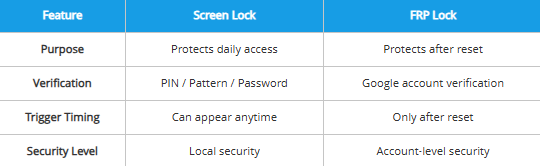
| Feature | Screen Lock | FRP Lock |
| Purpose | Protects daily access | Protects after reset |
| Verification | PIN / Pattern / Password | Google account verification |
| Trigger Timing | Can appear anytime | Only after reset |
| Security Level | Local security | Account-level security |
When Is FRP Triggered?
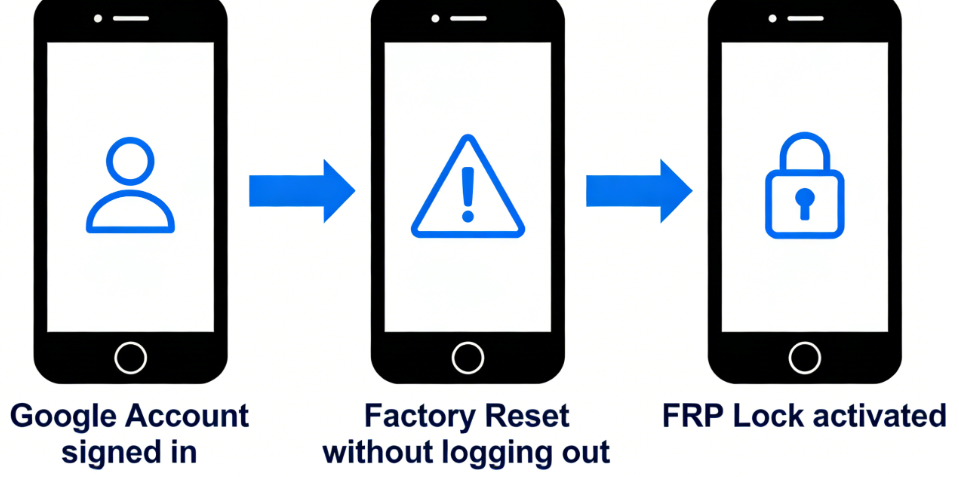
FRP is automatically activated when all of the following conditions are met:
- A Google account is signed in
- The device is factory reset
- The account is not removed prior to reset
When these conditions are met, Android will require Google account verification during the device setup process.
1. Factory Reset Without Removing Google Account
If an Android device is factory reset without first removing the linked Google account, FRP lock will activate during setup. The system will require the previously synced credentials before activation. In this situation, users typically begin looking for official recovery guidance or factory reset protection bypass explanations.
2. Second-Hand Device with Existing Account
If a used phone is purchased and the previous owner did not remove their Google account, FRP verification will appear during setup. The new user cannot complete activation without those credentials. Many people then seek brand-specific unlocking guides or device-based Android FRP unlock instructions.
3. Forgotten Google Account Credentials
If the original Google account email or password cannot be remembered, FRP verification cannot be completed after reset. The device remains locked even if the user is the legitimate owner. In this case, users often consider third-party FRP bypass tools or FRP unlock tools when account recovery fails.
Can FRP Lock Be Removed?
FRP removal depends on account access and device conditions.
Solutions typically follow two paths: official Google verification or alternative methods under specific circumstances.
Official Method
Yes — FRP can be removed if you sign in with the previously synced Google account.
If credentials are forgotten, Google’s account recovery system should be used first. This is the only guaranteed and officially supported method.
Non-Official or Alternative Methods
There are technical procedures and FRP bypass tools that claim to remove FRP lock under certain conditions.These methods are not officially supported by Google and may not function on newer Android security builds.
The effectiveness of factory reset protection bypass methods depends on several factors, including:
- Android version
- Device model
- Security patch level
Some FRP bypass tools may support specific firmware builds or brands, while others may not be compatible with newer system updates. As Android security evolves, the availability of google FRP bypass or android FRP unlock options may vary.
Whether an FRP lock can be removed depends on device-specific conditions rather than a universal solution.
Common FRP Removal Methods (Overview)
The following section outlines the main types of FRP removal approaches and how they differ in principle.
Official Google Account Verification
Official FRP removal is completed by signing in with the previously synced Google account during device setup. This restores access through account authentication and does not alter system files or firmware. It is the recommended and standard method for resolving FRP lock.
Limitations:
This approach depends entirely on access to the original Google account credentials. If the email or password cannot be recovered, this method cannot proceed.
- Learn more: Official Google Account Recovery Guide
Manufacturer or Authorized Service Assistance
Some device manufacturers or authorized service centers may provide FRP-related support after verifying device ownership. This process typically involves identity confirmation and proof of purchase. Availability and procedures vary by brand and region.
Limitations:
Service support depends on manufacturer policy, warranty status, and regional regulations. Assistance is conditional and may not be available for all devices or ownership scenarios.
- Related guide: How to Contact Your Device Manufacturer for FRP Support
FRP Bypass Tools
FRP bypass tools are third-party software solutions that attempt factory reset protection bypass under specific technical conditions. These tools may support functions such as google FRP bypass, android FRP unlock, or FRP lock Samsung removal depending on device compatibility.
Limitations:
Effectiveness depends on Android version, security patch level, and firmware build. Compatibility varies, and support is not universal across all devices.
- Further reading: Complete FRP Bypass Methods Guide
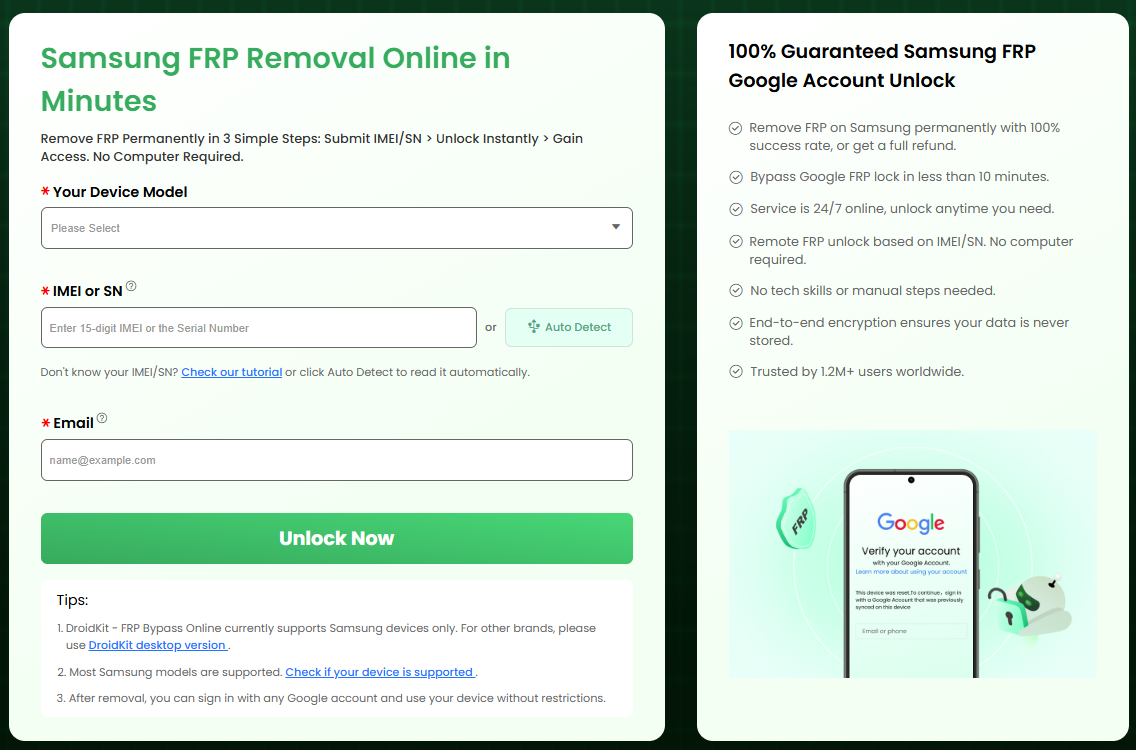
While many tools require a Windows PC and USB cables, modern solutions now include Online FRP Unlockers. These tools are preferred because they:
- Require No Download: No need to install EXE or APK files that might contain malware.
- No PC Needed: The entire process is handled via the device’s own interface.
- Universal Accessibility: Works on any operating system since it runs in a browser.
→ Access the Online FRP Tool Here
Limitations & Risks of FRP Removal
Q1: Does FRP bypass work on all Android versions?
No — it depends on the Android version and security patch level.
Works only on certain versions and may fail on newer Android versions with updated security patches.
Newer Android updates include stronger security protections that block many previously known bypass methods. A technique that worked before may no longer function after a security update.
Q2: Does FRP removal work on all phone brands?
No — most methods are brand-specific.
Works only on certain manufacturers or firmware builds.
Some bypass techniques are developed for specific devices (for example, certain Samsung models), and may not work on Xiaomi, OPPO, or other brands running different system versions.
Q3: Can every FRP-locked device be bypassed?
No — not all devices can be unlocked.
Depends on device model, Android version, and security patch status.
If the device runs a newer system with updated security protections, bypass may not be technically possible.
Q4: Will FRP bypass restore my data?
No — FRP bypass does not recover erased data.
Unless data was backed up or remains recoverable through separate recovery tools.
FRP is triggered after a factory reset, and factory reset removes user data. Bypassing FRP only removes Google account verification, not deleted files.
Q5: Is FRP bypass legal?
It depends — legal only if you are the rightful owner.
Illegal if performed on a device you do not legally own.
FRP is a security protection feature. Removing it from a stolen or unauthorized device may violate local laws. Users should ensure legitimate ownership before attempting removal.
Related FRP Scenarios & Guides
To find the correct solution based on your situation:
→ FRP Removal Decision Guide (Recommended First Step)
Brand-specific resources:
→ Android FRP unlock by device model
These dedicated guides provide detailed instructions tailored to specific scenarios.
DroidKit
As an all-round Android solution, DroidKit has multiple functions such as Android data recovery, screen password unlock, Google account lock removal, SD card data recovery, Android data management, etc., fully meeting the various needs of Android users.
Free Download for all windows & 100% safe
Free Download for all mac & 100% safe
Free Download 100% Clean & Safe


Roger Smith is a senior technical writer with years of experience in providing Android solutions. He loves to help users solve various problems such as Android unlock, Android data recovery, and Android system repair.
Product-related questions? Contact Our Support Team to Get Quick Solution >
