Samsung FRP Bypass: Choose by Model, One UI & Method
Samsung FRP does not behave the same way across Galaxy A, S, Note, and Tab devices. The route you can use depends on the exact model, One UI build, security update, and whether checkpoints such as Test Mode or USB debugging are available. Use this Hub to choose a Samsung-specific guide, compare manual and PC-based options, and stop methods that do not match your device.
Samsung FRP does not behave the same way across every Galaxy phone or tablet. A Galaxy A15, Galaxy S20, Galaxy Note model, and Galaxy Tab can all reach Google Account Verification after a reset, but the next step may differ because of the model, One UI build, Android version, security update, and the setup screens still available on that device.
That makes model matching more useful than trying a random “Samsung FRP bypass” video. Some Samsung routes depend on Test Mode, a USB debugging prompt, an older setup shortcut, or a particular PC workflow. If the checkpoint shown in a guide never appears on your phone, that route does not match the current device state.
If you still control the Google account previously synced with the Samsung device, recover or sign in to that account first. If the phone was bought second-hand and is still linked to another person’s account, ask the previous owner or seller to remove it properly. The methods and device guides below are intended for Samsung devices you own or are authorized to manage.
For FRP guidance across Samsung and other Android brands, see the Android FRP bypass guide.
Samsung FRP Bypass: Which Route Fits Your Device?
The best Samsung FRP route is determined by what your device actually allows you to do. Start with the Samsung model and account situation, then check the setup checkpoint required by the method.
| Your Samsung Situation | Check First | Route to Consider |
| You can recover the previously synced Google account | Google account access | Sign in or recover the account; a bypass route is unnecessary. |
| The phone was bought used and belongs to another Google account | Previous-owner access | Ask the seller or previous owner to remove the account properly. |
| You have a Galaxy A-series phone | Exact A-series model and One UI build | Find your exact Galaxy A model in the device table below and use the closest model-specific guide available. |
| You have a Galaxy Tab | Tablet model and setup flow | Use the Samsung Tablet FRP guide rather than a phone-only tutorial. |
| *#0*# opens Samsung Test Mode | Whether the next USB/debugging checkpoint is available | A compatible Test Mode or SamFW workflow may be worth evaluating. |
| *#0*# does nothing | Test Mode availability | Stop using a workflow that requires Test Mode and choose another route. |
| An older APK, browser, or setup shortcut is missing | Whether the tutorial matches the current setup screen | Use a model-specific guide or another supported option instead of repeating the shortcut. |
| The manual route does not match your Samsung and you have a computer | Device support for the selected software | Compare Samsung FRP tool options or a compatible guided PC workflow. |
What Changes Samsung FRP Methods? Model, One UI & Security Updates
Samsung FRP tutorials often fail because the instructions were recorded on a different Galaxy model or software state. Android version matters, but it is only one part of the compatibility check.
Before trusting a Samsung FRP method, compare these factors:
- Galaxy model: An A-series, S-series, Note, and Tab device may use different setup paths.
- One UI build: Menus, accessibility paths, browser access, and prompts can change between One UI builds.
- Android version: A guide recorded on another Android generation may show different setup screens.
- Security update: Older shortcuts or setup behaviors may no longer be available after software changes.
- Required checkpoint: Test Mode, browser access, an APK install path, or a USB debugging prompt must actually appear for a method that depends on it.
- Account status: If the original Google account can still be recovered, that is a different situation from a device whose account cannot be accessed.
Do not treat a specific Android or One UI version as a guarantee that a route will work. The stronger compatibility signal is whether the exact screen required by the method exists on the Samsung device in front of you.
Check These Samsung Details Before Choosing a Method
Use this short pre-check before opening a tool, installing an APK, or following a Test Mode tutorial.
| Check | What to Confirm | Why It Matters |
| Exact model number | Identify the full Galaxy model rather than only “Samsung phone.” | Model-specific setup behavior can change the available route. |
| Galaxy series | A, S, Note, Tab, or another family | The closest model or valid series guide is usually more useful than a generic method. |
| One UI / Android information | Compare it with the guide you plan to use. | A tutorial for a different software environment may stop at a missing menu. |
| Test Mode | Check whether *#0*# opens the expected Samsung diagnostic screen. | SamFW-type workflows may depend on this checkpoint. |
| USB debugging prompt | Check whether the workflow can actually trigger the required prompt. | If the prompt never appears, a method that depends on it cannot continue. |
| Computer access | Windows, Mac, or no computer | SamFW requires Windows; other guided workflows may support Windows or Mac. |
Compare Samsung FRP Bypass Options
Samsung FRP options are easier to compare by prerequisites and failure points than by claims that one method works on every Galaxy device.
| Option | PC Needed | Best Fit | Main Limitation |
| Google account recovery | No | You still own and can recover the previously synced account | Requires access to Google’s account recovery options. |
| Samsung model-specific guide | Depends on method | You know the exact Galaxy model or series | The guide still needs to match your One UI/build and available setup screens. |
| Older no-PC / manual routes | Usually no | The required shortcut still appears on the device | Browser, APK, SIM, accessibility, or setup paths may be absent. |
| Test Mode / *#0*# checkpoint | No for the check itself | You need to determine whether a Test Mode-dependent workflow can continue | Opening Test Mode alone does not remove FRP. |
| SamFW Tool | Windows | Advanced users whose device reaches the checkpoints required by the selected SamFW workflow | Test Mode, drivers, device detection, or a USB debugging prompt may be unavailable. |
| DroidKit FRP Bypass | Windows or Mac | Users who prefer an on-screen PC workflow and have a compatible Samsung scenario | Device/workflow compatibility should be confirmed before starting. |
Choose a Samsung FRP Route by Situation
This page is the Samsung FRP Hub, so you do not need to force every Galaxy model into the same tutorial. Use the route that matches what you are trying to do:
- Galaxy A user: Find your exact Galaxy A model in the device matrix below. A03, A04, A13, A14, A15, A22, A25, and A30 have dedicated guides, so there is no need to route through an outdated series page.
- Galaxy Tab user: Use the Samsung Tablet FRP guide because tablet setup behavior can differ from Galaxy phones.
- Looking for software: Compare Samsung FRP tool options instead of treating a manual trick as the only route.
- Interested in older free methods: Check whether the browser, APK, SIM, accessibility, or firmware prerequisite still exists before attempting an older route. If you specifically need a firmware-flashing workflow, see the Odin FRP bypass guide.
- Using *#0*# or SamFW: Check the Test Mode and USB debugging checkpoints in the sections below before installing more tools.
Samsung FRP Guides by Galaxy Series and Model
If your Samsung model has a dedicated guide, use it before trying instructions recorded for another Galaxy phone. This Hub keeps broad Samsung decision logic here while the child pages handle narrower model-specific details.
| Samsung Family | Recommended Guide | When to Use It |
| Galaxy A03 / A04 | Galaxy A03 FRP guide / Galaxy A04 FRP guide | Use when your exact model is A03 or A04 rather than applying another A-series tutorial. |
| Galaxy A13 / A14 / A15 | Galaxy A13 FRP guide / Galaxy A14 FRP guide / Galaxy A15 FRP guide | For newer A-series models where One UI/build matching is especially important. |
| Galaxy A25 | Galaxy A25 FRP bypass guide | Use for A25-specific Google verification and FRP scenarios. |
| Galaxy A22 / A30 | Galaxy A22 FRP guide / Galaxy A30 FRP guide | Use when older A-series setup behavior or Android-version-specific methods are relevant. |
| Galaxy S20 / S20 FE | Samsung Galaxy S20 FRP removal guide | For S20 and S20 FE-specific FRP, Test Mode, and tool decision paths. |
| Galaxy Note | Galaxy Note 10 / Note 10+ FRP guide | Use when the locked device belongs to the Note 10 family. |
| Galaxy Tab / Samsung Tablets | Samsung Tablet FRP guide / Samsung Tab A8 FRP guide | Use tablet-specific navigation rather than assuming Galaxy phone steps apply. |
If your exact device is not listed, compare the available model guides with your Galaxy family, Android version, One UI build, and required setup checkpoint. For a Samsung tablet, use the Samsung Tablet FRP guide. Do not switch randomly between tutorials for unrelated Galaxy models.
DroidKit FRP Bypass for Compatible Samsung Devices
DroidKit becomes relevant when the Samsung model is covered by its available FRP workflow and the setup route required by an older manual method is unavailable. It is a computer-based option, so it is better suited to users who prefer on-screen instructions over piecing together APK files, Test Mode commands, or firmware-related steps.
You can also review the dedicated DroidKit FRP Bypass page before starting.
Consider this route when:
- the Samsung-specific manual guide no longer matches the screens on your phone;
- the browser, APK, or older setup shortcut required by a free route is unavailable;
- you have a Windows or Mac computer available; and
- the FRP workflow shown by DroidKit applies to your Samsung device situation.
Free Download for Windows Free Download for Mac
Samsung FRP Workflow in DroidKit
Step 1. Install and open DroidKit on your Windows or Mac computer.
Step 2. Choose FRP Bypass from the main interface.
Step 3. Connect the Samsung phone with a data-capable USB cable and follow the device prompts shown by the software.
Step 4. When the applicable workflow is displayed, click Start and continue with the instructions for that connected device.
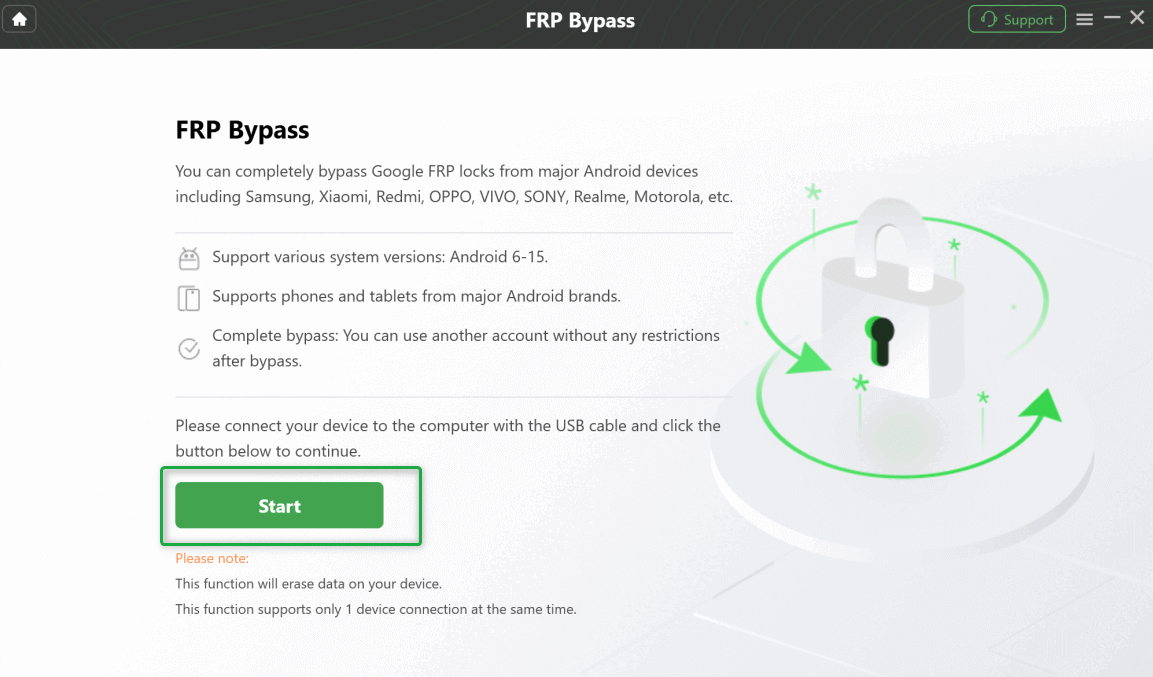
Start the FRP workflow in DroidKit.
Step 5. Follow the on-screen setup instructions rather than substituting steps from a different Galaxy model.
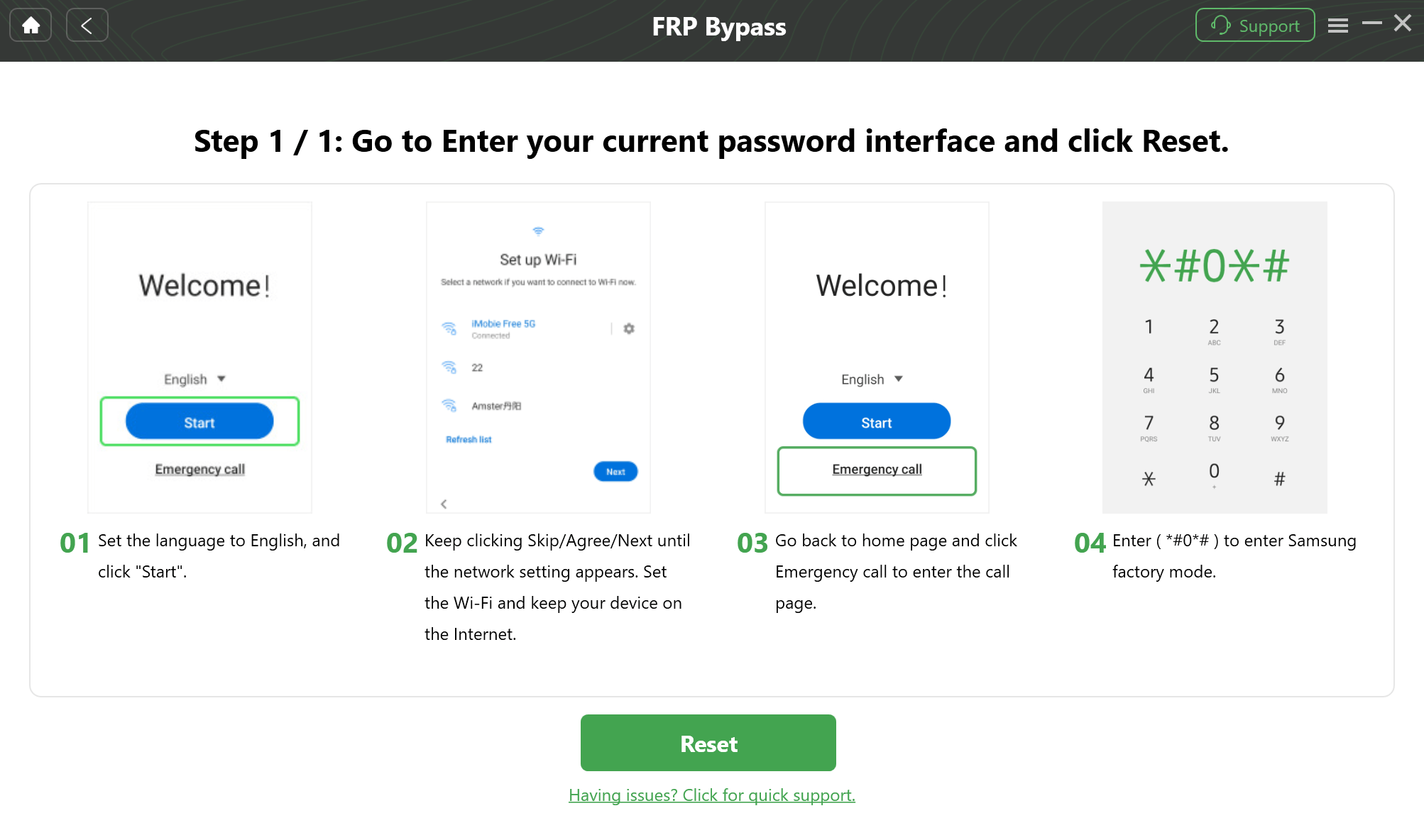
Follow the device setup shown by the software.
Step 6. Continue until the workflow reaches its completion screen, then follow the restart or setup instructions shown for the connected device.
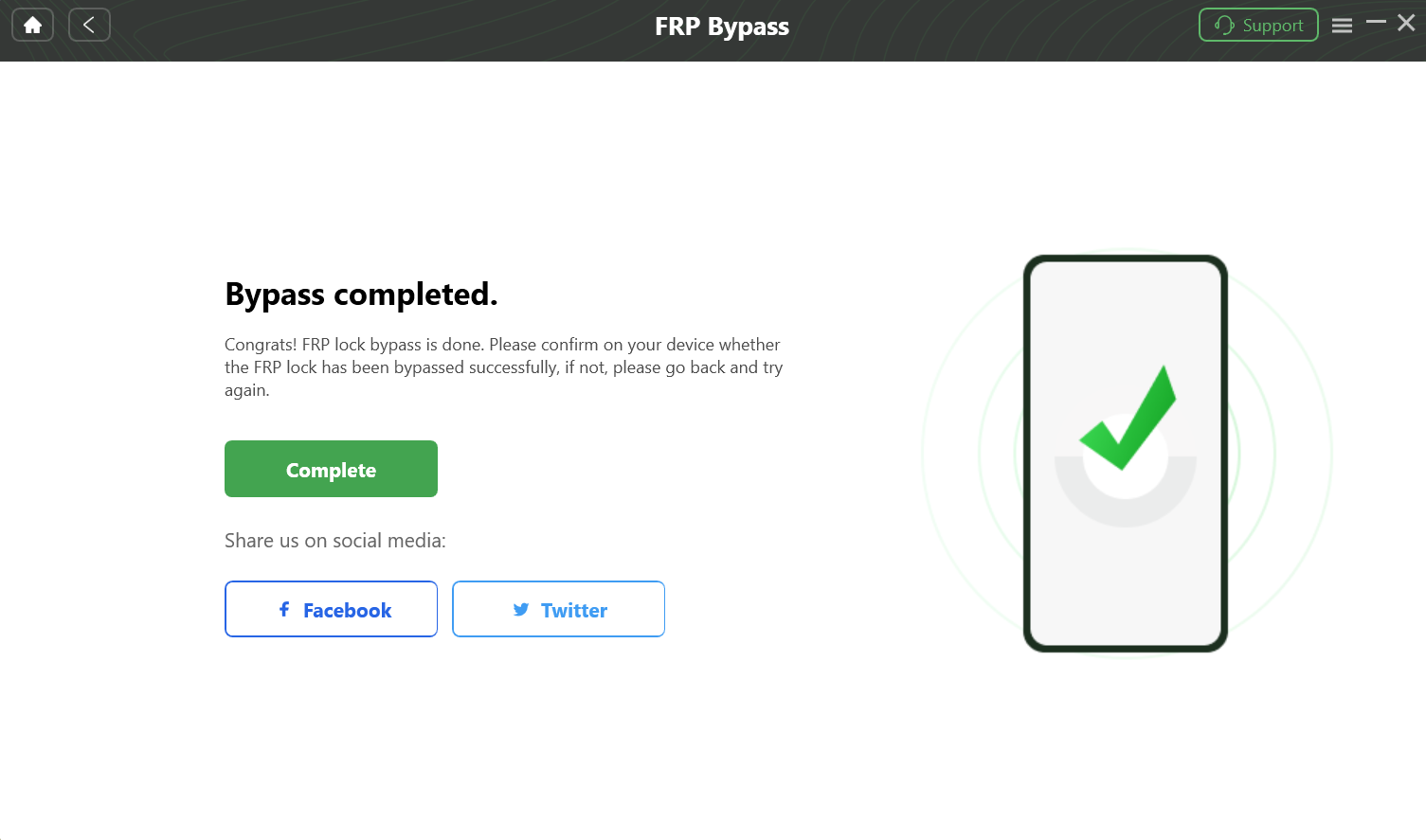
DroidKit FRP workflow completion screen.
Compatibility note: Do not assume that an Android or One UI version by itself confirms support. Use the Samsung device/workflow information shown by the software before depending on this option.
Does Samsung Test Mode Open with *#0*#?
The Emergency Call / *#0*# route is better treated as a compatibility checkpoint than as a complete no-PC FRP bypass. Some Samsung workflows depend on reaching the diagnostic Test Mode screen; if your device does not open it, those workflows cannot continue from that point.
Step 1. Turn on the Samsung device and reach the initial setup screens.
Step 2. Return to the Welcome screen if necessary and tap Emergency Call.
Step 3. Enter *#0*# on the dial pad.
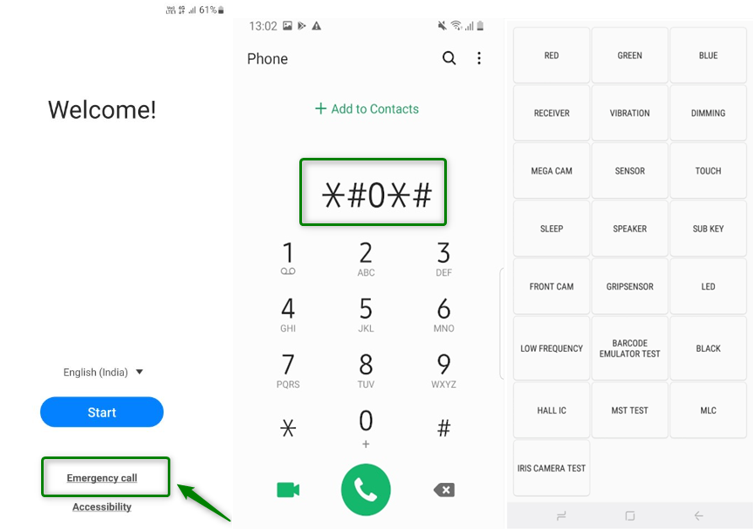
Check whether the Samsung Test Mode screen opens.
If Test Mode opens: you have confirmed one prerequisite used by certain Samsung workflows. You still need to check the remaining requirements of the method you plan to use.
If nothing happens: stop any workflow that requires this screen. Repeatedly entering the same code does not change the fact that the required checkpoint is unavailable on the current setup.
Samsung FRP with SamFW: Required Checkpoints
SamFW Tool is a Windows utility used in some Samsung FRP workflows. The useful way to evaluate it is to check its prerequisites before attempting the removal command.
For a broader look at the tool and alternatives, see the SamFW FRP Tool guide and alternatives.
Before Starting SamFW
- Use a Windows PC.
- Use a data-capable USB cable and a direct USB port when possible.
- Install the appropriate Samsung USB drivers.
- Confirm that the Samsung workflow you are following requires Test Mode and that *#0*# opens it.
- Be prepared to check whether an Allow USB debugging prompt appears when the workflow reaches that stage.
SamFW FRP Workflow
Step 1. Connect the Samsung phone to the Windows computer.
Step 2. From the Samsung setup screen, open Emergency Call and dial *#0*#.
Step 3. If Test Mode opens, launch SamFW Tool. If Test Mode does not open, stop because this particular workflow is missing a required checkpoint.
Step 4. Check whether SamFW detects the connected Samsung device.
Step 5. If the appropriate FRP option is available for the detected workflow, select it and monitor the phone for any required confirmation.
Step 6. If an Allow USB debugging prompt appears on the Samsung device, review the prompt and allow the connection as required by the workflow.
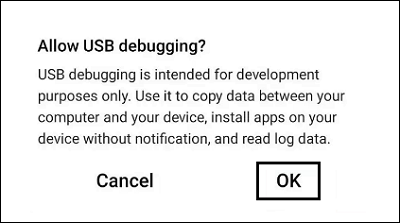
The USB debugging prompt is an important checkpoint in workflows that require it.
Step 7. Follow the remaining prompts shown by the tool and connected device.
If SamFW does not detect the phone, Test Mode never opens, or the required USB debugging prompt never appears after you have checked the connection, treat that as a workflow mismatch rather than downloading a succession of unrelated Samsung FRP utilities.
When to Use Older Free Samsung FRP Methods
Older Samsung FRP methods can include APK installation, SIM-PIN routes, Odin-related procedures, browser shortcuts, and other setup-screen techniques. They are useful only when the prerequisite shown in the tutorial still exists on the Galaxy device in front of you.
For example, an APK route is irrelevant if setup cannot reach a browser or package installer, while a Test Mode-based route is irrelevant if *#0*# never opens the required screen. Odin is a separate firmware-flashing workflow and requires exact device and firmware matching.
| Older Route | Check Before Trying It | Stop When |
| FRP APK | Browser/file access and package installation are actually available | The APK cannot install or cannot reach the Settings/account path required by the guide. |
| SIM-PIN / notification route | The exact notification behavior exists on your Samsung model | The expected shortcut never appears. |
| Odin / firmware-related route | You understand exact model, firmware, binary, and AP/BL/CP/CSC matching. | You cannot verify that the files and instructions match the device. |
| Old accessibility/browser shortcut | The guide shows the same setup menus available on your phone | TalkBack, browser, share, or Settings access stops at a missing screen. |
Do not combine several legacy routes into one long sequence. Identify the prerequisite first, then stop a route as soon as the Samsung device no longer matches the tutorial.
Samsung FRP Not Working? Find the Failure Point
A Samsung FRP attempt usually becomes easier to diagnose once you identify the exact checkpoint that is missing.
| Failure Point | What It Means | Next Step |
| *#0*# does nothing | The Test Mode checkpoint required by that workflow is unavailable. | Stop the Test Mode/SamFW route and choose another Samsung-specific option. |
| PC does not detect the Samsung phone | The issue may be the USB cable, port, driver, device state, or workflow compatibility. | Check the connection before assuming the FRP method itself failed. |
| USB debugging prompt never appears | A required checkpoint for the selected workflow is missing. | Recheck connection requirements; if the prompt remains absent, switch workflows. |
| APK shows “App not installed” | The package or installation path does not match the current setup. | Do not keep downloading random APK versions. |
| Browser, TalkBack, share, or Settings shortcut is missing | The older tutorial does not match the current Galaxy setup environment. | Return to the device matrix above and find a closer Galaxy model guide. |
| Steps work in a video for another Galaxy model but not yours | The guide is model/build-specific. | Use the exact Galaxy model or the closest relevant model guide. |
| The phone returns to Google verification after another reset | FRP is still active. | Recover the synced account when possible or evaluate another authorized route. |
Samsung FRP Bypass FAQ
What is the best Samsung FRP bypass method?
There is no single best method for every Samsung device. Start with the exact Galaxy model and account status. For Galaxy A phones, use the matching model guide in the matrix above. For Galaxy tablets, use the Samsung Tablet FRP guide. If a workflow depends on Test Mode, confirm that *#0*# actually opens it. If a manual path is unavailable and your Samsung scenario is covered by a PC tool, then a guided workflow may be more practical.
Can I bypass Samsung FRP without a PC?
Some older Samsung routes do not require a computer, but they depend on specific setup shortcuts such as browser access, APK installation, notifications, or other menus. If the shortcut required by the guide does not appear on your device, the fact that the method is “no PC” does not make it compatible.
Is *#0*# a Samsung FRP bypass code?
No. On workflows that use it, *#0*# is a checkpoint for opening Samsung Test Mode. Opening Test Mode by itself does not remove Google verification. If the code does nothing, methods that require that screen cannot continue.
Why does SamFW not work on my Samsung phone?
Check where it stops. The phone may not open Test Mode, Windows may not detect the device, the Samsung USB connection may be incorrect, or the required USB debugging prompt may never appear. Each of those failures means the specific SamFW workflow needs to be reassessed rather than repeated blindly.
Why does my Samsung FRP APK say “App not installed”?
The package or installation path may not match the current Samsung setup. If the same guide also relies on browser, Settings, or account access that your device cannot reach, installing another APK version will not solve the missing setup checkpoint.
Do Galaxy A phones use the same FRP method?
No. Galaxy A03, A04, A13, A14, A15, A22, A25, A30, and other A-series models can differ by Android version, One UI build, region, and security update. Use the exact model guide in the Samsung device matrix whenever one is available instead of assuming all Galaxy A phones share the same FRP route.
Are Samsung tablet FRP steps the same as Galaxy phone steps?
Not necessarily. Galaxy Tab devices have their own Samsung Tablet FRP guide because setup behavior and available model guides can differ from Galaxy phones. Tab A8 users, for example, should use the Tab A8-specific guide instead of assuming an A-series phone tutorial applies.
Can DroidKit bypass FRP on every Samsung phone?
No software should be treated as compatible with every Samsung configuration solely because the device runs Android or One UI. DroidKit is relevant when its available FRP workflow covers the Samsung device situation you are trying to resolve. Check that workflow before starting.
What should I do if every older Samsung FRP trick fails?
Use the failure point to choose the next route. If Test Mode never opens, stop Test Mode-based methods. If an APK cannot install, stop stacking APK files. If the setup screens differ from the tutorial, return to the model matrix and find a closer Galaxy guide. A PC-based tool is worth evaluating only when the connected Samsung scenario is supported.
The most useful Samsung FRP decision is not simply “free method versus paid tool.” It is whether the route matches your exact Galaxy model and exposes every checkpoint the method needs. Narrow the device first, check its One UI and Android environment, confirm Test Mode or USB requirements when relevant, and then continue with the matching model, tablet, Odin, SamFW, or Samsung FRP tool route.
More Related Articles


Roger Smith is a senior technical writer with years of experience in providing Android solutions. He loves to help users solve various problems such as Android unlock, Android data recovery, and Android system repair.
Product-related questions? Contact Our Support Team to Get Quick Solution >
