Easy Samsung FRP Tool Free Download & FRP Bypass Guide (2026 Updated)
“Anyone has tried easy samsung frp tool for bypassing Samsung Google account? I learnt about this tool online but I don’t know if it’s worth trying. Can you recommend?” – A Samsung user asked in the forum. If you have the same questions, read the following content and understand the features of Easy FRP Tool.
iMobie DroidKit – Best Alternative to Easy Samsung FRP Tool
Find it difficult to use the Easy Samsung FRP Tool? No worries, iMobie DroidKit allows you to bypass FRP on Samsung without technical skills or complex operations. It is the best alternative to the Easy Samsung FRP Bypass Tool.

Stuck on the Samsung phone FRP (Factory Reset Protection) after performing a factory reset? No worries! Easy Samsung FRP Tool can help you bypass this lock and regain access to your device. However, if you want something more versatile, we present you with the ultimate DroidKit. In this guide, you will be able to learn how to download and use the Easy Samsung FRP Tool V2.7 and its reliable alternative. So, let’s start to explore this in detail!
Quick Answer
If you’re looking for a quick answer:
- ✅ Easy Samsung FRP Tool works mainly on Android 5–13
- ❌ It may fail on newer systems (Android 14+)
- ⚠️ Requires manual APK installation and technical steps
- 👉 For a simpler and higher success rate solution, check this FRP bypass alternative:
👉 Use DroidKit FRP Bypass for a faster and guided process
What is Easy Samsung FRP Tool
Easy Samsung FRP Tool is a reliable and easy-to-use program that helps users get around the Factory Reset Protection (FRP) lock on Samsung smartphones. The latest version is Easy Samsung FRP Tool V2.7. It is recognized that upon a device reset, the Google account linked to this device must be entered to access the FRP security feature. If you purchase a used smartphone with the FRP lock active or have forgotten your Google login credentials, this easy-to-use program will help you get back in.
Key Features:
- Unlock FRP without needing a password.
- Supports almost all Samsung models.
- Utilize MTP Mode for FRP unlocking.
- A completely free tool with no hidden charges.
- Remotely access your web browser to unlock FRP.
- Virus-free and secure.
👍Pros
- ✅With a simple interface, it’s suitable for all users.
- ✅With a high compatibility for almost all Samsung models.
👎Cons
- ❎It works on Android 5-13, but is unsuitable with the latest version.
- ❎You need to manually download some APK files to bypass Samsung FRP.
Note: Easy Samsung FRP Tool has three versions. 2021 v2.7 is the latest and the most stable and adaptable version. The old versions 2020 V1 and 2020 V2 are mainly compatible with older Android models and may have some errors.
Is Easy Samsung FRP Tool Free to Use?
Yes, Easy Samsung FRP Tool is completely free to use on Windows.
However, you may need to:
- Disable driver signature enforcement
- Temporarily turn off antivirus software
- Manually install APK files
These steps can be challenging for beginners.
Is It Safe to Use Easy Samsung FRP Tool?
The tool can be safe if downloaded from a trusted source.
However:
- Downloading from unknown sites may expose your system to malware
- It may require system-level changes (drivers, permissions)
👉 For safer options, consider official methods or professional tools.
Safety Tips Before Using this Easy Samsung FRP Tool V2.7:
- Download from trusted sources: Avoid unofficial websites to prevent malware.
- Check compatibility: Ensure the tool is suitable for your specific Samsung model.
- Disable antivirus temporarily: Some programs may block the tool, you can disable your antivirus temporarily to ensure a smooth process.
- Follow instructions carefully: Missteps could lead to issues with your device.
- Understand the risks: Using third-party tools that may require your device to root will have many risks and void warranty.
Does Easy Samsung FRP Tool Still Work in 2026?
This is one of the most common questions users ask.
✔ When it works:
- Android 5 to Android 13
- Older Samsung models
- When all drivers and APK steps are correctly followed
❌ When it fails:
- Android 14 or newer
- Updated security patches
- Missing drivers or blocked APK installation
👉 In many cases, users report getting stuck at:
- “Connecting”
- “Driver not found”
- APK installation failure
📌 Conclusion:
Easy Samsung FRP Tool still works in limited scenarios, but its success rate has decreased significantly on newer devices.
👉 If your device runs a newer Android version, you may need a more reliable FRP bypass solution.
How to Download & Use Easy Samsung FRP Tool
If you need to bypass the FRP (Factory Reset Protection) lock on a Samsung device, Easy Samsung FRP Tool V2.7 provides a quick and user-friendly method. Here’s how to safely download and use the tool.
Samsung FRP Tool V2.7 Download for Free:
You can download the latest Easy Samsung FRP Tool V2.7 from its official website or a trusted source. Do not download this tool from random APK hosting websites, as it may contain malware.
How to Use Easy Samsung FRP Tool V2.7?
⚠️ Warning: This tool requires disabling driver signature enforcement. Proceed carefully, as this could affect your system’s security settings.
Step 1. Download the Easy Samsung FRP Tool 2024 and save it to your PC.
Step 2. Unzip the file by 7-Zip or WinRAR.
Step 3. Run the setup by double-clicking on SamsungFrp. exe.
Step 4. Click on “Disable Driver Signature Enforcement” and restart your computer.
Step 5. Reconnect your Samsung phone to the computer and ensure it’s connected to a good Wi-Fi network.
Step 6. Open the setup file again and click “Bypass FRP.” Wait for the process to complete, and if a driver installation popup appears, click “Install this driver software anyway.”
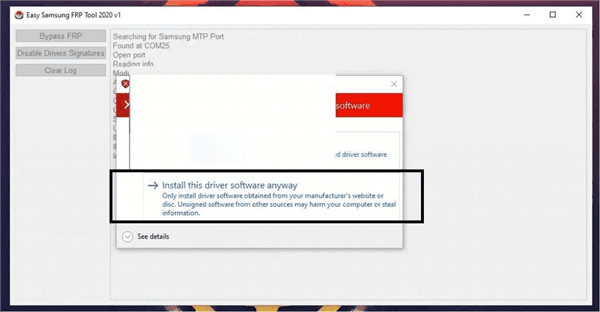
Install Easy Samsung FRP Tool V2.7
Step 7. On your phone, follow the prompts in the Easy Firmware popup. A Chrome browser will open—type in https: // tiny.cc / frptools to download the FRP bypass APK. Install and open the app, select “Bypass FRP,” go to “Settings,” then “Security,” and set up a pattern lock. Reboot your phone to complete the process.
Why Easy Samsung FRP Tool Fails
Many users report that the tool does not work. Here are the main reasons:
1. Unsupported Android Versions
Newer Android updates block older FRP bypass methods.
2. Driver Issues
Incorrect or missing USB drivers can cause connection failures.
3. APK Installation Blocked
Security patches may prevent APK-based bypass.
4. Complex Manual Steps
The process requires technical knowledge and multiple steps.
👉 What this means for you:
If you are not experienced with manual bypass methods, this tool may not be the best choice.
Best Alternative to Easy Samsung FRP Tool
As Easy Samsung FRP Tool requires complicated operation steps on both your PC and the phone, some users feel it difficult to follow the instructions for FRP bypass. No worries, the best alternative to Easy Samsung FRP Tool – iMobie DroidKit is available to use with easy steps.
Why it’s better:
- ✔ Works on newer Android versions (up to Android 15)
- ✔ No need to manually install APK files
- ✔ Guided process (no technical skills required)
- ✔ Higher success rate in Samsung FRP bypass.
How to Use DroidKit FRP bypass:
Step 1. Get iMobie DroidKit installed on your Windows or Mac computer.
Free Download * 100% Clean & Safe
Step 2. Access DroidKit and choose the “FRP Bypass” option from the menu.

Choose FRP Bypass Mode
Step 3. Attach your Samsung phone to the computer using a USB cable. Click on “Start” and select your device brand.
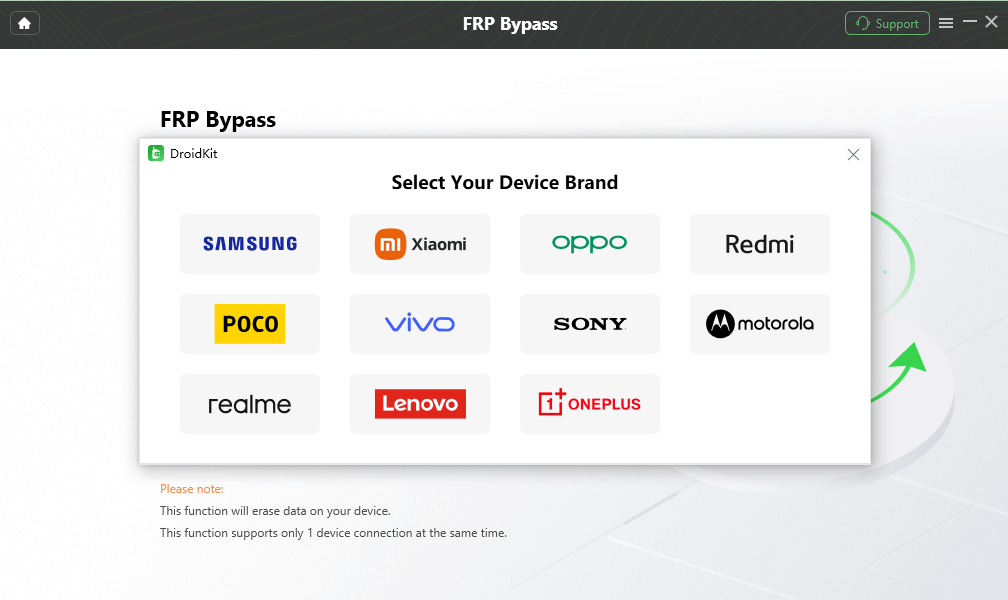
Choose Device Brand
Step 4. The tool will prepare a configuration file for your device. Once it’s ready, click “Start to Bypass.”
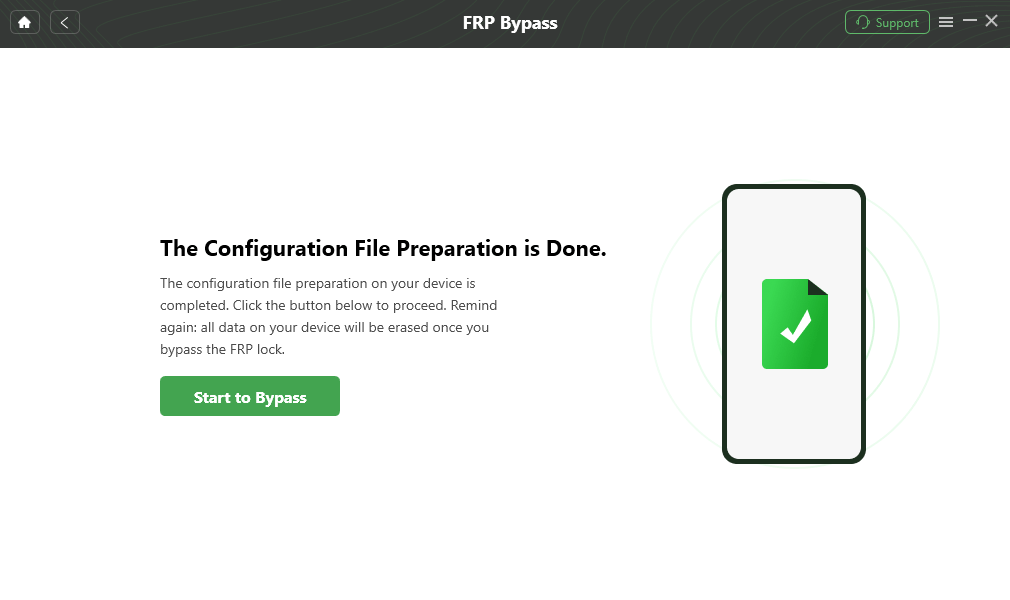
Click Start to Bypass
Step 5. Choose the Android version of your device. Once done, click “Next” button to continue. Follow the on-screen instructions to complete the phone setup.
Step 6. DroidKit will begin bypassing the FRP lock. When done, you will get a confirmation text.

FRP Bypass Complete
Comparisons Between DroidKit and Easy Samsung FRP Tool
If you’re comparing DroidKit and Easy Samsung FRP Tool to decide which one better fits your FRP bypass needs, the chart below highlights the key differences based on our hands-on testing:
| Freatures | iMobie DroidKit | Easy Samsung FRP Tool |
| Ease of Use | Operates on the computer only. No technical skills are required. | Operates on both the computer and your phone. Technical skills are required. |
| Supported OS | Windows and Mac | Windows only |
| Supported Android Devices | Supports a wider range: Samsung, Xiaomi, Redmi, POCO, Sony, OPPO, Vivo, Motorola, Realme, Lenovo — with Android 5.1 to 15. | Supports Samsung devices running Android 5.1 to 13. |
| Updates | Actively maintained with monthly updates and ongoing improvements. | The latest version is 2.7, released in 2021, with no recent updates reported. |
User’s Review:
Tried Easy Samsung FRP Tool v2.7 on One UI 5.0 — got stuck at ‘driver not found.’ DroidKit was smoother and detected the phone instantly. Definitely worth it if you’re not into manual scripts.” — Reddit user @android_unlocks, r/AndroidHelp
📌Our opinion:
- ✅If you are looking for a simple and fast solution and have experience, Easy Samsung FRP Tool v2.7 is a good choice;
- ✅But if you want a higher success rate and a stable experience, DroidKit is a more reliable long-term unlocking solution.
Bonus Tip: How to Bypass Samsung FRP with Official Ways (For Select Models)
Before using any third-party FRP bypass tools, it’s always recommended to check whether your Samsung device qualifies for official unlocking methods. These methods are more secure, trustworthy, and less likely to void your warranty.
Method 1: Use Samsung’s Find My Mobile (If Enabled)
Some Samsung phones allow users to bypass FRP if Find My Mobile was activated before the device reset.
- Visit Find My Mobile on a computer or another phone.
- Sign in using the same Samsung account linked to the locked device.
- From the dashboard, select the “Unlock” option.
- Follow the on-screen instructions to remove the screen lock and FRP.
⚠️ Note: This method only works if the device is connected to Wi-Fi and Find My Mobile was set up beforehand.
Method 2: Contact Samsung Support with Proof of Ownership
If your device is not eligible for remote unlocking, you may still be able to request FRP removal through Samsung customer service, especially if you can provide valid documentation.
You’ll typically need:
- Original purchase receipt or invoice
- Device IMEI or serial number
- A government-issued ID (in some cases)
You can contact Samsung via:
- Samsung Support Website
- Local service hotline or authorized service center
💡 This method is official and secure, but processing times may vary depending on your region.
✏Editor’s suggestion:
If your device supports Samsung’s official unlock methods, they are the safest and most reliable option. If not, tools like Easy Samsung FRP Tool or DroidKit offer alternative solutions, with DroidKit being especially suitable for beginners due to its guided interface.
FAQs About Easy Samsung FRP Tool
Not sure if Easy Samsung FRP Tool is right for you, or facing some issues during the process? Browse through these frequently asked questions to find quick answers and useful tips.
1. Is Easy Samsung FRP Tool Free to Use?
Yes, Easy Samsung FRP Tool is free to use on Windows computer. That’s why Samsung users wonder how the Easy Samsung FRP Tool helps to bypass FRP on their phones or tablets. However, it’s important to note that while the tool itself is free, using it may require certain technical steps, such as disabling driver signature enforcement on your computer and temporarily turning off antivirus software to ensure proper functionality.
2. Why does the Easy Samsung FRP Tool get stuck on “Connecting”?
This issue often occurs if drivers are not installed properly or if the USB debugging option isn’t enabled. Try reinstalling Samsung USB drivers or switching ports.
3. Will using FRP tools void my phone warranty?
It might. Bypassing FRP with unofficial tools can void your warranty, depending on your region and device manufacturer policy.
Conclusion
Easy Samsung FRP Tool v2.7 offers a free solution for users with some technical knowledge and older device models. However, it may not work consistently on Android 14+.
For those seeking a simpler, safer, and higher success rate alternative, iMobie DroidKit stands out with the latest Android devices (up to Android 15), and dedicated support team.
Free Download * 100% Clean & Safe
More Related Articles


Roger Smith is a senior technical writer with years of experience in providing Android solutions. He loves to help users solve various problems such as Android unlock, Android data recovery, and Android system repair.
Product-related questions? Contact Our Support Team to Get Quick Solution >
